
File Details |
|
| File Size | 291.7 MB |
|---|---|
| License | Shareware, $49.95 |
| Operating System | Windows 7/8/10/Server 2012 |
| Date Added | April 6, 2023 |
| Total Downloads | 23,113 |
| Publisher | TechSmith Corp. |
| Homepage | SnagIt |
Publisher's Description
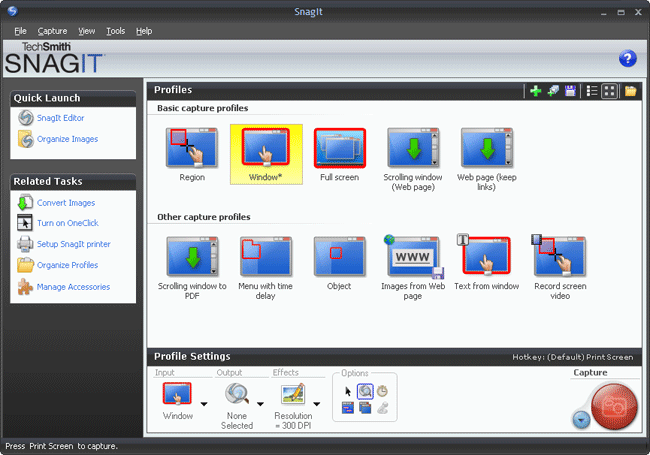
SnagIt delivers customized screen captures with the press of a hotkey. SnagIt is the only screen capture software that captures images, text, and video from your Windows desktop. Effortlessly produce perfect graphics and video with this complete capture solution.
Latest Reviews

Paganini reviewed v23.0.3 on Jan 14, 2023
What about ScreenPresso?

Steve1209 reviewed v21.1.0 Build 7764 on Dec 17, 2020
Too Expensive
Steve1209 reviewed v20.0.2.4781 on Nov 25, 2019
If you want decent screenshot software for free try Greenshot instead of this $50 software Look here https://acethinker.com/d...reenshot-vs-snagit.html

some guy reviewed v12.2.2 on Oct 29, 2014
works good for IE only!

lehenryjr reviewed v12.2.2 on Oct 29, 2014
I previously used SnagIt all the time; it has a lot of interesting features, but after a while I turned away from it because I wasn't using all the functions. I found free alternatives that did 90% of what SnagIt did. I don't see the justification for the $50 purchase. I still rate this highly for it's abilities, but if all you're doing is still screenshots; there's other options.

Karol Mily reviewed v12.0.0 on May 14, 2014
Not bad, not bad at all.
Still has a few bugs to solve.
Karol Mily reviewed v11.4.3.280 on Apr 30, 2014
to Blaxima: FastStone Capture is very nice.
Needed more MODES - 3 or 4. From Simple to PRO.

Blaxima reviewed v11.4.2.236 on Mar 11, 2014
For the price, it's not worth it. If it were a free option I'd give it a 3.
I make little use of screen capturing and there are many free options including paint that can handle this function with your print screen button so what I was mainly looking for was video capture. I've tried everything from Camtasia (buggy crap), Screen2AVI(good video but only records the mic line), Ashampoo(bloated crap) and on and on. Most were just to cluncky and I always seemed to have playback issues(choppy or out of sync video). Reducing the FPS never really helped either.
The one I've settle on is FastStone Capture. It's very lightweight and I never have any issues with the videos it produces. The only knock is that I can't choose the encoder or container so I'm stuck with WMV. Still, the results are always good which is something I can't say about the others I've tried
Karol Mily reviewed v11.0.0.207 on Feb 28, 2012
I like slim apps, what do one thing best. Here we see that Snag version 9/10/11 gets some features not much useful - like partial editing of image.
My favorites are:
* Ashampoo Snap 5.1.2 (https://www.ashampoo.com/en/eur/pin/0624)
* HyperSnap 7.13.03 (http://www.hyperionics.com/)
* Screenshot Studio 1.9.96 (http://screenshot-program.com/features.php)
For video I like:
* BB FlashBack Pro 3.2.2.2096 (http://www.bbsoftware.co...FlashBack/Features.aspx)
* ViewletCam 2.0.245 (http://www.qarbon.com/presentation-software/vc/)
* and Camtasia 7.1.1 of course.

Cris3 reviewed v10.0.0 on May 14, 2010
This new version 10 is absolutely awesome! It has new features such as the All-in-one-capture and the ability to capture transparency which makes this edition a game changer for TechSmith.
Snagit is not just a screen capture tool but a screen capture editing suite. Video capture is a snap and saves to .avi.
Give it a try if you never used it before and upgrade from the older version as this one is worth every penny.

Paganini reviewed v23.0.3 on Jan 14, 2023
Pros: Has bugs.
Cons: Too expensive:
Bottom Line: What about ScreenPresso?
Steve1209 reviewed v21.1.0 Build 7764 on Dec 17, 2020
Pros: Good but FREE is better try this free Chrome extension Lightshot https://chrome.google.co...bpiphghaielnnpgdp?hl=en
Cons: Too Expensive
Bottom Line: Too Expensive
Steve1209 reviewed v20.0.2.4781 on Nov 25, 2019
Pros: Has good Options
Cons: Very Expensive
Bottom Line: If you want decent screenshot software for free try Greenshot instead of this $50 software Look here https://acethinker.com/d...reenshot-vs-snagit.html
some guy reviewed v12.2.2 on Oct 29, 2014
works good for IE only!
lehenryjr reviewed v12.2.2 on Oct 29, 2014
I previously used SnagIt all the time; it has a lot of interesting features, but after a while I turned away from it because I wasn't using all the functions. I found free alternatives that did 90% of what SnagIt did. I don't see the justification for the $50 purchase. I still rate this highly for it's abilities, but if all you're doing is still screenshots; there's other options.
Karol Mily reviewed v12.0.0 on May 14, 2014
Not bad, not bad at all.
Still has a few bugs to solve.
Karol Mily reviewed v11.4.3.280 on Apr 30, 2014
to Blaxima: FastStone Capture is very nice.
Needed more MODES - 3 or 4. From Simple to PRO.
Blaxima reviewed v11.4.2.236 on Mar 11, 2014
For the price, it's not worth it. If it were a free option I'd give it a 3.
I make little use of screen capturing and there are many free options including paint that can handle this function with your print screen button so what I was mainly looking for was video capture. I've tried everything from Camtasia (buggy crap), Screen2AVI(good video but only records the mic line), Ashampoo(bloated crap) and on and on. Most were just to cluncky and I always seemed to have playback issues(choppy or out of sync video). Reducing the FPS never really helped either.
The one I've settle on is FastStone Capture. It's very lightweight and I never have any issues with the videos it produces. The only knock is that I can't choose the encoder or container so I'm stuck with WMV. Still, the results are always good which is something I can't say about the others I've tried
Karol Mily reviewed v11.0.0.207 on Feb 28, 2012
I like slim apps, what do one thing best. Here we see that Snag version 9/10/11 gets some features not much useful - like partial editing of image.
My favorites are:
* Ashampoo Snap 5.1.2 (https://www.ashampoo.com/en/eur/pin/0624)
* HyperSnap 7.13.03 (http://www.hyperionics.com/)
* Screenshot Studio 1.9.96 (http://screenshot-program.com/features.php)
For video I like:
* BB FlashBack Pro 3.2.2.2096 (http://www.bbsoftware.co...FlashBack/Features.aspx)
* ViewletCam 2.0.245 (http://www.qarbon.com/presentation-software/vc/)
* and Camtasia 7.1.1 of course.
Cris3 reviewed v10.0.0 on May 14, 2010
This new version 10 is absolutely awesome! It has new features such as the All-in-one-capture and the ability to capture transparency which makes this edition a game changer for TechSmith.
Snagit is not just a screen capture tool but a screen capture editing suite. Video capture is a snap and saves to .avi.
Give it a try if you never used it before and upgrade from the older version as this one is worth every penny.

emanresU deriseD reviewed v9.1.3 on Oct 27, 2009
Eh? What does witnessing awful performance have to do with recognizing the value of advanced features? Nothing, that's what.
I have terrible performance with SnagIt 9.x as well. My system is old, yes. SnagIt 8.2.3 runs great on it.
Oh--and I use text capture, region and window screen shot capture, and video capture. I hope that's OK.

Pwnd0z3r reviewed v9.1.2 on Apr 24, 2009
I use this everyday and it provides an amazing wealth of functionality. The prior reviewers below probably only use it to capture basic screenshots once in a while, and don't realize the added value that the new UI and functionality provides to real power-users that need this in day to day work. There is not a feature or change that I do not use and celebrate.

dougk2 reviewed v9.1.1 on Jan 29, 2009
I use this tool at work on a 2.2Ghz dual-core laptop and the performance is fine. If you just want a simple snapshot tool, then you might consider this bloated, but if you want the the Swiss Army Knife of snapshot software, look no further. Some of the enhanced features, such as the image editor, image format conversion, stamps, etc are a nice touch. Maybe not best of breed, but much better than nothing (which is what I would have if I had to justify the purchase of these features to my IS dept). I'm sure many of you know what I mean.
So I rate this 5-stars for ease of use, performance, stability and the fact that I really need and use this tool every day and am quite satisified with it.