File Details |
|
| File Size | 2.9 MB |
|---|---|
| License | Freeware |
| Operating System | Windows (All) |
| Date Added | June 30, 2016 |
| Total Downloads | 212,888 |
| Publisher | Alfredo Milani-Comparetti |
| Homepage | SpeedFan |
Publisher's Description
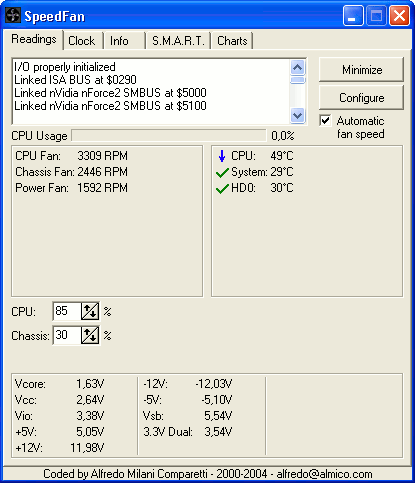
SpeedFan monitors fan speeds, temperatures and voltages in computers with hardware monitor chips. It can even access S.M.A.R.T. info for those hard disks that support this feature and show hard disk temperatures too, if supported. It can even change the FSB on some hardware. At the lowest level, it is a hardware monitor software, but its main feature is that it can control fan speeds according to the temperatures inside your pc, thus reducing noise and power consumption.
Latest Reviews

inkowyouknow reviewed v4.50 on Aug 20, 2014
Does what it says, and does it well

Music4Ever reviewed v4.48 Beta 6 on Jan 2, 2013
Made my fans fun so fast it sucked the cat into the PC case, I never noticed they were running fast though.
Good, interface a bit dated but it's free & does the job well.

tontito reviewed v4.47 Beta 2 on May 8, 2012
nilst2006 you are funny
Speedfan destroying your funs, lol
How much voltage did you put on it?
never seen a fun been destroyed by low rotation

jcollake reviewed v4.46 on Mar 27, 2012
A classic piece of freeware. Yea, the interface is what it is. However, it is probably best kept complex to prevent accidental misconfiguration by the layman. A little intimidation on advanced projects is sometimes appropriate. The author also has a minimalist design to his web sites, except for the ads, which are a little aggressive. He might tone them down, but that's the site. Software is good.

nilst2006 reviewed v4.46 Beta 4 on Feb 14, 2012
This %&¤&%¤% destroyed one tiny fan on my mobo ! If i knew that all fans where set to 100% when Windows were shut down i had prevented this disaster. It was a while ago, but i warn people from using this without going throuth all settings properly, twice !!!!
Nope, it was NOT my fault the setting were 100% after install and the 1st start. I can only blame the program. I usually always check settings properly in software i install. I didn't with this one. That fan it destroyed should never have a speed above 25%. To You below who blame me, got to H !

Mirage_Etoile reviewed v4.46 Beta 2 on Dec 31, 2011
It could get better , too bad a poor interface

johnk119 reviewed v4.45 Beta 2 on Sep 24, 2011
it is possible that running at 100% could decrease your fan's lifetime..... It was most likely your fault for not checking it occasionally and allowing it to run 100%... It only provides options for you to use and is not responsible for peoples' stupidity

some guy reviewed v4.45 Beta 2 on Aug 30, 2011
seriously this program did not blow up your computer! faulty fan did and a improper setting in your bios should have set the pc to power off after it reaches a certain temp... just to funny

Input Overload reviewed v4.44 on Jul 13, 2011
Put the new SIW on.

jorgosch reviewed v4.44 Beta 2 on Apr 5, 2011
Great features, but latest versions needs admin rights to start it meaning it can't be run on startup anymore without a hassle. This makes it pretty much useless for me now.

inkowyouknow reviewed v4.50 on Aug 20, 2014
Does what it says, and does it well
Music4Ever reviewed v4.48 Beta 6 on Jan 2, 2013
Made my fans fun so fast it sucked the cat into the PC case, I never noticed they were running fast though.
Good, interface a bit dated but it's free & does the job well.
tontito reviewed v4.47 Beta 2 on May 8, 2012
nilst2006 you are funny
Speedfan destroying your funs, lol
How much voltage did you put on it?
never seen a fun been destroyed by low rotation
jcollake reviewed v4.46 on Mar 27, 2012
A classic piece of freeware. Yea, the interface is what it is. However, it is probably best kept complex to prevent accidental misconfiguration by the layman. A little intimidation on advanced projects is sometimes appropriate. The author also has a minimalist design to his web sites, except for the ads, which are a little aggressive. He might tone them down, but that's the site. Software is good.
nilst2006 reviewed v4.46 Beta 4 on Feb 14, 2012
This %&¤&%¤% destroyed one tiny fan on my mobo ! If i knew that all fans where set to 100% when Windows were shut down i had prevented this disaster. It was a while ago, but i warn people from using this without going throuth all settings properly, twice !!!!
Nope, it was NOT my fault the setting were 100% after install and the 1st start. I can only blame the program. I usually always check settings properly in software i install. I didn't with this one. That fan it destroyed should never have a speed above 25%. To You below who blame me, got to H !
Mirage_Etoile reviewed v4.46 Beta 2 on Dec 31, 2011
It could get better , too bad a poor interface
johnk119 reviewed v4.45 Beta 2 on Sep 24, 2011
it is possible that running at 100% could decrease your fan's lifetime..... It was most likely your fault for not checking it occasionally and allowing it to run 100%... It only provides options for you to use and is not responsible for peoples' stupidity
some guy reviewed v4.45 Beta 2 on Aug 30, 2011
seriously this program did not blow up your computer! faulty fan did and a improper setting in your bios should have set the pc to power off after it reaches a certain temp... just to funny
Input Overload reviewed v4.44 on Jul 13, 2011
Put the new SIW on.
jorgosch reviewed v4.44 Beta 2 on Apr 5, 2011
Great features, but latest versions needs admin rights to start it meaning it can't be run on startup anymore without a hassle. This makes it pretty much useless for me now.

DudeBoyz reviewed v4.43 on Mar 17, 2011
It is frustrating that this app STILL does not accurately detect and identify elements on various motherboards, GPU and other items. I want my CPU information to be 100% correct and labeled, the same with my GPU. Nvidia GTX 460 for example with a 6 core Intel system and a Gigabyte motherboard seems to baffle this app. Why are the fans / temperature, etc. not properly identified and labeled? I just don't get it.

OldGeek reviewed v4.43 Beta 14 on Mar 9, 2011
It seems now in order to download the file to try it out you get redirected to the authors web site, then you have to 'register' or 'login' in order to access the download. Thanks but No thanks.

stdly reviewed v4.43 Beta 8 on Jan 12, 2011
Thanks, love this app prevented a failure at least once for me.
I use it on all my PC's but especial like using it with MediaPortal to show information about my system on my HTPC.
nilst2006 reviewed v4.43 Beta 8 on Jan 12, 2011
Poor support. Needed help - got none ! Therefore i rate it as a 1 only !
some guy reviewed v4.42 Beta 4 on Oct 5, 2010
great software but how about a decent interface thats so Xp looking

conan1873 reviewed v4.42 Beta 2 on Aug 30, 2010
Fantastic software, detects all of my hard drives, cpu, and gpu. Thanks to the developer!
conan1873 reviewed v4.41 Beta 13 on Jul 2, 2010
4.41 beta 13 doesn't work on ASUS P5P43TD/USB3 LGA 775 boards. Previous version worked well except the S.M.A.R.T. features.
jorgosch reviewed v4.41 Beta 13 on Jul 2, 2010
@Terry
Yet you're not smart enough to understand that this is about betanews, not about SpeedFan. Fileforum is a file service, not an announce service. Clicking the download-button for SpeedFan beta does NOT download it.

Terry6v reviewed v4.41 Beta 3 on Mar 17, 2010
That's weird, because I just downloaded it. But I also read the instructions for the beta area. You have to register, which I must have done long ago because I already had an account. READ how to install as well or it will encounter errors. Install 4.40 and then download the beta and replace the speedfan.exe with the beta one. I'm a novice and I figured this one out. READ everything.
jorgosch reviewed v4.41 Beta 3 on Mar 17, 2010
betanews, don't announce software that can't be downloaded by the general public!

SizzlechestXXX reviewed v4.40 on Nov 30, 2009
This program does a better job on my Shuttle PC than Shuttle's own program.

roymccoy reviewed v4.39 Beta 7 on Jun 3, 2009
I hope there's a version supporting the AMD K8 Processor coming soon!?
I used this excellent program continuously on my old laptop...

Brian49 reviewed v4.37 on Nov 22, 2008
It's still pretty good, but I don't like the way recent versions add DLLs to my Temp folder which apparently relate to hardware I don't have installed.

nattswe reviewed v4.36 on Nov 14, 2008
its a lifesaver
keep up the good work

almico reviewed v4.35 on Aug 20, 2008
Actually, the next beta should see the light in a few days and 4.36 should be released very soon.

Ryusennin reviewed v4.35 on Aug 20, 2008
Nice. See you next year for the next stable update.

paul_doo reviewed v4.35 on Aug 19, 2008
Once again it does what it says it will do.

BobTheVeg reviewed v4.35 Beta 31 on Aug 15, 2008
@SimSalabim: you should rate to 1 only the tools which does not have accurate values.

SimSalabim reviewed v4.35 Beta 24 on Aug 1, 2008
Take 25 of these tools, and they ALL show you different values.
jcollake reviewed v4.35 Beta 21 on Jul 22, 2008
SpeedFan is nice. Give the author a break. It is difficult for a lone author to give you support and add all feature requests. Usually its a full time job just keeping up with maintenance on software.

Undesired Username reviewed v4.35 Beta 15 on Jun 17, 2008
Still no option to hide the tray icon? My god...

rseiler reviewed v4.34 on Apr 22, 2008
Sadly, it still requires you to run it as administrator (this can be set in properties of the shortcut) in Vista, otherwise you don't get full functionality (e.g. it doesn't see the drives).
Brian49 reviewed v4.34 on Apr 22, 2008
I continue to like this program a lot. I'd like it even more if it would read my CPU frequencies and voltages (Intel Core 2 Duo), or if I at least knew why it won't.
If there's a distinction between the 51st beta and beta number 51, it's lost on me, although this is just an observation, not a complaint.
almico reviewed v4.34 Beta 51 on Apr 20, 2008
The beta requires a free registration because it requires advanced users that know what they are doing. A few ISPs are blocking the confirmation email and they never answered my requests for clarification. I receive about 6K emails per day and try to answer all of them. This is not the 51th beta. It's the beta number 51. I will always use as many betas as needed to release a quality software.
Ryusennin reviewed v4.34 Beta 51 on Apr 8, 2008
It works well and it's free, but I have two gripes.
1. Registration for the beta program doesn't work. I've never received this "confirmation email" despite me contacting the author (and him not responding, or more likely him never receiving my emails either). Talk about feedback.
2. Beta 51... Yup, read that again. This is the 51th beta of version 4.34. Does it really require 51 betas to get a stable release?

guru_v reviewed v4.34 Beta 44 on Mar 23, 2008
Who can tell? It now requires a login to access the beta, and when one gives the information, and then waits, and waits, and waits, for the liknk to maically appear in their mail - well...
Tells me the author doesn't really care about new users as beta testers.
Certainly would be nice to get this thing out of beta - we have here the exact opposite of Microsoft - this gentleman isn't going to 'go gold' until no one has any problems, ever.

joltdude reviewed v4.34 Beta 42 on Mar 18, 2008
It works but having to jump through hoops to download the current beta is a PITA..
There has got to be a better app out there, but so far its one of the few that works with my HP/MSI motherboard...reasonaly well

Mystiqq reviewed v4.34 Beta 40 on Feb 27, 2008
Better apps out there? Such as? After Motherboard Monitor died, i havent seen better (free) alternative than Speedfan.
Brian49 reviewed v4.34 Beta 38 on Jan 30, 2008
In general I like this a lot, but it doesn't detect either CPU frequencies or voltages on my machine (Intel Core 2 Duo), whereas PC Wizard detects both. Also, 38 betas to move from 4.33 to 4.34 seems a bit over the top.

pipdipchip reviewed v4.34 Beta 38 on Jan 30, 2008
It does what it says. Although there are similar programs, I like SpeedFan. It works very nice with my Dell laptop. I don't like people who give low ratings just because there is similar software out there. It does what is says and does it well. Rate on that.

ice_m2 reviewed v4.34 Beta 37 on Jan 1, 2008
Its just useless IMO better apps out there.

bobad reviewed v4.34 Beta 37 on Jan 1, 2008
Nice app, and very useful and flexible. The temperature and voltage graph is the most useful feature, and by far the best I have found. Unfortuantely, SpeedFan is extremely tedious to configure. Where PCWizard automatically detects my temperatures and fan speeds correctly, SpeedFan requires changing such arcane settings as "Fan Divisors" to get it working. 1 point downgrade for all that silliness.

Adrian79 reviewed v4.34 Beta 37 on Dec 31, 2007
works good, but for advanced users... if u think u can just click and control ur "fan speed" look elsewhere.

bourgeoisdude reviewed v4.34 Beta 37 on Dec 31, 2007
Lightweight and incredibly useful. I especially love the SMART reporting tools in it.

Vimes reviewed v4.34 Beta 34 on Oct 28, 2007
Does what it says on the tin.
Great application that somehow always seems to improve on each release :)

Verdauga Greeneyes reviewed v4.34 Beta 34 on Oct 27, 2007
Don't be ridiculous, would you rather the betas were private and the release tested by 10-100 users rather than thousands?
Great piece of software, very handy for monitoring

KRome reviewed v4.34 Beta 34 on Oct 26, 2007
Great but too many beta versions

white lightning reviewed v4.34 Beta 34 on Oct 26, 2007
It works...for sure !
Lightweight , clear & detailed interface , a good number of options , really precise .
Excellent work :-)

coover reviewed v4.34 Beta 31 on Oct 19, 2007
Ok, you guys who claim that Speed Fan doesn't work ... you must read the instructions.
And the instructions say that you must ... YOU MUST ... first install the latest full version, 4.33, before installing the beta, which is only a patch.

horsecharles reviewed v4.34 Beta 30 on Oct 19, 2007
To all scemi cornutti claiming SpeedFan doesn't work on Vista:
Firstly- under Supported OS, Vista's NOT listed!!!
Secondly- & however: it DOES work on Vista!!!
Just read the istruzioni!!!
You know, this does not bode well for your poor girlfriends either-- that, nowithstanding, you're nevertheless able to somehow masterfully dissect their G-Spot instruction manuals... in spite of ...
Attention Far Right: this a perfect example of why Monogamy is so unrealistic!!! But hey, that's a topic for another day / different forum.
Adrian79 reviewed v4.34 Beta 30 on Oct 18, 2007
build 33 is out, download from publisher website, because this download only has the .exe file (no intalltion setup file)

hell0 reviewed v4.34 Beta 30 on Oct 18, 2007
It DOES work under Vista.

outofspace reviewed v4.34 Beta 28 on Oct 18, 2007
doesnt work on vista
almico reviewed v4.34 Beta 21 on Oct 9, 2007
Adrian, did you ever read install instructions before posting thing that are absolutely wrong?
Adrian79 reviewed v4.34 Beta 21 on Oct 9, 2007
doesnt work on vista
hell0 reviewed v4.34 Beta 21 on Oct 9, 2007
Nice... I wish S.M.A.R.T. were better implemented, and I'd love to be able to hide the tray icon. Other than that, it works well for me. Which is good, because my mainboard's native CPU fan throttling feature is utterly useless.
guru_v reviewed v4.34 Beta 19 on Oct 8, 2007
Yes, much better on my nForce 4 board. Now to see if it works better on the ATi Radeon board in the other room.

Kipster reviewed v4.33 on Sep 30, 2007
I used it for years. 5 stars.

uberfly reviewed v4.33 on Sep 18, 2007
The previous version would also not run on my P5B-E. New version works great. This is a very good tool for overclocking, etc.
almico reviewed v4.33 Beta 18 on Aug 27, 2007
SpeedFan works great on the P5B. Most likely you downloaded the beta and didn't properly install it.

covex reviewed v4.33 Beta 18 on Aug 24, 2007
Not running on P5B, Intel Core 2 Duo 6400, Geforce 7600GS...

kashin reviewed v4.32 on Apr 19, 2007
It's very good, and the price is right! I was using MBMPro a few years ago, but I was never really happy with it. Then I found SpeedFan and I've been using it on all my computers ever since then. Definitely a must for everyone who wants to see their system's temperature, voltage, and fan readings.

hook_ reviewed v4.32 on Mar 2, 2007
Hmmm... 4.32 says my CPU fan is going 30 000 RPM. Yeah, right... Let's go back to 4.30.

harpyboy reviewed v4.32 on Mar 1, 2007
lgjivic: Can't you at least try this version first before rating it? Do you even have a brain for commonsense like this? sighh...
Works great in Vista x64, that's the only thing I'm looking for. Most tweaking tools are taking their time with Vista x64 development.

lgjivic reviewed v4.32 on Feb 28, 2007
Usefull program, but never suported remembering of fan speeds after reboot. Every time you reboot your system you have to adjust fan speeds all over again. That is the reason why I don't use it anymore.
Can anyone confirm is the same situation with this new version?

jpm01 reviewed v4.32 Beta 17 on Feb 21, 2007
One of the rare softs with which you can see the real processor temperature the temperature of the processor and of the hard drives can be monitored in the system tray or on the G15 LCD screen with LCD studio don t tell you how useful it is a must have

photonboy reviewed v4.32 Beta 17 on Feb 9, 2007
**AMD USERS**
The new AMD HSF (heatsink/fan) has a built-in fan speed controller. Not only is the minimum speed 3000RPM which is quite high, but it can NOT be turned off and it causes problems when used with the motherboard fan speed control.
I managed to find my configuration for this Speedfan version for my Asus A8N-SLI Premium and altered the CPU to 50%. What this is altering is the voltage from the motherboard via the IT8712F chip so the base voltage for the AMD fan is turned lower. My motherboard (Asus Q-fan) fan speed control is off in BIOS with software removed(or disabled). What a difference!!
I'll be replacing the fan (not the heatsink) or soldering to bypass the control circuitry, however if you can get this method working it's really good alternative as a temporary or permanent solution.
I'm not sure if you can get Speedfan to automatically start at 50% after a REBOOT but that's not a huge issue. It only takes 5 seconds to open it and click down to 50%. (You may need to change this for warmer climates. Check the CPU temperature for your model.)
*Again,I used this for correcting for the new AMD HSF which has auto fanspeed control. You are turning OFF the onboard fan control and turning the motherboard fan control chip to 50%.

kooshini reviewed v4.32 Beta 17 on Feb 9, 2007
Yay Vista support finally - used to crash my system last time. Plus it works with my E6700 to get the true temp like core temp beta does...
I'm giving this a 5 as it saves me using 2 programs from now on.
Koosh

Caiyoo reviewed v4.32 Beta 8 on Dec 10, 2006
Great program! My only problem is trying to see the "charts" tab -- dark colors on a dark background and no way to change them. :(

RunsWithSissors reviewed v4.32 Beta 4 on Oct 27, 2006
I downloaded this zip file and I can't even get it to install without major errors. The last version had major problems in displaying and setting up events (right side of screen cut off and button control logic not working properly). If these things could be fixed - it would be a great program - if I could load it.

Yannis123 reviewed v4.32 Beta 4 on Oct 26, 2006
A dutch version would help me to get more prfit off this program. Still: it works!!

cricri_pingouin reviewed v4.31 on Oct 12, 2006
Does exactly what it says on the tin, and I never had a problem with it. That makes it easy to decide a rating!
bourgeoisdude reviewed v4.30 on Oct 2, 2006
This is a really nice program that is small but effective. Heck, the SMART attribute analysis in and of itself is an exceptionaly useful feature, in addition to the well-known features. Saved me a lot of work with diagnosing hardware issues too,as it notified me of the hard drive "getting close" to reaching threshold settings (e.g., prior to an official SMART error).
4.30 fixes the Vista bugs, greatly improves detection of newer Intel processor-based chipsets, and fixes some of those offset temperatures on the old Socket 754 mobos that showed system board temperatures exceeding 120 Celsius (which was obviously incorrect).

ranasrule reviewed v4.30 on Oct 2, 2006
awesome !!!

davygiven reviewed v4.30 Beta 9 on Sep 26, 2006
Yey! It now works in x64 Vista :-)
lgjivic reviewed v4.29 on Sep 17, 2006
Nice piece of software, but from my point of view it has one big minus. It can not remember fan speeds... every time you boot up your OS you have to adjust fan speeds all over again.

slow-motion reviewed v4.29 on Aug 21, 2006
Nice little program, it even could read the sensord on my no-name motherboard. I only got one problem and that is that with one game the program stops reading my temps.
almico reviewed v4.29 on Aug 6, 2006
lgjivic, you simply need to properly configure SpeedFan and fan speeds will be automatically reduced as soon as possible, that is: when temperatures will start decreasing a little bit showing that fans are running too fast.

Crono` reviewed v4.29 on Aug 3, 2006
More features than hmonitor (or maybe i didn't find fan speed automatic variations there), plus it's freeware.

dhry reviewed v4.29 on Aug 3, 2006
Yeah, I'm going to say that http://hmonitor.net is smaller and better.

1uk3 reviewed v4.29 on Aug 2, 2006
Great little program. I've been using it for ages with Win XP. Although my motherboard isn't 100% supported (cheap motherboard).
Shame I can't get it to work with Vista x64 Beta 2 Build 5472.
Will definitely be a program I come back to though.
bourgeoisdude reviewed v4.29 on Aug 2, 2006
The new hard drive details with the recent updated versions is an awesome feature--even with version 4.29, there are some older dells that have the "hidden" features of monitoring temperatures and fan speeds, but it still doesn't read them even if the dell thing is enabled. Still, a very nice program considering its size.

lordgibbness reviewed v4.29 Beta 13 on Jul 27, 2006
Mystiqq, it should still be possible to use MBM5 with not problems. I use it and it is working perfectly.
Mystiqq reviewed v4.28 on Feb 9, 2006
Its getting there but i still miss some of the Motherboard Monitor features.

dejavu reviewed v4.28 on Feb 9, 2006
Nice Tool!!!

cyberguy reviewed v4.28 on Feb 9, 2006
Lately there have been startup problems for me. When the program is set to autostart with Windows AND start minimized, the program will start, but there is nothing in the task tray. I know it is working because the fans start slowing down - you just can't see or control it.
I have to go into task manager, shut the program down, and start it again. This is a pain.
When it works properly, it works well so i will give it a 4 this time around.

HcoolP reviewed v4.28 on Feb 9, 2006
best monitoring progam ive had ever its small light on mem usage and gives u almost everything u could want from such a program.
been using it for years and its getting better and better each build :)
almico reviewed v4.28 Beta 11 on Jan 25, 2006
Beta versions require a specific install procedure clearly stated on the website. Several "Unable to use I/O" errors are simply the result of not having read them.
some guy reviewed v4.28 Beta 11 on Jan 24, 2006
did not work on my motherboard incorrect reading from the bios temps. said 70c the bios says 45c
on cpu ...I know it's hard to support all mother board's so I gave it a 2

Aires reviewed v4.28 Beta 11 on Jan 24, 2006
Been getting a "Unable to read I/O" error message for too long now that I've stopped using it anymore. Which is a shame because it was very good software. I'm sure the author must be aware of the bug and it's on Google if you do a search. But like I said it's been too long now.
photonboy reviewed v4.28 Beta 11 on Jan 23, 2006
Beta version didn't work at all for me, and the previous version detected 7 temperatures when I only have 2 sensors. Strange that the Beta detects LESS than the previous version. Perhaps it is more picky and so the previous wrong results simply are not shown. I tried to Scan but it didn't do anything. It only had two motherboards listed for my manufacturer, so this program has a LONG way to go and I know it has been around for a while so I don't think much work has been done on it. It didn't even show my Hardrive in the Beta although it got it right in the previous version. The ONLY thing it shows in the Beta is my CPU.
I know there are a lot of 5's out there, but I have to rate it by how it works on my system and that is not well at all. I should have given it an even lower score, but I think people would be angry with me.
Also, a word of caution. Most or all programs that monitor hard drive temperature or SMART capability prevent the drive from shutting down as per the Power Settings in the Control Panel.
Check out HDD Thermometer which is free. I know there are other software programs including ones from your motherboard manufacturer. (Giga-byte's is ugly and huge)
bourgeoisdude reviewed v4.28 Beta 11 on Jan 23, 2006
Love it, still usin beta 6 but im getting beta 11 right now. Have this loaded in browser cache so if I have a bad experience with this version i'll edit.
EDIT: No, no problems. No huge changes for me either, but it's only a newer beta so that's expected.

ModderXManiac reviewed v4.28 Beta 11 on Jan 23, 2006
Nifty and just plain splendid for overclocking and seeing the effectiveness of new cooling systems.

brotherS reviewed v4.28 Beta 6 on Dec 29, 2005
Great, tiny tool! I'm using it mostly to just display the CPU temp in the tray, the fan speed graphs are nice too!

mgdn reviewed v4.27 on Nov 27, 2005
nifty! cool. throttles my amd 3700+, CnQ enabled, fan pretty well. i got one question though - when i change it to 0% below desired t1 - t2 range, it doesn't stop the fan altogether.... or may be it shouldn’t, any light on this will help.

christoofar reviewed v4.27 on Nov 8, 2005
not sure what "hiwayracers" trip is, but he is comparing apples & oranges. Speedfan's main goal is to control fan speeds based on user-specifed temp settings, not as a diagnostic app. Works a treat on my Asus P4800-SE mobo, though not so good on my Intel D915GAG. Price is right too!

azimov reviewed v4.27 on Nov 8, 2005
Sorry some guy, But my NOD32, detected a TSR.com virus threat.
Time Module Object Name Threat Action User Information
08/11/2005 15:57:46 IMON archive http://www.almico.com/speedfan427.exe probably unknown TSR.COM virus
I'm sure this is a false positive as I have been using Speedfan for may a year and haven't seen any problems. I have sent it of to ESET for review as a false positive.

jafo818 reviewed v4.27 on Nov 8, 2005
My 2.50.25 version of NOD32 detects this as a virus as well. I'm sure it's a false positive (let's hope!). Speedfan is the next best thing to MBM. :)
ModderXManiac reviewed v4.27 on Nov 7, 2005
HAHAHA, he uses real-time virus protection...
Great app.

httpd.confused reviewed v4.27 on Nov 7, 2005
It's obviously a false positive. My copy of NOD32 2.5 doesn't detect anything, by the way. (No idea what ModderXManiac is getting jollies over above...)
dejavu reviewed v4.27 on Nov 7, 2005
What happened?
NOD32 shows http://www.almico.com/speedfan427.exe probably unknown TSR.COM virus.
I use version 4.26 without any problem! excellent program!
This FALSE POSITIVE happened when I try to download under a way which NOD32 to interpret as malicious activities (A MISTAKE). Is FALSE POSITIVE. I got the file speedfan427.exe (NO VIRUS)! Speedfan is a great tool, congratulations to Author!
kashin reviewed v4.26 on Sep 24, 2005
Hey Blackhole8746, Intel's Active Monitor is laughable. It looks disgusting, is a memory hog and doesn't come nearly with as many options as SpeedFan. The ability to read SMART information of HDDs for instance.
All the other monitoring programs made specificially for your brand of motherboard are also crap. I have yet to see one that isn't ugly, has useless garbage like skinning, and is not a memory hog. SpeedFan is all those and more!

kanuac reviewed v4.26 on Sep 14, 2005
Great program, Alfredo!
2 Thumbs up!

BNuser reviewed v4.26 on Sep 14, 2005
nVidia support seems really to be improved, now I can monitor my GF6800 without hangs. Very nice!
Mystiqq reviewed v4.26 on Sep 13, 2005
Personally i think they (manufactures) should be more open with the sensor stuff. Like the good old Motherboard Monitor couldnt go open source after the author decided to stop development, because he had to sign NDA to get the nessary info to make the monitor to work, if i recall right.
It would be better to have one program to support all motherboards etc. that way you could make addons to monitor/log the health of your computer(s) rather than having multiple software for each indivitual motherboard (etc). Those programs usually dont provide anything more than basic capability of monitoring and are rather weak if you want/need something more advanced.

Blackhole8746 reviewed v4.26 on Sep 13, 2005
Nice work, but most boards especially intel already come with software to monitor temepratures, voltages, and fan speeds like Intel Active Monitor... Manufacturers build sensors in boards to collect that information (temp, speed etc.) the program doesn't get that info itself... So the least the manufacturers could do is make software of their own to display info from the sensors... They dun wait for someobody else to do it for them

Master- reviewed v4.26 on Sep 13, 2005
An easy 5/5 is given for this program!

peterj1978 reviewed v4.26 on Sep 13, 2005
@some guy:
Why not help out instead of complaining?
Take the side of your pc and tell us what the manufacturer/modell and everything you can find out about your chip that is monitoring temperatures/fans and such and maybe it could be added?
Maybe the creator of the software (which is free) doesn't have access to the kind of motherboard that you have otherwise he would have added it.
Great piece of software worth a 5.0.
kashin reviewed v4.26 Beta 11 on Sep 7, 2005
Hey "some guy" are you going to come back for every single beta release and give this program a 1, just because it doesn't detect your messed up motherboard? Dude, just get over it and move on. I think you have waaay too much free time on your hands to come back every time and give it a 1 just out of spite.
Oh and now for the review. We have in this house 7 different motherboards (5 of them currently in use.) Two of them are Intel, two are Asus, one Chaintech, one A-bit and one Gigabyte. This program has worked with every single one of them so far and best of all it's free!!

p0rt1s reviewed v4.26 Beta 11 on Sep 4, 2005
asrock 266? is that some board to run dishwashers? works great on my dell laptops, my office compaq laptop, my opteron (asus board) and all others i've tried with.
some guy reviewed v4.26 Beta 11 on Sep 4, 2005
how can I give it any higher then a 1 if it can't read my asrock 266 board. If the bios can read it then a program aswell should be able to read it so I give it a 1 for not supporting my board, cheap or not.It may be a great program if it read my board Id give it a 5.

ArKay74 reviewed v4.26 Beta 8 on Aug 31, 2005
Version 4.24 works smoothly on my K8N Neo4. Didn't try this new one yet.
httpd.confused reviewed v4.26 Beta 8 on Aug 31, 2005
Works great with my board. :)
I also find it ironic that this freeware author is much more responsive than most shareware and commercial software authors/vendors I encounter.

kazso reviewed v4.26 Beta 8 on Aug 31, 2005
Still doesn't work with my MSI K8N Neo4 motherboard. And this isn't an old or cheap one...

wizard68sc3 reviewed v4.26 Beta 8 on Aug 30, 2005
wHat is an 266 asrock. Is this maybe from an old 266 model? Anyway my AMD athlon thorobred 1800+ works perfecly fine with this software, or should I say this perfect software.
kashin reviewed v4.26 Beta 8 on Aug 30, 2005
Hey there "some guy", perhaps in the future you shouldn't opt for the cheapest possible motherboard. I'm willing to bet that *NO* monitoring software can read what ever messed up sensors your crappy motherboard has. That is no reason to give this excellent program such a low rating.
ModderXManiac reviewed v4.26 Beta 8 on Aug 30, 2005
Your the same guy that bashed the last version of this. Asrock 266 IS A CHEAP BOARD. If they dont support that old cheap p.o.s. by now, they will never.
STOP RATING THIS 1 FOR THE SAKE OF YOUR CHEAP BOARD.
some guy reviewed v4.26 Beta 8 on Aug 30, 2005
positive havent found one monitor tool that will give a acurate reading on this 266 asrock board says my cpu temp 70c while the bios says 43c
BobTheVeg reviewed v4.26 Beta 8 on Aug 30, 2005
Reviewer: some guy Aug 25, 2005
Version: 4.26 Beta 4
dosnt support asrock m board 266
Are you sure your Motherboard "CAN" be supported ?

eviljolly reviewed v4.26 Beta 4 on Aug 25, 2005
Great simple program. Supports my Asrock K8-Z Combo board just fine, although the motherboard does not support fan control, it works great as a light temp monitor program. Uses about 1.5MB/ram while minimized displaying CPU temp in the system tray.

Tene reviewed v4.26 Beta 4 on Aug 25, 2005
Yet another great update to a great piece of software ...
Only qualm, as usual is aesthetics. Though a manifest file sorts this out (as I pointed out to the author a while ago). Bad styling (notice the two buttons that are fixed despite msthemes).
Underneath though, brilliant.
some guy reviewed v4.26 Beta 4 on Aug 25, 2005
dosnt support asrock m board 266
ModderXManiac reviewed v4.26 Beta 4 on Aug 25, 2005
aruprc,
they stopped updating MBM about 1.5 years ago, so there is no way you can compare it to this. Also, this program is completely free, no commercial counterpart unlike MBM. And its up to date. It gives better fan control, smaller memory footprint, and is just more customizable.
Best system monitoring software around.
Mystiqq reviewed v4.25 on Jul 21, 2005
Number one "PC meter". :)
It still lacks some "essential" features, such as someone descriped before my post. I think things like automatic shutdown is a must.

aruprc reviewed v4.25 on Jul 21, 2005
almico,
If you can put a OSD feature like MBM as well as the ability for the system to shut down once a parameter is exceeded, this program would be truly among the best.
almico reviewed v4.25 on Jul 21, 2005
SpeedFan 4.25 adds events. You can easily configure events to do anything you like (including calling any shutdown script or run your favourite movie if the CPU is too cold) :-)
kashin reviewed v4.25 on Jul 21, 2005
Simply the best. I was a MBM user for a long time, but this is much much better!
PS. - Please don't ever make it look anything like MBM Pro. That thing had the most disgusting interface I have ever seen!
ArKay74 reviewed v4.25 on Jul 20, 2005
"Service cannot be installed", even after I had uninstalled the old version from the Device Manager by hand. Must be a bug, 4.24 installs just fine so I'll stick to that version.

mmebane reviewed v4.25 on Jul 20, 2005
@anomoly: Are you kidding? On the download page, it says "The latest version is SpeedFan 4.25." The words "SpeedFan 4.25" are a direct link to the download.
some guy reviewed v4.25 on Jul 20, 2005
ounce again another progee that can't read my asrock board, so I give it 1

anomoly reviewed v4.25 Beta 9 on Jun 12, 2005
how wonderful. free to download I hear (2x) but not a single url to do so without registering-any version. I have aopen ax4spe maxii & it is apparently not compatible. Plan on getting supermicro dual cpu mobo-if it is compatible? may finally give proper review. Most mobos come with this software, including mine, which I don't even use.
httpd.confused reviewed v4.24 on May 18, 2005
What are you talking about, Alfredo? The issues I wrote about a year ago? Of course they've been remediated, and that's why I said so in the billion reviews I wrote since then. I am a strong supporter of yours, both in reviews and via PayPal.
bobad reviewed v4.24 Beta 18 on May 9, 2005
Excellent!!! Works just great on my Asus P4C800-E Dlx motherboard. Wish it worked on more boards. My friends want to use it, but can't use it. (Gigabyte boards for 1)

BogdanSHA reviewed v4.24 Beta 8 on May 7, 2005
SlowNeasy, "Free (and easy) registration is needed only to download the latest beta. The standard version is always available for free and without registration." ...stupid people...

oayz reviewed v4.24 Beta 8 on May 6, 2005
Program is great but it does take a time to master it. After this your cPC become cool and quiet.
almico reviewed v4.24 Beta 8 on May 6, 2005
Free (and easy) registration is needed only to download the latest beta. The standard version is always available for free and without registration.
There is a bug tracking system online and I do try to answer to all emails and reports I do receive.
SpeedFan works absolutely great on my ABIT BP6 and on my ABIT NF7-S rev. 2.0
Obviously, I give it a 5 :-)
TEDBIERI: it looks like /NONVIDIAI2C command line switch should fix your issue.
SOME GUY: if your BIOS says 38C and SpeedFan says 30C it might be because Windows uses HALT command, which is not used in BIOS (and causes a temp drop).
TOWNS54: no computer was ever hurt by changing fan speeds in 5 years.
XIPPON: are you sure any tool can show SMART on your motherboard?
BLACKCHERRY: did you find FAQs and the step-by-step tutorial in the help file unuseful?
HUNTERB: the help file includes explainations on SMART readings. You can find an article online too.
CHRISJS162216: you seem to have experienced a broken download.
HTTPD.CONFUSED: all of your issues were fixed long ago.
DARKPEPE: there are 293 confirmed motherboards that can change fan speeds with SpeedFan.

tedbieri reviewed v4.24 Beta 8 on May 5, 2005
I said this before but guess this will have to be the last time I try this program, it simple does not like my motherboard and video. This time it it worked for a bit then my screen went blank and I lost my monitor driver and my smbus driver, TG for system restore!!!!
Gigabyte MB GA-8SQ800
Abit Video TI4200 8x
Monitor Sony 19"
All good stuff!!!

impact reviewed v4.23 on Apr 13, 2005
Excellent program, free, it just works
httpd.confused reviewed v4.23 on Apr 13, 2005
Bite your tongue. You do not want Microsoft taking over this type of functionality. The reason is that it's highly technical, and requires constant updating and tweaking. These are things that Microsoft does not excel at.
It works, it's free, and the support is better than with many shareware applications--be happy with that. If you like it, donate--I did.

Cekay reviewed v4.23 Beta 8 on Apr 4, 2005
A tip for Bill Gates: Buy the license for this great program and include it in your next windows release!
I just love this tool since over 2 years now!

robmanic44 reviewed v4.23 Beta 8 on Mar 28, 2005
What I like most about this program is the meticulous instuctions for setup and configuration. It works well with a minimum of prep. Keep up the good work.

Lt_Master reviewed v4.23 Beta 7 on Mar 27, 2005
Well, i can say you that this program owns. :D
some guy reviewed v4.23 Beta 7 on Mar 26, 2005
I would give it a 5 if it worked with my crappy asrock m266a motherboard the cpu temp shows 69c but the bios temp shows 40c all other readings are the same as bios though. Can't find one program that works with this board, 2.4 overclocked to a 2.8 it was chaep though guess ya get what ya pay for:(
httpd.confused reviewed v4.23 Beta 7 on Mar 26, 2005
Please note the following from the author's page:
"[T]his beta is packaged with so many changes that great care should be taken before setting and forgetting it."
http://www.almico.com/sfbetaprogram.php
ModderXManiac reviewed v4.22 on Mar 14, 2005
Great program, better than Motherboard Monitor.
As for the guy with the Dell, of course it doesnt work. They use Intel mobo's w/ restricted access to certain bios features; in this case its the temperature probes. You cant overclock a Dell anyway, so this program is useless to you.
Thats no reason to give this program a score of 1. Build your OWN computer, and you'll see that this works great. DUDE'S DO NOT BUY DELL! Dont be a n00b!

Nogard reviewed v4.22 on Mar 14, 2005
It don't work with Dell Dimensions. It would a good tool if it worked with Dell Dimensions. Let me explain why I gave it a 1. The interface isn't the best. The unistall wasn't smooth. It left a file on my computer. But I'm not here to overclock my computer just wanted to see my temp to my HDD.
As for the guy that calls me a n00b. I hate to tell you but I'm a computer software developer and I don't have much time to build a computer.

robertmc8 reviewed v4.22 Beta 11 on Mar 5, 2005
For all those who can't get to work. You need to copy and pasted the speed fan exe into speed fan folder in C:program files speed fan. and said yes to it. Then will be updated that way.
BNuser reviewed v4.22 Beta 6 on Mar 1, 2005
Issues arose when I changed from a GF4200 (no problems) to a GF6800. It keeps reeding from the bus and stuck there forever, sometimes it even don't start up anymore (only tray icon, but no GUI). CPU temp goes up, because it's on 100% as someone mentioned here. I simply can't use the Program anymore. If thats fixed, it's in my autostart again. I still rate it 4, since it's perfect for my needs normally.

Darth-Revan reviewed v4.22 Beta 6 on Mar 1, 2005
Well very very good Program but... when first started my temperatures were not CPU, motherboard, hard disk etc... but temp1,temp2,temp3 etc... I had to do their names manually and I don't know if I did them well :(.
some guy reviewed v4.22 Beta 6 on Mar 1, 2005
the readings very to far from my bios readings, I haven't found one monitor program that realy works with my crappy asrock mother board, MBM 3.5 tell'S me my cpu is at 70c this one tells me its at 30c my bios tells me its about 38-40c, I wish I had one that worked cries, so i give it a 2 for the fact it dosen't work with my motherboard.

DataBitz reviewed v4.21 on Feb 19, 2005
Great program, still have an ongoing problem with speedfan 100% CPU when temperature readings from GF5600 are enabled.

EaGler reviewed v4.21 on Feb 19, 2005
Its a good program, easy control fans. But at my PC after around 10min - 40 min speedfan starts to behave strangly. It goes sucking 100% CPU very strange, i have to kill it then, coz it almost kills my PC. Then start again, then after a while CPU again @ 100% and i do the same proces again. Am i the only on that has this? I have it on all versions from 4.18 till the newest im using 4.21

mihaua reviewed v4.21 Beta 19 on Feb 17, 2005
It's unique program.
It does more then I can expected.

madk0w reviewed v4.21 Beta 13 on Feb 8, 2005
good stuff but i can't find a way to show all the temps of my hard drives (it does detect them)
either way, decent and stable

klumy reviewed v4.21 Beta 13 on Feb 8, 2005
Goot and useful tool

guevara reviewed v4.21 Beta 13 on Feb 8, 2005
kashin reviewed v4.21 Beta 13 on Feb 7, 2005
I wish morons like towns54 didn't write their "engrish" comments and give bad ratings to this excellent piece of software. This program does exactly what it says and best of all it's free. I have been using it for a long time on many different AMD/Intel machines with great success. Ever since Motherboard Monitor Pro bit the dust, this has been the best alternative by far. If you need a really good hardware monitoring tool, give this a try and don't listen to idiots who can't figure out how to use it.
httpd.confused reviewed v4.21 Beta 13 on Feb 7, 2005
What are you talking about? Why is it "too risk to use" (sic)? All decent modern mainboards have protection circuitry built into them that will kill the power if a CPU overheating condition is encountered. Yeah, I suppose you could mess something up, if you either got totally careless, or are an idiot to begin with.
Besides, you have no leg to stand on. Guns are risky, too, but a good gun still deserves a good rating.

towns54 reviewed v4.21 Beta 10 on Feb 5, 2005
TOOOOOOOO risk to use!
httpd.confused reviewed v4.21 Beta 10 on Feb 4, 2005
Whether HDD temperature is displayed or not depends on whether the hard drive supports it, you goofballs. A lot of modern hard drives (such as my own awful WD drives) don't report their temperature. Do you expect SpeedFan to magically obtain the HDD temperature somehow? How about your own rectal temperature?

xippon reviewed v4.19 on Jan 12, 2005
on k7n400 pro2 mainboard it doesn't show hdd temperature after SMART enebled

sockey99 reviewed v4.19 on Dec 26, 2004
I install SpeedFan on every customers AMD machine. Besides the fan control, I like the temperature readings for slight overclocking monitoring and the S.M.A.R.T. info.

blackcherry reviewed v4.19 on Dec 19, 2004
tooooooo hard to use.
kashin reviewed v4.19 on Dec 19, 2004
I've been using this ever since MBM Pro was discontinued. In fact, I much prefer it to MBM's ugly interface. It can also do everything MBM did and then some! If you need a good hardware monitoring tool, this is the way to go. Serious Samurize even added support for this, so you can customize how the output looks as much as you like! So far every version of this program has worked for me perfectly. No lockups or any other problems mentioned by the other reviews.

moogleman reviewed v4.18 on Nov 30, 2004
All this program seems to do is freeze my computer so I have to restart manually (it even makes the sound of when it turns off). I'm sure it's probably a decent program if it works for your computer, but for my Dell Inspiron 8100, it's useless.

gigsvoo reviewed v4.18 on Nov 29, 2004
This is a powerful tool that can alter your CPU fan, so becareful. I ran with my Intel Monitor, and it has slow down some CPU power.
brotherS reviewed v4.18 on Nov 26, 2004
Nice tool! I use it to display my CPU temp in the notification area ('systray') and *never* had a problem with it.
httpd.confused reviewed v4.18 on Nov 25, 2004
SpeedFan has been working well for me for months, and I've been running a private beta of 4.18 for weeks. Finally, my fan speed display issue is fixed!
SpeedFan truly has turned into one of those applications I can't do without--as soon as I close it, my CPU fan reverts to 100% speed, and my ears start telling me to start it back up.
Little-known trick: Use the /NOSMARTSCAN command line parameter to make SpeedFan skip all S.M.A.R.T. scanning. If you have more than one drive, this can make the difference between drives that enter sleep mode, and drives that spin continuously, due to having their S.M.A.R.T. status queried continuously.

chichiri reviewed v4.17 on Oct 19, 2004
Well some people have problems with every software, I have never had a problem with this one. Still the very best free beer hardware monitoring tool, which shines through simple functionality. If you want überslick go MBM but if all you need is the information reliably and accurately then this is your monitoring software.

Tridus reviewed v4.17 on Oct 19, 2004
Looks like people are having some problems, but its working flawlessly here.
tedbieri reviewed v4.17 on Oct 19, 2004
Tryed it again and same problem as below , tryed the switches, at one point in started to run but then crashed hard! Needs a lot more work.
-----------------
I really can't review this but I have a Gigabyte GA-8SQ800 p4 3.06 hypethread with a Abit ti4200 and everytime I try to run speedfan my video disapears and I have to reboot to get it back. So the 3 is because I really don't know if it is running or not cause it kills the video.

hunterb reviewed v4.17 on Oct 18, 2004
It ran ok on my Sony Vaio P4M. The SMART detection was good and easy to read the overall status. The SMART items where hard to decypher as the values didn't mean anything to me. (temperature of 0x003600100028 = 40 degress according the a temp graph it showed on another screen). It couldn't find my CPU temp or tell me much else except some electrical info about my RAM.

chrisjs162216 reviewed v4.16 on Sep 28, 2004
I would rate this a zero if I could. The thing wont even start up! It performs an "Illegal Operation" then closes. Re-installed it, didn't help.
tedbieri reviewed v4.16 on Sep 18, 2004
I really can't review this but I have a Gigabyte GA-8SQ800 p4 3.06 hypethread with a Abit ti4200 and everytime I try to run speedfan my video disapears and I have to reboot to get it back. So the 3 is because I really don't know if it is running or not cause it kills the video.

PcBoss reviewed v4.15 on Aug 20, 2004
This program is a great tool, very intresting in my opionion... I downloaded for test reasons but too bad i already have a temperature detecter installed on my machine that runs with a LCD display...
httpd.confused reviewed v4.14 on Jul 23, 2004
I'm going to go with a 5 this time, because I've been using SpeedFan for weeks, and it has been working just great. (It does still report my fan speed incorrectly though.)

ahjefri reviewed v4.13 on Jun 20, 2004
I give this software 5 ,, cuase it controls my fan speed very well ,, and it watched my HDD acuratly,, it does what it claim more than what it claims,, Keep up the good work..
httpd.confused reviewed v4.13 on Jun 18, 2004
Well, it certainly did more than "nothing" on my A7N8X-E Deluxe. I merely clicked a down-arrow control one time, changing the CPU fan speed percentage from 13% to 8%, and suddenly my system became almost totally silent, and my CPU temp began to creep up. (That, and my heart almost stopped.) I give SpeedFan just 3 stars because some of the information it reports for my board--which is listed as compatible on the home page--is wildly inaccurate. For example, it reported my CPU fan speed as well over 4,000 RPM, when it was actually more like 2,300 RPM (and isn't even capable of much more than that). The interface could also use quite a bit of polishing.

The5y5tem reviewed v4.13 on Jun 18, 2004
It did absolutly nothing. I guess it supports none of my hardware. That's quite disappointing. I might be doing something wrong though(?).
Anyways, giving it a rating less (or more) than neutral would be unfair.

darkpepe reviewed v4.13 on Jun 18, 2004
Good alternative to MBM5 as monitoring software.
The Program name is not what it does, since this software is uesless for fan speed control.
Just very few mobos supported for FSB change.

wdekler reviewed v4.11 on Feb 23, 2004
Another bunch of hardware supported, good stuff for a freeware utility. Speedfan supports a lot more than just 9 mobo's please look at it's mainsite in the hardware section. Currently there are over 175 motherboards listed and a lot of them them are supported if hardware permits.
Also a great tool for monitoring your HDD's temperature.

Practice reviewed v4.06 on Aug 11, 2002
This looks like it could be a very cool program, but correct me if I'm wrong, but it looks like it only supports about nine motherboards, my ABIT KG7-RAID not being one of them.
I also remember looking at this program some months ago, but today I see it has no added features or additional motherboard support.
I have four case fans, two low RPMs in the front and two thermally controlled in the rear. This SpeedFan program would have been great to control all four case fans, and with SpeedFan, I wouldn't of had to buy the more expensive low RPM and thermal fans.

Dcaptony reviewed v4.05 on Aug 3, 2002
Very good program. The only thing that could make it even better is to cover more motherboards. So I could make use the Clock tab. My motherboard is'nt listed. I have a Abit TH7-II with raid.
THANKS again for a GREAT Program.
Dcaptony

Kiriakos GR reviewed v4.05 on Apr 23, 2002
As long it does not work with the ASUS boards , or the ASUS boards with it .
There is no need for testing it .

Que2 reviewed v4.04 on Apr 9, 2002
If you have a Dell Notebook especially C810 it is excellent.
I use this to turn on the fans (100%) while it is in the docking station to ofset problems with the temperature of my HD getting 147F (No fan comes on because the trigger for the sensor is on the CPU temp which is normal)
If I could give it a 10 I would.
Nuff Said!

atin90 reviewed v4.04 on Apr 8, 2002
This is exactly what I have been looking for for a long time. I have a case with two fans that are loud and this program reduced the noise comming from these fans by reducing the speed depending on the temperature.
I just wish that it would vary the speed on more even curve but then again that may be allready possible with the options - I just have to look again.