File Details |
|
| File Size | 12.1 MB |
|---|---|
| License | Shareware, $59.90 |
| Operating System | Windows (All) |
| Date Added | July 26, 2012 |
| Total Downloads | 11,639 |
| Publisher | Super Flexible Software |
| Homepage | Super Flexible File Synchronizer |
Publisher's Description
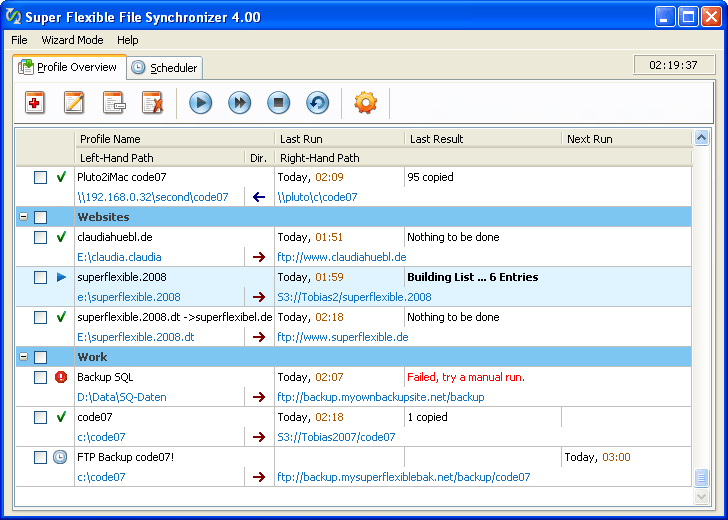
Super Flexible File Synchronizer is used to back up data and to synchronize PCs, servers, and notebooks. Users can choose the user interface that suits them best: Wizard Mode or Advanced Mode. The settings are stored in multiple profiles, and the software comes with support for FTP and secure FTP servers, ZIP compression, data encryption, and a scheduler for automated backups. On Windows NT/2000/XP, or 2003 Server, the scheduler can run as a service without users having to log on. This program features the ability to freely select files and folders across the whole folder hierarchy in a tree view, and it has support for e-mail notification, profile categories, and various filters.
Latest Reviews

anomoly reviewed v5.62 on Jan 9, 2012
Actually in linux it is portable as a single executable is free and works beautifully. I'm still a linux noob so who knows. Fsarchiver is also recommended but that's linux only.

ghammer reviewed v5.57a on Oct 29, 2011
I myself have used this tool for literally years to backup to USB and to a NAS. I mirror what I backup and have vastly different schedules.
Never seen a failure.

CyberDoc999 reviewed v5.56a on Oct 16, 2011
I have seen it fail many times
I used to reccomend it ..... but no more
ghammer reviewed v5.56 on Oct 10, 2011
You give a fine tool a 1 because it is not portable and does not claim to be portable? It also does not whittle, knit, nor cook dinner. Nor does it claim to.
What it does claim to do, it does extremely well. In fact, I have found no other tool that does all that this one does.

HeilNizar reviewed v5.55 on Sep 24, 2011
This guy is writing everywhere, Program Files, Program Data, AppData..
Make it portable please, and I mean PORTABLE where it writes to no where but its dir.

svkowalski reviewed v5.30b on Jan 18, 2011
Can't say enough about this tool. I use it to synch my MP3s to my SSD in my car; it cleans out all the non-mp3 files so the player doesn't get stuck. I replaced my PC in 3 hours using this tool to reload all of my personal files. It keeps getting better with each release.
anomoly reviewed v5.19a on Nov 18, 2010
Has all the bells and whistles and a seemingly easily configured gui but it likes to popup questions during the sync which is annoying, especially for an ap that has built-in scheduling-that oughta work well. It is totally portable as long as the ini file which contains your key is left in your program data folder-you can even uninstall it. The main exe is compressible down to 4+mb's.
There are free ones such as Capivara (jar) which is completely network & cross-platform compatible though I have not used it other than to sync to a local flash drive. Also try Create Synchronicity (small fast and light) but I'm not sure if it's network capable at all and it does have some filter file-type limitations. My personal free favorite, FreeFileSync, is also cross platform and OS. I doubt it's network capable on it's own. Above are all portable btw. so there
The ssl binaries need updating in this ap.

Plumber reviewed v5.17 on Oct 15, 2010
Yet another bit of complete nonsense. BestSync comes in several versions, one of which is free. But the free version is seriously limited: No backup to USB, FTP, or network, no encryption or compression, and so on.
How ridiculous to rate SFFS down because of price. No one needs others to review based on price. You can see at a glance how much a thing costs. What you cannot see at a glance is how a thing performs. That's what reviews are for.

eviljolly reviewed v5.16a on Oct 13, 2010
Honestly the only thing wrong with this software is the price. It's a $25 program at most, and there's just no way I'd fork out the $59.90 they're asking for.
Bestsync is available for free, and works well too.
ghammer reviewed v5.16a on Oct 12, 2010
Still, the one, the only, the best. Name something you'd like to do regarding backups/syncing. It does it, and does it accurately and easily.
Portable? Um, wouldn't paths and devices be a problem? Oh, wait. Perhaps you do not look for specific media before backing up.
But really, you don't need to be portable to evaluate the app. If it works on the eval machine, why would it fail as portable? Gimme a break... Portable, sheesh!

anomoly reviewed v5.62 on Jan 9, 2012
Actually in linux it is portable as a single executable is free and works beautifully. I'm still a linux noob so who knows. Fsarchiver is also recommended but that's linux only.
ghammer reviewed v5.57a on Oct 29, 2011
I myself have used this tool for literally years to backup to USB and to a NAS. I mirror what I backup and have vastly different schedules.
Never seen a failure.
CyberDoc999 reviewed v5.56a on Oct 16, 2011
I have seen it fail many times
I used to reccomend it ..... but no more
ghammer reviewed v5.56 on Oct 10, 2011
You give a fine tool a 1 because it is not portable and does not claim to be portable? It also does not whittle, knit, nor cook dinner. Nor does it claim to.
What it does claim to do, it does extremely well. In fact, I have found no other tool that does all that this one does.
HeilNizar reviewed v5.55 on Sep 24, 2011
This guy is writing everywhere, Program Files, Program Data, AppData..
Make it portable please, and I mean PORTABLE where it writes to no where but its dir.
svkowalski reviewed v5.30b on Jan 18, 2011
Can't say enough about this tool. I use it to synch my MP3s to my SSD in my car; it cleans out all the non-mp3 files so the player doesn't get stuck. I replaced my PC in 3 hours using this tool to reload all of my personal files. It keeps getting better with each release.
anomoly reviewed v5.19a on Nov 18, 2010
Has all the bells and whistles and a seemingly easily configured gui but it likes to popup questions during the sync which is annoying, especially for an ap that has built-in scheduling-that oughta work well. It is totally portable as long as the ini file which contains your key is left in your program data folder-you can even uninstall it. The main exe is compressible down to 4+mb's.
There are free ones such as Capivara (jar) which is completely network & cross-platform compatible though I have not used it other than to sync to a local flash drive. Also try Create Synchronicity (small fast and light) but I'm not sure if it's network capable at all and it does have some filter file-type limitations. My personal free favorite, FreeFileSync, is also cross platform and OS. I doubt it's network capable on it's own. Above are all portable btw. so there
The ssl binaries need updating in this ap.
Plumber reviewed v5.17 on Oct 15, 2010
Yet another bit of complete nonsense. BestSync comes in several versions, one of which is free. But the free version is seriously limited: No backup to USB, FTP, or network, no encryption or compression, and so on.
How ridiculous to rate SFFS down because of price. No one needs others to review based on price. You can see at a glance how much a thing costs. What you cannot see at a glance is how a thing performs. That's what reviews are for.
eviljolly reviewed v5.16a on Oct 13, 2010
Honestly the only thing wrong with this software is the price. It's a $25 program at most, and there's just no way I'd fork out the $59.90 they're asking for.
Bestsync is available for free, and works well too.
ghammer reviewed v5.16a on Oct 12, 2010
Still, the one, the only, the best. Name something you'd like to do regarding backups/syncing. It does it, and does it accurately and easily.
Portable? Um, wouldn't paths and devices be a problem? Oh, wait. Perhaps you do not look for specific media before backing up.
But really, you don't need to be portable to evaluate the app. If it works on the eval machine, why would it fail as portable? Gimme a break... Portable, sheesh!

heintro reviewed v5.15 on Oct 12, 2010
Seems to be very complete and pro but due to lack of a portable evaluation version cannot not risk it.
Plumber reviewed v5.12 on Sep 14, 2010
I am so sick of people whining about portability...

ballyhairs reviewed v5.07 on Aug 4, 2010
Its about time the author starts releasing it as portable.