File Details |
|
| File Size | 5.7 MB |
|---|---|
| License | Shareware, $29.95 |
| Operating System | Windows (All) |
| Date Added | July 20, 2010 |
| Total Downloads | 1,161 |
| Publisher | Dextronet |
| Homepage | Swift To-Do List |
Publisher's Description
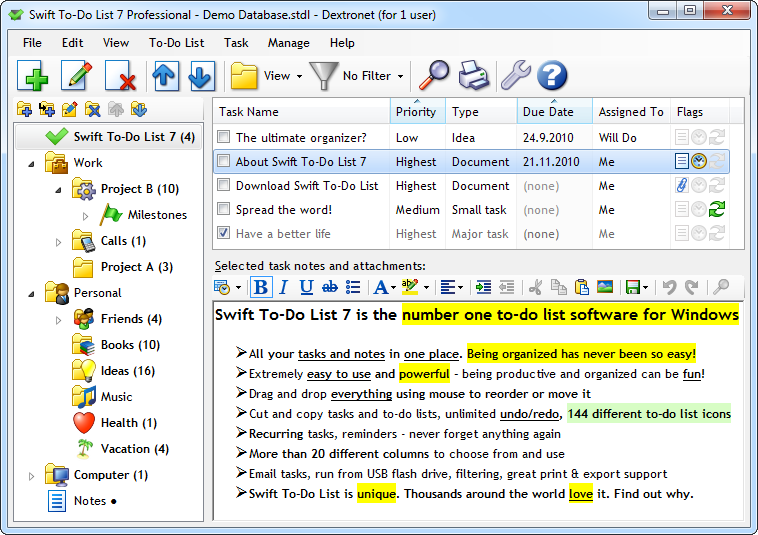
Swift To-Do list is a great to-do list software with reminder and to-do lists organized using unique tree structure with icons. To-do lists can be exported to Excel or HTML. Application is suitable both for personal and business use. All tasks can have customized priority level, task type, due date, and reminder. There is an option which will remove all finished tasks, so your list can be up to date. You can sort the to-do list by subject, priority , due date or the task type. It is also possible to batch modify properties of tasks.
Latest Reviews

tranglos reviewed v7.0 Beta 12 on Sep 10, 2010
Very convenient, with just the right set of features and nice layout. As long as you don't need a fully-fledged project manager, with Gantt charts and all, Swift To-Do List will serve as a fine manager for your tasks and personal projects.
I like the visual separation of categories from the tasks themselves - this is much cleaner and somehow more usable to me than the approach taken in My Life Organized, which sort of bundles everything together in one pane. I like how all the functionality can be accessed with the keyboard (another point over MLO). I like the customizable, color-coded priorities.
The rich text pane for notes is highly useful (clickable URLs and all), as is the ability to attach files to tasks - this one feature lets me use Swift To-Do list for bug-tracking.
All that, plus the filtering and the ability to batch-add tasks is why I originally bought it and upgraded to the latest version.
And that's where the missing star comes in the rating. Up to version 6.9, Swift To-Do list was apparently written in Delphi. As is typical for Delphi apps,it was snappy and lightweight. For whatever reason version 7 was rewritten in .Net. Now it takes way too much memory (60 MB just for starters) and takes ten seconds to load instead of one. Version 7 added a bunch of new features, but none of them required .Net. This is quite frustrating really - why would the developer(s) willingly transform a quick, lightweight application into a slow, resource-hungry one is beyond me. But there it is.
On the Dextronet website they still describe it as "light-weight". Well, it sure used to be.

uberfly reviewed v7.0 Beta 12 on Jul 21, 2010
A GUI exactly like I've been looking for. Very well done. It was well worth the purchase.

ChrisE reviewed v6.96 on Nov 5, 2008
Very clear, easy to use, but with all features you really need. Also good to store snippets of texts ...
Tried/Used many to-do-list programs and like this most.

brusco reviewed v6.90 on Nov 29, 2007
I like it. Attractive and simple. Does what it's supposed to and does it well, doesn't clutter up the place with garbage features that nobody would use.
30 bucks for a to-do list app mightn't be everyones idea of value though.

tranglos reviewed v7.0 Beta 12 on Sep 10, 2010
Very convenient, with just the right set of features and nice layout. As long as you don't need a fully-fledged project manager, with Gantt charts and all, Swift To-Do List will serve as a fine manager for your tasks and personal projects.
I like the visual separation of categories from the tasks themselves - this is much cleaner and somehow more usable to me than the approach taken in My Life Organized, which sort of bundles everything together in one pane. I like how all the functionality can be accessed with the keyboard (another point over MLO). I like the customizable, color-coded priorities.
The rich text pane for notes is highly useful (clickable URLs and all), as is the ability to attach files to tasks - this one feature lets me use Swift To-Do list for bug-tracking.
All that, plus the filtering and the ability to batch-add tasks is why I originally bought it and upgraded to the latest version.
And that's where the missing star comes in the rating. Up to version 6.9, Swift To-Do list was apparently written in Delphi. As is typical for Delphi apps,it was snappy and lightweight. For whatever reason version 7 was rewritten in .Net. Now it takes way too much memory (60 MB just for starters) and takes ten seconds to load instead of one. Version 7 added a bunch of new features, but none of them required .Net. This is quite frustrating really - why would the developer(s) willingly transform a quick, lightweight application into a slow, resource-hungry one is beyond me. But there it is.
On the Dextronet website they still describe it as "light-weight". Well, it sure used to be.
uberfly reviewed v7.0 Beta 12 on Jul 21, 2010
A GUI exactly like I've been looking for. Very well done. It was well worth the purchase.
ChrisE reviewed v6.96 on Nov 5, 2008
Very clear, easy to use, but with all features you really need. Also good to store snippets of texts ...
Tried/Used many to-do-list programs and like this most.
brusco reviewed v6.90 on Nov 29, 2007
I like it. Attractive and simple. Does what it's supposed to and does it well, doesn't clutter up the place with garbage features that nobody would use.
30 bucks for a to-do list app mightn't be everyones idea of value though.