File Details |
|
| File Size | 45.3 MB |
|---|---|
| License | Shareware, $3.99 |
| Operating System | Windows 7/2000/Server 2003/Vista/XP |
| Date Added | August 12, 2015 |
| Total Downloads | 7,687 |
| Publisher | TVersity |
| Homepage | TVersity |
Publisher's Description
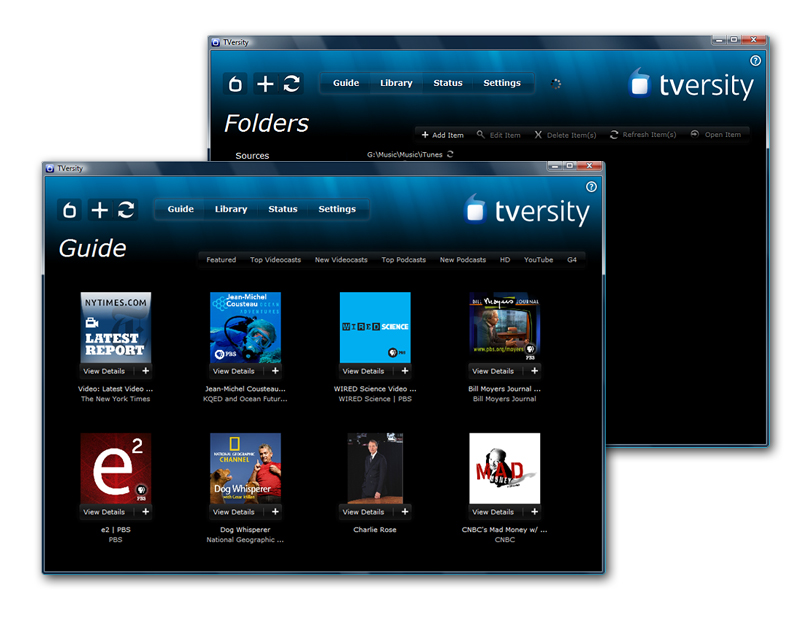
TVersity let's you stream media from your PC to almost any device that connect to your home network. For example you can browse photos, music or movies on devices like the PS3 or XBox 360. While some devices already allow streaming usually the formats supported are quite limited. It supports virtually any file you can play on your PC.
Latest Reviews

Antichrist reviewed v2.6 on Aug 8, 2013
I used to use TVersity and would always have some sort of trouble with it. I tried a bunch of the alternatives like Plex, PS3 Media Server (as well as Universal Media Server), and Mezzmo, and finally switched to Serviio, which I'm much happier with. Serviio still has a freeware version which is all I need as well. Hope this saves you some time if you've had the same type of experiences!
http://www.serviio.org/
Also, I finally had to accept that wireless n wasn't going to cut it with any of these transcoders streaming to my xbox 360 etc. The only way to eliminate playback issues completely was to revert to a wired ethernet connection.

Andem reviewed v2.2 on Sep 24, 2012
TVersity used to be a pretty good program with several bugs. Although after fiddling around with settings, things eventually worked. Unfortunately, this program is no longer really freeware and AFAIK, has not been updated in quite some time.

Ryusennin reviewed v2.2 on Jun 9, 2012
Since version 2.0, TVersity is not freeware anymore. Even the Basic build now requires a commercial key which is only valid for six months.

VelvetElvis reviewed v1.9.7 on Nov 12, 2011
Had problems with PS3 Media Server flagging almost all my music videos as corrupt. Installed TVersity and it plays everything.
Had one problem - I tried to add a folder, but it wouldn't show up in the library. Had to change the folder permissions on the folder, after which it worked fine. Odd that the same folder didn't present problems to PS3 Media Server.

FixXxeR reviewed v1.0.0.10 RC6 on Jan 7, 2009
This program is great, although, it's interface is a bit slow at times and you have a good refresh time upon startup as well as initiating a media library rebuild.
Other than that, TVersity is definitely a fantastic solution for a home based DLNA solution, such as my setup with my PS3. I highly recommend it as nothing has been easier to configure. I say that as of right now, this receives a solid 4/5.
On a side note:
UAC is a solution that software developers need to adapt to. Programmers have been coding poorly for years, relying on storage of settings and parameters outside the documents and settings\username folder and using other poor coding techniques. UAC should not need to be disabled for this program to install. It works fine with UAC Enabled after installation, but during the install you have to disable it and that is unacceptable. That is like telling someone you have to disable your house power in order to get your TV's wall mount installed on the wall. That should not be the case and is the fault of the developer not Microsoft. Thousands of software applications work with Vista's UAC enabled, in fact this is the only one I have found which does not, and I believe TVersity should alter it's programming to work with UAC as well. This is solely TVersity's responsibility to fix their lack of programming standardization.

Matrix3000k reviewed v1.0.0.10 RC6 on Jan 6, 2009
gate1975mlm
Don't blame the software for your crappy UAC. Thats a Microsoft problem not the software you moron. Man I can't stand people like your dumb a** blaming the software for not working "right" when its a WinBlows problem. Learn how to use a computer then comment idiot!!!!

VictorAnderson reviewed v1.0.0.10 RC6 on Jan 6, 2009
Not bad - but I still like ORB better - and is there support for Windows Mobile devices?

gate1975mlm reviewed v1.0.0.7 RC4 on Oct 26, 2008
Its sucks that you need to disable UAC to get it to run! :(
I hope this will be fixed sometime soon!

Metshrine reviewed v1.0.0.2 RC1 on Jul 14, 2008
This program is a fine program, it works well for what it is designed to do, and I can easily share media throughout my home to various devices. Its easy to use, it is easy to understand, and its very powerful.
That said, it has some downfalls. This version, along with all others, require you to disable UAC before you can even run the installer. The second issue is that you have to rebuild your media library after every update. The third is that it loses certain settings (such as the menu structure) every time you upgrade. These are all minor issues but I think they should be addressed. UAC hasnt been a problem for 95% of the installers out there, unsure why this one is having an issue with it. The UI is also a major downfall. Flash based is not a good way to go as it is slow, unresponsive at times, and can provide very little info (such as progress on the rebuild or initial build of a library). A GTK style gui would be a good choice for cross-platform compatibility.
Other than that, I recommend it highly. It is the best in it's genre, it blows media center out of the water.
Metshrine reviewed v0.9.11.4 on Jul 5, 2008
This is one of those programs that finds a niche, perfects it (for the most part) and does what it is intended to do very well. This is a great DLNA program and works perfectly with my PS3. That said, it is not without flaw. The interface is highly clumsy. It often times has several timeouts while streaming videos over a wireless connection. I often times have videos cease playback even thou the router is basically next to the PS3 (less than 10 ft). Another issue is that there is no progress indicator for media refreshes in the library. Minus that, this is a top notch piece of software. Cant wait for 1.0 which is due out soon!

Antichrist reviewed v2.6 on Aug 8, 2013
I used to use TVersity and would always have some sort of trouble with it. I tried a bunch of the alternatives like Plex, PS3 Media Server (as well as Universal Media Server), and Mezzmo, and finally switched to Serviio, which I'm much happier with. Serviio still has a freeware version which is all I need as well. Hope this saves you some time if you've had the same type of experiences!
http://www.serviio.org/
Also, I finally had to accept that wireless n wasn't going to cut it with any of these transcoders streaming to my xbox 360 etc. The only way to eliminate playback issues completely was to revert to a wired ethernet connection.
Andem reviewed v2.2 on Sep 24, 2012
TVersity used to be a pretty good program with several bugs. Although after fiddling around with settings, things eventually worked. Unfortunately, this program is no longer really freeware and AFAIK, has not been updated in quite some time.
Ryusennin reviewed v2.2 on Jun 9, 2012
Since version 2.0, TVersity is not freeware anymore. Even the Basic build now requires a commercial key which is only valid for six months.
VelvetElvis reviewed v1.9.7 on Nov 12, 2011
Had problems with PS3 Media Server flagging almost all my music videos as corrupt. Installed TVersity and it plays everything.
Had one problem - I tried to add a folder, but it wouldn't show up in the library. Had to change the folder permissions on the folder, after which it worked fine. Odd that the same folder didn't present problems to PS3 Media Server.
FixXxeR reviewed v1.0.0.10 RC6 on Jan 7, 2009
This program is great, although, it's interface is a bit slow at times and you have a good refresh time upon startup as well as initiating a media library rebuild.
Other than that, TVersity is definitely a fantastic solution for a home based DLNA solution, such as my setup with my PS3. I highly recommend it as nothing has been easier to configure. I say that as of right now, this receives a solid 4/5.
On a side note:
UAC is a solution that software developers need to adapt to. Programmers have been coding poorly for years, relying on storage of settings and parameters outside the documents and settings\username folder and using other poor coding techniques. UAC should not need to be disabled for this program to install. It works fine with UAC Enabled after installation, but during the install you have to disable it and that is unacceptable. That is like telling someone you have to disable your house power in order to get your TV's wall mount installed on the wall. That should not be the case and is the fault of the developer not Microsoft. Thousands of software applications work with Vista's UAC enabled, in fact this is the only one I have found which does not, and I believe TVersity should alter it's programming to work with UAC as well. This is solely TVersity's responsibility to fix their lack of programming standardization.
Matrix3000k reviewed v1.0.0.10 RC6 on Jan 6, 2009
gate1975mlm
Don't blame the software for your crappy UAC. Thats a Microsoft problem not the software you moron. Man I can't stand people like your dumb a** blaming the software for not working "right" when its a WinBlows problem. Learn how to use a computer then comment idiot!!!!
VictorAnderson reviewed v1.0.0.10 RC6 on Jan 6, 2009
Not bad - but I still like ORB better - and is there support for Windows Mobile devices?
gate1975mlm reviewed v1.0.0.7 RC4 on Oct 26, 2008
Its sucks that you need to disable UAC to get it to run! :(
I hope this will be fixed sometime soon!
Metshrine reviewed v1.0.0.2 RC1 on Jul 14, 2008
This program is a fine program, it works well for what it is designed to do, and I can easily share media throughout my home to various devices. Its easy to use, it is easy to understand, and its very powerful.
That said, it has some downfalls. This version, along with all others, require you to disable UAC before you can even run the installer. The second issue is that you have to rebuild your media library after every update. The third is that it loses certain settings (such as the menu structure) every time you upgrade. These are all minor issues but I think they should be addressed. UAC hasnt been a problem for 95% of the installers out there, unsure why this one is having an issue with it. The UI is also a major downfall. Flash based is not a good way to go as it is slow, unresponsive at times, and can provide very little info (such as progress on the rebuild or initial build of a library). A GTK style gui would be a good choice for cross-platform compatibility.
Other than that, I recommend it highly. It is the best in it's genre, it blows media center out of the water.
Metshrine reviewed v0.9.11.4 on Jul 5, 2008
This is one of those programs that finds a niche, perfects it (for the most part) and does what it is intended to do very well. This is a great DLNA program and works perfectly with my PS3. That said, it is not without flaw. The interface is highly clumsy. It often times has several timeouts while streaming videos over a wireless connection. I often times have videos cease playback even thou the router is basically next to the PS3 (less than 10 ft). Another issue is that there is no progress indicator for media refreshes in the library. Minus that, this is a top notch piece of software. Cant wait for 1.0 which is due out soon!

werwin reviewed v0.9.11.4 on Feb 13, 2008
Great software for streaming videos from my PC to my TV through my Xbox 360, although it does need some major work.

Qlib reviewed v0.9.11.4 on Jan 30, 2008
about bloody time this one made it to betanews.. great program.. not perfect but.. work in progress!!