
File Details |
|
| File Size | 3.8 MB |
|---|---|
| License | Freeware |
| Operating System | Windows 7/8/10/Server 2008/Vista/XP |
| Date Added | May 7, 2022 |
| Total Downloads | 76,840 |
| Publisher | Sergey Serkov |
| Homepage | TagScanner |
Publisher's Description
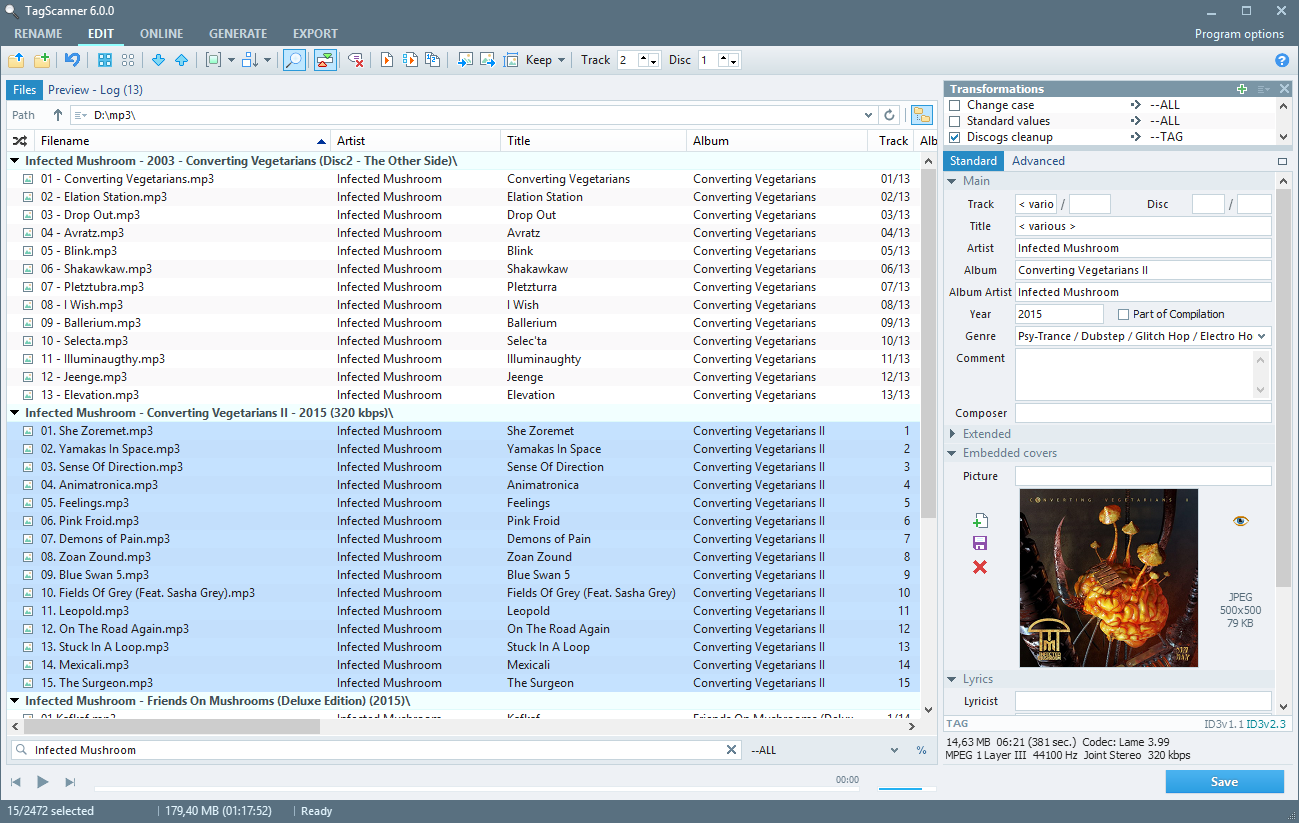
TagScanner is a powerful tool for organizing and managing your music collection. It can edit tags of most modern audio formats, supports ID3v1/v2, Vorbis comments, APEv2, WMA and MP4(iTunes) tags. You can rename files according to information from the tags, import tag information from filenames or other sources, perform any text replacement and transformations in tags and filenames. Also you may get album info and download covers via online databases like freedb, Amazon, Discogs or MusicBrainz. You can create playlists in one click and export your collection to HTML, Excel or any user-defined format. Program has easy-to-use multilingual interface and built-in audio player.
Latest Reviews

empirical reviewed v6.1.2 on Jun 15, 2020
Not sure why yet cannot get this latest 6 version to work properly.
I could be overlooking something yet have experience using earlier versions in the 4 and 5 series that worked well tagging WAV files.

rebradley reviewed v6.0.1 on Jan 20, 2016
I like TagScanner. It does what I want and is easy to use. They only problem I have with it is after 6.0.0 is that it has gone with an ugly Win10 look.

scf reviewed v5.1.657 on Nov 14, 2014
tag scanner is great, check it out.

radiomike reviewed v5.1.651 on Aug 27, 2014
Tagscanner is perfect for tagging those songs before placing them on the radio server. However I have found that the latest versions will not allow for a save after the info have been entered. On a hunch I installed an older version and it works perfectly. I'm not sure what happened between the versions. but the older version works and the newest version sux!

mikebratley reviewed v5.1.648 on Mar 11, 2014
very nice

chrispaul reviewed v5.1.647 on Feb 17, 2014
not bad

barrytbutler reviewed v5.1.645 on Jan 29, 2014
i am a linux user and this works great!

djb247365 reviewed v5.1.641 on Oct 14, 2013
TagScanner is one of those really good pieces of software that doesn't get a lot of mention as it should. I use the portable version for tagging my FLAC files and some of my movies. It works pretty fast and I've never had any issues since I started using this, so it's definitely something I would recommend for enthusiasts like me, that wish to add a bit of structure to their media collection, without the need to use anything overly complicated. Great program!

olivergiving reviewed v5.1.638 on Sep 25, 2013
5 stars

dubstepmaker reviewed v5.1.630 on Feb 14, 2013
tagscanner is an great program!

empirical reviewed v6.1.2 on Jun 15, 2020
Pros: Earlier versions worked efficiently tagging WAV files..
Cons: Cannot seem to get this newer version to tag WAV files.
Bottom Line: Not sure why yet cannot get this latest 6 version to work properly.
I could be overlooking something yet have experience using earlier versions in the 4 and 5 series that worked well tagging WAV files.
rebradley reviewed v6.0.1 on Jan 20, 2016
I like TagScanner. It does what I want and is easy to use. They only problem I have with it is after 6.0.0 is that it has gone with an ugly Win10 look.
scf reviewed v5.1.657 on Nov 14, 2014
tag scanner is great, check it out.
radiomike reviewed v5.1.651 on Aug 27, 2014
Tagscanner is perfect for tagging those songs before placing them on the radio server. However I have found that the latest versions will not allow for a save after the info have been entered. On a hunch I installed an older version and it works perfectly. I'm not sure what happened between the versions. but the older version works and the newest version sux!
mikebratley reviewed v5.1.648 on Mar 11, 2014
very nice
chrispaul reviewed v5.1.647 on Feb 17, 2014
not bad
barrytbutler reviewed v5.1.645 on Jan 29, 2014
i am a linux user and this works great!
djb247365 reviewed v5.1.641 on Oct 14, 2013
TagScanner is one of those really good pieces of software that doesn't get a lot of mention as it should. I use the portable version for tagging my FLAC files and some of my movies. It works pretty fast and I've never had any issues since I started using this, so it's definitely something I would recommend for enthusiasts like me, that wish to add a bit of structure to their media collection, without the need to use anything overly complicated. Great program!
olivergiving reviewed v5.1.638 on Sep 25, 2013
5 stars
dubstepmaker reviewed v5.1.630 on Feb 14, 2013
tagscanner is an great program!

Music4Ever reviewed v5.1.612 on May 24, 2012
An excellent free program I personally use MP3Tag but TagScanner does give different options for some users.
Amazingly small size.

anomoly reviewed v5.1.610 on Feb 15, 2012
Works perfect in linux under wine too.

egg83 reviewed v5.1.607 on Jan 13, 2012
Very intuitive piece of software, allows me to rename music files, and to edit tags, even to add pictures to the files themselves! 5 stars!