File Details |
|
| File Size | 0.3 MB |
|---|---|
| License | Open Source |
| Operating System | Windows 2000/9x/Server 2003/XP |
| Date Added | November 9, 2005 |
| Total Downloads | 6,255 |
| Publisher | Felix Geyer |
| Homepage | Thunderbird-Tray |
Publisher's Description
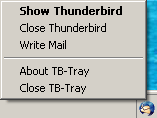
Thunderbird-Tray is a system tray launcher tool for Mozilla Thunderbird. It hides Thunderbird when you minimize the Thunderbird window or when you click the tray icon. Clicking the icon again will re-show the main window. Also it is possible to start Thunderbird by clicking on the tray icon. You can right click the Thunderbird-Tray icon to see a menu with the available options at any time.
Latest Reviews

Mindsweeper reviewed v1.1 on Jun 23, 2005
If the minimize to tray extension doesn't work for you which didn't for me, then this is a very competent alternative. Slight criticism is that it doesn't allow you to right click on tray icon to check mail even though you can compose a new message from there.

httpd.confused reviewed v1.1 on Jun 20, 2005
Thunderbird-Tray (TB-Tray) is not always shown in the tray, even when Thunderbird isn't running. Look at the options for the application. Here they are:
Thunderbird Path
[tell TB-Tray where to find Thunderbird.exe]
Use EXE name to detect Thunderbird
[on/off]
Always maximize Thunderbird
[on/off]
Thunderbird EXE name
[tell TB-Tray the image name for Thunderbird]
Profile name
[specify which one to start Thunderbird with]
Language
[22 are supported by default--which is excellent]
Single/double click tray icon to show Thunderbird
[on/off]
Hide tray icon when Thunderbird is shown
[on/off]
Add "Write Mail" to tray icon menu
on/off
Add "Open Address Book" to tray icon menu
[on/off]
What to do when TB-Tray starts
[do nothing; run Thunderbird; or run and hide Thunderbird]
Thunderbird start delay time
[in ms]
What to do when TB-Tray exits
[do nothing; or close Thunderbird]
What to do when Thunderbird exits
[do nothing; restart Thunderbird; or close TB-Tray]
Hotkey to show Thunderbird
[alt/ctrl/shift/win + any number/letter]
As you can see, TB-Tray crushes the (buggy) "Minimize to Tray" extension like a grape. Then it hops up and down on its carcass, laughing all the while.
I have TB-Tray configured so that instead of running Thunderbird, I run TB-Tray instead. If I close either one, the other closes, too. With this configuration, using TB-Tray is essentially just like having tray icon support built right into Thunderbird. (And why they didn't is beyond me.)

scriptee reviewed v1.1 on Jun 4, 2005
This little app is great for what it does. One thing that I think will bug some people is how its ALWAYS in the tray even if Thunderbird is not running, and when you R-Click it there is the option to Launch Thunderbird, and if its already open then Show/Hide it.
Personally, I love the way it works ... Assuming there are no bugs (which I see no trace of yet).
This little app works better then the recent Sunbird extension release which I immediately found bugs in which hindered the usability a hell of a lot.

bugmenot reviewed v1.0 on May 10, 2005
I used this for a while until I found http://minimizetotray.mozdev.org/ which seems to work a lot better. This program had issues minimizing thunderbird. I would also recomend minimizetotray.

Nikkie reviewed v1.0 on Apr 18, 2005
It's called open source .. Anyone can make their own version of this function ..
I like this one ..

Vagman reviewed v0.6 Beta on Feb 28, 2005
sorry but... there is the "minimizetotray" extension thats doing those things in thunderbird... so why to use this?
http://minimizetotray.mozdev.org/
giving it 4 but i didnt used it...

lickmygiggle reviewed v0.6 Beta on Feb 28, 2005
Great Program...Exactly what I've been looking for for my Thunderbird.

SniperBeamer reviewed v0.5 Beta on Oct 22, 2004
If you found bugs please post them at http://sourceforge.net/t...=121942&atid=691852
I use Mozilla Calendar as a Thunderbird extension and it works perfectly.

denka reviewed v0.5 Beta on Oct 22, 2004
Crashes once in a while, doesn't "minimize" the window as it should.
This can become a nice utility but it needs som extra work.

Yochanan reviewed v0.5 Beta on Oct 21, 2004
SuperBeaner, that is because Mozilla Calendar 0.8+ is not compatible with Thunderbird 0.8/0.9 yet. That is the cause of the crash.
This program works with 0.9, but the Minimize to Tray 0.0.1.20040828+ plugin does not.

Mindsweeper reviewed v1.1 on Jun 23, 2005
If the minimize to tray extension doesn't work for you which didn't for me, then this is a very competent alternative. Slight criticism is that it doesn't allow you to right click on tray icon to check mail even though you can compose a new message from there.
httpd.confused reviewed v1.1 on Jun 20, 2005
Thunderbird-Tray (TB-Tray) is not always shown in the tray, even when Thunderbird isn't running. Look at the options for the application. Here they are:
Thunderbird Path
[tell TB-Tray where to find Thunderbird.exe]
Use EXE name to detect Thunderbird
[on/off]
Always maximize Thunderbird
[on/off]
Thunderbird EXE name
[tell TB-Tray the image name for Thunderbird]
Profile name
[specify which one to start Thunderbird with]
Language
[22 are supported by default--which is excellent]
Single/double click tray icon to show Thunderbird
[on/off]
Hide tray icon when Thunderbird is shown
[on/off]
Add "Write Mail" to tray icon menu
on/off
Add "Open Address Book" to tray icon menu
[on/off]
What to do when TB-Tray starts
[do nothing; run Thunderbird; or run and hide Thunderbird]
Thunderbird start delay time
[in ms]
What to do when TB-Tray exits
[do nothing; or close Thunderbird]
What to do when Thunderbird exits
[do nothing; restart Thunderbird; or close TB-Tray]
Hotkey to show Thunderbird
[alt/ctrl/shift/win + any number/letter]
As you can see, TB-Tray crushes the (buggy) "Minimize to Tray" extension like a grape. Then it hops up and down on its carcass, laughing all the while.
I have TB-Tray configured so that instead of running Thunderbird, I run TB-Tray instead. If I close either one, the other closes, too. With this configuration, using TB-Tray is essentially just like having tray icon support built right into Thunderbird. (And why they didn't is beyond me.)
scriptee reviewed v1.1 on Jun 4, 2005
This little app is great for what it does. One thing that I think will bug some people is how its ALWAYS in the tray even if Thunderbird is not running, and when you R-Click it there is the option to Launch Thunderbird, and if its already open then Show/Hide it.
Personally, I love the way it works ... Assuming there are no bugs (which I see no trace of yet).
This little app works better then the recent Sunbird extension release which I immediately found bugs in which hindered the usability a hell of a lot.
bugmenot reviewed v1.0 on May 10, 2005
I used this for a while until I found http://minimizetotray.mozdev.org/ which seems to work a lot better. This program had issues minimizing thunderbird. I would also recomend minimizetotray.
Nikkie reviewed v1.0 on Apr 18, 2005
It's called open source .. Anyone can make their own version of this function ..
I like this one ..
Vagman reviewed v0.6 Beta on Feb 28, 2005
sorry but... there is the "minimizetotray" extension thats doing those things in thunderbird... so why to use this?
http://minimizetotray.mozdev.org/
giving it 4 but i didnt used it...
lickmygiggle reviewed v0.6 Beta on Feb 28, 2005
Great Program...Exactly what I've been looking for for my Thunderbird.
SniperBeamer reviewed v0.5 Beta on Oct 22, 2004
If you found bugs please post them at http://sourceforge.net/t...=121942&atid=691852
I use Mozilla Calendar as a Thunderbird extension and it works perfectly.
denka reviewed v0.5 Beta on Oct 22, 2004
Crashes once in a while, doesn't "minimize" the window as it should.
This can become a nice utility but it needs som extra work.
Yochanan reviewed v0.5 Beta on Oct 21, 2004
SuperBeaner, that is because Mozilla Calendar 0.8+ is not compatible with Thunderbird 0.8/0.9 yet. That is the cause of the crash.
This program works with 0.9, but the Minimize to Tray 0.0.1.20040828+ plugin does not.

AntiochMedia reviewed v0.5 Beta on Oct 21, 2004
As was mentioned before, this application seems rather redundant as the Mozilla Thunderbird plugin, which can be found at: http://minimizetotray.mozdev.org/
I used this for a short period of time and while it did work, it didn't necessarily feel integrated with Mozilla Thunderbird, rather a hack to achieve something that until recently hasn't been available as a plug-in.
SniperBeamer reviewed v0.4 on Oct 17, 2004
The MinimizeToTray Extension is buggy.
Thunderbird crashes when you use MinimizeToTray and Mozilla Calendar (as Thunderbird Extension).

foobah reviewed v0.4 on Oct 12, 2004
I personally found it buggy.
As posted before, there is a much better extension that works for firefox and thunderbird. In TB, you can also right-click the tray icon and compose emails from there.