
File Details |
|
| File Size | 0.1 MB |
|---|---|
| License | Freeware |
| Operating System | Windows (All) |
| Date Added | September 6, 2022 |
| Total Downloads | 20,526 |
| Publisher | NirSoft |
| Homepage | USBDeview |
Publisher's Description
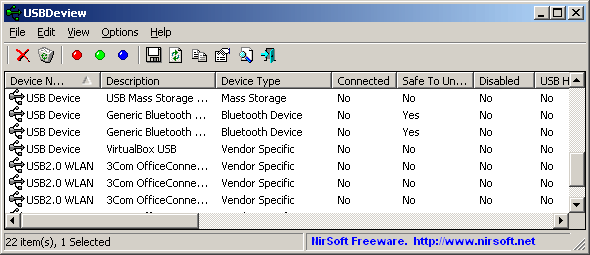
USBDeview is a small utility that lists all USB devices that currently connected to your computer, as well as all USB devices that you previously used. For each USB device, exteneded information is displayed: Device name/description, device type, serial number (for mass storage devices), the date/time that device was added, VendorID, ProductID, and more. USBDeview also allows you to uninstall USB devices that you previously used, and disconnect USB devices that are currently connected to your computer. You can also use USBDeview on a remote computer, as long as you login to that computer with admin user.
Latest Reviews

Python669 reviewed v3.06 on Dec 30, 2023
I often use it in precision mode to target specific USB devices or conduct a comprehensive cleanup of all ports, letting Windows reinstall the active ones.

Hilbert reviewed v2.26 on Sep 5, 2013
A great utility, I use it regularly to clean old USB rubbish out of Windows. I'll use it in what I call precision mode to deal with a specific USB device or I'll clean out all ports and let Windows reinstall the ones that are still active (plugged in).
As with all NirSoft utilities, USBDeview is product that works as you'd expect. There's few software writers who know the internals of a PC and Windows as well as Nir Sofer does.

Zootopia3001 reviewed v2.20 on Dec 5, 2012
Works as advertised. Simple and effective. Only had one device no longer in use(external 6 in 1 card reader).

DudeBoyz reviewed v2.11 on Jun 18, 2012
This is one of those awesome utilities that you never realized you needed until you found out about it.
I found like 5 devices that I have never re-connected to the PC whose entries were just sitting there taking up space. I just selected them and uninstalled them and it's like CCleaner for USB.
I have to do more experimenting. Hopefully this util will not let me do any actual damage while I'm tinkering. We shall see.
Very cool idea for an app.

Music4Ever reviewed v2.10 on Apr 19, 2012
I actually used this today to sort a PC that refused to recognise any new USB drives, why windows stores the amount of unneeded crap is does is beyond me.
Great program as are most from Nir.

Input Overload reviewed v2.00 on Jan 17, 2012
Nice utility, as below I didn't even know windows kept this amount of info.

irwinofupton reviewed v1.97 on Dec 29, 2011
What is most intriguing about this fine utility was not knowing Windows even kept this data!

DrTeeth reviewed v1.97 on Dec 28, 2011
The NirSoft utils are brilliant without exception and this one is a life saver. It allows one to see every device that is or was connected to a given PC (or OS or multibooters, natch). The only util one needs to sort out USB issues.

bopb99 reviewed v1.97 on Dec 28, 2011
Very handy if you regularly work with a lot of usb gadgets.

yleclerc reviewed v1.77 on Sep 13, 2010
"Sweathog" USBDLM is a completely different tool. It lets people control the drive letter. Do not confuse it with list out the USB devices that have been or are connected. Nirsoft has been consistent with unique tools to help configure Windows. USBDeview is a MUST for solving USB device problems.
Python669 reviewed v3.06 on Dec 30, 2023
Pros: USBDeview is truly a game-changer in USB management.
Cons: nothing
Bottom Line: I often use it in precision mode to target specific USB devices or conduct a comprehensive cleanup of all ports, letting Windows reinstall the active ones.

Hilbert reviewed v2.26 on Sep 5, 2013
A great utility, I use it regularly to clean old USB rubbish out of Windows. I'll use it in what I call precision mode to deal with a specific USB device or I'll clean out all ports and let Windows reinstall the ones that are still active (plugged in).
As with all NirSoft utilities, USBDeview is product that works as you'd expect. There's few software writers who know the internals of a PC and Windows as well as Nir Sofer does.
Zootopia3001 reviewed v2.20 on Dec 5, 2012
Works as advertised. Simple and effective. Only had one device no longer in use(external 6 in 1 card reader).
DudeBoyz reviewed v2.11 on Jun 18, 2012
This is one of those awesome utilities that you never realized you needed until you found out about it.
I found like 5 devices that I have never re-connected to the PC whose entries were just sitting there taking up space. I just selected them and uninstalled them and it's like CCleaner for USB.
I have to do more experimenting. Hopefully this util will not let me do any actual damage while I'm tinkering. We shall see.
Very cool idea for an app.
Music4Ever reviewed v2.10 on Apr 19, 2012
I actually used this today to sort a PC that refused to recognise any new USB drives, why windows stores the amount of unneeded crap is does is beyond me.
Great program as are most from Nir.
Input Overload reviewed v2.00 on Jan 17, 2012
Nice utility, as below I didn't even know windows kept this amount of info.
irwinofupton reviewed v1.97 on Dec 29, 2011
What is most intriguing about this fine utility was not knowing Windows even kept this data!
DrTeeth reviewed v1.97 on Dec 28, 2011
The NirSoft utils are brilliant without exception and this one is a life saver. It allows one to see every device that is or was connected to a given PC (or OS or multibooters, natch). The only util one needs to sort out USB issues.
bopb99 reviewed v1.97 on Dec 28, 2011
Very handy if you regularly work with a lot of usb gadgets.
yleclerc reviewed v1.77 on Sep 13, 2010
"Sweathog" USBDLM is a completely different tool. It lets people control the drive letter. Do not confuse it with list out the USB devices that have been or are connected. Nirsoft has been consistent with unique tools to help configure Windows. USBDeview is a MUST for solving USB device problems.

slinkys_delsol reviewed v1.77 on Sep 12, 2010
I have nooooooo clue what "Sweathog" is talking about, but this is an essential app if you are an IT Tech. It's great to pull up the entire tree of what USB Devices have been connected over time and serves an excellent if nothing else way to clean out all that which is no longer connected and may never connect again.
My only complaint of this is I wish I had it years ago!
NirSoft has a bunch of useful application, check them out!

sweathog reviewed v1.77 on Sep 11, 2010
I hate to detract from NirSoft because they make some excellent utilities but I think USB Drive Letter Manager (http://www.uwe-sieber.de/usbdlm_e.html) is a much better free utility for ID'ing USB devices. First of all, in the default setting the NirSoft app will list all your USB ports when nothing is connected which can be confusing for some newbies. To its credit the NirSoft app does have some nice features like USB speed test and autoplay. But USB Drive Letter Manager is just as tiny an app but lists only occupied USB ports, you can customize the names of the found devices and, overall, it provides provides much the same info as NirSoft plus gives control over Window's drive letter assignment for USB drives. The only downside with USB Drive letter manager is the info is given in a DOS box, but NirSoft's interface isn't much more glamorous. NirSoft USB app is a fine utility for what it does. But for me USB Drive Letter Manager packs more of the features I need for managing and ID'ing USB devices..