
File Details |
|
| File Size | 2.9 MB |
|---|---|
| License | Freeware |
| Operating System | Windows (All) |
| Date Added | February 5, 2023 |
| Total Downloads | 39,913 |
| Publisher | KC Softwares |
| Homepage | VideoInspector |
Publisher's Description
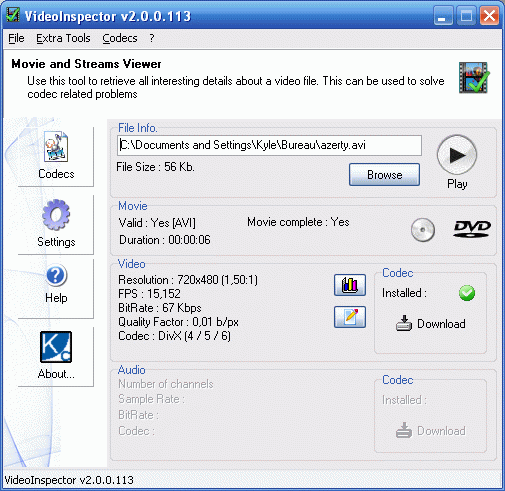
VideoInspector is a tool designed to provide you with as much information as possible about your video files. With VideoInspector you'll know why your video files has no sound or refuses to play correctly. VideoInspector will help you installing the required CoDecs (coder/decoder software) for an optimal performance. VideoInspector can also inspect your system to find which codecs are available.
This download is for the Lite installer. It does not contain any sponsor.
Latest Reviews

stephenstud reviewed v2.7.1.131 on Dec 28, 2014
Sorry eset threw it out. If its packed with more than just the app, then that could be it.

BANDIT- reviewed v2.7.0.130 on Jul 30, 2014
VideoInspector is General Use = 2*
~~~~~~~~~~~~~~~~~~~~~~~~~~~
MediaInfo 0.7.69
http://fileforum.betanew.../MediaInfo/1194575334/1
You can R.Click A media File & when the UI launches,
-Tick HTML in "View" tab
-Now click the "Debug" tab & Tick "Advanced Mode".

zeeshan1153 reviewed v2.5.0.128 on Feb 15, 2013
RelevantKnowledge is a market research program. The software is installed with a user's permission and can be uninstalled anytime via the control panel. You can read more about this software at our website http://www.relevantknowledge.com/faq.aspx. The program also offers user rewards for taking part in occasional surveys. In addition, RelevantKnowledge donates a tree for every user's participation. This way the user helps out a good cause. If you have any questions, we encourage you to contact us athttps://www.relevantknowledge.com/supportform.aspx
Thank you,
The Relevant Knowledge Support Team
zeeshan1153 reviewed v2.3.0.126 on May 9, 2012
Please be assured that comScore, the parent company of RelevantKnowledge, has invested substantial resources in making our data collection and privacy practices the best they can possibly be. Our company adheres to industry-accepted best practices regarding the collection and secure storage of the data collected by software such as RelevantKnowledge.
comScore is recognized as a leader in the privacy space by organizations such as the OnlineTrust Alliance, where our co-founder Gian Fulgoni was a panelist earlier this year, along with representatives from the FTC and TRUSTe. (link to http://blog.comscore.com..._privacy_town_hall.html).
If you have further questions about RelevantKnowledge, please visit our website: http://www.relevantknowledge.com/faq.aspx
Thank you,
RelevantKnowledge Customer Support Team

bestguy4u46 reviewed v2.2.8.126 on Aug 19, 2011
It's handy, easy and fast to use, clean installing, but still not a miracle.

kbsoftware reviewed v2.2.8.126 on Jun 7, 2011
Anti-Virus to the rescue, did not install this sucker with the nasty adware/malware.
GSpot it's an older program but it still does the job and doesn't include any nasty's. http://www.headbands.com/gspot/v26x/index.htm

radiomaffia reviewed v2.2.4.123 on Mar 11, 2010
Looks nice and healthy but...reviews are not to promising and makes me stay away from this app. Would like to see some explaining around this tool cause when so many give bad reviews there is something the matter with this tool....
update :I had a short briefing with kcsoftwares and this is their answer:-
"Most of them comply about the optional sponsor proposed during the
install process.
This is not related to the quality of the product itself."
Edit: the setup is down at the moment but http://www.download3k.co...ort-VideoInspector.html looks promising..
Here is the adwarefree version:
ftp.relline.ru/pub/win/graph/videoinspector-1.7.2.90.zip (create your own folder & create shortcut yourself ) It is working perfect!

litterworm reviewed v2.2.2.121 on May 22, 2009
Use to scan with antivirus, the result got virus, file0047.bin - Win32/Adware.Agent.NMA application.

Crypton reviewed v2.1.0.116 on Jan 6, 2009
Something not right with this application, I had even declined the agreement for the "RelevantKnowledge" software as well as unchecked it on the final screen before installation took place. Not sure what is going on with it, but it hung up my Vistal Ultimate x64 Quad Core system, I had to choose logoff to get anything working again (Task Manager did not want to open), I then tried it on XP 32bit via VMware and had the same result. Program hangs up the system during install. Uninstall and not using again, G-Spot has always worked fine and has remained non-questionable. I will say that no spyware etc.. was detected after install, so it may just be a junk installer used for this program who knows. My rig is 2 weeks old and I was looking for software to use on here for video related things, looked interesting, but thanks anyway.

Zoroaster reviewed v2.0.0.113 on Sep 9, 2008
I agree with rotjong.
Because of this, as related by rotjong, not only am I not installing this new version 2.0.0.113 but I am removing as well installed version : I just cannot stand softwares which install themselves this way. I'll wait for a clean install of VideoInspector to install it again.

stephenstud reviewed v2.7.1.131 on Dec 28, 2014
Sorry eset threw it out. If its packed with more than just the app, then that could be it.
BANDIT- reviewed v2.7.0.130 on Jul 30, 2014
VideoInspector is General Use = 2*
~~~~~~~~~~~~~~~~~~~~~~~~~~~
MediaInfo 0.7.69
http://fileforum.betanew.../MediaInfo/1194575334/1
You can R.Click A media File & when the UI launches,
-Tick HTML in "View" tab
-Now click the "Debug" tab & Tick "Advanced Mode".
zeeshan1153 reviewed v2.5.0.128 on Feb 15, 2013
RelevantKnowledge is a market research program. The software is installed with a user's permission and can be uninstalled anytime via the control panel. You can read more about this software at our website http://www.relevantknowledge.com/faq.aspx. The program also offers user rewards for taking part in occasional surveys. In addition, RelevantKnowledge donates a tree for every user's participation. This way the user helps out a good cause. If you have any questions, we encourage you to contact us athttps://www.relevantknowledge.com/supportform.aspx
Thank you,
The Relevant Knowledge Support Team
zeeshan1153 reviewed v2.3.0.126 on May 9, 2012
Please be assured that comScore, the parent company of RelevantKnowledge, has invested substantial resources in making our data collection and privacy practices the best they can possibly be. Our company adheres to industry-accepted best practices regarding the collection and secure storage of the data collected by software such as RelevantKnowledge.
comScore is recognized as a leader in the privacy space by organizations such as the OnlineTrust Alliance, where our co-founder Gian Fulgoni was a panelist earlier this year, along with representatives from the FTC and TRUSTe. (link to http://blog.comscore.com..._privacy_town_hall.html).
If you have further questions about RelevantKnowledge, please visit our website: http://www.relevantknowledge.com/faq.aspx
Thank you,
RelevantKnowledge Customer Support Team
bestguy4u46 reviewed v2.2.8.126 on Aug 19, 2011
It's handy, easy and fast to use, clean installing, but still not a miracle.
kbsoftware reviewed v2.2.8.126 on Jun 7, 2011
Anti-Virus to the rescue, did not install this sucker with the nasty adware/malware.
GSpot it's an older program but it still does the job and doesn't include any nasty's. http://www.headbands.com/gspot/v26x/index.htm
radiomaffia reviewed v2.2.4.123 on Mar 11, 2010
Looks nice and healthy but...reviews are not to promising and makes me stay away from this app. Would like to see some explaining around this tool cause when so many give bad reviews there is something the matter with this tool....
update :I had a short briefing with kcsoftwares and this is their answer:-
"Most of them comply about the optional sponsor proposed during the
install process.
This is not related to the quality of the product itself."
Edit: the setup is down at the moment but http://www.download3k.co...ort-VideoInspector.html looks promising..
Here is the adwarefree version:
ftp.relline.ru/pub/win/graph/videoinspector-1.7.2.90.zip (create your own folder & create shortcut yourself ) It is working perfect!
litterworm reviewed v2.2.2.121 on May 22, 2009
Use to scan with antivirus, the result got virus, file0047.bin - Win32/Adware.Agent.NMA application.
Crypton reviewed v2.1.0.116 on Jan 6, 2009
Something not right with this application, I had even declined the agreement for the "RelevantKnowledge" software as well as unchecked it on the final screen before installation took place. Not sure what is going on with it, but it hung up my Vistal Ultimate x64 Quad Core system, I had to choose logoff to get anything working again (Task Manager did not want to open), I then tried it on XP 32bit via VMware and had the same result. Program hangs up the system during install. Uninstall and not using again, G-Spot has always worked fine and has remained non-questionable. I will say that no spyware etc.. was detected after install, so it may just be a junk installer used for this program who knows. My rig is 2 weeks old and I was looking for software to use on here for video related things, looked interesting, but thanks anyway.
Zoroaster reviewed v2.0.0.113 on Sep 9, 2008
I agree with rotjong.
Because of this, as related by rotjong, not only am I not installing this new version 2.0.0.113 but I am removing as well installed version : I just cannot stand softwares which install themselves this way. I'll wait for a clean install of VideoInspector to install it again.

rotjong reviewed v2.0.0.113 on Sep 9, 2008
Now comes bundled with RelevantKnowledge instead of the toolbar as in the last version 1 release. The RelevantKnowledge installation is optional with Accept or Decline unchecked. You have to click an option but the way it is shown to the end user I will bet many just automatically click Accept without realizing they just installed bundled software because they didn't read closely enough. It looks like your standard software installation agreement and not a bundled software agreement.
I had processes start hanging from the beginning of running the installer and after finally getting done and rebooting my system was completely unstable. I uninstalled and the problem remained. I restored to right before the installation and the problems vanished.
Based upon this experience with the installation even when I did NOT accept installation of RelevantKnowledge and what I consider a far too subtle user acknowledgement of installation of bundled software I have to give this a 1 rating. I won't touch this with a 10 foot pole.
Btw, I reproduced this problem a number of times in trying to make sure this was indeed the culprit.
It used to be an awesome program. Too bad they had to ruin it.
I'll stick with GSpot and MediaInfo.

zridling reviewed v1.9.0.102 on May 23, 2006
Got to agree. Thanks for the tip, Matt.

matt2971 reviewed v1.8.0.94 Beta on Dec 22, 2005
This is OK, and does what it says, but I prefer the humourously named G-Spot freeware suggested by others here - it has much more info and features:
http://www.headbands.com/gspot/
Screenshot
http://www.headbands.com/gspot/main_dlg.png