
File Details |
|
| File Size | 3.4 MB |
|---|---|
| License | Shareware, $29.00 |
| Operating System | Windows (All) |
| Date Added | February 20, 2023 |
| Total Downloads | 623,626 |
| Publisher | Alexander Roshal |
| Homepage | WinRAR |
Publisher's Description
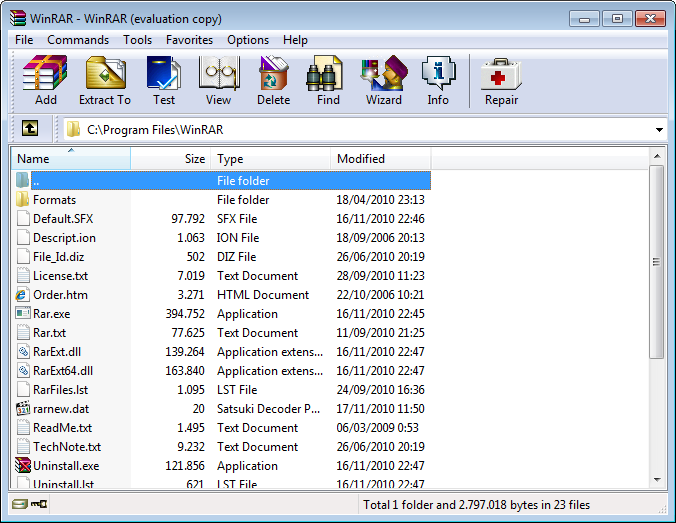
RAR is a general purpose archiving and compression program competing with/replacing programs such as PKZip, ARJ, and others. It offers significantly improved compression ratios, easier use and a cheaper price as well as supporting long file names, disk spanning, and self-extracting file creation.
Latest Reviews

BogdanSHA reviewed v6.20 on Jan 26, 2023
Works great and the price is worth it, especially since it will get you a life licence.

aszure reviewed v6.10 on Jan 26, 2022
Works great, but can't justify that price when there are many free options available.

Moler_Stagi reviewed v6.02 on Jul 18, 2021
using it for many years and it works great

melissachris reviewed v6.02 on Jun 21, 2021
Good app

Robin6060 reviewed v6.01 Beta 1 on Apr 7, 2021
however, if you are looking for a tool for working with archives then this application is for you.

kstev99 reviewed v5.70 Beta 2 on Feb 22, 2019
Still simply the best. This version (5.70 Beta2) fixes a critical security bug, and If you are currently using WinRAR you should update or read this article on Ghacks for more information.
https://www.ghacks.net/2...ity-bug-here-is-the-fix/

roman313 reviewed v5.61 on Oct 3, 2018
Best, old program for a many systems
kstev99 reviewed v5.60 Beta 1 on Mar 12, 2018
Still the best archive manager out there. I like the new icons with this version, but still prefer the "Gorilla" theme from the rar labs website. It looks very classy.

Music4Ever reviewed v5.50 Beta 2 on May 6, 2017
Simply the best ! (better than all the rest) Nuff said.
kstev99 reviewed v5.31 on Feb 9, 2016
The BEST archiving program, hands down!
Lifetime License is well worth the investment,
What it DOESN'T do is Milk more money from users on a yearly basis or for major upgrades.7zip is also good, but lacks features such as comments in archive, recovery etc.

BogdanSHA reviewed v6.20 on Jan 26, 2023
Pros: Powerful
Cons:
Bottom Line: Works great and the price is worth it, especially since it will get you a life licence.
aszure reviewed v6.10 on Jan 26, 2022
Pros: Stable. Supports a ton of file types.
Cons: Price
Bottom Line: Works great, but can't justify that price when there are many free options available.
Moler_Stagi reviewed v6.02 on Jul 18, 2021
Pros: great app
Cons: no cons
Bottom Line: using it for many years and it works great
melissachris reviewed v6.02 on Jun 21, 2021
Pros: This app is great!
Cons: none
Bottom Line: Good app
Robin6060 reviewed v6.01 Beta 1 on Apr 7, 2021
Pros: it offers an original compression algorithm that provides high compression ratios on executable files, large text files, and objects. Provides an optional compression algorithm that is highly optimized for multimedia data. It ensures the security of documents and files as it offers services like setting passwords and adding files and archive comments. It ensures reliability of data as it repairs physically damaged files and locks a file to prevent further changes.
Cons: The speed of compression and decompression varies with the capability of the computer in use and hence the process may be slower on computers that are slower. It means if you have a slower pc and you are working on 4 or 5 archives then your pc can compute slowly.
Bottom Line: however, if you are looking for a tool for working with archives then this application is for you.
kstev99 reviewed v5.70 Beta 2 on Feb 22, 2019
Pros: The Best
Cons: None
Bottom Line: Still simply the best. This version (5.70 Beta2) fixes a critical security bug, and If you are currently using WinRAR you should update or read this article on Ghacks for more information.
https://www.ghacks.net/2...ity-bug-here-is-the-fix/
roman313 reviewed v5.61 on Oct 3, 2018
Pros: Best, old program for a many systems
Cons: Best, old program for a many systems
Bottom Line: Best, old program for a many systems
kstev99 reviewed v5.60 Beta 1 on Mar 12, 2018
Pros: Opens nearly all archive formats. Excellent compression rates
Cons: none
Bottom Line: Still the best archive manager out there. I like the new icons with this version, but still prefer the "Gorilla" theme from the rar labs website. It looks very classy.
Music4Ever reviewed v5.50 Beta 2 on May 6, 2017
Simply the best ! (better than all the rest) Nuff said.
kstev99 reviewed v5.31 on Feb 9, 2016
The BEST archiving program, hands down!
Lifetime License is well worth the investment,
What it DOESN'T do is Milk more money from users on a yearly basis or for major upgrades.7zip is also good, but lacks features such as comments in archive, recovery etc.

roymccoy reviewed v5.30 Beta 5 on Oct 10, 2015
New in version 5.30 beta 5
1. Information about the critical vulnerability in WinRAR self-extracting
archives recently published in news is incorrect. Unfortunately
mass media failed to recognize that what was described as WinRAR
vulnerability is Windows OLE vulnerability patched in November 2014:
https://technet.microsof.../security/ms14-064.aspx
Even if unpatched, this Windows OLE vulnerability does not introduce
new risk factors for WinRAR SFX archives.
Please read http://rarlab.com/vuln_sfx_html2.htm for more details.
No patches for WinRAR are needed.
2. "Import/Export" commands:
a) WinRAR performs the additional validation of Settings.reg contents
for "Import settings from file" command to prevent importing Registry
keys unrelated to WinRAR settings;
b) WinRAR specifies the full path to regedit.exe tool to prevent
running copies of "regedit" from other folders.
3. Bugs fixed:
a) If 'file' and 'file.exe' were present in the same folder
and user double clicked on 'file', WinRAR could start 'file.exe'
instead;
b) "Generate report" command could create a report in wrong folder,
not that with selected files;
c) RAR could crash when unpacking .rar archives with corrupt file
headers. Fixed now.

sn0wflake reviewed v5.30 Beta 5 on Oct 10, 2015
Simply the best compression tool available on all major platforms. Besides a great compression ratio there's a wealth of command line options so it can be used for virtually everything like in a backup script. The fact that the program is 20 years old and is still maintained is also a testament of it's excellence.
roymccoy reviewed v5.30 Beta 1 on Jul 20, 2015
What's new in version 5.30 beta 1
1. Added extraction of multipart ZIP archives created by 7-Zip.
Such archives have .zip.001, .zip.002, ... file extensions.
You need to open .zip.001 file in WinRAR shell to browse
or unpack such archive. All parts must be stored in the same folder
before starting extraction.
2. Added extraction of files split to multiple parts with .001,
.002, ..., extensions. You can open .001 file as a usual archive
and then unpack its contents. WinRAR will combine all parts
and save them to extracted file. All parts must be stored
in the same folder before starting extraction.
"001" item is included to "Associate WinRAR with" list
in "Settings/Integration" dialog.
3. WinRAR file list allows to use mouse Back and Forward buttons
or Alt+Left and Alt+Right keyboard shortcuts to navigate
in recently visited folders.
4. Folder wildcards are allowed in RAR command line in file names to
archive. For example:
rar a backup c:\backup\2015*\*
Recursion is enabled automatically for such folder wildcards
even if -r switch is not specified.
5. "Extract" button in SFX archive is changed to "Pause" when extraction
is started, so it is possible to pause SFX extraction and resume it
later.
6. "Skip encrypted" option in "Find files" dialog to silently skip
encrypted archives while performing search command.
7. Archive test command works for tar.gz, tar.bz2 and tar.xz archives.
Since TAR format does not provide file data checksums, WinRAR checks
only validity of GZIP, BZIP2 or XZ container.
8. Adding a new string to WinRAR diagnostic messages window could be
slow and affect the operation performance in case of thousands
of errors. Now it works fast regardless of errors number.
9. New 'R' object for -sc switch defines encoding of console
RAR messages sent to redirected files and pipes. For example:
rar lb -scur data > list.txt
will produce Unicode list.txt with archived file names.
10. Sleep time parameter in -ri[:] switch is
adjusted to lower its impact to RAR performance and especially
to recovery record related operations. Higher sleep time values
are needed to reduce the system load to same level as
in previous versions.
11. Console RAR "l" and "v" commands display file time in YYYY-MM-DD
format.
12. When extracting RAR and ZIP archives created in Unix, WinRAR maps
decomposed Unicode characters to precomposed. Such conversion
is required for some Unix and OS X archives to correctly unpack
non-English archived names in Windows. It works for Windows versions
starting from Windows Vista.
13. Modification time is set for all folders created when unpacking
.7z archives. Previous versions set it only for non-empty folders.
14. WinRAR prevents a computer to go to sleep by inactivity timeout
until current operation, such as archiving, extraction or another
archive processing, is done.
15. Total progress bar is displayed when extracting .arj, .lzh and .cab
archives (except multivolume archives).
16. Progress bar is displayed when deleting files after archiving
and when clearing "Archive" attribute of archived files.
17. "Test" command also verifies contents of NTFS alternate data streams
in RAR 3.x - 5.x archives. Previously their contents was checked
only during extraction command.
18. Bugs fixed:
a) console RAR crashed instead of displaying an overwrite prompt
when attempting to add files to already existing volumes;
b) console RAR "lt" command did not display seconds in file timestamp;
c) WinRAR failed to decompress .xxe files if they did not include
"section N of xxencode" string in the body;
d) RAR could not restore contents of NTFS alternate data stream
saved with -os switch if it was split between different volumes.