
File Details |
|
| File Size | 11.3 MB |
|---|---|
| License | Open Source |
| Operating System | Windows (All) |
| Date Added | April 18, 2024 |
| Total Downloads | 49,935 |
| Publisher | Martin Prikryl |
| Homepage | WinSCP |
Publisher's Description
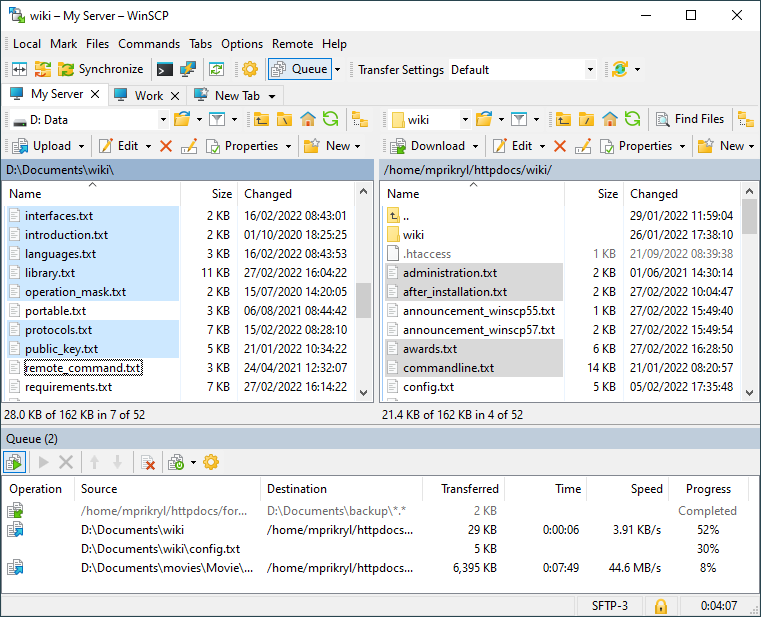
WinSCP is freeware SFTP (SSH File Transfer Protocol) and SCP (Secure CoPy) client for Windows using SSH (Secure Shell). Its main purpose is safe copying files between local and remote computer. Beyond this basic function, it manages some other actions with files. It can do all basic operations with files, such as copying and moving. It also allows you to rename files and folders, create new folders, change properties of files and folders. One of two selectable program interfaces allows user to manage files even on local computer. Most operations can be done recursively for files in folders.
Latest Reviews

sweathog reviewed v5.17.5 on Apr 27, 2020
Why this program has fewer than half the downloads of FileZilla is beyond me. WinSCP is bulletproof, has an easy to use interface and supports scripting. Enuf said.

barrytbutler reviewed v5.5.1 on Jan 29, 2014
as the others say. such a good program!

boaz reviewed v5.2.1 Beta on May 14, 2013
This is a straight forward SFTP/FTP utility. I have been using this for a few years now. I use it for standard FTP, as well as Secure FTP sites. It's very reliable.

stisev reviewed v5.1.1 on Nov 9, 2012
The goldstandard. The best!
bravo!
sweathog reviewed v5.0.9 RC on Sep 7, 2012
The Standard! Highly recommended.

jetz reviewed v5.0.3 Beta on Oct 21, 2011
Great program! Use it everyday. There is nothing better.

war593122 reviewed v4.3.1 Beta on Dec 19, 2010
Finally the slow upload bug (http://winscp.net/forum/viewtopic.php?p=33236) is fixed. :D
Bug report is @ http://winscp.net/tracker/show_bug.cgi?id=615

azazel666 reviewed v4.3 Beta on Nov 10, 2010
Been using this program for some years now and I really enjoy this piece of software.

bogbasic reviewed v4.2.7 on Mar 23, 2010
Very great program which is reminiscent of Total Commander (another of my favorites) but with benefit of secure file transfers and the ability to automate daily backups e.g. from a linux filesystem onto a windows PC using the windows scheduler. I tried to do the same thing with deltacopy and rsync (that name always sounds a bit dodgy to me) but it was too complicated for my pea-sized brain so WinSCP saved the day!
stisev reviewed v4.2.5 on Jan 17, 2010
Best client to s***o my iPhone ^^

sweathog reviewed v5.17.5 on Apr 27, 2020
Pros: Great interface. Easy to use. Scripting support
Cons: None.
Bottom Line: Why this program has fewer than half the downloads of FileZilla is beyond me. WinSCP is bulletproof, has an easy to use interface and supports scripting. Enuf said.
barrytbutler reviewed v5.5.1 on Jan 29, 2014
as the others say. such a good program!
boaz reviewed v5.2.1 Beta on May 14, 2013
This is a straight forward SFTP/FTP utility. I have been using this for a few years now. I use it for standard FTP, as well as Secure FTP sites. It's very reliable.
stisev reviewed v5.1.1 on Nov 9, 2012
The goldstandard. The best!
bravo!
sweathog reviewed v5.0.9 RC on Sep 7, 2012
The Standard! Highly recommended.
jetz reviewed v5.0.3 Beta on Oct 21, 2011
Great program! Use it everyday. There is nothing better.
war593122 reviewed v4.3.1 Beta on Dec 19, 2010
Finally the slow upload bug (http://winscp.net/forum/viewtopic.php?p=33236) is fixed. :D
Bug report is @ http://winscp.net/tracker/show_bug.cgi?id=615
azazel666 reviewed v4.3 Beta on Nov 10, 2010
Been using this program for some years now and I really enjoy this piece of software.
bogbasic reviewed v4.2.7 on Mar 23, 2010
Very great program which is reminiscent of Total Commander (another of my favorites) but with benefit of secure file transfers and the ability to automate daily backups e.g. from a linux filesystem onto a windows PC using the windows scheduler. I tried to do the same thing with deltacopy and rsync (that name always sounds a bit dodgy to me) but it was too complicated for my pea-sized brain so WinSCP saved the day!
stisev reviewed v4.2.5 on Jan 17, 2010
Best client to s***o my iPhone ^^

FixXxeR reviewed v4.2.5 on Dec 22, 2009
Kindly ignore the bug about F5 refreshing, that can be done in the explorer interface. It defaults to the commander interface. That was my fault. The rest of the issues I listed below are still prevelant.
FixXxeR reviewed v4.2.3 Beta on Oct 24, 2009
I love winscp. It is the one FTP Client that just feels right. That said, I have a few minor issues I feel could be addressed:
1. Allowing for the F5 key to be used, windows convention, for refreshing a folder either local or remote.
2. There is no way to remove something from the queue that I have been able to devise.
3. The pause/suspend functionality does not work very well. I have been able to pause a transfer but never been able to restart it.
4. Auto-resume does not work. I have tried every possible configuration but it does not work. It simply overwrites every file which SUCKS when you are 250MB into a 300MB upload.
Other than that, I highly recommend this client. I would give this a 4.5/5 but there are no half star ratings so a 4/5 it is for now.

BoiseComputerService reviewed v4.2.1 Beta on Feb 28, 2009
I love this program.