
File Details |
|
| File Size | 11.3 MB |
|---|---|
| License | Open Source |
| Operating System | Windows (All) |
| Date Added | April 18, 2024 |
| Total Downloads | 49,942 |
| Publisher | Martin Prikryl |
| Homepage | WinSCP |
Publisher's Description
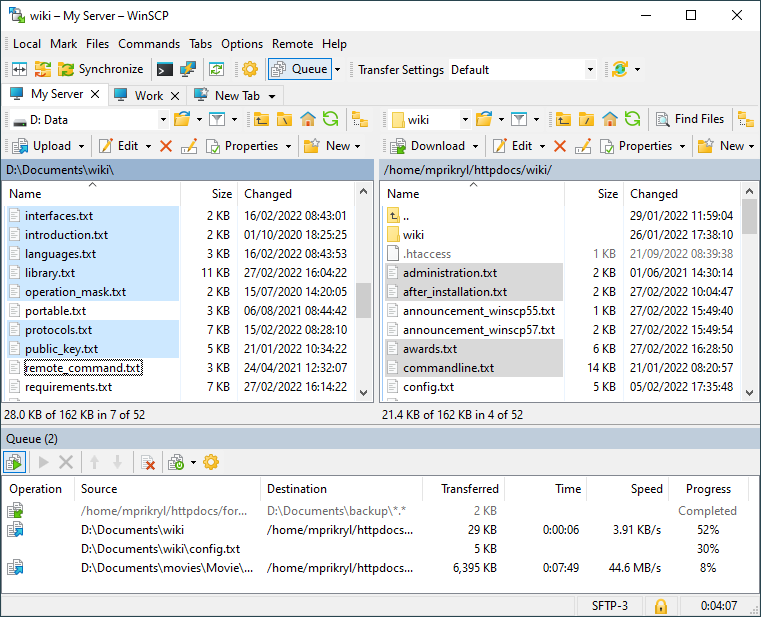
WinSCP is freeware SFTP (SSH File Transfer Protocol) and SCP (Secure CoPy) client for Windows using SSH (Secure Shell). Its main purpose is safe copying files between local and remote computer. Beyond this basic function, it manages some other actions with files. It can do all basic operations with files, such as copying and moving. It also allows you to rename files and folders, create new folders, change properties of files and folders. One of two selectable program interfaces allows user to manage files even on local computer. Most operations can be done recursively for files in folders.
Latest Reviews

sweathog reviewed v5.17.5 on Apr 27, 2020
Why this program has fewer than half the downloads of FileZilla is beyond me. WinSCP is bulletproof, has an easy to use interface and supports scripting. Enuf said.

barrytbutler reviewed v5.5.1 on Jan 29, 2014
as the others say. such a good program!

boaz reviewed v5.2.1 Beta on May 14, 2013
This is a straight forward SFTP/FTP utility. I have been using this for a few years now. I use it for standard FTP, as well as Secure FTP sites. It's very reliable.

stisev reviewed v5.1.1 on Nov 9, 2012
The goldstandard. The best!
bravo!
sweathog reviewed v5.0.9 RC on Sep 7, 2012
The Standard! Highly recommended.

jetz reviewed v5.0.3 Beta on Oct 21, 2011
Great program! Use it everyday. There is nothing better.

war593122 reviewed v4.3.1 Beta on Dec 19, 2010
Finally the slow upload bug (http://winscp.net/forum/viewtopic.php?p=33236) is fixed. :D
Bug report is @ http://winscp.net/tracker/show_bug.cgi?id=615

azazel666 reviewed v4.3 Beta on Nov 10, 2010
Been using this program for some years now and I really enjoy this piece of software.

bogbasic reviewed v4.2.7 on Mar 23, 2010
Very great program which is reminiscent of Total Commander (another of my favorites) but with benefit of secure file transfers and the ability to automate daily backups e.g. from a linux filesystem onto a windows PC using the windows scheduler. I tried to do the same thing with deltacopy and rsync (that name always sounds a bit dodgy to me) but it was too complicated for my pea-sized brain so WinSCP saved the day!
stisev reviewed v4.2.5 on Jan 17, 2010
Best client to s***o my iPhone ^^

sweathog reviewed v5.17.5 on Apr 27, 2020
Pros: Great interface. Easy to use. Scripting support
Cons: None.
Bottom Line: Why this program has fewer than half the downloads of FileZilla is beyond me. WinSCP is bulletproof, has an easy to use interface and supports scripting. Enuf said.
barrytbutler reviewed v5.5.1 on Jan 29, 2014
as the others say. such a good program!
boaz reviewed v5.2.1 Beta on May 14, 2013
This is a straight forward SFTP/FTP utility. I have been using this for a few years now. I use it for standard FTP, as well as Secure FTP sites. It's very reliable.
stisev reviewed v5.1.1 on Nov 9, 2012
The goldstandard. The best!
bravo!
sweathog reviewed v5.0.9 RC on Sep 7, 2012
The Standard! Highly recommended.
jetz reviewed v5.0.3 Beta on Oct 21, 2011
Great program! Use it everyday. There is nothing better.
war593122 reviewed v4.3.1 Beta on Dec 19, 2010
Finally the slow upload bug (http://winscp.net/forum/viewtopic.php?p=33236) is fixed. :D
Bug report is @ http://winscp.net/tracker/show_bug.cgi?id=615
azazel666 reviewed v4.3 Beta on Nov 10, 2010
Been using this program for some years now and I really enjoy this piece of software.
bogbasic reviewed v4.2.7 on Mar 23, 2010
Very great program which is reminiscent of Total Commander (another of my favorites) but with benefit of secure file transfers and the ability to automate daily backups e.g. from a linux filesystem onto a windows PC using the windows scheduler. I tried to do the same thing with deltacopy and rsync (that name always sounds a bit dodgy to me) but it was too complicated for my pea-sized brain so WinSCP saved the day!
stisev reviewed v4.2.5 on Jan 17, 2010
Best client to s***o my iPhone ^^

FixXxeR reviewed v4.2.5 on Dec 22, 2009
Kindly ignore the bug about F5 refreshing, that can be done in the explorer interface. It defaults to the commander interface. That was my fault. The rest of the issues I listed below are still prevelant.
FixXxeR reviewed v4.2.3 Beta on Oct 24, 2009
I love winscp. It is the one FTP Client that just feels right. That said, I have a few minor issues I feel could be addressed:
1. Allowing for the F5 key to be used, windows convention, for refreshing a folder either local or remote.
2. There is no way to remove something from the queue that I have been able to devise.
3. The pause/suspend functionality does not work very well. I have been able to pause a transfer but never been able to restart it.
4. Auto-resume does not work. I have tried every possible configuration but it does not work. It simply overwrites every file which SUCKS when you are 250MB into a 300MB upload.
Other than that, I highly recommend this client. I would give this a 4.5/5 but there are no half star ratings so a 4/5 it is for now.

BoiseComputerService reviewed v4.2.1 Beta on Feb 28, 2009
I love this program.

sn0wflake reviewed v4.2.1 Beta on Feb 28, 2009
Replaced FileZilla.

eaves reviewed v4.2.1 Beta on Feb 27, 2009
tech939 - some of us prefer to use a Windows operating system that does not have a remote on/off switch in the guise of WGA, WinSCP works fine on W2K (for the most part), and so long as the developers of WinSCP support W2K, I will continue to use it.
WinSCP is a very good program.

innerspirit reviewed v4.1.6 on Sep 2, 2008
Great program, just wish it could import ftp settings from other programs.

tech939 reviewed v4.1.6 on Jul 31, 2008
Excellent tool for all tech.
Darkk - your comments are becoming a major annoyance, drop w2k or leave winscp alone.

Darkk reviewed v4.1.6 on Jul 31, 2008
Still won't remember screen size in 2k.
And tech939, I'll stop reporting 2k bugs in WinSCP when they officially take 2k off the supported OS list for the WinSCP application.
As long as the 2k OS is on the supported list and there are bugs, I'll report them here. If you bothered to look closer, you would have seen that the reports I posted, and several reports are showing, were for different revisions of WinSCP, this latest being 4.1.6. I'm not reposting the same bug, merely reporting that it has yet to be addressed in this latest revision.

p2062007 reviewed v4.1.6 on Jul 30, 2008
Horrible transfer speeds for local SFTP transfers. 1MB/s vers 10MB/s with other products. Not recommended for professional use.
Darkk reviewed v4.1.5 on Jul 15, 2008
Still not remembering window size in W2K, but it works fine. A minor annoyance. That bug has been reported a while ago now.

malves reviewed v4.1.5 on Jul 14, 2008
Wish it had a Linux version!
Darkk reviewed v4.1.4 Beta on Jun 28, 2008
Still has the bug of not remembering the window size under W2k, listed as a supported OS.

ConceptJunkie reviewed v4.1.4 Beta on Jun 25, 2008
Do one thing and do it well.
WinSCP is everything a software package should be. It's simple to use, flexible, cleanly designed and just all around pleasant. This software is everything big companies like Microsoft, Adobe, Corel and others should study WinSCP because they have completely forgotten everything about writing software that this little Open Source wonder does right, and does well.

Diam0nd reviewed v4.1.4 Beta on Jun 25, 2008
Excellent! Simply the best SFTP experience EVER! I haven't seen anything come even remotely close to this.

GBH reviewed v4.1.3 Beta on May 26, 2008
WinSCP is the best SFTP client that I have used.
I personally don't like the commander style interface so I changed it via the options menu to be a standard window.
There are other clients out there but WinSCP's ability to work alongside putty makes it my favourite.

periklo reviewed v4.1.3 Beta on May 25, 2008
It has been buggy for some months now. It is iritating.
Diam0nd reviewed v4.1.3 Beta on May 23, 2008
A must have app for everyone doing sftp. should be betanews's pick btw
Darkk reviewed v4.1.2 Beta on May 13, 2008
Great application, but the beta releases over 4.07 crash on exit on W2K and do not remember the window maximize settings on W2K.
Works fine on XP.
It's annoying on W2K.
Get this fixed and I'd rate it higher.

Ian C. reviewed v4.1.2 Beta on May 13, 2008
I've always passed this by because I've been happy using FileZilla, but I decided to give this a try today. It's very fast and has a very clean interface, although the layout is a little unconventional. I really like that it handles multiple sessions in one window, unlike most of its competitors. I would definitely try it out more, accept I can't figure out how to permanently set the bandwidth throttling for uploads.
Update: I did some searching on this apps official site, and it doesn't support a permanent throttling option, so I guess I'll have to bump it down a point. That's a critical feature for me.
And thanks to spiked for the heads up on that UI option to make it act like a normal windows app, and not something from the DOS days.

spiked reviewed v4.1.2 Beta on May 12, 2008
Good program which IS actively being developed but sometimes a little recklessly. For example, the recent crashes on exit (which are fixed in 4.12), the annoying hangs, and the inexcusable port conflicts should have never made it into any release, not even a beta.
WinSCP offers a nice range of UI options, but the #1 thing you need to know if you choose the 2-pane "Norton Commander" style is: Go into Preferences, Environment, Commander. In the Panel section, set the "Explorer-style selection" drop-down list to "Mouse and Keyboard." Why this isn't the default in 2008 is beyond me. With the default, to select multiple files, you have to tag them by hitting the space bar on them. That was real common in the real original Norton Commander (meaning in character-mode DOS), but if you were expecting behavior like most Windows-based 2-pane file browsers (including many popular FTP clients like WS_FTP), WinSCP will drive you nuts until you either change this drop-down or switch out of Commander mode and go to Explorer integration mode.
Diam0nd reviewed v4.1.2 Beta on May 12, 2008
Got nothing but LOVE for this tool. Invaluable!
bigmama: I really loved your "Very good with scp and sftp, not so good with ftp" comment. Especially considering that this is NOT an ftp client :|
Diam0nd reviewed v4.1.1 Beta on May 5, 2008
Best SFTP there is. Simple as that. No pay tool comes even close.

cowgaR reviewed v4.1 Beta on Apr 19, 2008
bigmama, are you a robot or can you be more verbose on not-so-good with ftp?
can you name any better free ftp alternative? I've haven't found one...

bigmama reviewed v4.1 Beta on Mar 20, 2008
Very good with scp and sftp, not so good with ftp
You can use it as portable too
A better startup configuration dialog is needed...
Diam0nd reviewed v4.1 Beta on Mar 20, 2008
This is one amazing SFTP tool. #1, if you ask me.

brusco reviewed v4.0.6 on Jan 18, 2008
@bigmama below:
It's not an FTP client so shouldn't be judged as such. Its like criticizing a Ferarri because there's no room for the shopping bags in the back. You're missing the point entirely.
bigmama reviewed v4.0.6 on Jan 3, 2008
very good for scp not so good with ftp

mickrussom reviewed v4.0.4 on Sep 4, 2007
Been using 4.x for a few days. This program is absolutely awesome, and its free.
war593122 reviewed v4.0.1 Beta on May 30, 2007
WinSCP 4.0.2 beta is already out by the way
war593122 reviewed v4.0 Beta on Apr 9, 2007
Finally!, you can minimize to the taskbar notification area (system tray)! :)

Cure110 reviewed v4.0 Beta on Apr 9, 2007
Finally FTP-support.. Great!

hondaman reviewed v3.8.2 on Jun 19, 2006
This plus SecureCRT are invaluable for *nix admin. I love this program!
Easy 5 stars.

UTAKER reviewed v3.8.1 Build 312 on May 9, 2006
Free. Simple and to the Point.
Best Program for SCP.
My recommended proggie for everyday use.

popdog reviewed v3.8 Beta on Jan 31, 2006
Excellent program, really nice interface and is able to import your putty saved sessions.

davewalden reviewed v3.7.6 on Aug 16, 2005
Very well layed out. Easy to use. AND it imports configured sessions from Putty (another FREEWARE utility). Excellent work.

heybirder reviewed v3.7.5 Beta on May 12, 2005
Great piece of software. I use it every day.

emredondo reviewed v3.7.5 Beta on May 12, 2005
Good!!!

woodengod reviewed v3.6 Beta on May 11, 2004
Well done Martin!

sheppe reviewed v3.6 Beta on May 10, 2004
A very good, well written program. I have been using it for a long while now and I have been very happy with it - and it's freeware!

Bachalor reviewed v3.2.1 on Aug 28, 2003
Yes, very good tool. I'm a student an therfore I was every time happy to see FREEWARE. For pupils and students was commercial software to expensive, thx to ALL FREEWARE authors.

gena01 reviewed v2.23 Build 139 on Apr 24, 2003
I've been using this program for a number of years now, and I love it. Note: I've had some issues w/ using compression but still not sure if it's the ssh on the server or in this software that's causing it. So I have compression disabled and it works great.

IronWolve reviewed v2.0 Beta Build 89 on Feb 24, 2002
Very good program. Been using it for some time, and since I disable FTP on all my servers, SSH is the only way to connect. With this program it emulates a explorer/ftp program perfectly, but uses SCP (ssh)

_jaz_ reviewed v2.0 Beta Build 69 on Oct 27, 2001
I'm just trying this program right now.
I had a few (minimal) problems getting it work.(It failed to copy)
I solved it selecting a specific Shell, as the help said (Online Webpage)
It doesn't have any type of "bookmark" (or I couldn't find it)
Overall, it is intuitive and performed fine. I just had some problems with mass copy, but I am not sure if they were program's fault or server's fault.
Ops!!! Just detected an enormous Memory leak!!! it is using 22MB of RAM right now! (I've copied files for a size of 9MB) Is this possible?