File Details |
|
| File Size | 16.9 MB |
|---|---|
| License | Shareware, $9.99 |
| Operating System | Windows 7/8/10/Vista |
| Date Added | December 15, 2016 |
| Total Downloads | 11,369 |
| Publisher | Stardock Corp. |
| Homepage | WindowFX |
Publisher's Description
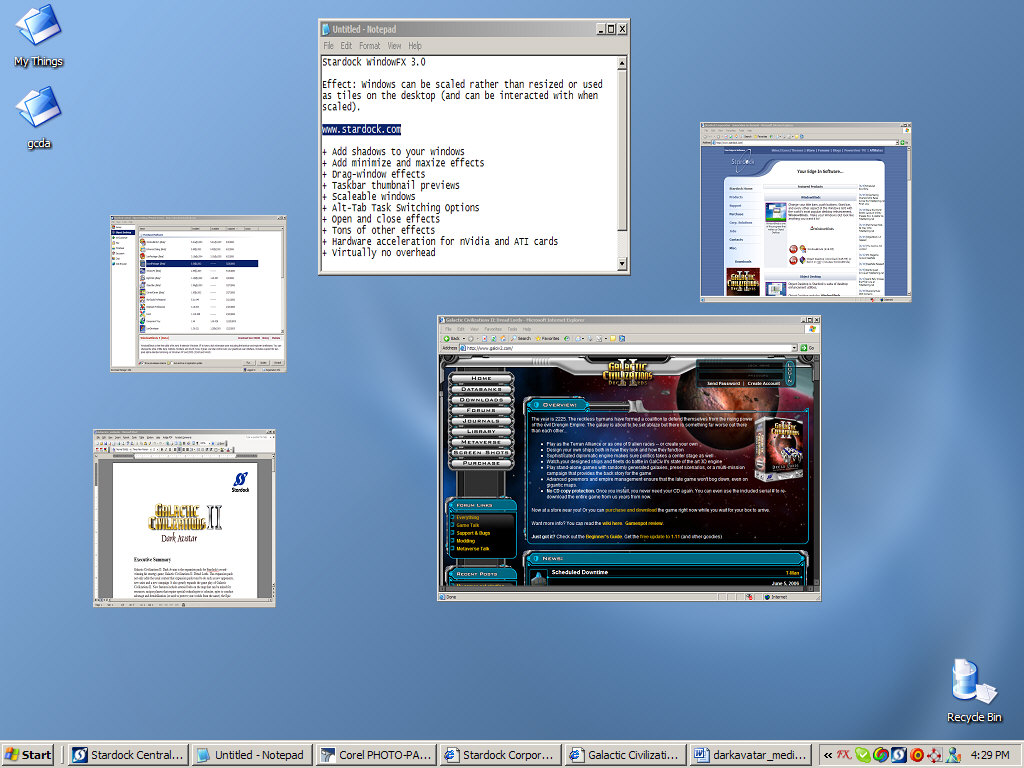
WindowFX is a program that takes advantage of many of the hidden visual APIs in Windows. Depending on which version of Windows you are running, it can do some amazing things ranging from adding real alpha blended shadows under windows to having semi-transparent menus. It also provides users who run at high resolution the ability to set their window maximization size. It introduces skinning to the desktop background. Now users can have animated wallpapers that use little CPU. A library of desktop skins is available from which users can have their desktop wallpaper provide news, animation, and more without the normal CPU hit one would get from Active Desktop.
Latest Reviews

jetz reviewed v4.01 on Jan 14, 2011
This works great in Win 7! Integrated with DWM. Won't slow down your system.
Ver 4.x is for Win 7. It is $9.95, not $19.95 as listed here.
Love the feature that keeps flash video fullscreen on muti monitor systems.

freegoo reviewed v3.0 on Jun 10, 2006
This is probably my favorite application from the Object Desktop. It actually has some useful features that you can use every day vs the eye candy of WindowBlinds and the system bloat of DesktopX. I really like the transparant Windows when dragging them, or setting up certain programs to always be transparent. Also the preview of application windows when you mouse over task bar programs is real nice (stolen from Vista? Who cares!)
All in all it works well on my system with very few quirks, which is more than I can say for most of Stardocks stuff. It does have some drawbacks. Occasionally a program will pop up a dialog box that doesn't get displayed due to some conflict with WindowFX. This can be fixed by disabling WinFX features per application. System performance may lag a bit on OLDER PC's, but really I ran it fine with my older Radeon 9700 card and AMD 2500, so if your system isn't up to snuff - maybe it's time to upgrade?
Reason for me knocking off 2 stars. 1 star is for the lack of support for transparant window dragging when using Windowblinds 5 transparant title bar skins. I expected this in WindowFX's beta stages, but there is no excuse for it in final version. Worse, there is no dialog to let you know this is unsupported so I ended up wasting lots of time trying to figure out why it wasn't working. They have the lame animations working for those skins, so I don't see what the hold up is for transparant dragging.
The second star is demoted for compatibility issues. While far less of a problem than other Stardock programs I've installed and workarounds by disabling WinFX per application are available I'd like to see these issues dissapear.

davec1031 reviewed v3.0 on Jun 9, 2006
While being a good program for making your windows OS desktop look pretty and do some really cool thing, it is skinable, and thier is a TON of items online to skin it with! It can make your windows look like U want it.. not how MS would think you like it.
Ok, now the downside..
IT IS a memory hog. It does tend to lag down a lower end system. Newer systems alltho, might have a better go at it. With thier faster processors, and more ram.
As far as the system requirements:
(in my opinion)
1ghz CPU at a minimum
512 mb ddr ram a must
64 mb video card (higher if you want transparent windows)
Now for the recomended system specs:
2ghz or higher processor
1 gig of ddr ram
128 - 256 mb video card.
The problem is when you have to render more items on the screen, the more pixel and gradient fills, the more you add to the original look to the OS, the more it laggs down windows. If you get it and turn it fully on, and use the most grafic setting and skin you can find. You will see what I mean, if your on a lower end system..
All in all, not a bad program to make your PC your own style.
The only problems I can see is a slight memory leak, and too much system resources being used to render the changes. If they could tone it down on the system resources, it might be more appealing to the everyday poweruser.

tangentlin reviewed v2.12 on Oct 2, 2003
Cool concept stolen from Longhorn. If you have Always-on-top window running (e.g. Windows Task Manager), you might find part of that window swaying when you drag and sway the window around. This is because the software is doing a simple screen capture! If you sway the window big time, you will find some mysterious cropping in the animation. On my P4-2Ghz machine with 512MB of RAM, it maxes out the kernel. Nice concept, but I will just keep it for 30 days and wait for Longhorn.

Jeffsoft reviewed v2.12 on Oct 2, 2003
oh~ my dear

ajm149 reviewed v1.01 on Aug 2, 2000
I had this program for a while and as a vetran of this program I have to say, I LOVE IT. It is the greatest program to install on a system if you are changing from Mac to Windows. I especially love the skins you can get. The only problem I had when I un-installed it was the install.log didn't exist so I had to manually uninstall it. I still have to give it 5 stars because it is a unique and original program.

Cool-Gui reviewed v1.01 on Aug 2, 2000
This program doesn't use the resources. It's the alpha transparency in Win2000 that uses it. And also it's not Freeware as the description indicates. It's shareware just like all the other Stardock junk.

andrey reviewed v1.01 on Aug 1, 2000
This program uses system resources like there is no tomorrow. It definetely should have 1Ghz CPU with 512MB of RAM in system requirements.

timmersr reviewed v0.55 on Mar 6, 2000
Nice idea, but it is extremely slow on a PII-450, 128Meg, Win2000, TNT. This is because of the transparancy-function. Just forget that function and focus on features like dynamicly setting the maximum screen-size: If you're using 1600x1280 for example, you can have every window pop-up at 800x600 !
Anyway, some more work and a P-III 1 Ghz + GeForce and your done....

Alucard_X reviewed v0.55 on Feb 26, 2000
Yes it will work with win9x and w2k, but it is geared towards W2k, millennium WILL NOT benefit from it like w2k, millennium will act just like w9x. the reason w2k has this 'cool' function, is merely because of the fade menu option that M$ included, thanks to the gdi+. someone found the regkey that had the alpha bending and it was then a matter of time until ppl began to play with it.

jetz reviewed v4.01 on Jan 14, 2011
This works great in Win 7! Integrated with DWM. Won't slow down your system.
Ver 4.x is for Win 7. It is $9.95, not $19.95 as listed here.
Love the feature that keeps flash video fullscreen on muti monitor systems.
freegoo reviewed v3.0 on Jun 10, 2006
This is probably my favorite application from the Object Desktop. It actually has some useful features that you can use every day vs the eye candy of WindowBlinds and the system bloat of DesktopX. I really like the transparant Windows when dragging them, or setting up certain programs to always be transparent. Also the preview of application windows when you mouse over task bar programs is real nice (stolen from Vista? Who cares!)
All in all it works well on my system with very few quirks, which is more than I can say for most of Stardocks stuff. It does have some drawbacks. Occasionally a program will pop up a dialog box that doesn't get displayed due to some conflict with WindowFX. This can be fixed by disabling WinFX features per application. System performance may lag a bit on OLDER PC's, but really I ran it fine with my older Radeon 9700 card and AMD 2500, so if your system isn't up to snuff - maybe it's time to upgrade?
Reason for me knocking off 2 stars. 1 star is for the lack of support for transparant window dragging when using Windowblinds 5 transparant title bar skins. I expected this in WindowFX's beta stages, but there is no excuse for it in final version. Worse, there is no dialog to let you know this is unsupported so I ended up wasting lots of time trying to figure out why it wasn't working. They have the lame animations working for those skins, so I don't see what the hold up is for transparant dragging.
The second star is demoted for compatibility issues. While far less of a problem than other Stardock programs I've installed and workarounds by disabling WinFX per application are available I'd like to see these issues dissapear.
davec1031 reviewed v3.0 on Jun 9, 2006
While being a good program for making your windows OS desktop look pretty and do some really cool thing, it is skinable, and thier is a TON of items online to skin it with! It can make your windows look like U want it.. not how MS would think you like it.
Ok, now the downside..
IT IS a memory hog. It does tend to lag down a lower end system. Newer systems alltho, might have a better go at it. With thier faster processors, and more ram.
As far as the system requirements:
(in my opinion)
1ghz CPU at a minimum
512 mb ddr ram a must
64 mb video card (higher if you want transparent windows)
Now for the recomended system specs:
2ghz or higher processor
1 gig of ddr ram
128 - 256 mb video card.
The problem is when you have to render more items on the screen, the more pixel and gradient fills, the more you add to the original look to the OS, the more it laggs down windows. If you get it and turn it fully on, and use the most grafic setting and skin you can find. You will see what I mean, if your on a lower end system..
All in all, not a bad program to make your PC your own style.
The only problems I can see is a slight memory leak, and too much system resources being used to render the changes. If they could tone it down on the system resources, it might be more appealing to the everyday poweruser.
tangentlin reviewed v2.12 on Oct 2, 2003
Cool concept stolen from Longhorn. If you have Always-on-top window running (e.g. Windows Task Manager), you might find part of that window swaying when you drag and sway the window around. This is because the software is doing a simple screen capture! If you sway the window big time, you will find some mysterious cropping in the animation. On my P4-2Ghz machine with 512MB of RAM, it maxes out the kernel. Nice concept, but I will just keep it for 30 days and wait for Longhorn.
Jeffsoft reviewed v2.12 on Oct 2, 2003
oh~ my dear
ajm149 reviewed v1.01 on Aug 2, 2000
I had this program for a while and as a vetran of this program I have to say, I LOVE IT. It is the greatest program to install on a system if you are changing from Mac to Windows. I especially love the skins you can get. The only problem I had when I un-installed it was the install.log didn't exist so I had to manually uninstall it. I still have to give it 5 stars because it is a unique and original program.
Cool-Gui reviewed v1.01 on Aug 2, 2000
This program doesn't use the resources. It's the alpha transparency in Win2000 that uses it. And also it's not Freeware as the description indicates. It's shareware just like all the other Stardock junk.
andrey reviewed v1.01 on Aug 1, 2000
This program uses system resources like there is no tomorrow. It definetely should have 1Ghz CPU with 512MB of RAM in system requirements.
timmersr reviewed v0.55 on Mar 6, 2000
Nice idea, but it is extremely slow on a PII-450, 128Meg, Win2000, TNT. This is because of the transparancy-function. Just forget that function and focus on features like dynamicly setting the maximum screen-size: If you're using 1600x1280 for example, you can have every window pop-up at 800x600 !
Anyway, some more work and a P-III 1 Ghz + GeForce and your done....
Alucard_X reviewed v0.55 on Feb 26, 2000
Yes it will work with win9x and w2k, but it is geared towards W2k, millennium WILL NOT benefit from it like w2k, millennium will act just like w9x. the reason w2k has this 'cool' function, is merely because of the fade menu option that M$ included, thanks to the gdi+. someone found the regkey that had the alpha bending and it was then a matter of time until ppl began to play with it.

Jesse2000 reviewed v0.55 on Feb 26, 2000
WindowFX really only works with Windows 2000. But Windows 2000 is made and geared for business. Why would they want to add special effects to their computers? Hopefully, WindowFX will work with Windows Millennium, which likely it will.

d0ug reviewed v0.55 on Feb 25, 2000
The reason transparencys dont work for you is because your running windows 98. transparencys only work in windows 2000.

krazydog reviewed v0.55 on Feb 25, 2000
Seems like this one might be a bit more useful and resource friendly than WindowBlinds. I wonder how much the graphics card affects performance with these effects on? I didn't see an option to give windows shadows, either. I'm sure this one will be a keeper soon.