File Details |
|
| File Size | 2.6 MB |
|---|---|
| License | Open Source |
| Operating System | Windows 7/2000/Server 2003/Vista/XP |
| Date Added | May 8, 2015 |
| Total Downloads | 5,112 |
| Publisher | ZenCODE |
| Homepage | ZenKEY |
Publisher's Description
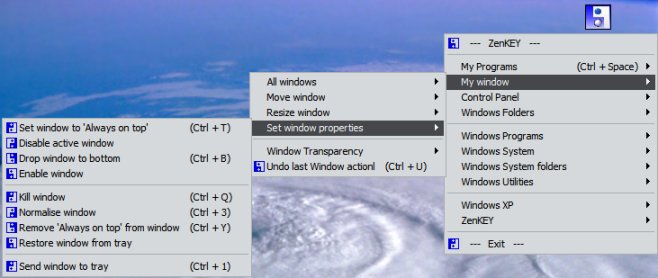
Using keystrokes, you can use ZenKEY to launch a program or bring it back into focus, open a document or Internet resource, resize or move a window, access utilities, control media players, issue system commands and simulate keystokes. You can assign any keystroke to perform these tasks, and create pop-up menus with often used commands that appear at the press of a button.
Latest Reviews

inkowyouknow reviewed v2.5.1 on Dec 7, 2013
Easy to use, does what it says 5XXXXX

Kylde reviewed v2.4.3 on Sep 23, 2012
Works fine (Win 7 64),clever app, highly customizable, although at first glance the only "keystroke" I can see is alt-space to brin up the zen menu, from there on it's mouse selection

Sativarg reviewed v2.3.18 on Sep 12, 2011

Lecter reviewed v1.8.6 on Jul 26, 2006
It looks good for a basic hotkey program. The price is right and you don't have to get into scripting like AutoHotKey or AutoIt.
Looks like the are screenshots there now:
http://www.camiweb.com/zenkey/ScreenShots.htm

zridling reviewed v1.5.1 on Sep 6, 2005
Since there are no screenshots on the ZenKey website, I figure it must not have an interface. It supposedly does some of the same things any hotkey app will do. I'll stick with AutoHotkey.

inkowyouknow reviewed v2.5.1 on Dec 7, 2013
Easy to use, does what it says 5XXXXX
Kylde reviewed v2.4.3 on Sep 23, 2012
Works fine (Win 7 64),clever app, highly customizable, although at first glance the only "keystroke" I can see is alt-space to brin up the zen menu, from there on it's mouse selection
Sativarg reviewed v2.3.18 on Sep 12, 2011
Lecter reviewed v1.8.6 on Jul 26, 2006
It looks good for a basic hotkey program. The price is right and you don't have to get into scripting like AutoHotKey or AutoIt.
Looks like the are screenshots there now:
http://www.camiweb.com/zenkey/ScreenShots.htm
zridling reviewed v1.5.1 on Sep 6, 2005
Since there are no screenshots on the ZenKey website, I figure it must not have an interface. It supposedly does some of the same things any hotkey app will do. I'll stick with AutoHotkey.