
File Details |
|
| File Size | 93.8 MB |
|---|---|
| License | Freeware |
| Operating System | Windows (All) |
| Date Added | November 16, 2023 |
| Total Downloads | 403,375 |
| Publisher | Softland |
| Homepage | doPDF |
Publisher's Description
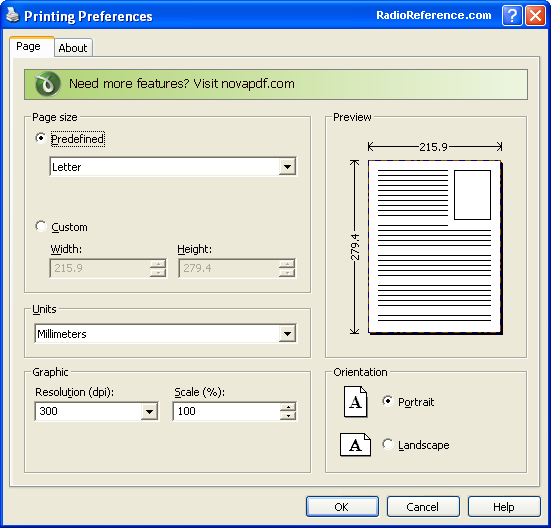
doPDF installs itself as a virtual PDF printer driver so after a successful installation will appear in your Printers and Faxes list. To convert to PDF, you just have to print the document to doPDF, the free pdf converter. Open a document (with Microsoft Word, WordPad, NotePad or any other software), choose Print and select doPDF. It will ask you where to save the PDF file and when finished, the PDF file will be automatically opened in your default PDF viewer.
Latest Reviews

Aegis69 reviewed v8.4.935 on Oct 22, 2015
Used to be 3MB now 60MB, you figure it out. They are installing all the crap in the universe on your computer just to make money, not to add any features. Find version 7 if you can. ZERO rating

johnusa reviewed v8.4.935 on Sep 25, 2015
This ridiculous program is getting bloated and growing larger with each new version.
It is now a HUGE 62 MB in size, its scary.
johnusa reviewed v8.2.929 on Apr 6, 2015
What in the world happened to this program? It is now a HUGE program about 40 MB.
I have an older version #7.3.393 that is one-tenth the size, only 4 MB (yes only four). I got it a bout a year ago.
Look for another program, here is a good place to start:
http://www.techsupportal...pdf-writer-software.htm

rajib79 reviewed v8.1.923 on Jan 27, 2015
i follow the instruction and it works. :D

war59312 reviewed v8.1.921 on Dec 22, 2014
Like others have said, version 7 is last good build.
Version 8 is crapware and fileforum should not even be hosting it..
Version 7 rating is 5 and version 8 is 1.

Enlightenment reviewed v8.1.921 on Dec 19, 2014
version 8.x sucks because of cr*pware that is bundled with it.
I highly recommend version 7.3.398 which doesn't have the cr*pware! Find the older version then you'll be happy!

egg83 reviewed v8.1.920 on Nov 25, 2014
What happened? With version 8, size of program has multiplied and some other stuff is installed as well. Am going back to 7.x version of this program.

balanceinmotion reviewed v8.0.915 on Sep 24, 2014
good stuff

jack_alexander reviewed v8.0.915 on Aug 5, 2014
This stopped being 'The PDF Printer' when they started the package deals of junk one doesn't want and now they are trying to trick you with an online installer. I know malware and this is now malware.
Why update. DoPDF 7 works perfectly on Win 8.1.1 64bit!

conleym reviewed v8.0.911 on Jul 3, 2014
Since version 8.0.907, I've been receiving a message to use Control Panel to uninstall doPDF before running the installer. I did that the first time ... it's still NOT there ... but I keep getting the same message and can't get the newer build installed. I even used REGEDIT to remove keys related to doPDF, to no avail.

Aegis69 reviewed v8.4.935 on Oct 22, 2015
Used to be 3MB now 60MB, you figure it out. They are installing all the crap in the universe on your computer just to make money, not to add any features. Find version 7 if you can. ZERO rating
johnusa reviewed v8.4.935 on Sep 25, 2015
This ridiculous program is getting bloated and growing larger with each new version.
It is now a HUGE 62 MB in size, its scary.
johnusa reviewed v8.2.929 on Apr 6, 2015
What in the world happened to this program? It is now a HUGE program about 40 MB.
I have an older version #7.3.393 that is one-tenth the size, only 4 MB (yes only four). I got it a bout a year ago.
Look for another program, here is a good place to start:
http://www.techsupportal...pdf-writer-software.htm
rajib79 reviewed v8.1.923 on Jan 27, 2015
i follow the instruction and it works. :D
war59312 reviewed v8.1.921 on Dec 22, 2014
Like others have said, version 7 is last good build.
Version 8 is crapware and fileforum should not even be hosting it..
Version 7 rating is 5 and version 8 is 1.
Enlightenment reviewed v8.1.921 on Dec 19, 2014
version 8.x sucks because of cr*pware that is bundled with it.
I highly recommend version 7.3.398 which doesn't have the cr*pware! Find the older version then you'll be happy!
egg83 reviewed v8.1.920 on Nov 25, 2014
What happened? With version 8, size of program has multiplied and some other stuff is installed as well. Am going back to 7.x version of this program.
balanceinmotion reviewed v8.0.915 on Sep 24, 2014
good stuff
jack_alexander reviewed v8.0.915 on Aug 5, 2014
This stopped being 'The PDF Printer' when they started the package deals of junk one doesn't want and now they are trying to trick you with an online installer. I know malware and this is now malware.
Why update. DoPDF 7 works perfectly on Win 8.1.1 64bit!
conleym reviewed v8.0.911 on Jul 3, 2014
Since version 8.0.907, I've been receiving a message to use Control Panel to uninstall doPDF before running the installer. I did that the first time ... it's still NOT there ... but I keep getting the same message and can't get the newer build installed. I even used REGEDIT to remove keys related to doPDF, to no avail.
jack_alexander reviewed v8.0.907 on May 21, 2014
Version 8 is loaded with other programs from NovaPDF. There was no choice during installation. Even with 'Clicky" working...
Do what I did. Uninstall the trash and doPDF 8 and find a copy of version 7.
conleym reviewed v8.0.905 on Apr 25, 2014
Installed 8.0.905 in Win 8.1 64bit ... appeared to go normally, but got four threat warnings from files installed in the package downloaded from fileofrum. TrendMicro removed those four files. Did a test print from the program and it appears to work normally without those files, and without any error messages.

shoek reviewed v8.0.905 on Apr 24, 2014
Can't install the new version 8.0

mikebratley reviewed v7.3.393 on Mar 11, 2014
5 stars

chrispaul reviewed v7.3.393 on Feb 17, 2014
cool

barrytbutler reviewed v7.3.393 on Jan 29, 2014
5 stars for this sucka. really handy tool.

tomkelly reviewed v7.3.391 on Aug 22, 2013
great tool!
egg83 reviewed v7.3.391 on May 10, 2013
Never a moments problem with this program. Does precisely what it advertises, and does it very well. 5 stars.

dubstepmaker reviewed v7.3.387 on Feb 14, 2013
awesome tool for sure! works without a hitch.
Enlightenment reviewed v7.2.376 on Feb 16, 2012
Work great. I've used it on Windows XP (32-bit), Vista (32-bit), 7 (32-bit), 7 (64-bit) without any problems!
war59312 reviewed v7.2.373 on Oct 7, 2011
Changelog:
Fix: Characters with skew effect weren't converted correctly (rotated instead of skewed)
Fix: Corrected problem when converting files with long name
Fix: Corrected conversion from Visio when backgrounds were used
Fix: Corrected Terminal Services message
Source: http://www.dopdf.com/for...te-dopdf-72353-released

Blaxima reviewed v7.2.373 on Oct 6, 2011
Works well and is easy to use but is a little sparse on options when compared to Bullzip PDF
war593122 reviewed v7.2.361 on Apr 4, 2011
Correction in the add-in for Microsoft Word, when filename contained Greek characters.
Source: http://www.dopdf.com/for...te-dopdf-72353-released

ballyhairs reviewed v7.2.359 on Feb 18, 2011
If its not possible to have it portable then Isn't it possible to make it least update itself?

JamesSmith2 reviewed v7.2.355 on Jan 3, 2011
I love not having to install Adobe Acrobat Professional to create a pdf file. Because it installs as a printer driver it integrates perfectly into every program. Keep up the good work.

ZenoLabs reviewed v7.1.349 on Oct 26, 2010
Best PDF creator around. I used to have PDFCreator installated, but this is lighter, better, faster.
johnusa reviewed v7.1.349 on Oct 26, 2010
Every time this program gets a new version it does not get updated properly and in a timely manner, as you keep getting the previous older version.
It is definitely a big problem with Softalnd, the developer of doPDF, as they have big issues updating their servers to allow users to download the new version. After a new version is announced users keep downloading the older version.
Shame on this site, FileForum for not testing and confirming that the new version is actually available for download.
Shame on FileForum, BetaNews and Softland.

Hilbert reviewed v7.1.347 on Oct 20, 2010
IT FAILED!!
The first PDF file I tried to create was a .MHT (MHTML Web archive file) and it failed!!
The error message was "There is no application associated with the given file name extension"
All Windows versions have the .MHT extension associated with Internet Explorer by default and IE will print it ok--it's only a web page as a single file. If you use another browser that supports the file type (eg Opera) then the extension is automatically associated with it.
The .MHT extension on my machine is associated with the browser and works perfectly.
I'm really getting jacked off by so-called 'free' software that's simply never been tested. Otherwise, how come I found the bug on the very first file I tried it on?
It really is hard to believe the developer could be so slack as not to check the normal Windows extensions that one can print from. But it happens....
>:-o
Finally this really isn't 'free' software but nobble-ware. Yuh have to buy the full version.
It's already uninstalled.

pjafrombbay reviewed v7.1.347 on Oct 20, 2010
I agree with JohnUSA; this is version 7.1.346 NOT 347
FileForum this is a bit shabby!
Software is still very good though.
Peter
johnusa reviewed v7.1.347 on Oct 19, 2010
This is NOT version 7.1.347 but it is the previous 7.1.346
I don't believe that fileforum does mistakes like this.
Please correct this mistake.
UPDATED ON 10/20/2010
This program has just been properly updated to version 7.1.348
Download it from the this link instead of this site (fileforum) which is still old version:
http://www.dopdf.com/

krakokainer reviewed v7.1.347 on Oct 19, 2010
totally rocking yo
egg83 reviewed v7.1.344 on Sep 14, 2010
Does exactly what I need it to do, use this mostly to print pages from my browser. Captures all of the fonts and graphics from webpages with great accuracy.

PaulWilliams reviewed v7.1.343 on Sep 7, 2010
Very good program. I had several dozen Microsoft Word .doc files that I needed converted to PDF and it handled them all extremely well. I didn't notice a considerable change in file size from .doc to .pdf. If you don't want to buy Adobe Acrobat, this is an excellent alternatives for saving in the pdf format.

DudeBoyz reviewed v7.1.342 on Jul 30, 2010
Versions 6-2-296 all the way to this latest version have a problem with some fonts, one such that seems very obvious on Windows XP 32 bit is the "Modern" font. Open Office 3.2.1 Writer built-in PDF export does a much better job, and is also more space efficient. It's still a decent program, but version 6 is still leaner without any adware type of clutter on the interface than version 7. Version 6-2-296 does properly process the "Marlett" font in terms of spacing, whereas none of the version 7 series does not. Version 6-2-296 files may be larger than version 7 releases, but it works correctly more often than those smaller version 7 releases. I'd recommend trying both and comparing the end results yourself when embedding fonts.

kglad reviewed v7.1.340 on Jun 18, 2010
excellent app that does exactly what it claims.

nusushika reviewed v7.1.332 on Apr 16, 2010
This doPDF create big pdf file but, I still prefer choosing it. I think it embeds every font when editing a document, and sometimes I get a plain text file up to 30MB!
I found create pdf file once more with doPDF in any pdf reader, the file size squeezed to only 60KB. It would be a little annoying so I choose 4 stars.

Tigris reviewed v7.1.329 on Mar 14, 2010
7.1.330 is out!
egg83 reviewed v7.1.329 on Feb 19, 2010
Have used this app for a while, and is getting better and better! Is getting better with printing out the contents of webpages as they are, and have not had many problems with this app.
Enlightenment reviewed v7.1.327 on Feb 10, 2010
This is an excellent PDF printer driver. It has printer preferences to increase the DPI output, so ignore the fools that didn't see this feature.
I previously used one by PDF995.com but it required many steps to install it, so I decided to find an easier one to install.

gubmonte reviewed v7.0.320 on Dec 13, 2009
So wait...are betanews ratings intended to rate the size of the application and not the functionality now? Dudeboyz, stop being a troll and rate how the application acts. When features are added, size often goes up. Not everyone is worried about operating things on their system containing 256MB of ram. There is no use having 4GB of ram if you are just leaving it sitting there.
DudeBoyz reviewed v7.0.320 on Dec 2, 2009
I'm a little concerned about the increase in the application size:
v6.2.296 = 1,726,264
v7.0.320 = 3,131,672
Version 7 also seems to be slower than the 6.2.x versions.
Yeah, Type 1 support is nice, as are subset embedding, but I'd like it more if they focused on keeping the application lean and clean.

irwinofupton reviewed v6.3.309 on Sep 15, 2009
Is this program lacking options: :yes. But having used it for over a year and since it does not require ancillary software to function what it does it does very well!

us3r reviewed v6.3.308 on Sep 14, 2009
Terrible application. Yes, it's fast and doesn't need additional libraries, but the quality of images and even some fonts is just terrible.

christoofar reviewed v6.3.308 on Aug 13, 2009
Discovered this recently & use it quite often to convert song lyrics in text into .pdfs to scroll on my laptop. Easy to use & works as advertised. Thanks to the authors.

Zarggg reviewed v6.3.308 on Aug 12, 2009
doPDF works just fine; I've used it for a long time and actually got my work to adopt it as a standard tool a few months back.
us3r has a history of downrating excellent programs and appears to be spamming on this one. (I don't care how bad you think a program is, don't advertise another one on a review.)

Reverb reviewed v6.2.301 on May 18, 2009
I am currently running Version 6.2 build 296 and am able to print to PDF from both Firefox 3 and IE 7 (XP SP3). The output file matches my print preview. It is very basic though and has very few options in the output dialogue. It is very small however (under 2 MB) and works well. There are a few other free PDF printers out there with more options but most require installing Ghostscript (such as Bullzip.com PDF) to work properly. If you're looking for a way to print PDF files from your apps and want something free and non-bloated this is what you need.
4 out of 5 since the only caveat is the lack of options.
us3r reviewed v6.2.300 on May 13, 2009
Doesn't work. Try to print any website using this 'software'. It won't work. But Microsoft's XPS Document Writer works flawlessly . doPDF - What a garbage- ware.
Edit: Forget about this crap (doPDF).
Here is a free PDF printer which allows also to print to BMP, ESP, JPEG, PCX, PNG, PS, TIFF.
http://www.bullzip.com/products/pdf/info.php

picsoetje reviewed v6.2.289 on Feb 25, 2009
Great program.
Worth a 5 !!
DudeBoyz reviewed v6.2.288 on Feb 9, 2009
First impression:
There is one thing about this app that seems to be functioning well and I noticed it right away. It handles FONT EMBEDDING in a way that seems to be not only incredibly easy but actually seems to work as I would have hoped / expected such a feature to work.
It feels bone-stock simple compared to the expensive and complex Acrobat suite from Adobe. The option is right there. The interface is not intimidating or complicated at all. You check the box, create the file, load it on another machine that does not have those fonts on it, and if the fonts you chose to embed allow for that function to be used, this application seems to be able to do it with little or no problems that I can discern.
This ia very nice development. Since this feature looks so promising, I'm going to start giving this application a higher priority on my list of apps that I work with and test. A solid 4 stars for now, and I'll see if I can put this through a bit of a workout so I can provide a more thorough bit of feedback later.
Nice work.

coover reviewed v6.1.287 on Jan 30, 2009
It is good to see that the software author continually works to improve this software by exorcising even the smallest bugs, even though most have little or no effect on the majority of users.
This is excellent and free software. Is it possible to give it a 6?

dgtlnight reviewed v6.1.284 on Jan 13, 2009
doPDF 6.1 build 284 was released (first build for 2009). Update is not necessary, as this build only has some minor specific fixes.
What's changed in doPDF 6.1.284:
* Fix: Corrected image conversion when printing from explorer
* Fix: A random crash in Windows Vista 64-bits occured when closing Printing Preferences
* Update: Minor documentation changes (updated help file, user manual and EULA)

BB88 reviewed v6.1.276 on Oct 9, 2008
What's changed in doPDF 6.1.276:
Fix: Corrected bug in converting Norwegian text containing numbers (for Norwegian numbers the thousand divider is a blank space, so the numbers were not correctly converted - bug in dlgPaper).
Fix: On Vista machines that have UAC enabled, printing from IE7 (in protected mode) returned a "Permission denied" error when trying to save the PDF file locally. Upon installation doPDF now sets permission to write to local files.
Update: Do not check open file when using doPDF on Vista and printing from IE
--------------------------------------------------
I have been using it for a while. I usually use it to create PDF invoice from online shopping. There are times when I created invoices from newegg or frys, some funny magenta color appears.

ag2ieric reviewed v6.1.267 on Jul 11, 2008
Simple and efficient.
Fix: Corrected a paper margin conversion bug from Word to PDF (margins where not converted exactly with the same size in certain conditions)
Fix: Corrected a conversion bug from Word to PDF, where if an Excel table was embedded in Word it would get replaced by a black rectangle
Fix: There was a page layout bug when printing a word document from the free TextMaker Viewer program - if the document contained a succession of portrait and landscape pages, the PDF would contain only portrait pages - the new build converts them correctly.

Umapathy reviewed v6.0.262 on Jun 5, 2008
Great product with excellent customer care. This version address the issues with some of the Tamil UNICODE letters (especially consonants) do not converted correctly with the previous version. Product is awesome.
By the way does any body know how to create a silent installer with this do pdf? so that I can make an nLite addon

SalmonSeller reviewed v6.0.262 on Jun 5, 2008
Sure, it lacks any advanced features, but it does one thing, and does it well.

slimscraggle reviewed v6.0.259 on May 7, 2008
with the addition of the changelog I'll give this a 5

halc reviewed v6.0.259 on Apr 28, 2008
For a free app like this, one really can't complain. The closest is the FinePrint PDF Factory Pro and that is €34 already.
I wish it would have a user selectable graphics compression setting.

stp33 reviewed v6.0.259 on Apr 21, 2008
It should be noted that PDF files with graphics made by doPDF are 4-5 times bigger than other PDF makers - doPDF so far can't compress the graphics, unlike others.

softland reviewed v6.0.258 on Apr 11, 2008
slimscraggle, Lord - there is a changelog, see the link right under the Get it button on the main page
slimscraggle reviewed v6.0.258 on Apr 9, 2008
Hear hear to -Lord-. The omission of a changelog anywhere is an unforgivable sin.
Otherwise? it does what it should.
Umapathy reviewed v5.3.250 on Feb 23, 2008
I like the small size and works fine with English texts. Best of part of the the software it is also avalailable as nLite addon so it can be installed while installing Windows.
It doesn't look like working well with Tamil (my Mother tongue) UNICODE texts. It appears the it skips all the consonents in Tamil Language I have done some tests characters like ??, ??, ??, in the original document let it be in MS Word or RTF(Rich Text File). I shall be thankful if this could be sorted out. If it is a RTF file the output looks horrible. You can access the Tamil Scripts via http://en.wikipedia.org/wiki/Tamil_script

-Lord- reviewed v5.3.250 on Feb 4, 2008
minus 1 for not giving a list of changes? I've been using it and it works, but here's a new version. If mine is working, why change it? That's what needs to be put here, why the update?
Other than that, decent enough.

klavc reviewed v5.3.249 on Jan 22, 2008
the install is small and simple, it is free and it works good enough for me for not heaving a reason to not give it a 5

betasun reviewed v5.3.249 on Jan 21, 2008
it does not allow to choose/define a default ''save as'' folder .

TGB72 reviewed v5.3.247 on Dec 26, 2007
Pros:
- Fast
- Small installer
Cons:
- No option to print large web pages (web articles, forum pages) without divide it in pages (A4, letter...custom), so at the end even if I set in the viewer "continuous layout" I still see lines dividing the article.
- It creates big files

Chocobito reviewed v5.3.247 on Dec 21, 2007
I don't like at all the big file size that this apps produce other similar soft create more optimize PDfs.

HighPlainsDrifter reviewed v5.3.238 on Oct 25, 2007
I like it,of course your not going to get all the bells and whistles,the creator is running a business and this is just to wet the beak or drive users to his other apps.It's business,Fredo.

muka3d reviewed v5.3.238 on Oct 25, 2007
Not sure what vcorvinus is talking about, but doPDF can "print" as many "pages" as you "want" it to.
Best freeware PDF printer.

vcorvinus reviewed v5.3.231 on Sep 26, 2007
Cannot "print" more than one page for sheet. Unusable for my needs

V.A reviewed v5.2.230 on Sep 22, 2007
My "personal" logo of my Powerpoint presentations is not copied into the PDF created by DoPDF.
This makes it unusable for me.
muka3d reviewed v5.2.228 on Aug 18, 2007
doPDF + SumatraPDF = Adobe Acrobat Pro without bloat...FREE!

schristie11 reviewed v5.2.228 on Aug 11, 2007
Love the software, works 100% of the time on all my PC's.
Wishlist: save the pdf without page breaks, like a continuous scroll down document without seperators.
betasun reviewed v5.2.228 on Aug 10, 2007
needs an option for a default "save as ", so not to ask everytime .

onestar reviewed v5.2.228 on Aug 10, 2007
Does what it's supposed to do and does it well.
Nice, lightweight, perfect for my needs.

mengo reviewed v5.2.226 on Jul 28, 2007
great PDF printer, one of the best
to the user asking for terminal sessions PDF printers, you can use cutePDF, but it does not have the same options as this one:-(
For future functions, working under terminal session would be nice

mmatheny reviewed v5.2.226 on Jul 27, 2007
Doesn't work in a terminal server session - does anyone know of a PDF printer that work in a terminal server session?
Umapathy reviewed v5.2.225 on Jul 22, 2007
I have not tried pdf creator but this (i.e. doPDF) works fine for English documents and I like the small size of the program. The only problem I found with UNICODE especially it only works one way for Indian Languages like my mother tongue Tamil. i.e. it does display when you convert a UNICODE Tamil document to pdf but when you copy back to Word or some other program we won't be able to get any meaning full text. I shall be thankful if Adobe can look in to this as a serious issue. This is a generic problem with pdf not just associated with doPDF.

VelvetElvis reviewed v5.1.222 on Jun 2, 2007
In a comparison with PDFCreator, doPDF files were noticeably larger (in one test, twice as large.) The kicker however, cam in testing an Excel file, doPDF could not render embedded Word Art properly, while PDFCreator had no problem.

spiked reviewed v5.1.222 on Jun 1, 2007
Displays a plug for the author's commercial product novaPDF (which does work on terminal servers) but does not stamp anything on the PDF files. Features are fairly comparable to the many GhostScript/Redmond-based open source print drivers like PrimoPDF, FreePDF, CutePDF, and PDFCreator. I wouldn't switch to doPDF if you're already using one of those and are happy with it, but doPDF is tighter and faster than any alternatives I've tried. Co-exists nicely with others and uninstalls cleanly, so trying is low risk.
Like all print driver solutions, PDFs created from web pages or other documents containing links don't retain their links (except to the extent that you use a reader which adds them by parsing text for raw URLs), so I'm still looking for something to replace Adobe's PDFMaker for IE and Office apps. Sadly, not even Adobe has been able to improve on it, as it remains unchanged in Acrobat 8 despite the brochures making it seem new.
DudeBoyz reviewed v5.1.222 on Jun 1, 2007
Hey, I really like this little freebie. So far, tests nice and is simple and uncomplicated.
I do think it should Automatically add the PDF file extension to any file you save. If you manually type in a file name and forget to type in the .PDF extension, it can save to the hard drive without that extension, which can be a pain for n00bs who want to double click to open a file from Explorer.
I'll keep checkin' it out. Thanks for making it simple and free.
V.A reviewed v5.0.218 on May 6, 2007
doPDF is great (read the best).
I do have one question about this version 0.5.0.218 though : does it exist ?
On the web-site there is still version 214.

iamalsohere reviewed v5.0.218 on Apr 30, 2007
You can not use doPDF over terminal services / RDP :(

jspratjr reviewed v5.0.218 on Apr 29, 2007
Excellent!! other than over-writing an existing file without prompting for acknowledgement, I didn't experience any of the other issues described previously by Esquire.

simko reviewed v5.0.218 on Apr 29, 2007
i like it a lot
Having trouble using xps but this worked as i wanted it to. :)

Esquire reviewed v5.0.214 on Apr 18, 2007
Problem:
1) It does NOT prompt user to replace an existing file - it just REPLACE the file without asking!
2) Test printing 2 pages from a 5 page document - but it generated PDF from the WHOLE document!
3) It's S-L-O-W - took 6 minutes or more to generate a PDF file that CutePDF took less than a minute.
4) PDF file size is nearly double that if CutePDF is used.
5) Uninstall doesn't remove all files and registry
Yes, it's free, doesn't require Ghostscript installation, and it appears to take less hard drive space.... BUT with problems like these it's back to CutePDF + Ghostscript 8.54 for me - and a rating of 1.

guti reviewed v5.0.214 on Apr 17, 2007
Nice, freeware, and no ghostcript required.

JonNuttNTL reviewed v5.0.214 on Apr 17, 2007
Does exactly what it says on the box. Been looking for a free pdf creator without the need to use Ghostscript. This is the one!