
File Details |
|
| File Size | 15.0 MB |
|---|---|
| License | Shareware, $29.95 |
| Operating System | Windows 7/8/10/2000/Vista/XP |
| Date Added | November 17, 2022 |
| Total Downloads | 130,088 |
| Publisher | Macecraft Software |
| Homepage | jv16 PowerTools |
Publisher's Description
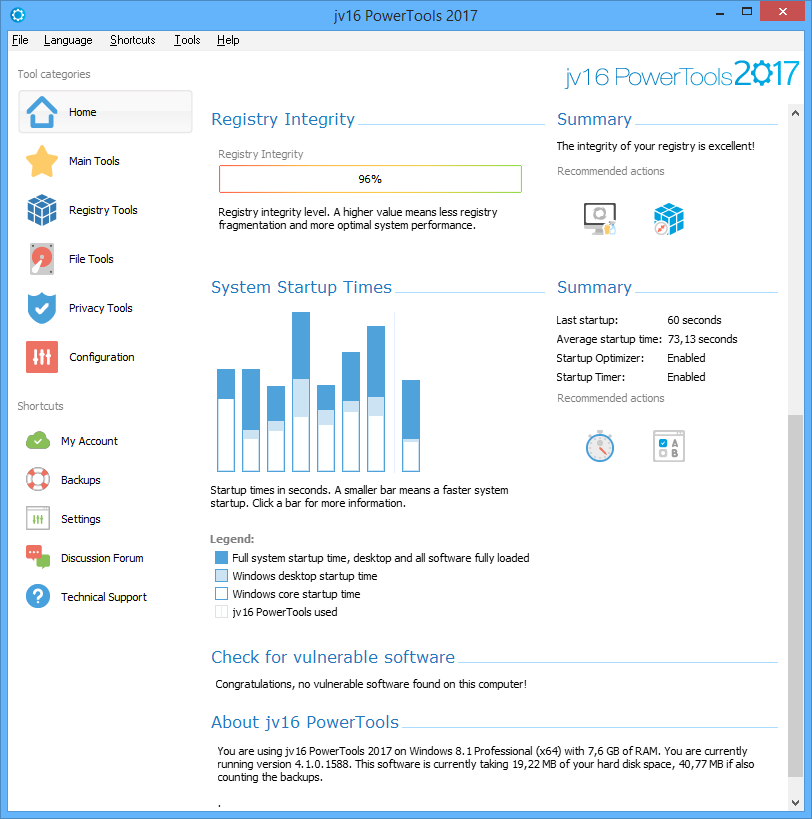
jv16 PowerTools is a full set of tools to keep your computer up and running. Until now your computer might have been the one who is in charge, but with it you can take the control. It contains all the tools needed for monitoring and cleaning the Registry and the file system. In addition to that, you can control all the computers in your LAN.
Latest Reviews

Someone reviewed v5.0.0.513 on Mar 2, 2020
stunning

Music4Ever reviewed v4.1.0.1602 RC3 on Sep 18, 2016
I used this for some time many, many years ago, today it's just not needed or IMO it's not even the right program for Win 7 & up. Registry cleaning with today's PC's makes little difference in speed & risks causing issues you may not even find for some time. If you have regular C:\ images fair enough if not avoid it. Many of the PC's I fix are messed up with so called 'clean/speed up' programs - Look at the past bug fixes & the times the accuracy of registry cleaning has been fixed.
Mixed views here:
http://www.wilderssecuri...s-2014-updated-x.374176/

CyberDoc999 reviewed v4.0.0.1499 on Jul 11, 2015
better have a backup before you use this..... it works but it can cause problems

carlvui reviewed v4.0.0.1480 on May 1, 2015
Their open source project to loot their end users has failed, leastways that's what they stated as an excuse for abandoning the project after collecting a nice amount of money which has just disappeared after all. They redesigned the icons in haste and are merchandizing the same old junk. The last OS that JV16 somewhat worked with was Windows XP.
Modern computing as well as new Windows systems and registry will not accept this old school cleaning and tune up softpack, it only causes damage. It needs a brand new approach to system maintenance which meets the system requirements that this tool fails to deliver and will never do as the development was halted many years ago and the company is only interested in ripping off their costumers.
To perform tune up by system cleaning, to fix system and registry errors please run proper analysis, contact technical support or visit Microsoft FixIt site that provides system repair patches for many different problems that will restore the damaged registry keys and errors to the original Windows settings without deleting or modifying any other values.

oldnuke69 reviewed v4.0.0.1474 on Mar 18, 2015
I'm surprised to see a new version of this released, given all the comments on the Macecraft forum and elsewhere that complained about the company founder absconding to the far east with money given to take the product open source. I never contributed to that, given that I already had a lifetime license. I haven't used it on Windows 7, as I haven't seen the need. For uninstalling crapware, I use IOBit Uninstaller (free and works well, but installs a trial version of other IOBit software that must be uninstalled itself). However, for my former Windows XP PC, it was the best registry tool (of a generally bad lot) I had tried. Several others, including Norton Utilities, had screwed up the system so bad as to require a reinstall from scratch. I didn't use agressive settings, however. My opinion nowadays is that registry cleaners in general, are unnecessary. With CPUs as fast as they are now, even a bloated registry can't take that long to process. I do think that using a registry is a bad design. A program should use it's own .ini file, resource file, or something similar, to store user and other program information. *Nix has the right idea.

AlphaBetaGamma reviewed v4.0.0.1474 on Mar 17, 2015
I have used Power Tools for years without major problems, and just upgraded to this latest version (4.0.0.1474) using the Platinum lifetime license I purchased a few months ago. I did not have any problems receiving it.
But as with any registry cleaner, you have to be careful. I have never had a crash or problem with the operating system because of it, but I do have to exclude one special-purpose utility. That is what the exclusions are for. I think the registry compactor and a few other options are more trouble than they are worth, and there is no point in removing items that will be recreated on the next reboot, but you can just add those items to the exclusion list. So learn how to use it, and if you like cleaning registries, it is one of the more thorough ones out there.

Andy Dean reviewed v4.0.0.1474 on Mar 16, 2015
I've tried this version out and to me it just seems like a reskinned version of PowerTools 2014.
I've used all the variations of this app for years and beta tested PT for Jouni since the programme was first introduced.
Personally I've never hosed my system with it or even introduced any minor problems.
A very big word of warning though. Macecraft had an active forum for years but this was recently removed due to all the posts about the company ripping people off by taking their money and not supplyiing them with a license.
I would be very reluctant to purchase from this company.
CyberDoc999 reviewed vX 4.0.0.1472 on Mar 12, 2015
you will need system restore for this

BANDIT- reviewed v2014 3.2.0.1344 on Oct 2, 2013
If it ain't broke.......... Break it with this..!!
ZILCH o Mundo stars. I'll give it 5 MOONS tho..
( ! ) ( ! ) ( ! ) ( ! ) & an Extra big one .. ( _ º _ )
[edit] Oct 3.
Re: (5* for everything) "Synsyn".. Well Spotted @M4Ever.. ~_^
Jeez, Macecraft even have a forum, Ya wanna see the
GOOF posted about jv16 PowerTools in there ..... sniggger.
-http://www.macecraft.com/forum/viewforum.php?f=38
[edit]
Music4Ever reviewed v2014 3.2.0.1341 on Sep 26, 2013
Will in time totally bugger your PC up, most of the functions are vaporware - Enable GOD mode on your PC & use CCleaner if you really, really must run a registry cleaner. You really don't need this on any PC.
@Synsyn - I see you have only reviewed Macecraft software - Interesting ~
Someone reviewed v5.0.0.513 on Mar 2, 2020
Pros: i use it its very good.allinfoedsk.com https://allinfodesk.com/
How to study in Canada
Canada study visa
Cons: best
Bottom Line: stunning
Music4Ever reviewed v4.1.0.1602 RC3 on Sep 18, 2016
I used this for some time many, many years ago, today it's just not needed or IMO it's not even the right program for Win 7 & up. Registry cleaning with today's PC's makes little difference in speed & risks causing issues you may not even find for some time. If you have regular C:\ images fair enough if not avoid it. Many of the PC's I fix are messed up with so called 'clean/speed up' programs - Look at the past bug fixes & the times the accuracy of registry cleaning has been fixed.
Mixed views here:
http://www.wilderssecuri...s-2014-updated-x.374176/
CyberDoc999 reviewed v4.0.0.1499 on Jul 11, 2015
better have a backup before you use this..... it works but it can cause problems
carlvui reviewed v4.0.0.1480 on May 1, 2015
Their open source project to loot their end users has failed, leastways that's what they stated as an excuse for abandoning the project after collecting a nice amount of money which has just disappeared after all. They redesigned the icons in haste and are merchandizing the same old junk. The last OS that JV16 somewhat worked with was Windows XP.
Modern computing as well as new Windows systems and registry will not accept this old school cleaning and tune up softpack, it only causes damage. It needs a brand new approach to system maintenance which meets the system requirements that this tool fails to deliver and will never do as the development was halted many years ago and the company is only interested in ripping off their costumers.
To perform tune up by system cleaning, to fix system and registry errors please run proper analysis, contact technical support or visit Microsoft FixIt site that provides system repair patches for many different problems that will restore the damaged registry keys and errors to the original Windows settings without deleting or modifying any other values.
oldnuke69 reviewed v4.0.0.1474 on Mar 18, 2015
I'm surprised to see a new version of this released, given all the comments on the Macecraft forum and elsewhere that complained about the company founder absconding to the far east with money given to take the product open source. I never contributed to that, given that I already had a lifetime license. I haven't used it on Windows 7, as I haven't seen the need. For uninstalling crapware, I use IOBit Uninstaller (free and works well, but installs a trial version of other IOBit software that must be uninstalled itself). However, for my former Windows XP PC, it was the best registry tool (of a generally bad lot) I had tried. Several others, including Norton Utilities, had screwed up the system so bad as to require a reinstall from scratch. I didn't use agressive settings, however. My opinion nowadays is that registry cleaners in general, are unnecessary. With CPUs as fast as they are now, even a bloated registry can't take that long to process. I do think that using a registry is a bad design. A program should use it's own .ini file, resource file, or something similar, to store user and other program information. *Nix has the right idea.
AlphaBetaGamma reviewed v4.0.0.1474 on Mar 17, 2015
I have used Power Tools for years without major problems, and just upgraded to this latest version (4.0.0.1474) using the Platinum lifetime license I purchased a few months ago. I did not have any problems receiving it.
But as with any registry cleaner, you have to be careful. I have never had a crash or problem with the operating system because of it, but I do have to exclude one special-purpose utility. That is what the exclusions are for. I think the registry compactor and a few other options are more trouble than they are worth, and there is no point in removing items that will be recreated on the next reboot, but you can just add those items to the exclusion list. So learn how to use it, and if you like cleaning registries, it is one of the more thorough ones out there.
Andy Dean reviewed v4.0.0.1474 on Mar 16, 2015
I've tried this version out and to me it just seems like a reskinned version of PowerTools 2014.
I've used all the variations of this app for years and beta tested PT for Jouni since the programme was first introduced.
Personally I've never hosed my system with it or even introduced any minor problems.
A very big word of warning though. Macecraft had an active forum for years but this was recently removed due to all the posts about the company ripping people off by taking their money and not supplyiing them with a license.
I would be very reluctant to purchase from this company.
CyberDoc999 reviewed vX 4.0.0.1472 on Mar 12, 2015
you will need system restore for this
BANDIT- reviewed v2014 3.2.0.1344 on Oct 2, 2013
If it ain't broke.......... Break it with this..!!
ZILCH o Mundo stars. I'll give it 5 MOONS tho..
( ! ) ( ! ) ( ! ) ( ! ) & an Extra big one .. ( _ º _ )
[edit] Oct 3.
Re: (5* for everything) "Synsyn".. Well Spotted @M4Ever.. ~_^
Jeez, Macecraft even have a forum, Ya wanna see the
GOOF posted about jv16 PowerTools in there ..... sniggger.
-http://www.macecraft.com/forum/viewforum.php?f=38
[edit]
Music4Ever reviewed v2014 3.2.0.1341 on Sep 26, 2013
Will in time totally bugger your PC up, most of the functions are vaporware - Enable GOD mode on your PC & use CCleaner if you really, really must run a registry cleaner. You really don't need this on any PC.
@Synsyn - I see you have only reviewed Macecraft software - Interesting ~
carlvui reviewed v2013 3.0.0.1267 on May 4, 2013
Just one warning if I may, please take it from me. The new version has a "Decrap my Computer" feature that promises to mass remove preinstalled bloatware.
This is a cheat, it only serves business purposes for better selling by promising to make your computer faster, but extremely dangerous. There is a little warning in the mass uninstall window, " Only use this option if you know what you are doing ! " i.e. they get rid of responsibility and leave you with the blame for destroying your PC. You can't be smart enough, you surely will kill your PC.
Please note that preinstalled software in your PC are integrated in your OS in a highly complex way and removing any of them without learning about the consequences might corrupt your system.
Some of them are Windows setting or system utility sotfpack, just the same as JV16 but comes as default specifically designed for your OS, and JV16 is busy to quickly remove it. But they are fully integrated. Please don't remove them even if you never want to use them.
Some others are associated one with another, and if you uninstall one you will kill three other important functions. Again, many of them are not even installed, just setup exe files and you need to check the agreement check-box to install and start them. They don't cause any problems, leave them there as you might need them later.
Yet, if you want to get rid of them preinstalled software, - not all of them bloatware - please use the OEM original software uninstaller/reinstaller utility. It will uninstall the software or bloatware in a way specifically designed for your PC.
JV16 doesn't know how to do that.
The OEM's own default uninstaller will remove them by only removing what is not integrated in the system, only deletes unnecessary registry keys and leaves the critical values intact. It is designed for that as the OEM bears responsibility for their products.
JV16 does not, they will call you dumb who doesn't understand the system if their softpack breaks it.
Also, please use the OEM own , in most cases animated helper. It will tell you how to uninstall bloatware, which of them can be uninstalled, in what order, i.e. uninstall this one to first and then that one to second etc. This is the proper expert way that JV16 doesn't know how to do, as it is different for every and each PC.
Be careful making changes with JV16 because if it fails you and you uninstall JV16, you will encounter serious difficulties in restoring changes you have made with it. Use Windows and the OEM own, completely safe and compatible features, they come as default, and you can undo changes at any time safely.
Again, Macecraft is selling functions that comes as default for each PCs straight from the OEM.
CyberDoc999 reviewed v2013 3.0.0.1267 on May 4, 2013
lucky I had a system restore ready for this junk

Synsyn reviewed v2013 3.0.0.1258 on Apr 25, 2013
I like this software. It's easy and fast and for me, it didn't remove anything important (didn't even tried, I check and appected) Just junk, temp-files, register errors etc. My computer works so much faster now.
Well, my computerskills are little above basic, so this works for me. I have just basic stuff in my computer and i'm using Windows Vista. There's so much stuff to do in this software and big plus for onlinehelper and language-options. I do can recommend this!