mRemote 1.48
Publisher's Description:
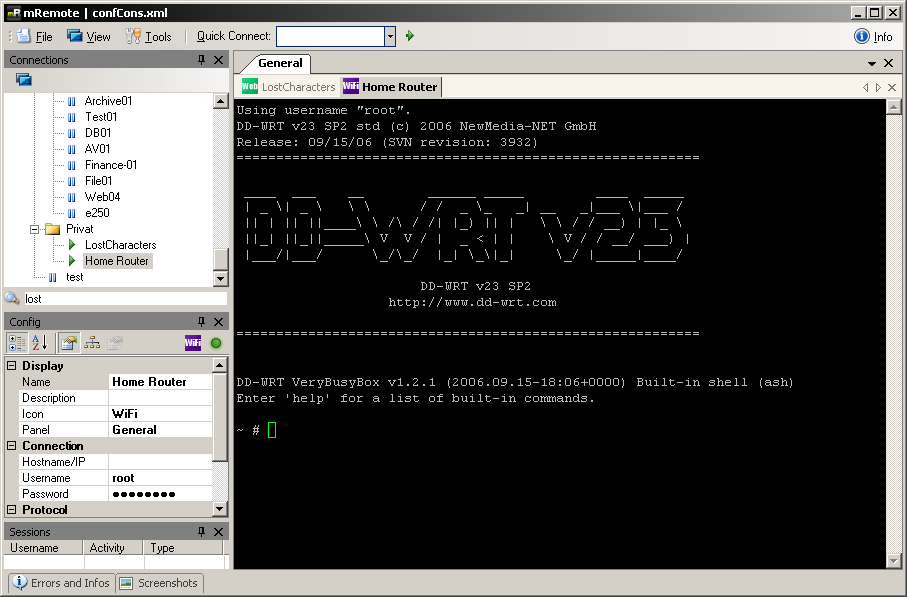
mRemote is a full-featured, open source, multi-tab remote connections manager. It allows you to store all your remote connections in a simple yet powerful interface. Learn more about the features, check out some screenshots and learn how to use mRemote.
Latest Changes:
- Added startup components check with directions to fix component installation (also available in Tools - Components Check)
- Added "Try to integrate" option to Ext. Apps. If enabled mRemote will try to integrate the app into a tab container like any other connection protocol
- Added Ext. App as protocol. Any Ext. App can be launched just like a normal connection
- Example (DameWare Mini Remote Control):
- Create a new Ext. App with the following properties:
- Display Name: DameWare
- Filename: c:\PathToYourDameWareInstallDir\DWRCC.exe
- Arguments: -c: -h: -m:%hostname% -u:%username% -p:"%password%" -d:%domain%
- Options: Try to integrate
- Create a new connection and select Ext. App as protocol
- Then choose DameWare in the Ext. App field
- If you have problems with a particular app that takes a long time to start up consider setting a higher PuTTY/Ext. Apps wait time in Tools - Options - Advanced
- Added option to completely encrypt connection files (tools - options - advancecd)
- Added Rendering Engine option for HTTP/S protocols
- You can now use the Gecko (Firefox) rendering engine
- For this to work you need to download xulrunner (get it here: ftp://ftp.mozilla.org/pub/xulrunner/releases/1.8.1.3/contrib/win32/)
- It must be the 1.8.1.3 release, 1.9.0.0 does NOT work
- Extract the contents to a path of your choice and set the correct path in Tools - Options - Advanced - XULrunner path
- The interface is tab enabled and usage is generally very firefox-like. So you can open new tabs with Ctrl+T, jump to the location bar with Ctrl+L and so on..
- Added "MAC Address", "User Field" fields and %MacAddress%, %UserField% variables to use in Ext. Apps
- Added descriptions for all fields in the config editor
- Fixed bug in connections loading code when using SQL storage
- Fixed bug in reconnect code
- Fixed VNC sessions not refreshing screen automatically when switching between tabs or panels
- WARNING! There have been changes to the connections file/SQL tables
- Please always backup your whole config before updating to a new mRemote beta release, especially when there have been changes to the config files/SQL tables
- To get SQL working with the new version please update your tables like in the provided script (Info - Help - SQL Configuration)
- These are the added lines:
- RenderingEngine varchar (10) COLLATE SQL_Latin1_General_CP1_CI_AS NULL ,
- MacAddress varchar (32) COLLATE SQL_Latin1_General_CP1_CI_AS NULL ,
- UserField varchar (256) COLLATE SQL_Latin1_General_CP1_CI_AS NULL ,
- ExtApp varchar (256) COLLATE SQL_Latin1_General_CP1_CI_AS NULL ,
- InheritRenderingEngine bit NOT NULL ,
- InheritMacAddress bit NOT NULL ,
- InheritUserField bit NOT NULL ,
- InheritExtApp bit NOT NULL ,
Screenshot:
Latest User Reviews:
| Reviewer: | etmare | Aug 21, 2008 |
| Version: | 1.48 | |
| |
|
Exactly what I need! Great remote access manager, supporting as RDP as VNC as ICA remote protocols. Usable when You need remote access to many computers with different remote protocols. Full stars!!!
|
| Rating: |  |
|
| Reviewer: | jviola | Aug 20, 2008 |
| Version: | 1.48 | |
| |
|
This program is awesome. I have many Servers that I maintain, both Linux and Windows. This allow me to connect all of them in one program. Keeps my task bar clean.
|
| Rating: |  |
|
| Reviewer: | sqiffr | Jun 20, 2008 |
| Version: | 1.43 | |
| |
|
awesome app!
|
| Rating: |  |
|
|
| Released: | August 10, 2008 |
| Publisher: | Felix Deimel |
| Homepage: | mRemote |
|---|
| Downloads: | 414 |
| License: | Open Source |
| OS Support: | Windows Vista/XP |
| Uninstaller?: | Yes |
|---|
| Skin Support?: | No; Supports XP Themes |
|---|
| Rating: | 4.6/5 (9 votes)
|
|