File Details |
|
| File Size | 14.3 MB |
|---|---|
| License | Freeware |
| Operating System | Windows (All) |
| Date Added | September 6, 2016 |
| Total Downloads | 247,948 |
| Publisher | Moonware Studios |
| Homepage | webcamXP |
Publisher's Description
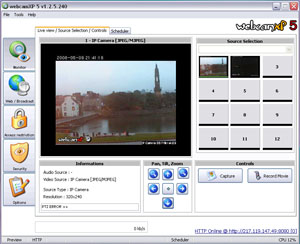
webcamXP is a powerful webcam utility that allows you to share your webcam with everyone without having to set a web server on your computer. The web server is integrated to the software and needs only a few configuration parameters such as server port and local directory.
webcamXP Free is free for private use and allows connecting up to 2 cameras. Private and Pro versions are available for a fee.
Latest Reviews

jsantos75 reviewed v5.6.4.0 on Oct 8, 2013
Great product. Highly recommended!

gfontel reviewed v5.6.4.0 on Oct 3, 2013
Love it, nice to see that it's getting frequently updated again.

uberfly reviewed v5.5.1.2 on Jul 28, 2011
Run it on Win7 64bit. Always runs great for days without a hitch, and very full featured. Nothing but good mojo for me for years.

gloria123 reviewed v5.5.0.8 on Mar 18, 2011
I just downloaded and installed webcamxp 5 pro and I cannot record either. I actually get a system crash when I click to stop recording. I am running Vista on a Dell computer with a winbook usb webcam. The webcam records fine with other software, just not with webcamxp.
gloria123 reviewed v3.72 on Mar 18, 2011
Hi. I actually need some help. I downloaded the trial version of webcamxp 5 pro and started using it. I am using a winbook usb webcam. It seemed to work fine until I tried to record. Every time I try to record, as soon as I click to stop recording, I get a system crash.
I have checked with the vendor of the webcam and they had me load the latest driver,and that did not help.
I emailed the Webcamxp software vendor today but no response yet. I am running Vista on a Dell desktop.

missadora reviewed v3.72 on Dec 13, 2010
This is great software at a great price !!! I think it is by far the best software for the price out there . Don't hesitate to purchase it , it works GREAT!!!

ObscureUserName reviewed v5.3.4.252 on Aug 19, 2009
Overall this software is not of acceptable quality to pay for. I am currently utilizing the 60 day trial, version 5.3.4.164.
Firstly, startup takes a very long time on a P4 2.4GHZ Northwood, 512MB ram. Not sure what kind of discovery it is doing but I get the splash screen with status updates and then no interface an 100% CPU usage for several minutes before the UI is visible.
All around, the User Interface is quite contorted. You have to right click to do just about everything. If you unplug a camera and plug it in again - even to the exact same port - your settings are lost. Every time I change resolution for my QuickCam for Notebooks, the face-tracking setting is reset and I have to turn it back off.
Motion detection takes a lot of CPU, requiring me to drop my video resolution down to sub 320x240. There is no pre-buffering of the video so the lag between detection and start of recording is enough that you can quite literally never see what made the motion detection alert fire.
Even with Windows Media Encoder installed none of the WMV compression profiles work. There is no error message given when recording starts and all other notifications indicate that it has successfully recorded a video when it simply has not. The same applies to almost all other compression options in the drop down. There is no indication whether the selection even has properties as the properties button either pulls up another dialog or does nothing at all leaving the user to wonder if they should be waiting or whether there simply is no dialog.
The web interface is hokey in that it uses javascript to just request an IMG url over and over and over. Ideally this should be streamed to a flash object (their flash object does the same thing as the javascript) or similar, not sending a request 3 times a second.
The motion detection is a simple "start when noticed and record X seconds afterwards" rather than recording while motion is present. It still serves its purpose but you wind up with the video of interest segmented into several different files.
When the motion detection does go off and start recording, the web interface does not update. I'm not sure whether this is due to the 100% cpu usage or whether, when recording a video, the software blocks all other communication to the web cam. This is unacceptable for my purposes as monitoring the cams in real time is mission critical.
All around this software was advertised to be much more than it is. From my experience it is a contorted mess of a user interface and extremely low performance software. I would do not recommend this software, especially for anything to do with security in mission critical environments.

rhinohide reviewed v5.3.4.164 on Jul 1, 2009
I've been running it continuously on Win7 32bit for a few days and it is working well so far. Using a Logitech webcam. Very easy to setup and not too hard to find everything except for the first time you have to choose your camera and assign it to a video source numbered tile. Even that only took me a minute to figure out. I installed the free version which disables some features.
It generates a nice, simple web interface for the end user and allows the user to switch video compression methods as well as control panning and zooming. If you choose the Flash format it cuts the network bandwidth used quite a bit and still looks just as good as the other formats.

ravemanson reviewed v5.3.4.156 on Jun 15, 2009
- Windows SEVEN please!
- Many parts of the interface is very un-intuitive and takes luck figuring out.

bigspud reviewed v5.3.4.075 on Apr 24, 2009
program locks on startup, just crap, dont waste your time.

jsantos75 reviewed v5.6.4.0 on Oct 8, 2013
Great product. Highly recommended!
gfontel reviewed v5.6.4.0 on Oct 3, 2013
Love it, nice to see that it's getting frequently updated again.
uberfly reviewed v5.5.1.2 on Jul 28, 2011
Run it on Win7 64bit. Always runs great for days without a hitch, and very full featured. Nothing but good mojo for me for years.
gloria123 reviewed v5.5.0.8 on Mar 18, 2011
I just downloaded and installed webcamxp 5 pro and I cannot record either. I actually get a system crash when I click to stop recording. I am running Vista on a Dell computer with a winbook usb webcam. The webcam records fine with other software, just not with webcamxp.
gloria123 reviewed v3.72 on Mar 18, 2011
Hi. I actually need some help. I downloaded the trial version of webcamxp 5 pro and started using it. I am using a winbook usb webcam. It seemed to work fine until I tried to record. Every time I try to record, as soon as I click to stop recording, I get a system crash.
I have checked with the vendor of the webcam and they had me load the latest driver,and that did not help.
I emailed the Webcamxp software vendor today but no response yet. I am running Vista on a Dell desktop.
missadora reviewed v3.72 on Dec 13, 2010
This is great software at a great price !!! I think it is by far the best software for the price out there . Don't hesitate to purchase it , it works GREAT!!!
ObscureUserName reviewed v5.3.4.252 on Aug 19, 2009
Overall this software is not of acceptable quality to pay for. I am currently utilizing the 60 day trial, version 5.3.4.164.
Firstly, startup takes a very long time on a P4 2.4GHZ Northwood, 512MB ram. Not sure what kind of discovery it is doing but I get the splash screen with status updates and then no interface an 100% CPU usage for several minutes before the UI is visible.
All around, the User Interface is quite contorted. You have to right click to do just about everything. If you unplug a camera and plug it in again - even to the exact same port - your settings are lost. Every time I change resolution for my QuickCam for Notebooks, the face-tracking setting is reset and I have to turn it back off.
Motion detection takes a lot of CPU, requiring me to drop my video resolution down to sub 320x240. There is no pre-buffering of the video so the lag between detection and start of recording is enough that you can quite literally never see what made the motion detection alert fire.
Even with Windows Media Encoder installed none of the WMV compression profiles work. There is no error message given when recording starts and all other notifications indicate that it has successfully recorded a video when it simply has not. The same applies to almost all other compression options in the drop down. There is no indication whether the selection even has properties as the properties button either pulls up another dialog or does nothing at all leaving the user to wonder if they should be waiting or whether there simply is no dialog.
The web interface is hokey in that it uses javascript to just request an IMG url over and over and over. Ideally this should be streamed to a flash object (their flash object does the same thing as the javascript) or similar, not sending a request 3 times a second.
The motion detection is a simple "start when noticed and record X seconds afterwards" rather than recording while motion is present. It still serves its purpose but you wind up with the video of interest segmented into several different files.
When the motion detection does go off and start recording, the web interface does not update. I'm not sure whether this is due to the 100% cpu usage or whether, when recording a video, the software blocks all other communication to the web cam. This is unacceptable for my purposes as monitoring the cams in real time is mission critical.
All around this software was advertised to be much more than it is. From my experience it is a contorted mess of a user interface and extremely low performance software. I would do not recommend this software, especially for anything to do with security in mission critical environments.
rhinohide reviewed v5.3.4.164 on Jul 1, 2009
I've been running it continuously on Win7 32bit for a few days and it is working well so far. Using a Logitech webcam. Very easy to setup and not too hard to find everything except for the first time you have to choose your camera and assign it to a video source numbered tile. Even that only took me a minute to figure out. I installed the free version which disables some features.
It generates a nice, simple web interface for the end user and allows the user to switch video compression methods as well as control panning and zooming. If you choose the Flash format it cuts the network bandwidth used quite a bit and still looks just as good as the other formats.
ravemanson reviewed v5.3.4.156 on Jun 15, 2009
- Windows SEVEN please!
- Many parts of the interface is very un-intuitive and takes luck figuring out.
bigspud reviewed v5.3.4.075 on Apr 24, 2009
program locks on startup, just crap, dont waste your time.

hunterb reviewed v5.3.2.450 on Feb 2, 2009
Free version puts a banner in the image. Even Pro Trial still has this. I can not configure my DirectShow USB camera source size with this - greyed out. General features look good.

some guy reviewed v4.10 Beta on Mar 12, 2008
auh it's ok

shroom reviewed v4.01 Beta on Oct 18, 2007
It would be nice to see reviews that are actually reviews instead of stupid "price complainers" that obviously haven't even taken the time to test the software...
FYI :
80$ = pro version
40$ = private version
And to conclude, excellent software that should be at least tried. I've been using it for at least 3 years and I'm still relying on it when it comes to webcam stuff.