File Details |
|
| File Size | 35.2 MB |
|---|---|
| License | Freeware |
| Operating System | Windows XP |
| Date Added | February 26, 2010 |
| Total Downloads | 7,100 |
| Publisher | AVI2ISO |
| Homepage | AVI2ISO |
Publisher's Description
AVI2ISO is a all-in-one tool that converts avi/mkv/rmbv/vwv/flv with just one click to a ISO format. It uses only freeware tools and can handle varius freeware enconders (QuEnc/FreeEnc/HCENC) and also comercial Cinema Craft Encoder.
Latest Reviews

some guy reviewed v2.10.00 Beta 3 on Dec 4, 2008
what is the purpose of taking a avi and making it a iso ? then you have to extract it again to watch it ?

anomoly reviewed v2.08.06a on Jan 19, 2008
He just likes to keep all the duckies in a row as his last post states. This came out after avi2dvd & I believe it has better support and does work better. (sans the vcd options which didn't work in avi2dvd anyways)

hariskar reviewed v2.08.06a on Jan 18, 2008
Thank you for this great program! As the developer says, ask in the forum if you have a problem, he responds very soon and is very helpful. I tried a lot of programs for minidv (or avi) to dvd convert, but sticked with this.

Delta2 reviewed v2.08.06 Beta on Dec 17, 2007
I'm the developer of this piece of software, it's free so I don't care about reviews ranges. I only care about Usability, Stability, and Functionality.
If you can play any movie/format, supposedly supported by this piece of software, in WMP..then you can convert it...in DirectShowSource method, of course, Otherwise it's a bug
Then, you have Menu Image where you can see the preview, select filters, and aspect ratios
Whatever, there is support for bugs, missing codecs, etc...etc...etc..in official forum
Without a clue I can't fix any bug, this is already a huge program...so ask for help, you're welcome in the forum
1 point for review, where is zero for review ?!
anomoly reviewed v2.08.06 Beta on Dec 17, 2007
Actually not true. Time between reviews was too great & I could not simply edit the one.
Regardless. If there are limitations (source method) then they should be stated. Am I to take it that free video encoding software has inherent limitations? I'm guessing the 5.1 audio was to blame.? I can't see how 640x480 at 25fps is. I can't learn how to use this if I don't know what went wrong.
Anywho, I never had a sync issue which is saying a lot for a free program. The quality is excellent when it does work which seems to be ~99% of the time.
Just because you can watch a video from your pc does not mean it is an easy process to reencode it into a dvd compliant structure complete with a menu and selectable subtitles.
Haven't tried this version and since I bought my new 22" ws, don't really want to.
May test it with some quality mkv's I have though.
review subject to change-juust like the software
thanks to all
Delta2 reviewed v2.08.05 Beta on Oct 28, 2007
anomoly :
Stop to do nonsense reviews, for each failed conversion you do a new review, over and over.
If you can play your movie in WMP, then you can convert it in DirectShow....simple as that
AVISource method fails with non-regular movies, learn how to use use this
anomoly reviewed v2.08.05 Beta on Oct 27, 2007
Not much better than avi2dvd at all.
Some stuff avi2dvd won't accept this did.
Tried to add a 25fps 640x480 with 5.1 audio and avi2iso refused it. tmpgenc dvd with divx authoring worked fine and spit out an ntsc dvd compliant iso just fine with a nice little menu.
anomoly reviewed v2.08.04 on Oct 7, 2007
I converted an avi with a 25fps 624x272 aspect and 130 bitrate audio using hcenc and video_ts came out perfect (no menu).
Only confusing part was it defaults to it's basic gui and only has cce encoder options. Had to switch to advanced to see the normal options dialogs. It does make me want to install cce.
See avi2dvd. It does the same exact thing
hariskar reviewed v2.08.04 on Oct 5, 2007
Great program that easily and correctly converts video files to dvds. Also there is a great support from the developer. I tried a lot of programs to convert my miniDV to dvd, this is the best in my opinion. You can use free encoders and also Cinema Craft Encoder.

patmc7 reviewed v2.08.04 on Oct 4, 2007
Won't handle files of different frame rates or audio.
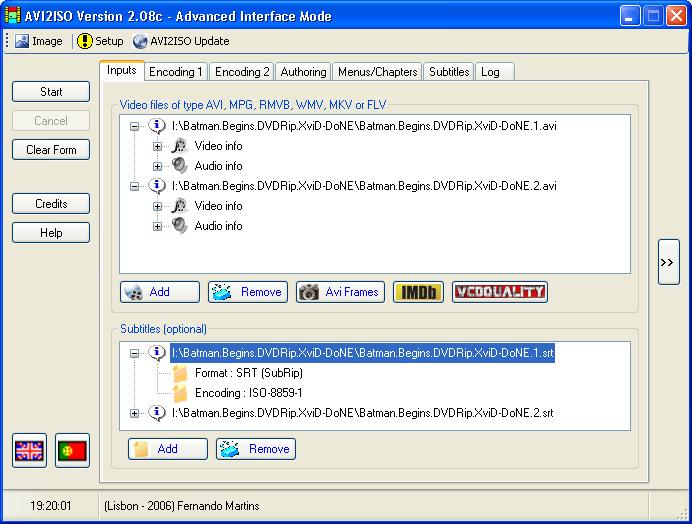
Looking at the graphic, I hope that's a backup version of Batman.

some guy reviewed v2.10.00 Beta 3 on Dec 4, 2008
what is the purpose of taking a avi and making it a iso ? then you have to extract it again to watch it ?
anomoly reviewed v2.08.06a on Jan 19, 2008
He just likes to keep all the duckies in a row as his last post states. This came out after avi2dvd & I believe it has better support and does work better. (sans the vcd options which didn't work in avi2dvd anyways)
hariskar reviewed v2.08.06a on Jan 18, 2008
Thank you for this great program! As the developer says, ask in the forum if you have a problem, he responds very soon and is very helpful. I tried a lot of programs for minidv (or avi) to dvd convert, but sticked with this.
Delta2 reviewed v2.08.06 Beta on Dec 17, 2007
I'm the developer of this piece of software, it's free so I don't care about reviews ranges. I only care about Usability, Stability, and Functionality.
If you can play any movie/format, supposedly supported by this piece of software, in WMP..then you can convert it...in DirectShowSource method, of course, Otherwise it's a bug
Then, you have Menu Image where you can see the preview, select filters, and aspect ratios
Whatever, there is support for bugs, missing codecs, etc...etc...etc..in official forum
Without a clue I can't fix any bug, this is already a huge program...so ask for help, you're welcome in the forum
1 point for review, where is zero for review ?!
anomoly reviewed v2.08.06 Beta on Dec 17, 2007
Actually not true. Time between reviews was too great & I could not simply edit the one.
Regardless. If there are limitations (source method) then they should be stated. Am I to take it that free video encoding software has inherent limitations? I'm guessing the 5.1 audio was to blame.? I can't see how 640x480 at 25fps is. I can't learn how to use this if I don't know what went wrong.
Anywho, I never had a sync issue which is saying a lot for a free program. The quality is excellent when it does work which seems to be ~99% of the time.
Just because you can watch a video from your pc does not mean it is an easy process to reencode it into a dvd compliant structure complete with a menu and selectable subtitles.
Haven't tried this version and since I bought my new 22" ws, don't really want to.
May test it with some quality mkv's I have though.
review subject to change-juust like the software
thanks to all
Delta2 reviewed v2.08.05 Beta on Oct 28, 2007
anomoly :
Stop to do nonsense reviews, for each failed conversion you do a new review, over and over.
If you can play your movie in WMP, then you can convert it in DirectShow....simple as that
AVISource method fails with non-regular movies, learn how to use use this
anomoly reviewed v2.08.05 Beta on Oct 27, 2007
Not much better than avi2dvd at all.
Some stuff avi2dvd won't accept this did.
Tried to add a 25fps 640x480 with 5.1 audio and avi2iso refused it. tmpgenc dvd with divx authoring worked fine and spit out an ntsc dvd compliant iso just fine with a nice little menu.
anomoly reviewed v2.08.04 on Oct 7, 2007
I converted an avi with a 25fps 624x272 aspect and 130 bitrate audio using hcenc and video_ts came out perfect (no menu).
Only confusing part was it defaults to it's basic gui and only has cce encoder options. Had to switch to advanced to see the normal options dialogs. It does make me want to install cce.
See avi2dvd. It does the same exact thing
hariskar reviewed v2.08.04 on Oct 5, 2007
Great program that easily and correctly converts video files to dvds. Also there is a great support from the developer. I tried a lot of programs to convert my miniDV to dvd, this is the best in my opinion. You can use free encoders and also Cinema Craft Encoder.
patmc7 reviewed v2.08.04 on Oct 4, 2007
Won't handle files of different frame rates or audio.
Looking at the graphic, I hope that's a backup version of Batman.