File Details |
|
| File Size | 1.7 MB |
|---|---|
| License | Freeware |
| Operating System | Windows 2000/9x/Server 2003/XP |
| Date Added | April 24, 2005 |
| Total Downloads | 1,869 |
| Publisher | Citi-Software Ltd |
| Homepage | Access Manager |
Publisher's Description
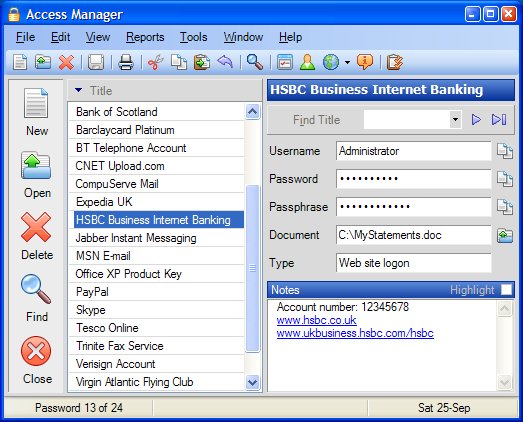
Access Manager lets you keep all your passwords in one safe place. It has everything you need to help you manage your passwords.
Latest Reviews

KingSky reviewed v2.0.56 on Mar 24, 2010
Used to be great but hasn't been updated in years.
Does NOT work on 64 bit systems and authors won't fix this nor will they give any information other than "we'll update it someday'.

Haaglander reviewed v2.0.56 on Aug 17, 2006
It's a great program. I use it for more than 1 year now.

eldergnomie reviewed v2.0.56 on Jul 24, 2005
These solutions to password safety are all so complicated! See my simple solution here:http://tinyurl.com/9pqp7

RLMiller reviewed v2.0.52 on Mar 11, 2005
Well, one thing you can say for it...it is secure. I installed it and upon running it get a password prompt but was not given a password to use it...surfed the web site and help files looking...then gave up.

John Steven reviewed v2.0.52 on Oct 22, 2004
Access Manager's has been upgraded so it has the ability to run completely from a USB key (all files installed on USB key), so you can run it on any machine that has .NET framework installed. There is a free personal version (without nags or spyware) or you can upgrade to the Pro version for a mere $19.95 (US)(lots of neat features in the Pro version).
This is one program you won't be sorry you upgraded.

PeteB reviewed v2.0.52 on Oct 21, 2004
If you're looking for program that keeps your passwords organised, safe and secure then you won't get any better than AM2.
I'm a long time user of Access Manager and I thought I'd try the new version which works with the Microsoft .Net Framework.
I'm glad I did and all it cost was £0.00 !
Free is very good :-) and you get a fully operational program with no ads.
If you want extra goodies you can opt for the pro version - I've got it and now I wonder how I managed before!
On the downside - well...
I haven't found any yet!

DigitalSin reviewed v1.3 on Mar 16, 2004
Great program. I've been using it for a couple months now.

KingSky reviewed v2.0.56 on Mar 24, 2010
Used to be great but hasn't been updated in years.
Does NOT work on 64 bit systems and authors won't fix this nor will they give any information other than "we'll update it someday'.
Haaglander reviewed v2.0.56 on Aug 17, 2006
It's a great program. I use it for more than 1 year now.
eldergnomie reviewed v2.0.56 on Jul 24, 2005
These solutions to password safety are all so complicated! See my simple solution here:http://tinyurl.com/9pqp7
RLMiller reviewed v2.0.52 on Mar 11, 2005
Well, one thing you can say for it...it is secure. I installed it and upon running it get a password prompt but was not given a password to use it...surfed the web site and help files looking...then gave up.
John Steven reviewed v2.0.52 on Oct 22, 2004
Access Manager's has been upgraded so it has the ability to run completely from a USB key (all files installed on USB key), so you can run it on any machine that has .NET framework installed. There is a free personal version (without nags or spyware) or you can upgrade to the Pro version for a mere $19.95 (US)(lots of neat features in the Pro version).
This is one program you won't be sorry you upgraded.
PeteB reviewed v2.0.52 on Oct 21, 2004
If you're looking for program that keeps your passwords organised, safe and secure then you won't get any better than AM2.
I'm a long time user of Access Manager and I thought I'd try the new version which works with the Microsoft .Net Framework.
I'm glad I did and all it cost was £0.00 !
Free is very good :-) and you get a fully operational program with no ads.
If you want extra goodies you can opt for the pro version - I've got it and now I wonder how I managed before!
On the downside - well...
I haven't found any yet!
DigitalSin reviewed v1.3 on Mar 16, 2004
Great program. I've been using it for a couple months now.