
File Details |
|
| File Size | 6.9 MB |
|---|---|
| License | Shareware, $39.95 |
| Operating System | Windows 2000/9x/Server 2003/XP |
| Date Added | March 23, 2019 |
| Total Downloads | 8,853 |
| Publisher | Aha-soft |
| Homepage | ArtIcons |
Publisher's Description
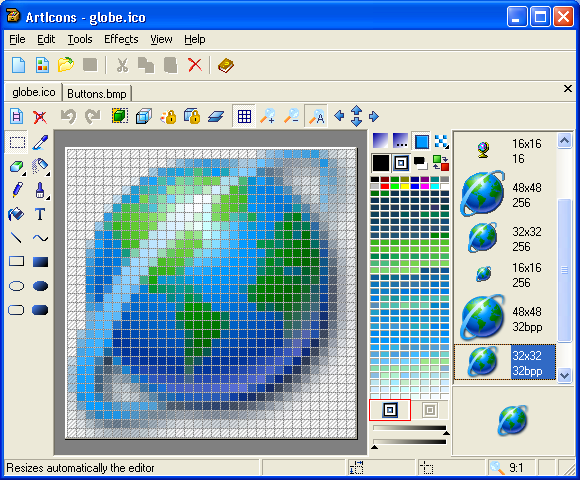
ArtIcons is an advanced icon-specific utility for Windows. It allows professional and amateur graphic artists alike to create and edit icon images and manage icon files and libraries.
The Pro version allows you to do everything in the Standard version plus Import GIF, Adobe Photoshop PSD, WMF, XPM, XBM and WBMP images, CUR and ANI cursor files; Export images to GIF, Adobe Photoshop PSD, RC, XPM, XBM, WBMP and CUR files; Import and export icon color palettes; Work with image lists in BMP and PNG formats; Export library items into one single image; Split icon libraries into individual icon files; and Split icons into sub-icons.
Latest Reviews

zridling reviewed v5.0 on Dec 7, 2005
Not a bad program at all in this version, but most photo editing and drawing apps allow one significant control over icon creation now, and is thus duplicative.

utomo reviewed v4.05 Beta on May 8, 2004
I rate this as 3.
there is many Icon creator choice now. but not a single one is easy enough to create a small icon 16x16. almost all considered as difficult.
also making icon with various size and color depth is not easy. better if somebody creating smart resize and more advanced functions.
there is also Microangelo and other icon software.
regarding fx icon limitation to 32x32 is not good. we need to be able to choose the icon size, and color depth.

ssb reviewed v4.0 Beta 2 on Jan 16, 2004
If you need such an application, get it. Small footprint, many features (for an icon editor), library management, various format import - export, full XP transparency support, effects etc.

Emily reviewed v3.15 on Dec 29, 2001
Very good except the price. $30 for the "pro" version? $40 for the CD? But otherwise a good program. Bump the price of the full best version to $20 and it's a good deal.

JohnXP reviewed v3.15 on Dec 29, 2001
It's a freaking patch! How does it make it easy to add more styles? You have to figure out how to copy them to some Windows subdirectory and pray it doesn't overright them. Then you have to sift through dozens of crappy recolored Lunas to find something that will just slow your system to a crawl. Stick with what comes with Windows.

zridling reviewed v5.0 on Dec 7, 2005
Not a bad program at all in this version, but most photo editing and drawing apps allow one significant control over icon creation now, and is thus duplicative.
utomo reviewed v4.05 Beta on May 8, 2004
I rate this as 3.
there is many Icon creator choice now. but not a single one is easy enough to create a small icon 16x16. almost all considered as difficult.
also making icon with various size and color depth is not easy. better if somebody creating smart resize and more advanced functions.
there is also Microangelo and other icon software.
regarding fx icon limitation to 32x32 is not good. we need to be able to choose the icon size, and color depth.
ssb reviewed v4.0 Beta 2 on Jan 16, 2004
If you need such an application, get it. Small footprint, many features (for an icon editor), library management, various format import - export, full XP transparency support, effects etc.
Emily reviewed v3.15 on Dec 29, 2001
Very good except the price. $30 for the "pro" version? $40 for the CD? But otherwise a good program. Bump the price of the full best version to $20 and it's a good deal.
JohnXP reviewed v3.15 on Dec 29, 2001
It's a freaking patch! How does it make it easy to add more styles? You have to figure out how to copy them to some Windows subdirectory and pray it doesn't overright them. Then you have to sift through dozens of crappy recolored Lunas to find something that will just slow your system to a crawl. Stick with what comes with Windows.