
File Details |
|
| File Size | 212.9 MB |
|---|---|
| License | Shareware, $24.99 |
| Operating System | Windows 10/11 |
| Date Added | March 4, 2024 |
| Total Downloads | 2,987 |
| Publisher | Ashampoo GmbH & Co. KG |
| Homepage | Ashampoo Snap |
Publisher's Description
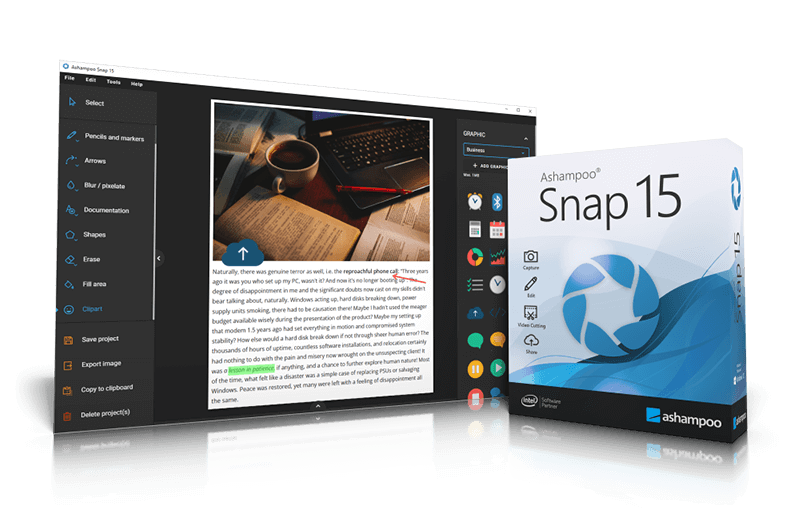
Ashampoo Snap captures anything you see on your screen as screenshots or videos. Multiple post-processing features help you augment your screenshots with graphics, texts and effects to illustrate your point with a single image instead of long text descriptions. Whether you record videos, create your own tutorials or simply seek to share what you see with others, Ashampoo Snap's versatile tools have got you covered. But despite its rich feature set, the program only takes center stage when it's needed. Smart convenience functions, like multi-lingual text recognition, automatic numbering or in-place image editing, will save you considerable time and effort. Finished screenshots and videos can not only be stored locally but also sent or uploaded to cloud services for sharing. Video screen captures can be cut, merged and exported as individual episodes. Individual parts can also be instantly turned into web-friendly GIF animations. The program also captures images of full-screen games without loss of quality.
Latest Reviews

Karol Mily reviewed v9.0.0 on Apr 19, 2016
In a new Snap 9 I do not get I want. Read posts bellow.
Seems like Screenpresso Pro is much better.
http://www.screenpresso.com/
Karol Mily reviewed v8.0.3 on May 13, 2015
First I bought Snap 6.
But even after release Snap 8 I miss a few important things:
- more customizable installer ( it install some ugly & old icons, arrows, ..., and no SVG support in 2015? look here - http://icons8.github.io/flat-color-icons/)
- please add ability to install only selected langs ( most user use only *one* )
- update codecs for video to h264 standard
- allow hide unused icons from application ( UI has icons which I newer used for couple of years )
- save predefined Text and Object setting ( I have to manualy set every time I need different style! )
Come on guys!

darkNiGHTS reviewed v7.0.4 on Mar 27, 2014
Potentially great program held back by video compression options. You can either have the finished video in WMV or AVI, no h.264 compression. I am not paying $20 for a program that I have to convert the finished product over to another file format to share with others who may or may not be using a Mac.

Betanoob reviewed v7.0.4 on Feb 5, 2014
$20 for garbage from spammers?
How did these spammers get so many faNboyZ?
Karol Mily reviewed v6.0.0 Beta on Oct 17, 2012
Dissapointed with this Beta. Happy with Snap v3, 4 and 5. But they improve software very slowly. First version is often buggy, and have to wait for 3rd or 4th update. Come on Ashampoo! Do nice and stable software. Yes, you can do it.
Even a free on-line editors uses vectors but here (in Snap 6) we still looks at resized and blury bitmaps!
- http://www.texaswebdevel...te_permalink.asp?id=131
- http://code.google.com/p/svg-edit/
Even as there are some nice alternatives -
HyperSnap 7 - http://www.hyperionics.com/hsdx/index.asp
FastStone Capture 7.3 - http://www.faststone.org/FSCaptureDetail.htm
or TechSmith Snagit 11 - http://www.techsmith.com/snagit.html
still there is no winner for me...

DKDude reviewed v6.0.0 Beta on Oct 16, 2012
Just installed the new v6, still a great snap tool, and it's even better than v5.
Keep up the good work.
DKDude reviewed v5.1.4 on Jul 18, 2012
This is a great snap-tool, if you search the net, you can get it with big discount, I got mine for 5$.
Karol Mily reviewed v5.1.1 on Dec 14, 2011
Nice and useful tool. There are roaming some alternatives. To speak some of them - Screenshot Studio 1.9.94 (http://screenshot-program.com/) and very good HyperSnap 7.11.01 (http://www.hyperionics.com/). The one from Camtasia (I mean - Snap 10) is not for me, its too complicated.
To choose right tool try all of them.

bokhylla reviewed v2.00 Beta on May 9, 2006
Ashampoo Magical Snap (not the beta version):
This is really a very good software. Easy to use,
stanby within easy reach, high stability, nice interface, high quality snapshots, easy to edit the captured snapshots and a low price. Bjorn Lundahl,
Gothenburg, Sweden

AStev0441 reviewed v2.00 Beta on Apr 22, 2006
Whenever I want to capture a screen, this program closes the program that I want to take a snapshot of. If you just want to take a picture of your main computer screen, it will do that. Not all bars are available after you exit the tutorial, either. Needs lots of work before I'll try it again.

Karol Mily reviewed v9.0.0 on Apr 19, 2016
In a new Snap 9 I do not get I want. Read posts bellow.
Seems like Screenpresso Pro is much better.
http://www.screenpresso.com/
Karol Mily reviewed v8.0.3 on May 13, 2015
First I bought Snap 6.
But even after release Snap 8 I miss a few important things:
- more customizable installer ( it install some ugly & old icons, arrows, ..., and no SVG support in 2015? look here - http://icons8.github.io/flat-color-icons/)
- please add ability to install only selected langs ( most user use only *one* )
- update codecs for video to h264 standard
- allow hide unused icons from application ( UI has icons which I newer used for couple of years )
- save predefined Text and Object setting ( I have to manualy set every time I need different style! )
Come on guys!
darkNiGHTS reviewed v7.0.4 on Mar 27, 2014
Potentially great program held back by video compression options. You can either have the finished video in WMV or AVI, no h.264 compression. I am not paying $20 for a program that I have to convert the finished product over to another file format to share with others who may or may not be using a Mac.
Betanoob reviewed v7.0.4 on Feb 5, 2014
$20 for garbage from spammers?
How did these spammers get so many faNboyZ?
Karol Mily reviewed v6.0.0 Beta on Oct 17, 2012
Dissapointed with this Beta. Happy with Snap v3, 4 and 5. But they improve software very slowly. First version is often buggy, and have to wait for 3rd or 4th update. Come on Ashampoo! Do nice and stable software. Yes, you can do it.
Even a free on-line editors uses vectors but here (in Snap 6) we still looks at resized and blury bitmaps!
- http://www.texaswebdevel...te_permalink.asp?id=131
- http://code.google.com/p/svg-edit/
Even as there are some nice alternatives -
HyperSnap 7 - http://www.hyperionics.com/hsdx/index.asp
FastStone Capture 7.3 - http://www.faststone.org/FSCaptureDetail.htm
or TechSmith Snagit 11 - http://www.techsmith.com/snagit.html
still there is no winner for me...
DKDude reviewed v6.0.0 Beta on Oct 16, 2012
Just installed the new v6, still a great snap tool, and it's even better than v5.
Keep up the good work.
DKDude reviewed v5.1.4 on Jul 18, 2012
This is a great snap-tool, if you search the net, you can get it with big discount, I got mine for 5$.
Karol Mily reviewed v5.1.1 on Dec 14, 2011
Nice and useful tool. There are roaming some alternatives. To speak some of them - Screenshot Studio 1.9.94 (http://screenshot-program.com/) and very good HyperSnap 7.11.01 (http://www.hyperionics.com/). The one from Camtasia (I mean - Snap 10) is not for me, its too complicated.
To choose right tool try all of them.
bokhylla reviewed v2.00 Beta on May 9, 2006
Ashampoo Magical Snap (not the beta version):
This is really a very good software. Easy to use,
stanby within easy reach, high stability, nice interface, high quality snapshots, easy to edit the captured snapshots and a low price. Bjorn Lundahl,
Gothenburg, Sweden
AStev0441 reviewed v2.00 Beta on Apr 22, 2006
Whenever I want to capture a screen, this program closes the program that I want to take a snapshot of. If you just want to take a picture of your main computer screen, it will do that. Not all bars are available after you exit the tutorial, either. Needs lots of work before I'll try it again.