File Details |
|
| File Size | 0.8 MB |
|---|---|
| License | Shareware, $14.99 |
| Operating System | Windows (All) |
| Date Added | August 8, 2013 |
| Total Downloads | 722 |
| Publisher | Badevlad |
| Homepage | BDV SystemEvents |
Publisher's Description
BDV SystemEvents can automatically perform specified actions under certain conditions. Just define any system command, and it will be executed when specified event will occur in your system.
Latest Reviews

Šbb Kbb reviewed v1.3 on Aug 12, 2013
15$ for something that Windows 7 does natively in Event Viewer? nice try

BaDeVlad reviewed v1.0 Beta on May 25, 2012
Not much so far. But it has great potential.
Here are some tasks that can be solved by the program:
1. Restarting application that crashed. It may be useful for system processes and tools that must reside in a memory.
2. Utilization of computer's idle time. If your computer is not used for a long time, program can automatically run system utilities, or even turn it off.
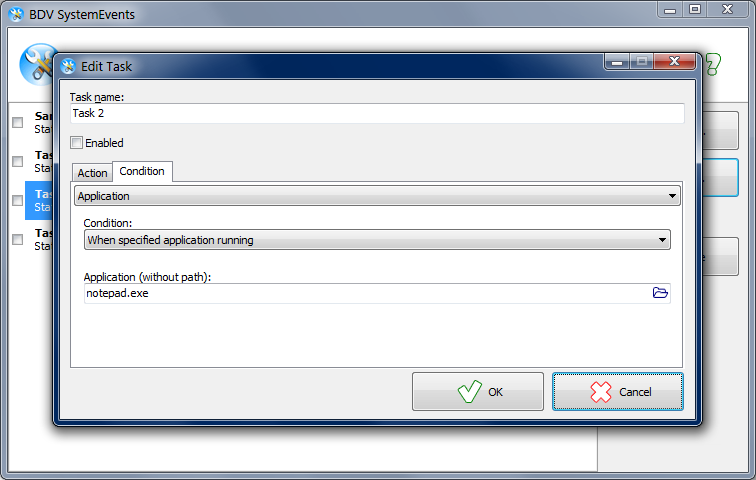
3. Prevent applications from running. If you'll set command "taskkill /IM notepad.exe" and condition "when notepad.exe is running" nobody will be able to use Notepad on your computer )
There are a lot of other options which you may find by yourself.

Šbb Kbb reviewed v1.3 on Aug 12, 2013
15$ for something that Windows 7 does natively in Event Viewer? nice try
BaDeVlad reviewed v1.0 Beta on May 25, 2012
Not much so far. But it has great potential.
Here are some tasks that can be solved by the program:
1. Restarting application that crashed. It may be useful for system processes and tools that must reside in a memory.
2. Utilization of computer's idle time. If your computer is not used for a long time, program can automatically run system utilities, or even turn it off.
3. Prevent applications from running. If you'll set command "taskkill /IM notepad.exe" and condition "when notepad.exe is running" nobody will be able to use Notepad on your computer )
There are a lot of other options which you may find by yourself.