File Details |
|
| File Size | 4.5 MB |
|---|---|
| License | Freeware |
| Operating System | Windows (All) |
| Date Added | March 27, 2015 |
| Total Downloads | 13,967 |
| Publisher | ED Company |
| Homepage | BeFaster |
Publisher's Description
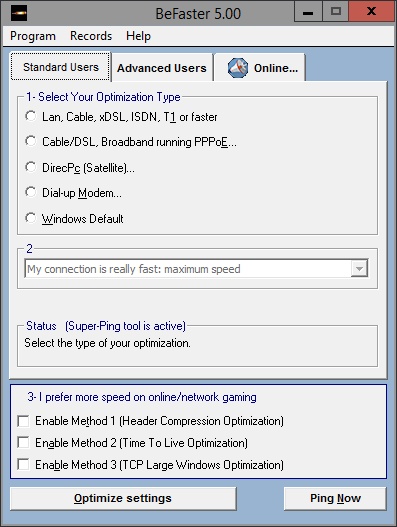
BeFaster is a multi-language internet speed up toolkit with some powerful tools. It makes optimization easier with better support and improved compability. It optimizes all kind of connection types: Dial-up modem, Lan, Wireless, Cable Modem, xDSL, ISDN, T1, DirecPc and Cable/DSL running PPPoE or PPPoA etc. and AOL, Symantec PcAnyWhere, IE, Opera. You can configure settings manually or program can automatically configure them for you. You can optimize your online/network gaming speed easily. Its Super-Ping Tool prevents connection drops and its Ping Now Function awakes suspended modems. Easier and better with multi-language support (over 27 languages). Its live update property will make you informed about the new versions or updated files. You can share your custom settings with your friends by using Records Function.
Latest Reviews

happyboy2x reviewed v4.0 on May 26, 2010
I am testing this new version. It works really good. My adsl2 is really better. but i did not find any scamware with my antivirus program. It is totally clear. I tested with Avast5. Must have a try!

jetz reviewed v4.0 on May 25, 2010
Falls under the catagory of Scamware!

Zoroaster reviewed v3.55 on Aug 30, 2005
I don't know, horsecharles, if you've wasted your time, but you've certainly helped others, as myself, not to lose theirs.
This sort of crapware is the big fashion.
Thanks for your accurate investigation.

horsecharles reviewed v3.55 Beta 1 on Aug 13, 2005
The reviews for this are so humorously excoriating, that i just had to check it out, in between several laughter rollarounds on the floor.
First thing caught my eye was the almost 3mb size-- what could possibly entail all this? So, I took an InstallRite snapshot just before:
The installation performed the following activity:
124 files added
8 files deleted(ok, here-- these were only temp install files)
22 files updated(this is a concern, as some are in windows\system32 on a fully patched winxp sp2-- though in fairness one never knows w/o further time-consuming sleuthing if this was due to the winxp self-registering feature whereby updated system files remain unregistered until initial use)
60 registry entries added
16 registry entries deleted
164 registry entries updated
Sure glad i took a snapshot before installing!
Installed 8/13/2005 8:34:36 PM
Rev. history states this program used to be sponsored by the following spywares: Webhancer, then Navhelper & Navexcel! These have all been removed with or as of this latest release-- instead there's now an option to opt in or out of including the Yahoo Toolbar.
Available in 26 languages-- 26 xxxlanguage.ini files auto-included in the install.
Unbelievable that for a program of such a size, there is only one catch-all optimize button that encompasses isdn, cable, dsl, t1, lan-- this makes no sense. A program like Cablenut(which is smaller in size to boot) differentiates between each, then further depending on down & up speeds, & furthermore by OS version-- while changing many more settings; plus it lists each proposed settings change before, giving a chance to edit it or opt out-- unlike this app(though it does come with an Advanced tab where supposedly afterwards one can edit previous settings).
Program is very annoying:
on initial open, the main module does not open-- it instead goes to homepage to retrieve html help(this is apart from the help already included, which has its separate icon next to the main exe icon), afterwards exiting help closes everything w/o main program having been used!!
Then it's find the icon again, open the program(after an initial register nag screen).
Subsequent clicking(from the third time on) of its icon does not open the program, only opens the reg nag screen, which disappears after clicking Continue; then one's left sitting there waiting for the main program to open-- it does not, & if one's lucky enough to notice a new icon in the systray... it places its icon there-- then it's figure out what method of clicking will get you to the program-- only a right-click works... it will pop up a menu of some 10 choices-- only one of which opens the main program. Exiting the program induces an 'are you sure' final prompt.
Exiting & closing completely the systray icon cannot be done from any of the other menu choices such as Preferences, Help, etc.-- only from the Show BeFaster main program selection or the Exit menu choice.
And all the different modules are separate-- one can't get to preferences from the settings app for instance...
I can't believe i've wasted all this time-- curiosity sure killed the cat.

rpavl reviewed v3.55 Beta 1 on Aug 13, 2005
Simply Garbage

tipsyboy reviewed v3.55 Beta 1 on Aug 13, 2005
This really sucks. Haven't seen such a crappy program for some time.
Stay away from it.

cosmotic reviewed v3.1 on Apr 1, 2003
(havnt used the progeam) Whats wrong with VB? All this program does is optimize registry settings which VB can do easaly.

jsinmacd reviewed v3.0 Beta 10 on Mar 28, 2002
This program did nothing to improve my speed mabey it would do something for someone on dial-up

wonko reviewed v3.0 Beta 10 on Mar 28, 2002
"Supports all operating systems"??
Sure, if by "all operating systems" you mean "Windows". The program's written in Visual Basic. Sheesh.

happyboy2x reviewed v4.0 on May 26, 2010
I am testing this new version. It works really good. My adsl2 is really better. but i did not find any scamware with my antivirus program. It is totally clear. I tested with Avast5. Must have a try!
jetz reviewed v4.0 on May 25, 2010
Falls under the catagory of Scamware!
Zoroaster reviewed v3.55 on Aug 30, 2005
I don't know, horsecharles, if you've wasted your time, but you've certainly helped others, as myself, not to lose theirs.
This sort of crapware is the big fashion.
Thanks for your accurate investigation.
horsecharles reviewed v3.55 Beta 1 on Aug 13, 2005
The reviews for this are so humorously excoriating, that i just had to check it out, in between several laughter rollarounds on the floor.
First thing caught my eye was the almost 3mb size-- what could possibly entail all this? So, I took an InstallRite snapshot just before:
The installation performed the following activity:
124 files added
8 files deleted(ok, here-- these were only temp install files)
22 files updated(this is a concern, as some are in windows\system32 on a fully patched winxp sp2-- though in fairness one never knows w/o further time-consuming sleuthing if this was due to the winxp self-registering feature whereby updated system files remain unregistered until initial use)
60 registry entries added
16 registry entries deleted
164 registry entries updated
Sure glad i took a snapshot before installing!
Installed 8/13/2005 8:34:36 PM
Rev. history states this program used to be sponsored by the following spywares: Webhancer, then Navhelper & Navexcel! These have all been removed with or as of this latest release-- instead there's now an option to opt in or out of including the Yahoo Toolbar.
Available in 26 languages-- 26 xxxlanguage.ini files auto-included in the install.
Unbelievable that for a program of such a size, there is only one catch-all optimize button that encompasses isdn, cable, dsl, t1, lan-- this makes no sense. A program like Cablenut(which is smaller in size to boot) differentiates between each, then further depending on down & up speeds, & furthermore by OS version-- while changing many more settings; plus it lists each proposed settings change before, giving a chance to edit it or opt out-- unlike this app(though it does come with an Advanced tab where supposedly afterwards one can edit previous settings).
Program is very annoying:
on initial open, the main module does not open-- it instead goes to homepage to retrieve html help(this is apart from the help already included, which has its separate icon next to the main exe icon), afterwards exiting help closes everything w/o main program having been used!!
Then it's find the icon again, open the program(after an initial register nag screen).
Subsequent clicking(from the third time on) of its icon does not open the program, only opens the reg nag screen, which disappears after clicking Continue; then one's left sitting there waiting for the main program to open-- it does not, & if one's lucky enough to notice a new icon in the systray... it places its icon there-- then it's figure out what method of clicking will get you to the program-- only a right-click works... it will pop up a menu of some 10 choices-- only one of which opens the main program. Exiting the program induces an 'are you sure' final prompt.
Exiting & closing completely the systray icon cannot be done from any of the other menu choices such as Preferences, Help, etc.-- only from the Show BeFaster main program selection or the Exit menu choice.
And all the different modules are separate-- one can't get to preferences from the settings app for instance...
I can't believe i've wasted all this time-- curiosity sure killed the cat.
rpavl reviewed v3.55 Beta 1 on Aug 13, 2005
Simply Garbage
tipsyboy reviewed v3.55 Beta 1 on Aug 13, 2005
This really sucks. Haven't seen such a crappy program for some time.
Stay away from it.
cosmotic reviewed v3.1 on Apr 1, 2003
(havnt used the progeam) Whats wrong with VB? All this program does is optimize registry settings which VB can do easaly.
jsinmacd reviewed v3.0 Beta 10 on Mar 28, 2002
This program did nothing to improve my speed mabey it would do something for someone on dial-up
wonko reviewed v3.0 Beta 10 on Mar 28, 2002
"Supports all operating systems"??
Sure, if by "all operating systems" you mean "Windows". The program's written in Visual Basic. Sheesh.