File Details |
|
| File Size | 4.0 MB |
|---|---|
| License | Shareware, $15.00 |
| Operating System | Windows (All) |
| Date Added | December 4, 2011 |
| Total Downloads | 66,707 |
| Publisher | Wolfram Podien |
| Homepage | CPUCooL |
Publisher's Description
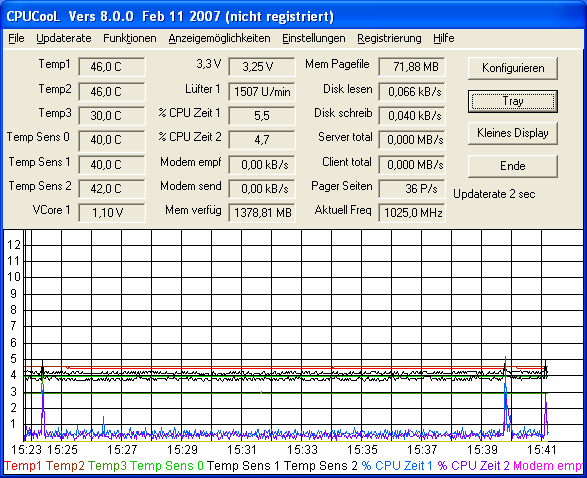
CPUCooL is capable of monitoring temperature, fan speed, voltages for many motherboards. It works with all chipsets from Intel, ALI, VIA, AMD, and SIS 5595 motherboards. You can see the temperature, voltage and fan values of your motherboard chipset.
Latest Reviews

CyberDoc999 reviewed v8.0.11 on Jan 14, 2011
great program

Mr Swiffer reviewed v8.0.11 on Jan 14, 2011
Doesn't work on newer Intel motherboards because they use EFI.

Phat Esther reviewed v8.0.11 on Jan 13, 2011
totally unnecessary in 2011 all features built in latest bios and cpu if not go and buy used but modern motherboard for 15 $ ,
THIS NOT BETA just writed to 64 bit for 4 years old program.
Dear BN, why put here?

Plumber reviewed v8.0.10 on Jun 7, 2010
It's no surprise that on tech-oriented software sites, where people actually know what they're doing, this software is rated at nearly 5/5.

emanresU deriseD reviewed v8.0.9 on May 5, 2009
Why? Well, uh, duh... My board NOMINALLY has CPU fan control built in, but it is literally USELESS. It doesn't do squat to the fan speeds, and is thus useless for noise control. This "feature" is built into the BIOS and has nothing to do with any utility from the board manufacturer that I could run under Windows.
SpeedFan? I can't use it because when I run it along with Avira AntiVir, my system freezes constantly. I don't know which is at fault, or if it is a compatibility issue that defies blame, but I'm absolutely certain of it: On my system, SpeedFan + AntiVir = FREEZES. The SpeedFan author can't/won't find/fix this problem. And no, I am not getting rid of AntiVir.
CPUCooL is the only alternative to SpeedFan that I have found. The interface is ridiculous, but the functionality is there. My only real complaint--other than the silly interface for the program's settings--are that it tends to use a ridiculous amount of CPU time (which is somewhat ironic, since CPU usage is what causes it to heat up...).

photonboy reviewed v8.0.0 on Feb 13, 2007
Why?
Fan Control:
If you have fan speed control for your motherboard then you will have software that come on your MOBO CD or download from the MOBO site so you won't require this.
Temperature and fan speed display:
There are several free programs that will do this.
If there's a reason why you aren't happy with your Motherboard software then there are free programs including "Speedfan" which will serve your needs.
This program is a waste of money.

nLctr reviewed v7.3.8 on Oct 24, 2006
You can get rid of the reporting and stuff which others do better IMO but the PCUCooler service runs without any problem, using almost no memory, and takes CPU temps down at least 8-10C.
I've used CPUCool forever and wouldn't be without it on a high performance rig.

Ashbentiel reviewed v7.3.6 on Apr 19, 2005
"A program that runs to make the CPU Idle ?? Thats the stupidest thing i ever heard of..."
Now that's the stupidest thing ~I~ have ever heard. I'll try and dumb this down so you can understand... There's idling, then there's idling without making the cpu work. Microsoft can't be bothered to care about your cpu running at full possible heat production constantly, unlike linux/freebsd/etc..., so this tool, and others like it, do.
My overclocked dual p3 rig, for instance, would be running 110-120F rather than the 75-85F it runs while sitting idle without a good HLT cooler.
The lesson here is: If you know not whereof you speak, your mouth is best used for chewing.

tpaman1975 reviewed v7.3.3 on Dec 14, 2004
Program installed without an issue, required a reboot. After reboot I tried to start the program via the desktop shortcut and it hard locked my machine. Program was running on a Dell Dimension 4600.
Program also uninstalled without an issue after reboot :-)

daver18qc reviewed v7.3.3 Beta on Dec 4, 2004
A program that runs to make the CPU Idle ?? Thats the stupidest thing i ever heard of... Humm maybe not...(Loading a program to free some ram, lol people are getting dumb these days...)
Tried it like 2 years ago and it never did anything more than heatsink can do...

CyberDoc999 reviewed v8.0.11 on Jan 14, 2011
great program
Mr Swiffer reviewed v8.0.11 on Jan 14, 2011
Doesn't work on newer Intel motherboards because they use EFI.
Phat Esther reviewed v8.0.11 on Jan 13, 2011
totally unnecessary in 2011 all features built in latest bios and cpu if not go and buy used but modern motherboard for 15 $ ,
THIS NOT BETA just writed to 64 bit for 4 years old program.
Dear BN, why put here?
Plumber reviewed v8.0.10 on Jun 7, 2010
It's no surprise that on tech-oriented software sites, where people actually know what they're doing, this software is rated at nearly 5/5.
emanresU deriseD reviewed v8.0.9 on May 5, 2009
Why? Well, uh, duh... My board NOMINALLY has CPU fan control built in, but it is literally USELESS. It doesn't do squat to the fan speeds, and is thus useless for noise control. This "feature" is built into the BIOS and has nothing to do with any utility from the board manufacturer that I could run under Windows.
SpeedFan? I can't use it because when I run it along with Avira AntiVir, my system freezes constantly. I don't know which is at fault, or if it is a compatibility issue that defies blame, but I'm absolutely certain of it: On my system, SpeedFan + AntiVir = FREEZES. The SpeedFan author can't/won't find/fix this problem. And no, I am not getting rid of AntiVir.
CPUCooL is the only alternative to SpeedFan that I have found. The interface is ridiculous, but the functionality is there. My only real complaint--other than the silly interface for the program's settings--are that it tends to use a ridiculous amount of CPU time (which is somewhat ironic, since CPU usage is what causes it to heat up...).
photonboy reviewed v8.0.0 on Feb 13, 2007
Why?
Fan Control:
If you have fan speed control for your motherboard then you will have software that come on your MOBO CD or download from the MOBO site so you won't require this.
Temperature and fan speed display:
There are several free programs that will do this.
If there's a reason why you aren't happy with your Motherboard software then there are free programs including "Speedfan" which will serve your needs.
This program is a waste of money.
nLctr reviewed v7.3.8 on Oct 24, 2006
You can get rid of the reporting and stuff which others do better IMO but the PCUCooler service runs without any problem, using almost no memory, and takes CPU temps down at least 8-10C.
I've used CPUCool forever and wouldn't be without it on a high performance rig.
Ashbentiel reviewed v7.3.6 on Apr 19, 2005
"A program that runs to make the CPU Idle ?? Thats the stupidest thing i ever heard of..."
Now that's the stupidest thing ~I~ have ever heard. I'll try and dumb this down so you can understand... There's idling, then there's idling without making the cpu work. Microsoft can't be bothered to care about your cpu running at full possible heat production constantly, unlike linux/freebsd/etc..., so this tool, and others like it, do.
My overclocked dual p3 rig, for instance, would be running 110-120F rather than the 75-85F it runs while sitting idle without a good HLT cooler.
The lesson here is: If you know not whereof you speak, your mouth is best used for chewing.
tpaman1975 reviewed v7.3.3 on Dec 14, 2004
Program installed without an issue, required a reboot. After reboot I tried to start the program via the desktop shortcut and it hard locked my machine. Program was running on a Dell Dimension 4600.
Program also uninstalled without an issue after reboot :-)
daver18qc reviewed v7.3.3 Beta on Dec 4, 2004
A program that runs to make the CPU Idle ?? Thats the stupidest thing i ever heard of... Humm maybe not...(Loading a program to free some ram, lol people are getting dumb these days...)
Tried it like 2 years ago and it never did anything more than heatsink can do...

deanparkr reviewed v7.2.12 on Apr 13, 2004
Failed- Reporting that I did not have any CPU drivers installed.
Needs more attention

bsf reviewed v7.2.8 on Oct 12, 2003
before on my desktop, my CPU was too hot, and i used this (version 5 I think) and it really helped me, because the windows 2k/XP idle doesn't do that much EVEN it said idle my CPU ws like always 70+ degrees sometimes 80+ (celcius) that thing brougt it down to 30 (until one day the weather killed it.. lightening..)but now .. it's getting more and.. more complicated.. I liked the good old one.

robin_v reviewed v7.2.3 on May 11, 2003
This program couldn't recognise my Intel chipset or CPU (Celeron.) I think it might require a bit more work before it's released. The idea's quite good but it's back to the drawing board, I feel. It told me that I had twice as many SDRAM banks as I actually have, for instance.