File Details |
|
| File Size | 0.7 MB |
|---|---|
| License | Adware |
| Operating System | Mac OS X |
| Date Added | January 29, 2003 |
| Total Downloads | 299,426 |
| Publisher | Jon Hess |
| Homepage | Direct Connect |
Publisher's Description
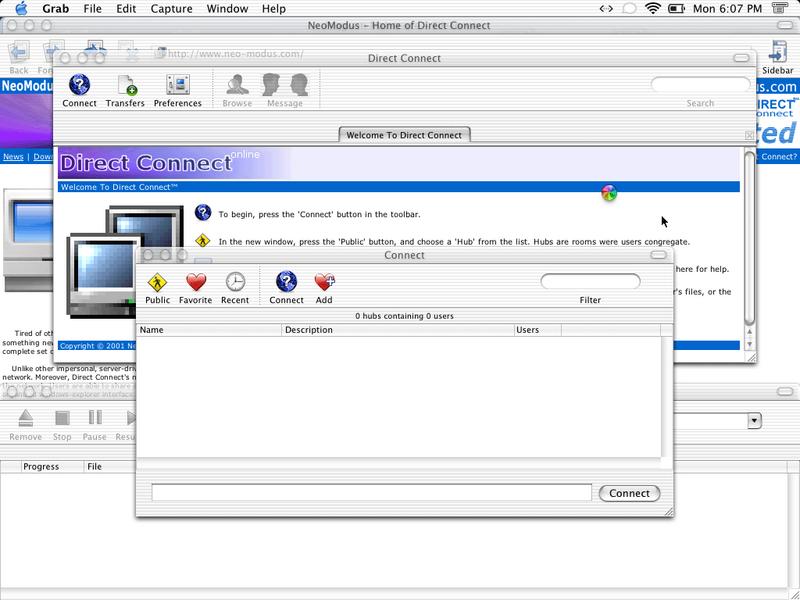
Direct Connect offers a community-oriented, open, user-controlled network. Moreover, its network architecture is built on a peer-to-peer foundation; users run, control, and maintain the network. Users are able to share any type of file - absolutely no restrictions. These files are easily viewed through a familiar organized windows-explorer interface. To conveniently access the plethora of files, advanced searching capabilities and filters are provided. All of these features are integrated into Direct Connect's unique communal file-sharing system.
Latest Reviews

olivergiving reviewed v1.1.0 on Sep 25, 2013
kind of annoying

Tric_trac reviewed v1.1.0 on Feb 18, 2006
I have major issues with this programme, I have been banned from my university hub cause DC is not sending them a desription of available tags!

happykoala reviewed v1.1.0 on Jul 6, 2005
1. Web site of author no longer works. Its blank.
2. Client will not retrieve a list of hubs when public button is pressed.
Even the very war macdc++ client from sourceforge is more useable....but thats awful too.
This software is dead.

Lotr reviewed v1.1.0 on Apr 28, 2005
I've tried windows DC & DC++ & the mac version really is primitive in comparison. With each OSX update new problems are faced. About time DC for OSX was UPDATED! In fact way over-time to fix it up in preparation for OSX Tiger & get rid of the little problems it has. It's not the most share friendly app either .. very temperamental & inconsistent in that & other regards.
(eggroll sounds like you need to forward a port: Look under apple here: http://www.portforward.com/routers.htm)

eggroll reviewed v1.1.0 on Mar 16, 2005
yeah i got it working, it was pretty simple (im not sure if i did it correctly or if i just managed some sort of jury rig)
anyways,
go > utilities > airport admin utility
select your airport and hit configure
go to the port mapping tab and add a new port
i havent done this in a while, as i havent had my own internet connection, but here's what i remember
public port: 32000
private address:
private port: 32000
if you go to system preferences > network, your airport summary should tell you what private ip has been assigned to your computer by your router. this goes in private address. in my case, 10.0.1.2
update the airport.
now open dc++ and go to preferences (in whichever client you're using it should be really similar). if you go to whatismyip.com - this site will tell you what your isp has assigned to you as your IP addess. you can also find it in the network settings somewhere.
ok so in dc++, go to preferences, network tab, select active and hit the advanced button.
address: the IP address you pulled from whatismyip.com
download port: 32000
search port: 32000
i used 32000 because, for some weird reason, whatever port i arbitrarily decided to open and use, dc++ would change the advanced setting from my port to 32000. so i went back and opened that port instead, and i was active.
you should be set. let me know if something is still ****ed up.

owlwoman44 reviewed v1.1.0 on Mar 14, 2005
This is a good product, at least it could be.
the Mac version gets me booted from hubs because of the tags, not being right(im not sure what that means but its not fair)
I am sure you could fix this with not too much effort. there has not been a Mac update in ages.
Please do a Mac update
Thanks

Beetlemeyer reviewed v1.1.0 on Mar 10, 2005
As for the Mac version, this is the worst program EVER!!!! I can't get on my school's hub simply because they didn't put a description for the hub. Seriously, very disappointed with the low quality of this program.

the_black_arts reviewed v1.1.0 on Oct 18, 2003
i am SICK and TIRED of always getting BOOTED for "fake share" when I have 120GB! it's all because this doesn't show ANYTHING to the OPs and I get booted for not having DC++ !!! come on!

bloodanguts reviewed v1.1.0 on Jul 2, 2003
Some Mac Hubs
mac.myftp.org
dfm.myftp.org:1090
steroidmaximus.zapto.org:1090
moshub.no-ip.info:1090

banjo reviewed v1.1.0 on May 23, 2003
Serious flaws in file naming and creation makes DC for X dangerous.
First I must join the line of thankful mac-users, this is the first really usable client for the dc network. However, one should be aware of certain weaknesses that may harm your computer. Firstly, files with names with non-ascii (Latin-1) characters can be downloaded but the names are garbled, two latin-1 characters add upp to one unicode character in the filename, sometimes this creates unfortunate filenames that cannot be deleted in the Finder.
More alarmingly, files created by DC doesn't always create correct data in the file structure, or the HFS+ tree. This means that the files are reported as erroneous when the machine is booted under OS 9. I made the mistake of deleting such a file while running OS 9 with the unfortunate result that many files were lost from my hard disk due to a partially destroyed file structure.

olivergiving reviewed v1.1.0 on Sep 25, 2013
kind of annoying
Tric_trac reviewed v1.1.0 on Feb 18, 2006
I have major issues with this programme, I have been banned from my university hub cause DC is not sending them a desription of available tags!
happykoala reviewed v1.1.0 on Jul 6, 2005
1. Web site of author no longer works. Its blank.
2. Client will not retrieve a list of hubs when public button is pressed.
Even the very war macdc++ client from sourceforge is more useable....but thats awful too.
This software is dead.
Lotr reviewed v1.1.0 on Apr 28, 2005
I've tried windows DC & DC++ & the mac version really is primitive in comparison. With each OSX update new problems are faced. About time DC for OSX was UPDATED! In fact way over-time to fix it up in preparation for OSX Tiger & get rid of the little problems it has. It's not the most share friendly app either .. very temperamental & inconsistent in that & other regards.
(eggroll sounds like you need to forward a port: Look under apple here: http://www.portforward.com/routers.htm)
eggroll reviewed v1.1.0 on Mar 16, 2005
yeah i got it working, it was pretty simple (im not sure if i did it correctly or if i just managed some sort of jury rig)
anyways,
go > utilities > airport admin utility
select your airport and hit configure
go to the port mapping tab and add a new port
i havent done this in a while, as i havent had my own internet connection, but here's what i remember
public port: 32000
private address:
private port: 32000
if you go to system preferences > network, your airport summary should tell you what private ip has been assigned to your computer by your router. this goes in private address. in my case, 10.0.1.2
update the airport.
now open dc++ and go to preferences (in whichever client you're using it should be really similar). if you go to whatismyip.com - this site will tell you what your isp has assigned to you as your IP addess. you can also find it in the network settings somewhere.
ok so in dc++, go to preferences, network tab, select active and hit the advanced button.
address: the IP address you pulled from whatismyip.com
download port: 32000
search port: 32000
i used 32000 because, for some weird reason, whatever port i arbitrarily decided to open and use, dc++ would change the advanced setting from my port to 32000. so i went back and opened that port instead, and i was active.
you should be set. let me know if something is still ****ed up.
owlwoman44 reviewed v1.1.0 on Mar 14, 2005
This is a good product, at least it could be.
the Mac version gets me booted from hubs because of the tags, not being right(im not sure what that means but its not fair)
I am sure you could fix this with not too much effort. there has not been a Mac update in ages.
Please do a Mac update
Thanks
Beetlemeyer reviewed v1.1.0 on Mar 10, 2005
As for the Mac version, this is the worst program EVER!!!! I can't get on my school's hub simply because they didn't put a description for the hub. Seriously, very disappointed with the low quality of this program.
the_black_arts reviewed v1.1.0 on Oct 18, 2003
i am SICK and TIRED of always getting BOOTED for "fake share" when I have 120GB! it's all because this doesn't show ANYTHING to the OPs and I get booted for not having DC++ !!! come on!
bloodanguts reviewed v1.1.0 on Jul 2, 2003
Some Mac Hubs
mac.myftp.org
dfm.myftp.org:1090
steroidmaximus.zapto.org:1090
moshub.no-ip.info:1090
banjo reviewed v1.1.0 on May 23, 2003
Serious flaws in file naming and creation makes DC for X dangerous.
First I must join the line of thankful mac-users, this is the first really usable client for the dc network. However, one should be aware of certain weaknesses that may harm your computer. Firstly, files with names with non-ascii (Latin-1) characters can be downloaded but the names are garbled, two latin-1 characters add upp to one unicode character in the filename, sometimes this creates unfortunate filenames that cannot be deleted in the Finder.
More alarmingly, files created by DC doesn't always create correct data in the file structure, or the HFS+ tree. This means that the files are reported as erroneous when the machine is booted under OS 9. I made the mistake of deleting such a file while running OS 9 with the unfortunate result that many files were lost from my hard disk due to a partially destroyed file structure.

brian35453 reviewed v1.1.0 on Apr 25, 2003
If youre going to download this, you should have a broadband connection. 99% of the people have broadband. You're going to be sharing large files!

momenth reviewed v1.1.0 on Apr 14, 2003
Version 1.01 was better. For me, the only noticeable change with this version is that you're forced to use a shorter username. 1 point off for that. So until you fix the username-length, I'm using the previous version.
-For those having trouble with hubs that don't see your share-size:
It's not DC:s fault. It's the hubsoftware, like DC++ hubsoft, that's not compatible with NMDC. -If it bothers you, try writing "mac-user" in your userinfo. Most hubowners/admins are aware that there's no "tags" sent that's compatible in DC++.
JavaDC suck bigtime. Buggy as h*ll. -Don't use it. -Latest release is from 2001.
DC for linux is hard to use and it's very common amongst hubowners to kick user with this client, since it's disliked and a source of trouble for other users.
Use NeoModus DC. -Best alternative for MacOS X!

Madcoil reviewed v1.1.0 on Apr 14, 2003
P-Chaaaaaaaaaaaaaaan! >_