
File Details |
|
| File Size | 88.6 MB |
|---|---|
| License | Freeware |
| Operating System | Windows (All) |
| Date Added | December 7, 2020 |
| Total Downloads | 36,573 |
| Publisher | Softland |
| Homepage | FBackup |
Publisher's Description
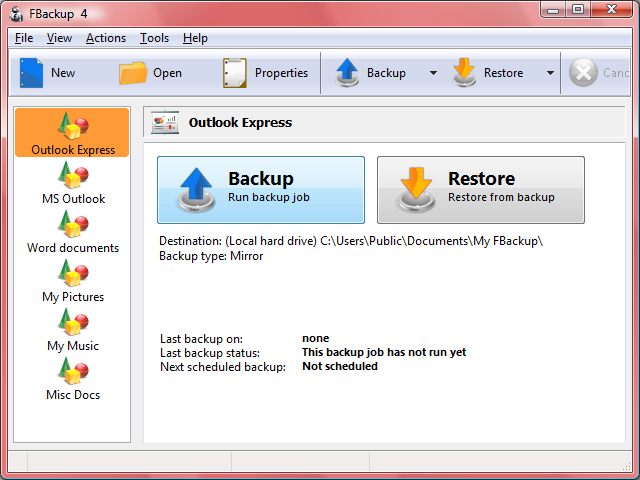
FBackup is freeware backup program for Windows. FBackup protects your important files and folders from partial or total loss by automating backup tasks, password protecting and compressing it to save storage space. Using FBackup you can easily backup to any local or network drive or to external drives (such as USB drives).
FBackup can backup open/locked files and it can perform full and mirror backups (backup type that does not compress the files). When defining a backup you can also set file filters and schedule the backup for automatic execution.
Latest Reviews

breebree reviewed v5.0.460 on May 28, 2014
Have been using this for quiet awhile, recently the puter took a surge [and let lots of blue smoke out the back of the power supply]. One new PS later and a new Hard Drive that had died, I turned to my back ups on a removable hard drive.. installed windows 7 from cd and got the system stable with all updates and drivers ect. I don't use FB for disk imaging as its not meant for that and i knew that going in , its meant to backup data/pics/music files ect.. well got the stuff installed then got out the FB backups. they went right in to the data folders where i had back them up out of originally. all my pics, music, and most importantly my banking was restored perfectly.
This prog is for just that. backup of your data files.. it does this perfectly and reliably as the media you put it on. I has never let me down . I use its big brother Backup4All for full disk images and it to has done its job.. ,, why 2 Backup programs. well for short i don't NEED a huge program to backup just data files. FBackup is a simple way to keep your personal files backed up and that just in case happens, and it WILL happen .So for me its a great program. It works as ment to , Its fast and simple. it just does its job.. They one thing i Wish they would add is a incremental back up mode.IE just backup what has changed in the folders you tell it to.

sajjansinghania reviewed v5.0.370 on Feb 23, 2014
Useless childish software. Not worth even when free. Does not offer even basic needs. Support is unreachable. Registering into support is like climbing on himalayas.

pjafrombbay reviewed v5.0.325 on Jan 18, 2014
CyberDoc999,
I simply DO NOT have to mirror 4 tb of data. If you do then I believe that there are MUCH BETTER ALTERNATIVES than this rubbish software. Try Bvckup (http://www.bvckup.com/).
These ratings are based on the way the software being rated meets the needs, requirements and experience of the individual who is undertaking the rating. So if my rating is one star and yours is five stars it DOES NOT mean my rating is not valid. You need to think about these issues a little before committing to print.
Peter

CyberDoc999 reviewed v5.0.325 on Jan 17, 2014
pjafrombbay good ...you do not need it ... try and mirror 4 tb of data and you will see a new need
pjafrombbay reviewed v5.0.314 on Jan 7, 2014
MY LAST RANT ON THIS SOFTWARE
---------------------------------------------
I used the link to the FBackup home page. I was able to find a link to the "Change Log" buried at the bottom of the home page. The Change Log's last entry is dated Tue Oct 15, 2013 12:25 pm and that was for the "Final Release" for FBackup version 5. There have been many releases since; the current version being 5.0.314. What has been fixed in these upgrades? Who knows!
I intend to stick with NOT USING ANY back-up software; its simply system bloat. Use a good two-pane file manager and simply copy your files from your computer to your back-up drive. Its easy and one less software product to monitor/maintain.
Regards,
Peter
pjafrombbay reviewed v5.0.309 on Dec 21, 2013
There have been several minor releases since my critical review below. Softland is NOT telling us what has been fixed/addressed in these upgrades. So I guess I will maintain my low rating and "Don't use" recommendation.
Actually, I have recently upgraded my PC to Windows 8 (as a result of earlier problems with FBackup) and am backing up my Windows Libraries by just copying the directories from my hard drive to my USB connected backup drive. Who actually needs backup software. I have used Xplorer2 (a two paned file manager) instead of Windows Explorer (a single pane file manager) for years. I am simply copying libraries (directories) from one pane to the other. I'm doing this without the pain of using specific backup software (the pun was deliberately intended :-) ).
Regards,
Peter
PS: Merry holiday season to fileForum users all around the world
pjafrombbay reviewed v5.0.304 on Dec 16, 2013
This software caused a really annoying problem on my computer causing me days of effort trying to resolve the issue. I was getting an error with a program called ntdll.dll and every Googled solution had no effect. Good detective work tracked the issue down to FBackup. Once the program was uninstalled (three days after the problem started (and I updated this software)) all was well again. I have since uninstalled doPDF which is developed by the same crew that does FBackup -- can't trust them.
Now I use bvckup instead of FBackup and Bullzip instead of doPDF; I'm happy with both.
Regards,
Peter

oompoop reviewed v5.0.245 on Nov 25, 2013
... to much online business.

smaragdus reviewed v5.0.230 on Nov 7, 2013
The ribbon made it useless.
breebree reviewed v5.0.230 on Nov 7, 2013
Have used this software both for back up and more importantly for restore. It worked as advertised. It was simple and worked well. It has saved me now twice when a bad motherboard took out the hard drives in raid mirror setup. I like the better package now due to the greater range of ability. That said for simple backup this program worked for me very well and I would use it for that and still do.

breebree reviewed v5.0.460 on May 28, 2014
Have been using this for quiet awhile, recently the puter took a surge [and let lots of blue smoke out the back of the power supply]. One new PS later and a new Hard Drive that had died, I turned to my back ups on a removable hard drive.. installed windows 7 from cd and got the system stable with all updates and drivers ect. I don't use FB for disk imaging as its not meant for that and i knew that going in , its meant to backup data/pics/music files ect.. well got the stuff installed then got out the FB backups. they went right in to the data folders where i had back them up out of originally. all my pics, music, and most importantly my banking was restored perfectly.
This prog is for just that. backup of your data files.. it does this perfectly and reliably as the media you put it on. I has never let me down . I use its big brother Backup4All for full disk images and it to has done its job.. ,, why 2 Backup programs. well for short i don't NEED a huge program to backup just data files. FBackup is a simple way to keep your personal files backed up and that just in case happens, and it WILL happen .So for me its a great program. It works as ment to , Its fast and simple. it just does its job.. They one thing i Wish they would add is a incremental back up mode.IE just backup what has changed in the folders you tell it to.
sajjansinghania reviewed v5.0.370 on Feb 23, 2014
Useless childish software. Not worth even when free. Does not offer even basic needs. Support is unreachable. Registering into support is like climbing on himalayas.
pjafrombbay reviewed v5.0.325 on Jan 18, 2014
CyberDoc999,
I simply DO NOT have to mirror 4 tb of data. If you do then I believe that there are MUCH BETTER ALTERNATIVES than this rubbish software. Try Bvckup (http://www.bvckup.com/).
These ratings are based on the way the software being rated meets the needs, requirements and experience of the individual who is undertaking the rating. So if my rating is one star and yours is five stars it DOES NOT mean my rating is not valid. You need to think about these issues a little before committing to print.
Peter
CyberDoc999 reviewed v5.0.325 on Jan 17, 2014
pjafrombbay good ...you do not need it ... try and mirror 4 tb of data and you will see a new need
pjafrombbay reviewed v5.0.314 on Jan 7, 2014
MY LAST RANT ON THIS SOFTWARE
---------------------------------------------
I used the link to the FBackup home page. I was able to find a link to the "Change Log" buried at the bottom of the home page. The Change Log's last entry is dated Tue Oct 15, 2013 12:25 pm and that was for the "Final Release" for FBackup version 5. There have been many releases since; the current version being 5.0.314. What has been fixed in these upgrades? Who knows!
I intend to stick with NOT USING ANY back-up software; its simply system bloat. Use a good two-pane file manager and simply copy your files from your computer to your back-up drive. Its easy and one less software product to monitor/maintain.
Regards,
Peter
pjafrombbay reviewed v5.0.309 on Dec 21, 2013
There have been several minor releases since my critical review below. Softland is NOT telling us what has been fixed/addressed in these upgrades. So I guess I will maintain my low rating and "Don't use" recommendation.
Actually, I have recently upgraded my PC to Windows 8 (as a result of earlier problems with FBackup) and am backing up my Windows Libraries by just copying the directories from my hard drive to my USB connected backup drive. Who actually needs backup software. I have used Xplorer2 (a two paned file manager) instead of Windows Explorer (a single pane file manager) for years. I am simply copying libraries (directories) from one pane to the other. I'm doing this without the pain of using specific backup software (the pun was deliberately intended :-) ).
Regards,
Peter
PS: Merry holiday season to fileForum users all around the world
pjafrombbay reviewed v5.0.304 on Dec 16, 2013
This software caused a really annoying problem on my computer causing me days of effort trying to resolve the issue. I was getting an error with a program called ntdll.dll and every Googled solution had no effect. Good detective work tracked the issue down to FBackup. Once the program was uninstalled (three days after the problem started (and I updated this software)) all was well again. I have since uninstalled doPDF which is developed by the same crew that does FBackup -- can't trust them.
Now I use bvckup instead of FBackup and Bullzip instead of doPDF; I'm happy with both.
Regards,
Peter
oompoop reviewed v5.0.245 on Nov 25, 2013
... to much online business.
smaragdus reviewed v5.0.230 on Nov 7, 2013
The ribbon made it useless.
breebree reviewed v5.0.230 on Nov 7, 2013
Have used this software both for back up and more importantly for restore. It worked as advertised. It was simple and worked well. It has saved me now twice when a bad motherboard took out the hard drives in raid mirror setup. I like the better package now due to the greater range of ability. That said for simple backup this program worked for me very well and I would use it for that and still do.

jacobjackson reviewed v5.0 Build 168 Beta on Aug 24, 2013
fbackup is perfect
pjafrombbay reviewed v4.8.289 on Jan 11, 2013
DudeBoyz
Who would ever call themselves "DudeBoyz"?
Anyway, his review is rubbish. I have found this product to be quite good. Reliable and does what it says on the box :-)
Regards,
Peter

DudeBoyz reviewed v4.8.278 on Jul 13, 2012
First, you guys have a very ugly website. Incredibly unprofessional right from the start.
Moving on, the free version is so crippled it makes it virtually useless. It's nothing more than a worthless taste to push you towards their $50 Backup4All Pro.
Save yourself the trouble and just go purchase O&O Disk Image 6 Pro instead.