File Details |
|
| File Size | 3.8 MB |
|---|---|
| License | Shareware, $24.95 |
| Operating System | Windows 2000/9x/Server 2003/XP |
| Date Added | October 30, 2009 |
| Total Downloads | 2,555 |
| Publisher | Mythicsoft Ltd. |
| Homepage | FileLocator Pro |
Publisher's Description
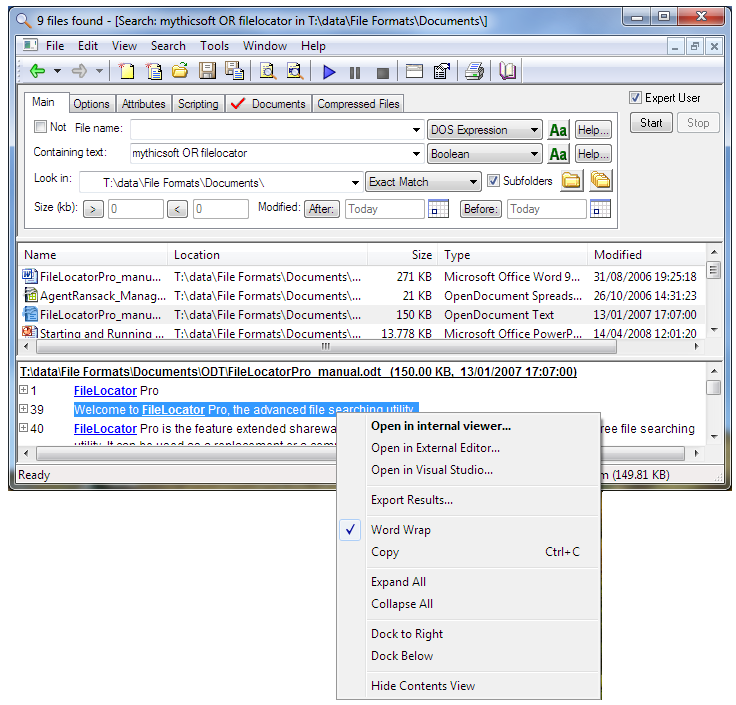
FileLocator Pro offers the most affordable way to exhaustively search your computer for all your important data. Unlike other search products like Windows XP's built in search, it does not consider any file too small or insignificant to examine. It works with regular exressions in both contents and file names, supports scripting, internal and external editing, sorting, etc.
Latest Reviews

NikB reviewed v5.2.0.1025 on Jan 22, 2023
I've been using it for many years, it's the best, but that doesn't prevent the syntax of the terms to be absolutely wooden. Even a simple expression like this "bms AND (NOT:*.dll;*.exe;*.sys)" cannot process normally.
terrible search filter doesn't handle simple AND/OR ("bms AND (NOT:*txt);
there is no option to filter the result.

emanresU deriseD reviewed v5.2.0.1025 on Oct 30, 2009
The utility by the name of "Everything" is good at what it does, but it doesn't let you search within documents (DOC, DOCX, PDF, TIF, XLS, XLSX, etc.) or within archives (7Z, CAB, ISO, RAR, ZIP, etc.) the way FLP can. FLP also lets you restrict results by attribute (archive, folder, system, compressed, hidden, sparse, encrypted, offline, index, or readonly). It can also show file content in search results, and let you jump directly to the line(s) displayed therein.
So in short, while FLP isn't perfect (see my previous review), comparing it to "Everything" doesn't make a hell of a lot of sense.
emanresU deriseD reviewed v4.5 Build 842 on Aug 12, 2009
I cannot believe that after all this time, FLP still does not allow you to search by file/directory CREATION DATE/TIME. You cannot even display a create date column in the search results. This is an annoying limitation.

aleng reviewed v4.5 Build 842 on Jan 16, 2009
Found FL good, as i hate the indexing stuff. But prefer "Everything" from http://www.voidtools.com/. Fast and Free

uecic reviewed v4.5 Build 828 on Aug 7, 2008
Simply the best ! I use it for 2 years now, and I couldn't live without.

Undesired Username reviewed v4.5 Build 828 on Aug 7, 2008
Yawn? Let me know when Locate32 has a preview pane like FileLocator Pro does. Also let me know how fun it is that you need to be sure you have a recent index each time you search with Locate32, or else the results may not be accurate. And how about searching within 7Z, CAB, ISO, PDF, and all the other file types FLP supports? Can Locate32 do that? I hope I haven't disturbed your slumber with all these facts.

zridling reviewed v4.0.0 Build 754 on Feb 27, 2007
Really cool.
Really strong features, including RegEx.
Really powerful.
Really fast.
zridling reviewed v3.0 Build 638 on Mar 27, 2006
Most will like the changes in 3.1x. Check it out. Oh, and this should be listed as 3.1 build 638, not 3.0.

Inray reviewed v3.0 Build 609 on Aug 21, 2005
I always used GREP like utilities to locate files in my computer. Unfortunately most GUI file find utilities available are slow or limited in terms of regular expressions support.
FileLocator Pro is an excellent alternative to command line GREP utils. It has the speed and many advanced features like scripting, regex etc.
I have to agree with previous reviewers, FLP lacks some features. It has no Explorer like renaming, visible columns customization or full drag and drop support.
But it is fast, even when searching for text content or a regular expression and that's enough for me to adopt FLP for my searchings.
Highly Recommended

httpd.confused reviewed v3.0 Build 609 on Aug 21, 2005
I don't expect it to be a full-fledged renaming utility; but even PowerDesk Pro's "File Finder" applet supports F2 renaming (which, come on now, is the de-facto standard for renaming a file in Windows).
The PowerDesk Pro applet also supports full drag-and-drop. FileLocator Pro 3.0 still only lets you drag-and-drop with the left mouse button (to perform a copy), but not at all with the right mouse button (to do ... whatever you want). This also means, of course, that FLP can't work with any shell extensions making use of DragDropHandlers registration.
But zridling's Alt+Enter suggestion led me to a new FLP discovery (read: annoyance/limitation): Alt+Enter does bring up a file's Properties dialog, but Alt+DoubleClick simply runs the file. The Alt key is ignored. Again, this runs counter to any decent file finder or Explorer replacement, not to mention Explorer itself.
When you throw in the fact that FLP's built-in accelerator keys (i.e. Alt+N to go to the "File name" text box; Alt+C to go to the "Containing text" text box, etc.) don't work at all when the file list has focus, hopefully my points begin to sink in.
The main reason I use FLP is for its very-useful "contents view" feature. But the limitations above will keep it from getting a 5 out of me for as long as they continue to exist.

NikB reviewed v5.2.0.1025 on Jan 22, 2023
Pros: the best
Cons: terrible search filter doesn't handle simple AND/OR ("bms AND (NOT:*txt);
there is no option to filter the result.
Bottom Line: I've been using it for many years, it's the best, but that doesn't prevent the syntax of the terms to be absolutely wooden. Even a simple expression like this "bms AND (NOT:*.dll;*.exe;*.sys)" cannot process normally.
terrible search filter doesn't handle simple AND/OR ("bms AND (NOT:*txt);
there is no option to filter the result.
emanresU deriseD reviewed v5.2.0.1025 on Oct 30, 2009
The utility by the name of "Everything" is good at what it does, but it doesn't let you search within documents (DOC, DOCX, PDF, TIF, XLS, XLSX, etc.) or within archives (7Z, CAB, ISO, RAR, ZIP, etc.) the way FLP can. FLP also lets you restrict results by attribute (archive, folder, system, compressed, hidden, sparse, encrypted, offline, index, or readonly). It can also show file content in search results, and let you jump directly to the line(s) displayed therein.
So in short, while FLP isn't perfect (see my previous review), comparing it to "Everything" doesn't make a hell of a lot of sense.
emanresU deriseD reviewed v4.5 Build 842 on Aug 12, 2009
I cannot believe that after all this time, FLP still does not allow you to search by file/directory CREATION DATE/TIME. You cannot even display a create date column in the search results. This is an annoying limitation.
aleng reviewed v4.5 Build 842 on Jan 16, 2009
Found FL good, as i hate the indexing stuff. But prefer "Everything" from http://www.voidtools.com/. Fast and Free
uecic reviewed v4.5 Build 828 on Aug 7, 2008
Simply the best ! I use it for 2 years now, and I couldn't live without.
Undesired Username reviewed v4.5 Build 828 on Aug 7, 2008
Yawn? Let me know when Locate32 has a preview pane like FileLocator Pro does. Also let me know how fun it is that you need to be sure you have a recent index each time you search with Locate32, or else the results may not be accurate. And how about searching within 7Z, CAB, ISO, PDF, and all the other file types FLP supports? Can Locate32 do that? I hope I haven't disturbed your slumber with all these facts.
zridling reviewed v4.0.0 Build 754 on Feb 27, 2007
Really cool.
Really strong features, including RegEx.
Really powerful.
Really fast.
zridling reviewed v3.0 Build 638 on Mar 27, 2006
Most will like the changes in 3.1x. Check it out. Oh, and this should be listed as 3.1 build 638, not 3.0.
Inray reviewed v3.0 Build 609 on Aug 21, 2005
I always used GREP like utilities to locate files in my computer. Unfortunately most GUI file find utilities available are slow or limited in terms of regular expressions support.
FileLocator Pro is an excellent alternative to command line GREP utils. It has the speed and many advanced features like scripting, regex etc.
I have to agree with previous reviewers, FLP lacks some features. It has no Explorer like renaming, visible columns customization or full drag and drop support.
But it is fast, even when searching for text content or a regular expression and that's enough for me to adopt FLP for my searchings.
Highly Recommended
httpd.confused reviewed v3.0 Build 609 on Aug 21, 2005
I don't expect it to be a full-fledged renaming utility; but even PowerDesk Pro's "File Finder" applet supports F2 renaming (which, come on now, is the de-facto standard for renaming a file in Windows).
The PowerDesk Pro applet also supports full drag-and-drop. FileLocator Pro 3.0 still only lets you drag-and-drop with the left mouse button (to perform a copy), but not at all with the right mouse button (to do ... whatever you want). This also means, of course, that FLP can't work with any shell extensions making use of DragDropHandlers registration.
But zridling's Alt+Enter suggestion led me to a new FLP discovery (read: annoyance/limitation): Alt+Enter does bring up a file's Properties dialog, but Alt+DoubleClick simply runs the file. The Alt key is ignored. Again, this runs counter to any decent file finder or Explorer replacement, not to mention Explorer itself.
When you throw in the fact that FLP's built-in accelerator keys (i.e. Alt+N to go to the "File name" text box; Alt+C to go to the "Containing text" text box, etc.) don't work at all when the file list has focus, hopefully my points begin to sink in.
The main reason I use FLP is for its very-useful "contents view" feature. But the limitations above will keep it from getting a 5 out of me for as long as they continue to exist.
zridling reviewed v3.0 Build 609 on Aug 20, 2005
Hey, that's why it's a locator, not a renamer. (But would an F2 rename operation kill them?) Just hit ALT+Enter and rename. The 3.x version adds more RegEx functionality and speeds everything up, from file find to running scripts.
[Addendum]: Hey, no fair, httpd. FLP is not a Windows Explorer replacement like PowerDesk Pro, even with PDP's File Finder module. I'll grant it could add an F2 renaming shortcut, and I'll even submit your suggestions to the developer. The inability to jump back to the File Name box using its own shortcut key (ALT+N) unless your cursor is in that part of the program is an annoyance. (But PowerDesk's File Finder has the exact flaw.) So I'll recant, change my vote to a 4, write the developer and see how long it takes to add/fix these issues. Should be interesting.
httpd.confused reviewed v2.0.2 Build 531 on May 23, 2005
Never quite finished is right! So why give it a 5? You can't even rename a file with F2 in FileLocator Pro!
zridling reviewed v2.0.2 Build 531 on Mar 7, 2005
httpd.confused has a point about the utility of drag-n-drop here, but like much software, this is an app that was never quite finished.