File Details |
|
| File Size | 1.8 MB |
|---|---|
| License | Freeware |
| Operating System | Windows 7/2000/Server 2008/Vista/XP |
| Date Added | March 6, 2011 |
| Total Downloads | 6,507 |
| Publisher | Naru |
| Homepage | Flexible Renamer |
Publisher's Description
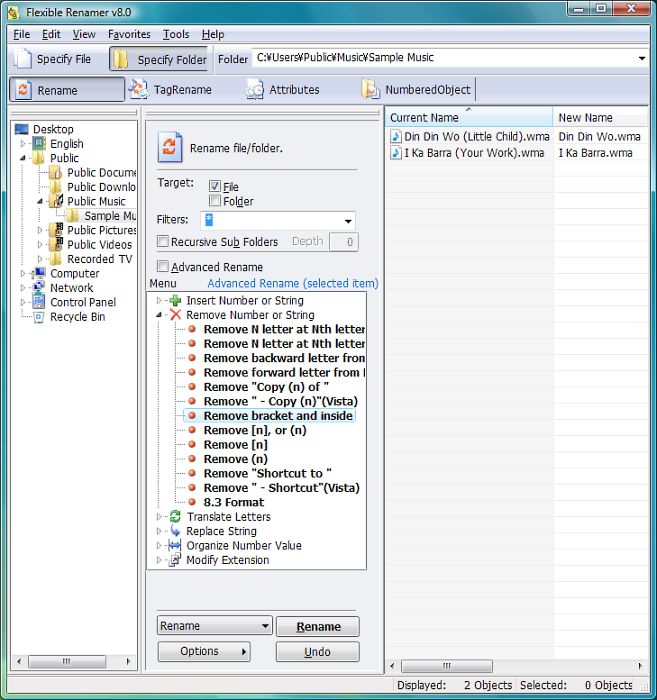
Flexible Renamer is a file/folder renaming utility which can use Wildcard or Regular-Expression and Tag-information (MP3, EXIF).
Latest Reviews

nLctr reviewed v8.2 on Jul 20, 2010
Great tool! Glad to see it is still being maintained.

drys reviewed v8.1 Beta on Feb 10, 2009
I HATE IT
has to build tons of parmeters not intuitive . never managed it to do the job. spent 4 hours trying to figure it out read in forum and in help.
no idea to have to learn making scripts, just to rename a bunch of files from different nameand number.swf to font01.svf font02.swf etc shoud be easiest in the world.
ability to save scripts great but no scripts with program

DudeBoyz reviewed v8.1 Beta on Nov 17, 2008
This is a pretty decent effort, and it has promise, but I think it has quite a ways to go before it matches Rename Master, which I think is still the best freeware application in this class. Betanews has it listed here for comparison:
http://fileforum.betanew...ame_Master/1050495974/1
This is worth keeping an eye on though, and I expect that with some interface tweaking to make it more efficient, and a bit of simplification overall, this program will rate at least a 4 out of 5.
Hopefully they'll keep working on it and frequent updates will keep coming.

zridling reviewed v8.0 on Nov 12, 2008
This was released April 8th (2008). Surprised the author just updated this page.

TomRC reviewed v8.0 on Nov 12, 2008
What a huge update after six years! Still the best in its class but now with
Unicode, Multilanguage, .... love it!

Erator reviewed v7.3 on Feb 15, 2007
My favorite file renaming utility!
To the author: Thank you!

cricri_pingouin reviewed v7.3 on Oct 12, 2006
If I compare with, say, Rename Master, this one will not allow you to rename some unicode file names. Rename Master will not show the unicode names properly, BUT will allow you to rename them nonetheless if you replace the unknown characters with as many "?" as rendered in European ISO format.
I'm not going to rate it 1 since it does rename ISO-8859 file names ok, but for me it just wasn't helpful, hence a 3.
zridling reviewed v7.3 on Aug 4, 2005
By far the best renamer of all because of its interface, design, and ease of use. Everyone else tries to make renaming difficult and circuitous; Flexible Renamer just does it fast.

httpd.confused reviewed v7.3 on Jun 7, 2004
You can also (and more easily) prefix or suffix a string using the "Insert AnyString..." function. Couldn't be much easier than that. It even lets you offset the position of the new string from the start or end of the original file name. Great stuff.

tasty reviewed v7.3 on May 11, 2004
ohmymy, it is your ignorance that is weak. You can do both with regular expressions.
.* -> \0suffix or prefix\0

nLctr reviewed v8.2 on Jul 20, 2010
Great tool! Glad to see it is still being maintained.
drys reviewed v8.1 Beta on Feb 10, 2009
I HATE IT
has to build tons of parmeters not intuitive . never managed it to do the job. spent 4 hours trying to figure it out read in forum and in help.
no idea to have to learn making scripts, just to rename a bunch of files from different nameand number.swf to font01.svf font02.swf etc shoud be easiest in the world.
ability to save scripts great but no scripts with program
DudeBoyz reviewed v8.1 Beta on Nov 17, 2008
This is a pretty decent effort, and it has promise, but I think it has quite a ways to go before it matches Rename Master, which I think is still the best freeware application in this class. Betanews has it listed here for comparison:
http://fileforum.betanew...ame_Master/1050495974/1
This is worth keeping an eye on though, and I expect that with some interface tweaking to make it more efficient, and a bit of simplification overall, this program will rate at least a 4 out of 5.
Hopefully they'll keep working on it and frequent updates will keep coming.
zridling reviewed v8.0 on Nov 12, 2008
This was released April 8th (2008). Surprised the author just updated this page.
TomRC reviewed v8.0 on Nov 12, 2008
What a huge update after six years! Still the best in its class but now with
Unicode, Multilanguage, .... love it!
Erator reviewed v7.3 on Feb 15, 2007
My favorite file renaming utility!
To the author: Thank you!
cricri_pingouin reviewed v7.3 on Oct 12, 2006
If I compare with, say, Rename Master, this one will not allow you to rename some unicode file names. Rename Master will not show the unicode names properly, BUT will allow you to rename them nonetheless if you replace the unknown characters with as many "?" as rendered in European ISO format.
I'm not going to rate it 1 since it does rename ISO-8859 file names ok, but for me it just wasn't helpful, hence a 3.
zridling reviewed v7.3 on Aug 4, 2005
By far the best renamer of all because of its interface, design, and ease of use. Everyone else tries to make renaming difficult and circuitous; Flexible Renamer just does it fast.
httpd.confused reviewed v7.3 on Jun 7, 2004
You can also (and more easily) prefix or suffix a string using the "Insert AnyString..." function. Couldn't be much easier than that. It even lets you offset the position of the new string from the start or end of the original file name. Great stuff.
tasty reviewed v7.3 on May 11, 2004
ohmymy, it is your ignorance that is weak. You can do both with regular expressions.
.* -> \0suffix or prefix\0

ohmymy reviewed v7.3 on Feb 6, 2004
weak... can't add prefix of suffix to file name.
TomRC reviewed v7.3 on Dec 10, 2003
Most powerfull and usefull renamer on the planet.
Sometimes its crashed for no reason but thats all right for the price;)

Dirk van Hoofen reviewed v7.3 on Aug 5, 2003
I search for a long time a such tool. Now I foudn it - really easy interface - thx for this GOOD Freeware