
File Details |
|
| File Size | 10.8 MB |
|---|---|
| License | Shareware, $59.95 |
| Operating System | Windows 7/8/10/Vista/XP |
| Date Added | December 1, 2020 |
| Total Downloads | 12,330 |
| Publisher | New Softwares.net |
| Homepage | Folder Lock |
Publisher's Description
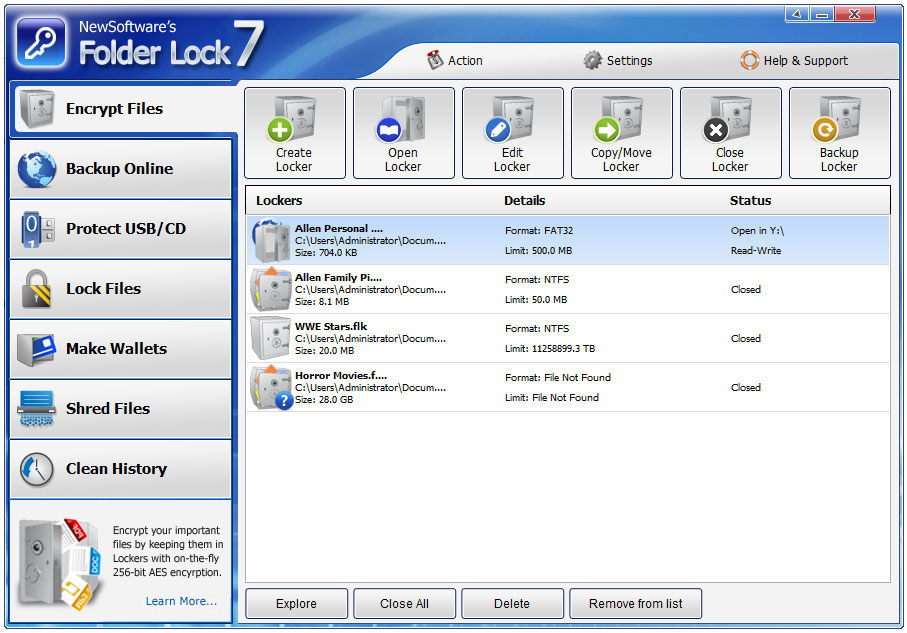
Folder Lock is a file encryption software that offers fastest way of encrypting and password protecting files and folders. You can either choose to encrypt important files from techies or lock your files, pictures and private data from casual users. Folder Lock comes with locking, encryption, shredding, stealth mode, hack attempt monitoring, portability, plug & play support, history cleaning, and more than 20 privacy features all tailored to special needs for people wanting privacy and security.
Latest Reviews

tomhriddle reviewed v7.2.2 on Feb 28, 2014
[4:10:54 PM] Arsalan Sheikh: Data security has not been an issue ever since I have started using Folder Lock, the ease of securing data in really unimaginable, I am thankful for the people who engineered such a program

paulperry reviewed v7.2.2 on Aug 24, 2013
5 stars!

kallisjhon007@gmail.com reviewed v7.1.0 on Jul 12, 2012
An excellent tool for professionals, Works with any file extension types.
I am a self employed accountant, I like Folder Lock because it enables me to keep safe my clients personal information. It has so many protection features unlike other software in it class. After downloading and trying it, I was sold on its ease of use and how dynamic its protection features are, thus, I purchased it. I would recommend it for all work at home professionals who deal with personal information of individuals.

carawmorris reviewed v7.0.6 on Mar 21, 2012
I bought this software to lock my folders because I used to consider encryption is a slow process and takes time. But I just got amazed by the speed of encryption in this software, its just too quick. I created an encrypted container of 50GB in just 20 seconds, phewww that was quick. I have never found any encryption software that provides encryption as quick as this one. So, if there is anyone out there who thinks encryption takes time (just like I used to) just try folder lock and you would know how fast encryption can be.

alishakcarter reviewed v7.0.6 on Mar 16, 2012
I have recently started using Folder Lock and I found it very helpful. I started with the trial version as thought it might be difficult to use and would require a lot of learning. Once I started to use the application, I found it quite simple and it took me no time to understand how it works and I decided to get the full version immediately. I feel secure that my data is protected with one of the best security software and I do not have to worry about my sensitive files while sharing my PC with my colleagues.

mariecmoles reviewed v7.0.6 on Mar 15, 2012
The encryption comes in an improved way in this version of Folder Lock. And the combination of history cleaning feature and USB protection makes it a great product for a home end user like me. Haven't gone for online back though. I hope it comes as good as it is advertised. Good work, though.

Uriel reviewed v7.0.6 on Jan 16, 2012
jetz must be talking about TrueCrypt. Who knows if Folder Lock has backdoors or not. But the FBI are spending big bucks trying to figure out how to crack TrueCrypt I understand.

jetz reviewed v7.0.3 on Nov 17, 2011
There are a lot better freewares then this scamware junk!

ronR reviewed v6.4.2 on Aug 23, 2010
I've been looking for a simple to use security product. This was suggested on a forum and I tried it. It does exactly what I want neatly and simply. Easy to install, easy to use and some really useful options. I was happy to pay for the full version.
I don't know what roymccoy is saying and why? I am using FL without any trouble, I am hiding some files in the locker, as well as locked a few folders on my PC, and it is working perfectly fine.

roymccoy reviewed v6.4.0 on Mar 17, 2010
The last 9 reviews that rated this a 5-star software, are from guys that has NEVER reviewed anything else but (their own) this program.
And most of them members since 2008!? Hmmm...
Usually I'm not a fan of antivotiing, or unrelated reviews, but as others points out - these reviews are all made by the developers them selves - or someone in the chain on profit - of Folder Lock!
It's strikingly obvious, and annoyingly pathetic!

tomhriddle reviewed v7.2.2 on Feb 28, 2014
[4:10:54 PM] Arsalan Sheikh: Data security has not been an issue ever since I have started using Folder Lock, the ease of securing data in really unimaginable, I am thankful for the people who engineered such a program
paulperry reviewed v7.2.2 on Aug 24, 2013
5 stars!
kallisjhon007@gmail.com reviewed v7.1.0 on Jul 12, 2012
An excellent tool for professionals, Works with any file extension types.
I am a self employed accountant, I like Folder Lock because it enables me to keep safe my clients personal information. It has so many protection features unlike other software in it class. After downloading and trying it, I was sold on its ease of use and how dynamic its protection features are, thus, I purchased it. I would recommend it for all work at home professionals who deal with personal information of individuals.
carawmorris reviewed v7.0.6 on Mar 21, 2012
I bought this software to lock my folders because I used to consider encryption is a slow process and takes time. But I just got amazed by the speed of encryption in this software, its just too quick. I created an encrypted container of 50GB in just 20 seconds, phewww that was quick. I have never found any encryption software that provides encryption as quick as this one. So, if there is anyone out there who thinks encryption takes time (just like I used to) just try folder lock and you would know how fast encryption can be.
alishakcarter reviewed v7.0.6 on Mar 16, 2012
I have recently started using Folder Lock and I found it very helpful. I started with the trial version as thought it might be difficult to use and would require a lot of learning. Once I started to use the application, I found it quite simple and it took me no time to understand how it works and I decided to get the full version immediately. I feel secure that my data is protected with one of the best security software and I do not have to worry about my sensitive files while sharing my PC with my colleagues.
mariecmoles reviewed v7.0.6 on Mar 15, 2012
The encryption comes in an improved way in this version of Folder Lock. And the combination of history cleaning feature and USB protection makes it a great product for a home end user like me. Haven't gone for online back though. I hope it comes as good as it is advertised. Good work, though.
Uriel reviewed v7.0.6 on Jan 16, 2012
jetz must be talking about TrueCrypt. Who knows if Folder Lock has backdoors or not. But the FBI are spending big bucks trying to figure out how to crack TrueCrypt I understand.
jetz reviewed v7.0.3 on Nov 17, 2011
There are a lot better freewares then this scamware junk!
ronR reviewed v6.4.2 on Aug 23, 2010
I've been looking for a simple to use security product. This was suggested on a forum and I tried it. It does exactly what I want neatly and simply. Easy to install, easy to use and some really useful options. I was happy to pay for the full version.
I don't know what roymccoy is saying and why? I am using FL without any trouble, I am hiding some files in the locker, as well as locked a few folders on my PC, and it is working perfectly fine.
roymccoy reviewed v6.4.0 on Mar 17, 2010
The last 9 reviews that rated this a 5-star software, are from guys that has NEVER reviewed anything else but (their own) this program.
And most of them members since 2008!? Hmmm...
Usually I'm not a fan of antivotiing, or unrelated reviews, but as others points out - these reviews are all made by the developers them selves - or someone in the chain on profit - of Folder Lock!
It's strikingly obvious, and annoyingly pathetic!

sauzee reviewed v6.3.5 on Feb 25, 2010
yup, i noticed all the fake reviews on a few other sites too.
Shame on you!

Second Shadow reviewed v6.3.5 on Feb 16, 2010
keithgub is yet another of the program's author clones.
This guy just doesn't learn!
Keep the anti-votes coming guys!

keithgub reviewed v6.3.2 on Dec 22, 2009
when I was using its trial version I tried all its features and after getting satisfied I now have bought its full version. I like almost all the features as they are for protecting my data and my privacy, particularly that password protected lockers cannot be deleted, move , edited and opened without the correct password. It ensures me that whatever I put in the locker is completely safe from getting lost or misused. I would highly recommend this software .