File Details |
|
| File Size | 0.6 MB |
|---|---|
| License | Freeware |
| Operating System | Windows 2000/9x/Server 2003/XP |
| Date Added | March 22, 2006 |
| Total Downloads | 20,978 |
| Publisher | YourWare Solutions |
| Homepage | FreeRAM XP Pro |
Publisher's Description
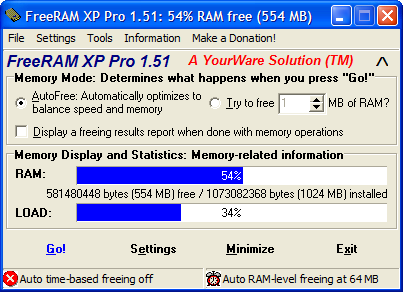
FreeRAM XP Pro is an application designed to defragment and free up your system's RAM. As a result, system performance, response time, and stability increase. It uses a minimal amount of memory, system resources, and CPU time, thus making it fast and efficient. It also uses a very fast memory allocation algorithm, allowing it to work quickly with less intrusion on your productivity.
Latest Reviews

Ball Sacks reviewed v1.52 (Updated) on Oct 21, 2012
LOL what a joke! if you need more ram then just go to newegg dot com and buy it! Like I did. i just paid $50 for 16gb of ram 3 days ago.
Kingston Technology HyperX Red 16GB Kit (2x8GB) 1600MHz 10-10-10 1.5V DDR3 PC3-12800 Non-ECC DIMM Motherboard Memory KHX16C10B1RK2/16
$50!

ak reviewed v1.52 (Updated) on Oct 15, 2008
If you run the program after a fresh boot, the page file size does not increase and available ram increases (you can try to free even 100%).
One may consider this when about to starting a session of work.
Freeing is quite fast.
Tools has advanced settings.
More likely to influence systems with less amounts of ram.

Straspey reviewed v1.52 (Updated) on Mar 28, 2006
I Have not tried this program, however:
RAM RAM Optimizers/Defragmenters
Myth - "Increasing the amount of available RAM improves performance."
Reality - "RAM Optimizers have no effect, and at worst, they seriously degrade performance. Although gaining more available memory might seem beneficial, it isn't. As RAM Optimizers force the available-memory counter up, they force other processes' data and code out of memory.
Say that you're running Word, for example. As the optimizer forces the available-memory counter up, the text of open documents and the program code that was part of Word's working set before the optimization (and was therefore present in physical memory) must be reread from disk as you continue to edit your document.
The act of allocating, then freeing a large amount of virtual memory might, as a conceivable side effect, lead to blocks of contiguous available memory. However, because virtual memory masks the layout of physical memory from processes, processes can't directly benefit from having virtual memory backed by contiguous physical memory.
As processes execute and undergo working-set trimming and growth, their virtual-memory-to-physical-memory mappings will become fragmented despite the availability of contiguous memory."
The source of this article can be found at:
http://mywebpages.comcas.../SupportCD/XPMyths.html

Drk1lucian reviewed v1.51 on Mar 10, 2006
I used the earlier version for a while, and yes i'd have to agree it did seem a little more simple, and useful. Although that is so, this program does do a good job of matching up. I personally love the program. People don't understand that RAM is not just something thats impossible to control, simply put, we create it, we control it. When this program does what it does, a very noticeable difference occurs with my computer. Great program all around.

SanctimoniousApe reviewed v1.50 on Dec 29, 2005
The purpose of this program is explained on the website quite clearly. It keeps a reasonable amount of RAM available so newly started programs (or documents) can get going more quickly. It doesn't overdo it - it attempts to find a good balance between performance and RAM availability. It does this at times when you are less likely to notice it (low CPU usage).
Without this management being done in this fashion, you'd have an additional wait when starting new programs/documents while WinDoze frees up memory for the task - this program eliminates that additional wait by making sure the memory is already freed before you need it without significantly affecting existing tasks.
This program is excellent for heavy multi-taskers like myself.
That said, I've had nothing but problems with the stability of v1.5. Granted, the PC I've tried it on isn't the most stable either, but I never had problems on v1.4 with the same PC. Fortunately, they have kindly kept the old version available for DL on their site. I'm working on setting up a clean new PC now, so I'll try v1.5 on that as well. I know it's not fair to bash the program considering the bad PC it's on, but I just thought I'd toss the warning out there and recommend v1.4 as a fallback if any problems are experienced...

styopa reviewed v1.50 on Oct 3, 2005
I'm probably not as BRIGHT a guy as the previous two, but I've actually found this to be a great program.
It doesn't DEFRAG RAM (since that can't be done) but it DOES close open memory hooks and purge unused (but occupied) memory addresses.
Ever heard of a memory leak? Ever found that through the day, on a Win98 system perhaps, after repeated opening and closing of Word, Excel, Access, and Powerpoint your system seems sluggish? That's because many programs (not just MS) don't play well with others (or themselves, come to think of it). They launch, and index that they need 12 megs of RAM. Then when they close, they close the actual RAM they are using (maybe 11.4) and leave the other addresses ocucpied (ie. showing that they are in use) but unused.
So yeah, it doesn't precisely defrag RAM, but as a layman's explanation it does the trick.
But then again, I'm not nearly as smart as those other guys posting here.

DigitalSin reviewed v1.50 on Oct 3, 2005
Garbage-ware.
Why would you free RAM? It's not in some cellblock in Chino.
If RAM is being used by a program, its because you're using that program. If you stop using that program and close it, the RAM is free and re-ordered as necessary. Windows NT \ 2000\ XP does a fine job of managing your RAM.
Believe me, none of these garbageware developers have some kind of special knowledge about memory management that Microsoft doesn't already have and implement in their OS.

httpd.confused reviewed v1.50 on Oct 1, 2005
I am really sick of seeing these useless crap futilities on every software site I visit. They're not only useless, they're harmful.
You can't defragment RAM. There is a difference between the actual physical memory and the addresses that are used to reference it. The applications you run don't see the memory directly, and, therefore, they can't defragment it!
Don't take it from me, take it from Mark Russinovich:
[B]ecause virtual memory masks the layout of physical memory from processes, processes can't directly benefit from having virtual memory backed by contiguous physical memory.
Let me clarify that the term "virtual memory" does not explicitly refer to the paging file.

brotherS reviewed v1.50 on Sep 30, 2005
Yes, it's a very nice program, but takes way too long to startup, using way too much CPU (50-100% for that period). If this would be fixed I'd recommend it even more often. This annoys me a bit, but it's still a nice program.

Master- reviewed v1.50 on Sep 30, 2005
Indeed a good program.
Just hope it will work all the way.

Ball Sacks reviewed v1.52 (Updated) on Oct 21, 2012
LOL what a joke! if you need more ram then just go to newegg dot com and buy it! Like I did. i just paid $50 for 16gb of ram 3 days ago.
Kingston Technology HyperX Red 16GB Kit (2x8GB) 1600MHz 10-10-10 1.5V DDR3 PC3-12800 Non-ECC DIMM Motherboard Memory KHX16C10B1RK2/16
$50!
ak reviewed v1.52 (Updated) on Oct 15, 2008
If you run the program after a fresh boot, the page file size does not increase and available ram increases (you can try to free even 100%).
One may consider this when about to starting a session of work.
Freeing is quite fast.
Tools has advanced settings.
More likely to influence systems with less amounts of ram.
Straspey reviewed v1.52 (Updated) on Mar 28, 2006
I Have not tried this program, however:
RAM RAM Optimizers/Defragmenters
Myth - "Increasing the amount of available RAM improves performance."
Reality - "RAM Optimizers have no effect, and at worst, they seriously degrade performance. Although gaining more available memory might seem beneficial, it isn't. As RAM Optimizers force the available-memory counter up, they force other processes' data and code out of memory.
Say that you're running Word, for example. As the optimizer forces the available-memory counter up, the text of open documents and the program code that was part of Word's working set before the optimization (and was therefore present in physical memory) must be reread from disk as you continue to edit your document.
The act of allocating, then freeing a large amount of virtual memory might, as a conceivable side effect, lead to blocks of contiguous available memory. However, because virtual memory masks the layout of physical memory from processes, processes can't directly benefit from having virtual memory backed by contiguous physical memory.
As processes execute and undergo working-set trimming and growth, their virtual-memory-to-physical-memory mappings will become fragmented despite the availability of contiguous memory."
The source of this article can be found at:
http://mywebpages.comcas.../SupportCD/XPMyths.html
Drk1lucian reviewed v1.51 on Mar 10, 2006
I used the earlier version for a while, and yes i'd have to agree it did seem a little more simple, and useful. Although that is so, this program does do a good job of matching up. I personally love the program. People don't understand that RAM is not just something thats impossible to control, simply put, we create it, we control it. When this program does what it does, a very noticeable difference occurs with my computer. Great program all around.
SanctimoniousApe reviewed v1.50 on Dec 29, 2005
The purpose of this program is explained on the website quite clearly. It keeps a reasonable amount of RAM available so newly started programs (or documents) can get going more quickly. It doesn't overdo it - it attempts to find a good balance between performance and RAM availability. It does this at times when you are less likely to notice it (low CPU usage).
Without this management being done in this fashion, you'd have an additional wait when starting new programs/documents while WinDoze frees up memory for the task - this program eliminates that additional wait by making sure the memory is already freed before you need it without significantly affecting existing tasks.
This program is excellent for heavy multi-taskers like myself.
That said, I've had nothing but problems with the stability of v1.5. Granted, the PC I've tried it on isn't the most stable either, but I never had problems on v1.4 with the same PC. Fortunately, they have kindly kept the old version available for DL on their site. I'm working on setting up a clean new PC now, so I'll try v1.5 on that as well. I know it's not fair to bash the program considering the bad PC it's on, but I just thought I'd toss the warning out there and recommend v1.4 as a fallback if any problems are experienced...
styopa reviewed v1.50 on Oct 3, 2005
I'm probably not as BRIGHT a guy as the previous two, but I've actually found this to be a great program.
It doesn't DEFRAG RAM (since that can't be done) but it DOES close open memory hooks and purge unused (but occupied) memory addresses.
Ever heard of a memory leak? Ever found that through the day, on a Win98 system perhaps, after repeated opening and closing of Word, Excel, Access, and Powerpoint your system seems sluggish? That's because many programs (not just MS) don't play well with others (or themselves, come to think of it). They launch, and index that they need 12 megs of RAM. Then when they close, they close the actual RAM they are using (maybe 11.4) and leave the other addresses ocucpied (ie. showing that they are in use) but unused.
So yeah, it doesn't precisely defrag RAM, but as a layman's explanation it does the trick.
But then again, I'm not nearly as smart as those other guys posting here.
DigitalSin reviewed v1.50 on Oct 3, 2005
Garbage-ware.
Why would you free RAM? It's not in some cellblock in Chino.
If RAM is being used by a program, its because you're using that program. If you stop using that program and close it, the RAM is free and re-ordered as necessary. Windows NT \ 2000\ XP does a fine job of managing your RAM.
Believe me, none of these garbageware developers have some kind of special knowledge about memory management that Microsoft doesn't already have and implement in their OS.
httpd.confused reviewed v1.50 on Oct 1, 2005
I am really sick of seeing these useless crap futilities on every software site I visit. They're not only useless, they're harmful.
You can't defragment RAM. There is a difference between the actual physical memory and the addresses that are used to reference it. The applications you run don't see the memory directly, and, therefore, they can't defragment it!
Don't take it from me, take it from Mark Russinovich:
[B]ecause virtual memory masks the layout of physical memory from processes, processes can't directly benefit from having virtual memory backed by contiguous physical memory.
Let me clarify that the term "virtual memory" does not explicitly refer to the paging file.
brotherS reviewed v1.50 on Sep 30, 2005
Yes, it's a very nice program, but takes way too long to startup, using way too much CPU (50-100% for that period). If this would be fixed I'd recommend it even more often. This annoys me a bit, but it's still a nice program.
Master- reviewed v1.50 on Sep 30, 2005
Indeed a good program.
Just hope it will work all the way.

hugh750 reviewed v1.40 on Sep 22, 2005
I Just Tried Freeram On My Windows Xp Home Edition Machine And It Works Good, I Highly Recommend It,If You Are A Gamer Like Me.

McAleck reviewed v1.40 on Jul 2, 2005
yes, great, works fine. but how come it takes forever to load on startup???

H_TeXMeX_H reviewed v1.40 on May 3, 2005
I've used this program for a long time, and it really does work, I tested it. In fact, my mom's computer would not be able to run without it ... the amount of ram would slowly decrease to zero and then it would crash, but this program fixes that =)
The best one of it's kind that I have found in my many years of searching, unlike some evil reviewers like to think ...