File Details |
|
| File Size | 0.2 MB |
|---|---|
| License | Open Source |
| Operating System | Windows 7/2000/Vista/XP |
| Date Added | May 5, 2010 |
| Total Downloads | 1,473 |
| Publisher | Alexander Vechersky |
| Homepage | Glint |
Publisher's Description
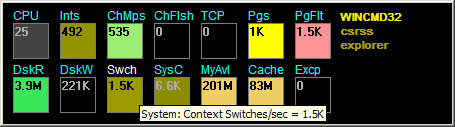
Glint reveals system activity by changing indicators brightness according to the values of corresponding system performance counters. Recent values can be also shown as graphs. It also displays the most active processes in system in descending CPU activity order. The names of displayed counters are shown in tool tips or program settings dialog. User can switch temporarily off costly or unnecessary counters or change the monitor view mode by pressing a key. Settings dialogs allow to select any counters available in system and set colors for their indication. Up to 100 counters can be displayed simultaneously in several rows.
Latest Reviews

nfigot reviewed v1.28 Build 1044 on May 9, 2010
Neat program for looking under the hood...
Had an issue running program - emailed author who was great at helping figure it out.
I'd like to see a restore default option - always useful for programs with lots of settings you can change.

ghammer reviewed v1.27 Build 1032 on Apr 3, 2010
Just kind of cool to watch.
Really a tool only a geek would like.
And I do.

nfigot reviewed v1.28 Build 1044 on May 9, 2010
Neat program for looking under the hood...
Had an issue running program - emailed author who was great at helping figure it out.
I'd like to see a restore default option - always useful for programs with lots of settings you can change.
ghammer reviewed v1.27 Build 1032 on Apr 3, 2010
Just kind of cool to watch.
Really a tool only a geek would like.
And I do.