File Details |
|
| File Size | 2.1 MB |
|---|---|
| License | Freeware |
| Operating System | Windows (All) |
| Date Added | July 19, 2014 |
| Total Downloads | 12,669 |
| Publisher | ProfessorCPU |
| Homepage | Gotcha! Data Backup |
Publisher's Description
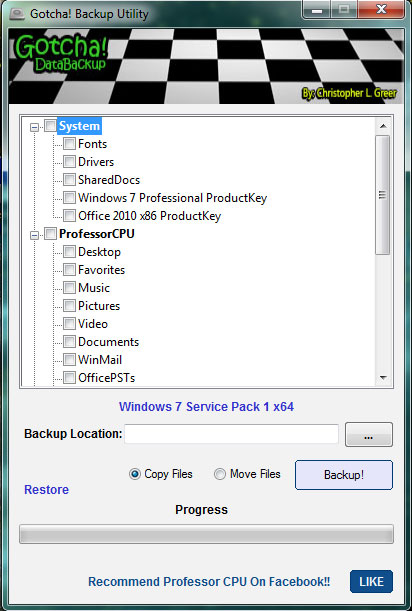
Gotcha! Data Backup is used to backup user data from a system before reinstalling a computer - or to transfer the data to another computer. Many of the much needed areas that Technicians tend to need to backup are included.
It can be used on a system running Windows. It can also detect multiple Windows drives. This is helpful when you attach a customers drive as a slave drive on your system by connecting their drive internally in your computer or through USB. It also will work on WinPE. Another useful feature it has is the ability to Move Files to your backup location instead of copying them.
Latest Reviews

burgerbaron reviewed v2014.7.19.0 on Nov 7, 2014
Who cares about date versioning vs release.If someone can't figure a newer date is the new version,I do not want to be asked to dinner at their house.

smaragdus reviewed v2014.7.19.0 on Jul 21, 2014
@ProfessorCPU
Hi, I am not saying that a date vesrioning is a bad idea, it's just I don't like it- such a versioning scheme shows nothing about the history/maturity of the product. So I am not suggesting that you revert to the previous scheme you used, I simply prefer version number to release date (of course release date can be an addition to version number).

ProfessorCPU reviewed v2014.7.8.1 on Jul 19, 2014
@smaragdus
I have to say that is the craziest reason I have heard for someone to give such a low score on a program.
Out of curiosity... what is the downside to using a release date for the version system? I internally release this program often and it is easier for me to see when the techs in my repair shop have downloaded a release.
I am willing to switch it back to a normal versioning system if there is a valid enough reason behind it. I'm not stuck on using a dated version. But I am very curious what the versioning does to your computer which would force you to discontinue using it? The date also follows a numbering system that will always be higher then the previous version. It will tell you when it was released... and the last number is a build number.
Does anyone have an idea as to why a dated versioning system would be a bad idea? Because I am open to suggestions. ;-)

CyberDoc999 reviewed v2014.7.8.1 on Jul 17, 2014
great app
who cares what version they call it!
smaragdus reviewed v2014.7.8.1 on Jul 15, 2014
The only disappointment is the new versioning scheme- when a program discards version number in favour of release date, I immediately discard it- the latest example was SMPlayer, now I am dumping Gotcha! Backup Utility.

smbridewell reviewed v0.5.1.1 on Oct 8, 2013
We are currently using this for backing up client PC's for a Windows 7 migration. We were currently using a backup tool created by dell which we paid thousands for. I told my fellow techs about this as weve been using it since. Very fast and gets EVERYTHING.. Made our job much easier. I highly recommend this program to any tech that is looking for a good and efficient backup program.
ProfessorCPU reviewed v0.5.1.1 on Oct 8, 2013
Gotcha Data Backup reads the registry to find all pst files that have been used by outlook. It's pretty quick and it is very accurate. Searching the entire hard drive would only be useful if you need to backup pst files that were not used by outlook. I'm not gonna say that this isn't possible... but it wouldn't happen very often in my opinion. In a later release I may add a feature to allow searching the hard drive for all pst files... but it would raise the amount of time for backups by a very large amount. Thanks for the recommendation! I will seriously consider it. :)

GadgetPig reviewed v0.5.1.1 on Oct 7, 2013
Great tool for quick backups. However you should still do a manual search for all hidden outlook pst files as the program may occasionally miss them.
CyberDoc999 reviewed v0.5.0.8 on Aug 19, 2013
I wish eset nod32 would stop calling this a virus.... I tried to contact them ... but eset nod32 is wrong about this program

JoeMORE reviewed v0.5.0.8 on Aug 18, 2013
The newest addition to my Tech arsenal :)
Great work!
Can you add a bunch of unattended commandline options in a later release?
BTW... I just sent you a donation!!

burgerbaron reviewed v2014.7.19.0 on Nov 7, 2014
Who cares about date versioning vs release.If someone can't figure a newer date is the new version,I do not want to be asked to dinner at their house.
smaragdus reviewed v2014.7.19.0 on Jul 21, 2014
@ProfessorCPU
Hi, I am not saying that a date vesrioning is a bad idea, it's just I don't like it- such a versioning scheme shows nothing about the history/maturity of the product. So I am not suggesting that you revert to the previous scheme you used, I simply prefer version number to release date (of course release date can be an addition to version number).
ProfessorCPU reviewed v2014.7.8.1 on Jul 19, 2014
@smaragdus
I have to say that is the craziest reason I have heard for someone to give such a low score on a program.
Out of curiosity... what is the downside to using a release date for the version system? I internally release this program often and it is easier for me to see when the techs in my repair shop have downloaded a release.
I am willing to switch it back to a normal versioning system if there is a valid enough reason behind it. I'm not stuck on using a dated version. But I am very curious what the versioning does to your computer which would force you to discontinue using it? The date also follows a numbering system that will always be higher then the previous version. It will tell you when it was released... and the last number is a build number.
Does anyone have an idea as to why a dated versioning system would be a bad idea? Because I am open to suggestions. ;-)
CyberDoc999 reviewed v2014.7.8.1 on Jul 17, 2014
great app
who cares what version they call it!
smaragdus reviewed v2014.7.8.1 on Jul 15, 2014
The only disappointment is the new versioning scheme- when a program discards version number in favour of release date, I immediately discard it- the latest example was SMPlayer, now I am dumping Gotcha! Backup Utility.
smbridewell reviewed v0.5.1.1 on Oct 8, 2013
We are currently using this for backing up client PC's for a Windows 7 migration. We were currently using a backup tool created by dell which we paid thousands for. I told my fellow techs about this as weve been using it since. Very fast and gets EVERYTHING.. Made our job much easier. I highly recommend this program to any tech that is looking for a good and efficient backup program.
ProfessorCPU reviewed v0.5.1.1 on Oct 8, 2013
Gotcha Data Backup reads the registry to find all pst files that have been used by outlook. It's pretty quick and it is very accurate. Searching the entire hard drive would only be useful if you need to backup pst files that were not used by outlook. I'm not gonna say that this isn't possible... but it wouldn't happen very often in my opinion. In a later release I may add a feature to allow searching the hard drive for all pst files... but it would raise the amount of time for backups by a very large amount. Thanks for the recommendation! I will seriously consider it. :)
GadgetPig reviewed v0.5.1.1 on Oct 7, 2013
Great tool for quick backups. However you should still do a manual search for all hidden outlook pst files as the program may occasionally miss them.
CyberDoc999 reviewed v0.5.0.8 on Aug 19, 2013
I wish eset nod32 would stop calling this a virus.... I tried to contact them ... but eset nod32 is wrong about this program
JoeMORE reviewed v0.5.0.8 on Aug 18, 2013
The newest addition to my Tech arsenal :)
Great work!
Can you add a bunch of unattended commandline options in a later release?
BTW... I just sent you a donation!!

Remax reviewed v0.5.0.8 on Aug 18, 2013
The new version is great!! The new WiFi and Mapped drives backup features are very helpful!
Thank You so much!!

JodieKira reviewed v0.5.0.4 on May 11, 2013
I tried this app, just so so, and I also tried other free Data backup, nice!!! Vibosoft Free Windows 7 Data Backup software can completely make a copy of system partition, backup all partitions of your portable devices and clone entire hard disk or USB drive. What’s more, it can also effectively and selectively backup various of data types, like: photos, videos, audios, office document and software application.
Resources: http://www.vibosoft.com/...ata-backup-windows.html

crazy.cat reviewed v0.5.0.4 on Jan 14, 2013
My name is Marco and I write from Italy (sorry for my English), I am very interested in your program, but I have a problem, you can save folders with the Italian name, not the English?
When I go to restore it gives me error http://i.imgur.com/HvFzY.jpg, if I rename the folders and Gotcha!.Ini in Italian restore works.
Gotcha!.ini
[marco]
Desktop=C:\Documents and Settings\marco\Desktop
Preferiti=C:\Documents and Settings\marco\Preferiti
Musica=C:\Documents and Settings\marco\Documenti\Musica
Immagini=C:\Documents and Settings\marco\Documenti\Immagini
Documenti=C:\Documents and Settings\marco\Documenti
Documents=Documenti
Favorites=Preferiti
Music=Musica
Pictures=Immagini
Desktop=Desktop