File Details |
|
| File Size | 1.2 MB |
|---|---|
| License | Shareware, $29.95 |
| Operating System | Windows (All) |
| Date Added | March 20, 2014 |
| Total Downloads | 1,859 |
| Publisher | InchWest |
| Homepage | Hotkeycontrol |
Publisher's Description
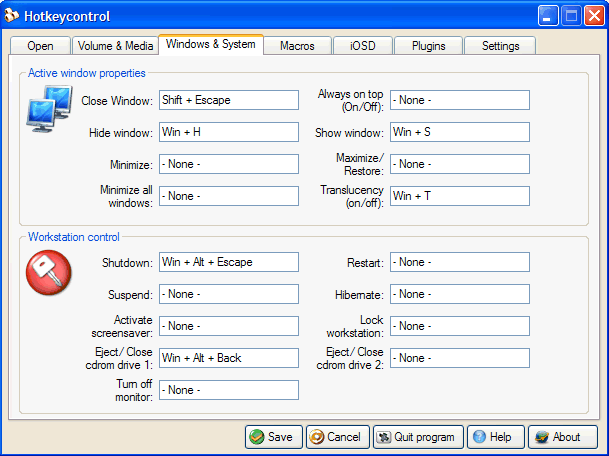
Hotkeycontrol will create hotkeys that let you do almost anything using your keyboard. These tasks include but are not limited to opening files, ejecting cdrom drives, restarting the computer, controlling active windows, changing volume, macros and much more. Besides the regular features, the volume status can be shown on screen (OSD). Pictures or rtf documents can also be shown directly and transparently on screen which can be handy in displaying TV tuner channels, game cheats, etc. And, more features can be added to the program by creating plugins - which essentially makes the possibilities limitless. In addition to normal combination hotkeys, you can use single keys such as function or number pad keys. The additional keys on your Multimedia/Internet keyboard can also be used with Hotkeycontrol and all the hotkeys are functional even in games and in other full-screen DirectX applications.
Latest Reviews

amyw reviewed v5.2 on Dec 21, 2005
Excellent program, fell in love with it the first time I used it. On screen display feature is extremely useful and rather unique. Overall user interface is also pretty cool.

zridling reviewed v5.2 on Dec 20, 2005
Same sentiment here. AutoHotkey is so easy and free and allows you to control virtual any aspect of your PC, keyboard, and mouse. However, Hotkeycontrol has an well-designed interface for those who need it.

thockam reviewed v5.2 on Dec 20, 2005
I have been using AutoIT and AutoHotKey for about 6 months and the they are such powerful programs - it's great they are open source - why pay to play?

QBgreen reviewed v5.2 on Dec 20, 2005
It's a very good program, but I still have the last free version. This new shareware version doesn't do all that much more to warrant the price charged.

Ulmo reviewed v5.1 on Nov 21, 2005
Work Great and easy. I Like it !

amyw reviewed v5.2 on Dec 21, 2005
Excellent program, fell in love with it the first time I used it. On screen display feature is extremely useful and rather unique. Overall user interface is also pretty cool.
zridling reviewed v5.2 on Dec 20, 2005
Same sentiment here. AutoHotkey is so easy and free and allows you to control virtual any aspect of your PC, keyboard, and mouse. However, Hotkeycontrol has an well-designed interface for those who need it.
thockam reviewed v5.2 on Dec 20, 2005
I have been using AutoIT and AutoHotKey for about 6 months and the they are such powerful programs - it's great they are open source - why pay to play?
QBgreen reviewed v5.2 on Dec 20, 2005
It's a very good program, but I still have the last free version. This new shareware version doesn't do all that much more to warrant the price charged.
Ulmo reviewed v5.1 on Nov 21, 2005
Work Great and easy. I Like it !