
File Details |
|
| File Size | 6.4 MB |
|---|---|
| License | Shareware, $29.95 |
| Operating System | Windows (All) |
| Date Added | March 23, 2019 |
| Total Downloads | 6,319 |
| Publisher | Aha-soft |
| Homepage | IconXP |
Publisher's Description
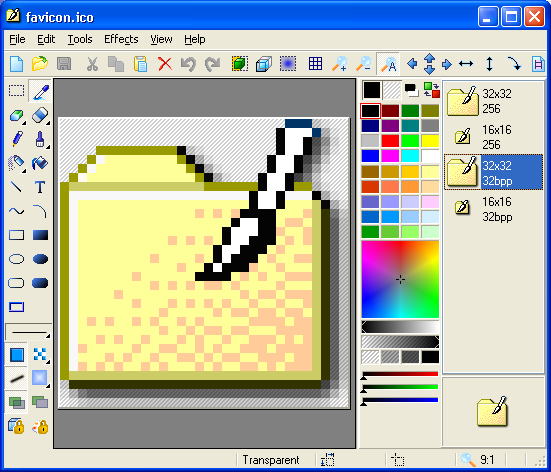
IconXP allows you to edit icons and customize Windows. It supports the new icon format introduced in Windows XP. Using this program you can create and edit icons in either standard or custom sizes, with color depths up to 32-bit True Color with 8-bit alpha channel. Paint tools include: color replacer, color selector, spray can, pencil, brush, flood fill, text tool, line tool, rectangle, curve, ellipse, 3d frame. Modifiers can also be used to apply color gradients and chess fills. For Windows XP icons, you get to add cool drop shadow and smooth effects. It allows you to import, export and change color palettes for icon images. Allows you to change standard Windows icons, folder icons and customize desktop attributes. You can easily replace, colorize, and save the icons Windows uses to display various objects. You can also hide or change shortcut overlays. There are also commands that change the desktop icons size and color resolution, rebuild the icon cache.
Latest Reviews

Karol Mily reviewed v3.35 on May 20, 2015
IconTools from AhaSoft (the same author) is best choice.
To guy with a icon missing: try this
- http://www.iconsdb.com/
- https://www.iconfinder.com/
- http://www.iconarchive.com/

utomo reviewed v1.99b2 on Mar 8, 2004
Another icon software, which I rate as 4.
why so many icon software did not include many common icon for base, so we can use it as icon which we can edit for our icon. creating icon from zero sometimes is not easy, example to create hyperlink icon, etc.
icon editor must include as many icon reference as possible to be used as base, so user will be able to edit it if needed and use it.
another good icon software is microangelo, I still waiting for their new version. I hope it will make creating icon more easier.

Karol Mily reviewed v3.35 on May 20, 2015
IconTools from AhaSoft (the same author) is best choice.
To guy with a icon missing: try this
- http://www.iconsdb.com/
- https://www.iconfinder.com/
- http://www.iconarchive.com/
utomo reviewed v1.99b2 on Mar 8, 2004
Another icon software, which I rate as 4.
why so many icon software did not include many common icon for base, so we can use it as icon which we can edit for our icon. creating icon from zero sometimes is not easy, example to create hyperlink icon, etc.
icon editor must include as many icon reference as possible to be used as base, so user will be able to edit it if needed and use it.
another good icon software is microangelo, I still waiting for their new version. I hope it will make creating icon more easier.