File Details |
|
| File Size | 1.9 MB |
|---|---|
| License | Freeware |
| Operating System | Windows 2000/9x/Server 2003/XP |
| Date Added | March 27, 2010 |
| Total Downloads | 7,236 |
| Publisher | Jan Kolarik and Ondrej Vaverka |
| Homepage | InstantStorm |
Publisher's Description
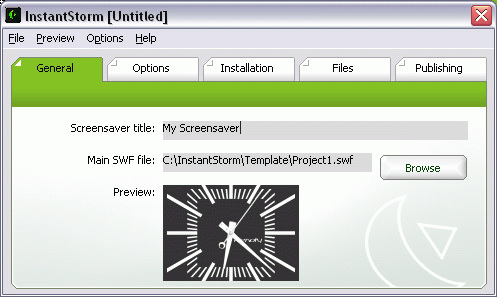
InstantStorm is a free tool for creating professional Flash screensavers. Select your Flash SWF file, set some options and compile an executable installer. To make creating screensavers very easy, you can use New project wizard and compile a professional screensaver in three steps.
Latest Reviews

fanbanlo reviewed v0.9.3.0 Technology Preview on Feb 25, 2006
ok, I tried, but it won't work with Flash movie that has a "PLAY NOW" screen, WHICH MOST LARGE/INTERESTING .SWF's DO! It will just stuck there, and if you try to press the "PLAY NOW" link, the screen saver will quit. :(
edit: wow... this is fast. Reply from the author in a forum.
QUOTE:
Hello.
Thank you for linking to InstantStorm Technology Preview.
InstantStorm is mainly made for creating and publishing screensavers from your own SWF files, files for screensavers usually do not contain buttons.
However, we decided to develop this little fix that might help you with the problem described above. This fix will be available in the final version 1.0.
Here are instructions to create screensaver from a SWF file that contains a button like 'Click here to play the movie':
1) Download this file: http://www.czokl.com/dow...onpress_fix_0.9.3.0.zip
2) Unpack the downloaded file to the following directory {path to InstantStorm}\bin
3) Confirm file overwriting
4) Run InstantStorm, create and compile the screensaver.
Best regards
Jan Kolařík {Opaquit}
InstantStorm developer

DaveNCheez reviewed v0.9.2.0 Technology Preview on Apr 13, 2005
Wow this is great. Works beautifully!
Makes perfect screensavers (and installers) from ANY flash clip.

danilloOc reviewed v0.9.2.0 Technology Preview on Apr 12, 2005
Just downloaded and testedwith some SWF's with sound and animations and worked very nice.
Awesome program.

pipdipchip reviewed v0.9.2.0 Technology Preview on Apr 12, 2005
What a great program, so much control of the screensaver install but it's pretty easy to do. The interface is also very clean and cool looking. Cheers to the programmers. Looking forward to future versions.

fanbanlo reviewed v0.9.3.0 Technology Preview on Feb 25, 2006
ok, I tried, but it won't work with Flash movie that has a "PLAY NOW" screen, WHICH MOST LARGE/INTERESTING .SWF's DO! It will just stuck there, and if you try to press the "PLAY NOW" link, the screen saver will quit. :(
edit: wow... this is fast. Reply from the author in a forum.
QUOTE:
Hello.
Thank you for linking to InstantStorm Technology Preview.
InstantStorm is mainly made for creating and publishing screensavers from your own SWF files, files for screensavers usually do not contain buttons.
However, we decided to develop this little fix that might help you with the problem described above. This fix will be available in the final version 1.0.
Here are instructions to create screensaver from a SWF file that contains a button like 'Click here to play the movie':
1) Download this file: http://www.czokl.com/dow...onpress_fix_0.9.3.0.zip
2) Unpack the downloaded file to the following directory {path to InstantStorm}\bin
3) Confirm file overwriting
4) Run InstantStorm, create and compile the screensaver.
Best regards
Jan Kolařík {Opaquit}
InstantStorm developer
DaveNCheez reviewed v0.9.2.0 Technology Preview on Apr 13, 2005
Wow this is great. Works beautifully!
Makes perfect screensavers (and installers) from ANY flash clip.
danilloOc reviewed v0.9.2.0 Technology Preview on Apr 12, 2005
Just downloaded and testedwith some SWF's with sound and animations and worked very nice.
Awesome program.
pipdipchip reviewed v0.9.2.0 Technology Preview on Apr 12, 2005
What a great program, so much control of the screensaver install but it's pretty easy to do. The interface is also very clean and cool looking. Cheers to the programmers. Looking forward to future versions.