File Details |
|
| File Size | 0.9 MB |
|---|---|
| License | Freeware |
| Operating System | Windows 2000/9x/Server 2003/XP |
| Date Added | May 21, 2007 |
| Total Downloads | 3,446 |
| Publisher | Code Sector |
| Homepage | JetStart |
Publisher's Description
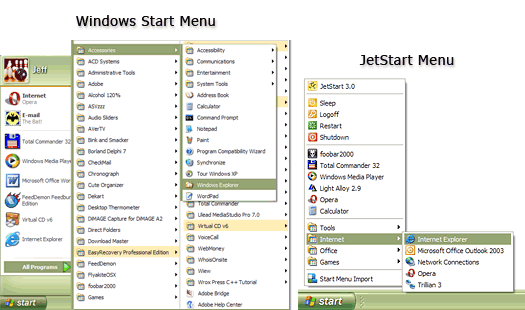
JetStart offers you a quick access to categorized Start Menu shortcuts, recently launched programs and system commands. Just point your mouse to the Start Menu button! You can also place your most used programs and documents into the handy toolbar and quickly run any program by typing few starting letters.
Latest Reviews

didit59 reviewed v4.4 on May 2, 2010
Well went to install this and Malwarebytes. And A-squared both picked up adware in it.

Blackhole8746 reviewed v3.18 on Feb 2, 2006
You can do this listing manually without the need for a program

RWW reviewed v3.18 on Feb 2, 2006
Too complicated, too much of a hassle, too bad - is a nice premise.

bobad reviewed v3.15 on Nov 21, 2005
Interesting. Nice, but too complicated. Adding, changing, and deleting menu items is quite confusing and cumbersome. Also, one doesn't need to re-invent the Task Bar or Quicklaunch Menu.
What would be nicer would be a simple right-click context menuitem (clicked anywhere) that would present a nice menu of your 10 or so most used programs or functions.

JackieRay reviewed v3.0 on Oct 13, 2005
1. Keyboard shortcuts ARE editable, you can change them freely.
2. It was the old nag, and already doesn't mean anything, settings were saved with no problem. You can check it yourself.

yokozuna reviewed v3.0 on Oct 13, 2005
1. keyboard shortcuts are not editable (it is impossible to switch them off). The problem is that they collide with important shortcuts used by non-English Windows/Ms Office. Put simply - one must decide what is more essential - Ms Office or JetStart.
2. there are two JetStarts: Free and shareware. I do not know why it is shown something like "the option is available in the paid version only" if any important feature is tried to be used. I dare say that JetStart comes in two flavours: shareware and unlimited demo/nagware.

didit59 reviewed v4.4 on May 2, 2010
Well went to install this and Malwarebytes. And A-squared both picked up adware in it.
Blackhole8746 reviewed v3.18 on Feb 2, 2006
You can do this listing manually without the need for a program
RWW reviewed v3.18 on Feb 2, 2006
Too complicated, too much of a hassle, too bad - is a nice premise.
bobad reviewed v3.15 on Nov 21, 2005
Interesting. Nice, but too complicated. Adding, changing, and deleting menu items is quite confusing and cumbersome. Also, one doesn't need to re-invent the Task Bar or Quicklaunch Menu.
What would be nicer would be a simple right-click context menuitem (clicked anywhere) that would present a nice menu of your 10 or so most used programs or functions.
JackieRay reviewed v3.0 on Oct 13, 2005
1. Keyboard shortcuts ARE editable, you can change them freely.
2. It was the old nag, and already doesn't mean anything, settings were saved with no problem. You can check it yourself.
yokozuna reviewed v3.0 on Oct 13, 2005
1. keyboard shortcuts are not editable (it is impossible to switch them off). The problem is that they collide with important shortcuts used by non-English Windows/Ms Office. Put simply - one must decide what is more essential - Ms Office or JetStart.
2. there are two JetStarts: Free and shareware. I do not know why it is shown something like "the option is available in the paid version only" if any important feature is tried to be used. I dare say that JetStart comes in two flavours: shareware and unlimited demo/nagware.