File Details |
|
| File Size | 2.5 MB |
|---|---|
| License | Freeware |
| Operating System | Windows 2000/XP |
| Date Added | April 22, 2015 |
| Total Downloads | 2,863 |
| Publisher | DonationCoder.com |
| Homepage | LaunchBar Commander |
Publisher's Description
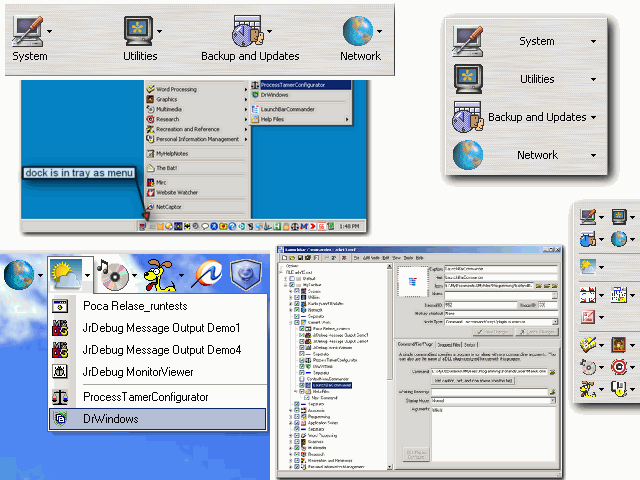
LaunchBar Commander is a highly customizable professional Launch Bar and Tray Menu tool with tons of features and a powerful configuration gui. It includes advanced button and menu types like Tool Buttons, Batch Buttons, Virtual Links anre more. Full drag+drop support for configuration and launching.
Latest Reviews

lhdal reviewed v1.60.06 Beta on Jan 18, 2007
Pros
- Good node structure but only one subfolder is possible.
- Selectable icons, system folders can be shown, currently running apps can be added to the toolbar easily.
- Very configurable shortcuts.
Cons
- Uses lots of resources.
- No Auto-Hide. Consumes screen space when docked.
- Reloads icons in every change.
Can become a very good launcher but it is not mature yet.

LokiLoki reviewed v1.55.03 on Oct 3, 2006
Even though some features are not yet implemented, it is still a very good software.
Support is great, the developer listens to users and it is free!

lhdal reviewed v1.60.06 Beta on Jan 18, 2007
Pros
- Good node structure but only one subfolder is possible.
- Selectable icons, system folders can be shown, currently running apps can be added to the toolbar easily.
- Very configurable shortcuts.
Cons
- Uses lots of resources.
- No Auto-Hide. Consumes screen space when docked.
- Reloads icons in every change.
Can become a very good launcher but it is not mature yet.
LokiLoki reviewed v1.55.03 on Oct 3, 2006
Even though some features are not yet implemented, it is still a very good software.
Support is great, the developer listens to users and it is free!