File Details |
|
| File Size | 2.8 MB |
|---|---|
| License | Freeware |
| Operating System | Windows 2000/9x/Vista/XP |
| Date Added | May 18, 2007 |
| Total Downloads | 1,643 |
| Publisher | Santanu Ghosh |
| Homepage | Lipikar |
Publisher's Description
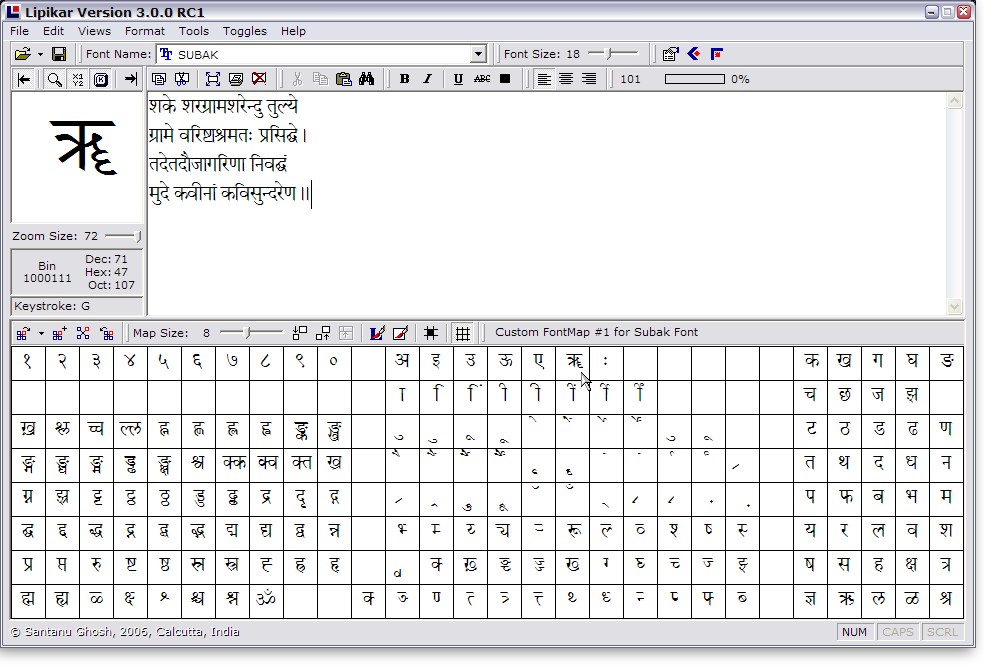
Lipikar is a simple but unique desktop authoring tool for Windows ANSI/ASCII fonts. It is independent of languages or keyboards and can be used to create short passages of text quickly in any language without any keystroke.
Latest Reviews

oompoop reviewed v3.0.0 RC2 on Feb 5, 2015
remarkable!
But today, after upgrading to Win7 ...
---------------------------
Lipikar
---------------------------
Component 'SYSINFO.OCX' or one of its dependencies not correctly registered: a file is missing or invalid
---------------------------
OK
---------------------------
Doesn't work anymore

Lipikar reviewed v3.0.0 RC2 on May 20, 2007
Hello Lipikar users
Lipikar already has right-to-left scripting support built into it - just right-click on the TextBoard and select that option for it to be activated.
The right-click context menu for Lipikar will appear ONLY when you have the optional right-to-left support installed in Windows XP.
If you aren't sure, follow this path (Control Panel - Regional and Language Options - Language (tab) - Supplemental Language Support) and see if the option "Install files for complex script..." is checked.
If not, check it - and all will be well.
If Lipikar's r-to-l context menu does not appear even if you already have this checked, then please use the feedback form on the Lipikar site with all the hardware and software details - I will try to have a look.
Thanks for using Lipikar - glad you all found it useful!
Santanu Ghosh
Author, Lipikar

godzila reviewed v3.0.0 RC2 on May 20, 2007
waw best :D

Rabelais reviewed v3.0.0 RC2 on May 19, 2007
Great utility! Very helpful when you have to write a couple of old Greek lines in an English text or a sentence in Sütterlin in a German essay. Quite Easy to use as well, except for languages written from right to left (Hebrew, Arabic,...): the only way I found was to right-align the text and write the sentences backwards! A rather tedious way, or is there another possibility I overlooked?

oompoop reviewed v3.0.0 RC2 on Feb 5, 2015
remarkable!
But today, after upgrading to Win7 ...
---------------------------
Lipikar
---------------------------
Component 'SYSINFO.OCX' or one of its dependencies not correctly registered: a file is missing or invalid
---------------------------
OK
---------------------------
Doesn't work anymore
Lipikar reviewed v3.0.0 RC2 on May 20, 2007
Hello Lipikar users
Lipikar already has right-to-left scripting support built into it - just right-click on the TextBoard and select that option for it to be activated.
The right-click context menu for Lipikar will appear ONLY when you have the optional right-to-left support installed in Windows XP.
If you aren't sure, follow this path (Control Panel - Regional and Language Options - Language (tab) - Supplemental Language Support) and see if the option "Install files for complex script..." is checked.
If not, check it - and all will be well.
If Lipikar's r-to-l context menu does not appear even if you already have this checked, then please use the feedback form on the Lipikar site with all the hardware and software details - I will try to have a look.
Thanks for using Lipikar - glad you all found it useful!
Santanu Ghosh
Author, Lipikar
godzila reviewed v3.0.0 RC2 on May 20, 2007
waw best :D
Rabelais reviewed v3.0.0 RC2 on May 19, 2007
Great utility! Very helpful when you have to write a couple of old Greek lines in an English text or a sentence in Sütterlin in a German essay. Quite Easy to use as well, except for languages written from right to left (Hebrew, Arabic,...): the only way I found was to right-align the text and write the sentences backwards! A rather tedious way, or is there another possibility I overlooked?