File Details |
|
| File Size | 170.7 MB |
|---|---|
| License | Freeware |
| Operating System | Linux |
| Date Added | June 10, 2009 |
| Total Downloads | 2,242 |
| Publisher | IBM Corp. |
| Homepage | Lotus Symphony |
Publisher's Description
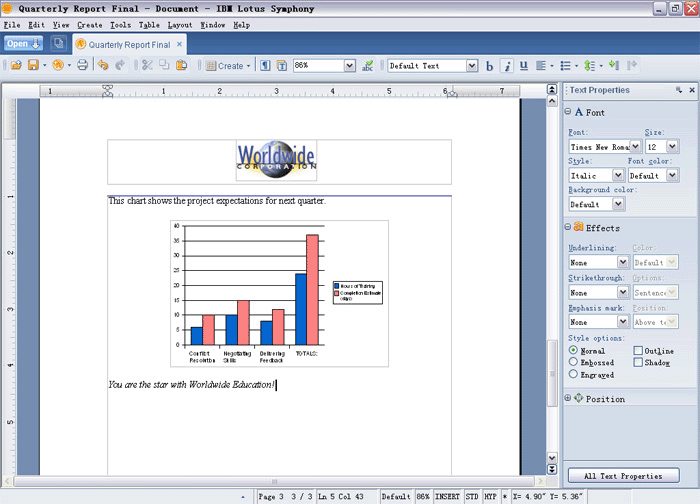
Lotus Symphony is comprised of three applications - Lotus Symphony Documents, Lotus Symphony Spreadsheets and Lotus Symphony Presentations. These intuitive software tools, which support Windows and Linux desktops, are designed to handle the majority of office productivity tasks that workers typically perform. It supports multiple file formats including Microsoft Office and Open Document Format (ODF), and also can output content in PDF format.
Latest Reviews

zridling reviewed vBeta 3 on Dec 24, 2007
More improvements, including faster installation, blogging features, and autosave. This is what MS Office 2007 should have been like.
zridling reviewed vBeta 1 on Oct 3, 2007
Essentially an advanced shell on top of OpenOffice, I actually like it and it's a lot faster on GNU/Linux than on Windows (just like OpenOffice is). Neat features include: (1) placing formatting and positioning elements in a visible taskbar, or "sidebar" which can also be floated or hidden; (2) tabbed documents below the menu and dropdown toolbar icons; (3) an integrated environment, allowing you to open and view any type of document without opening another window; (4) a wordcount dialog that also counts foreign words to the default language; (5) features for long research papers and documents, and hey, stupid-simple TOC creation.
IT IS A BETA RELEASE as some keyboard shortcuts don't work and it doesn't remember to open in a maximized position. But if MS Office 2007 had taken this tack instead of that 1st grader ribbon, they would have saved 116 pixels of vertical screen space for each document. In all, this makes the 23rd office program or suite to use ODF as its native file format compared to [-1-] for Microsoft's failed MS-OOXML format.

zridling reviewed vBeta 3 on Dec 24, 2007
More improvements, including faster installation, blogging features, and autosave. This is what MS Office 2007 should have been like.
zridling reviewed vBeta 1 on Oct 3, 2007
Essentially an advanced shell on top of OpenOffice, I actually like it and it's a lot faster on GNU/Linux than on Windows (just like OpenOffice is). Neat features include: (1) placing formatting and positioning elements in a visible taskbar, or "sidebar" which can also be floated or hidden; (2) tabbed documents below the menu and dropdown toolbar icons; (3) an integrated environment, allowing you to open and view any type of document without opening another window; (4) a wordcount dialog that also counts foreign words to the default language; (5) features for long research papers and documents, and hey, stupid-simple TOC creation.
IT IS A BETA RELEASE as some keyboard shortcuts don't work and it doesn't remember to open in a maximized position. But if MS Office 2007 had taken this tack instead of that 1st grader ribbon, they would have saved 116 pixels of vertical screen space for each document. In all, this makes the 23rd office program or suite to use ODF as its native file format compared to [-1-] for Microsoft's failed MS-OOXML format.