File Details |
|
| File Size | 0.7 MB |
|---|---|
| License | Freeware |
| Operating System | Windows (All) |
| Date Added | June 15, 2013 |
| Total Downloads | 3,043 |
| Publisher | Kevin Schneider |
| Homepage | MP3 Quality Modifier |
Publisher's Description
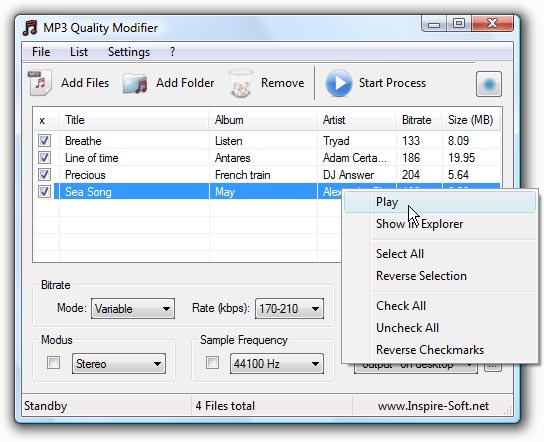
MP3 Quality Modifier is a straightforward program that is able to easily change the quality of your MP3's in order to save disk space and/or to fit more music on your MP3 player while maintaining the desired level of audio quality and keeping all ID3 tags intact. The program is pretty simple to use: The first step is to drag and drop MP3 files on the file list. Various information such as the name, interpret, size and bitrate are displayed automatically. The next step is to select a preset which ranges from high quality over portable and compromise to low quality. More advanced users can choose from a variety of configurations such as bitrate mode and rate, sample frequency and the stereo modus. The process itself takes only a few seconds per song and is even able to adapt the folder structure (example: "Artist X" folder with "Album 1" and "Album 2" as subfolders) if that is wanted. Unlike other tools all ID3 tags like the title, artist etc. are automatically retained as well. Finally the result window allows to compare the original and created music files by listing their size differences.
Latest Reviews

FatBastard reviewed v2.52 on May 23, 2013
LOL
What a crazy program!

radiomaffia reviewed v1.3 on Jul 3, 2010
This is just an audioconverter, right?If it works fast, its good, otherwise look for a faster one.On a mobile phone you can go as low as mp3 / 112 kbps with slightly qualityloss but i prefer 192 kbps but 320 kbps is just a wast of data and I callit stupitidy. Why doesnt this app presents it self as : "mobilephone mp3 converter"?Using it for your own on-disk collection is not recommended

CyberDoc999 reviewed v1.3 on Jul 2, 2010
works great

emanresU deriseD reviewed v1.2 on Oct 3, 2009
Why would one use this? It's not complicated. My cell phone has a MicroSD card, and even if I get a "dirt cheap" 2-GB card for it, the space is still limited. I have lots of music files.
And here's the kicker--the music sounds pretty bad* irrespective of whether I use 128-kbps or 320-kbps files. So does it not make sense to reduce the bigger files in size and theoretical quality, so I can fit more music? (This is the part where you slowly nod your head.) The limiting quality factor is the phone, not the files, so this utility does have its place.
* By "pretty bad", I mean compared to when I'm listening at the computer with my Sennheiser HD-600 headphones. Telling me to get a better phone is absolutely missing the point.

myboy reviewed v1.13 on Sep 25, 2009
Many commercial "mp3 quality changers" out there and if you want to reduce the bitrate than this freeware is quite good.
And well I really need it for my old 512mb mp3-player ;-)

allthebestnamesgone reviewed v1.13 on Sep 21, 2009
on the plus side its free .... on the minus side its such a terrible idea to transcode your mp3s to another size
DONT DO IT

roj reviewed v1.13 on Sep 21, 2009
OK, this is simply garbage.
Anyone who knows the first thing about lossy encoding is aware that re-encoding mp3s (or any lossy format for that matter) WILL result is additional quality loss that goes beyond what would be lost if you had encoded to the new bitrate natively in the first place.
Hard drive space is dirt cheap. mp3 players with Gb capacity are dirt cheap. So why would you be stupid enough to use this dreck? And why would you create it in the first place?
ONE star.

FatBastard reviewed v2.52 on May 23, 2013
LOL
What a crazy program!
radiomaffia reviewed v1.3 on Jul 3, 2010
This is just an audioconverter, right?If it works fast, its good, otherwise look for a faster one.On a mobile phone you can go as low as mp3 / 112 kbps with slightly qualityloss but i prefer 192 kbps but 320 kbps is just a wast of data and I callit stupitidy. Why doesnt this app presents it self as : "mobilephone mp3 converter"?Using it for your own on-disk collection is not recommended
CyberDoc999 reviewed v1.3 on Jul 2, 2010
works great
emanresU deriseD reviewed v1.2 on Oct 3, 2009
Why would one use this? It's not complicated. My cell phone has a MicroSD card, and even if I get a "dirt cheap" 2-GB card for it, the space is still limited. I have lots of music files.
And here's the kicker--the music sounds pretty bad* irrespective of whether I use 128-kbps or 320-kbps files. So does it not make sense to reduce the bigger files in size and theoretical quality, so I can fit more music? (This is the part where you slowly nod your head.) The limiting quality factor is the phone, not the files, so this utility does have its place.
* By "pretty bad", I mean compared to when I'm listening at the computer with my Sennheiser HD-600 headphones. Telling me to get a better phone is absolutely missing the point.
myboy reviewed v1.13 on Sep 25, 2009
Many commercial "mp3 quality changers" out there and if you want to reduce the bitrate than this freeware is quite good.
And well I really need it for my old 512mb mp3-player ;-)
allthebestnamesgone reviewed v1.13 on Sep 21, 2009
on the plus side its free .... on the minus side its such a terrible idea to transcode your mp3s to another size
DONT DO IT
roj reviewed v1.13 on Sep 21, 2009
OK, this is simply garbage.
Anyone who knows the first thing about lossy encoding is aware that re-encoding mp3s (or any lossy format for that matter) WILL result is additional quality loss that goes beyond what would be lost if you had encoded to the new bitrate natively in the first place.
Hard drive space is dirt cheap. mp3 players with Gb capacity are dirt cheap. So why would you be stupid enough to use this dreck? And why would you create it in the first place?
ONE star.