File Details |
|
| File Size | 0.6 MB |
|---|---|
| License | Freeware |
| Operating System | Windows (All) |
| Date Added | July 6, 2002 |
| Total Downloads | 2,071 |
| Publisher | Mirek Wójtowicz |
| Homepage | MWSnap |
Publisher's Description
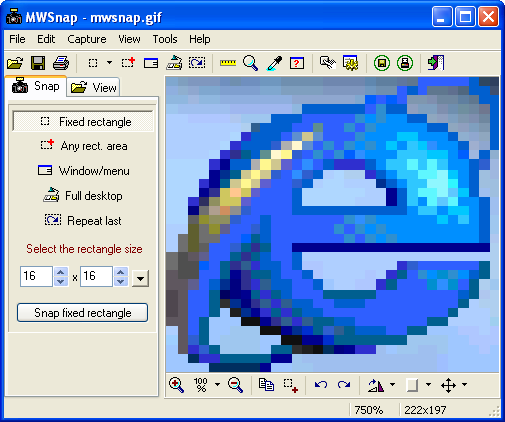
MWSnap is a small yet powerful Windows program for snapping (capturing) images from selected parts of the screen. It is capable of capturing the whole desktop, a highlighted window, an active menu, a control, or a fixed or free rectangular part of the screen. It handles 5 most popular graphics formats and contains several graphical tools: a zoom, a ruler, a color picker and a window spy. It can be also used as a fast picture viewer or converter.
Latest Reviews

Enlightenment reviewed v3.00.0.74 on Dec 19, 2014
No updates in forever, but I have used it numerous years on 32-bit Windows XP / Vista / 7, and currently using it with 64-bit Wndows 7.
It works perfect for capturing Full Screen and any X/Y cut from a full screen, including choice of saving to PNG or GIF and other file formats, though I only use PNG without any issues.
The only issue is it only captures a rectangle area, so for the other choice of capturing the current window, it doesn't account for the newer rounded corners nor is it exactly dead-on. If this issue was fixed, then it would be perfect for a FREE screen capture program. Still with this minor issue, I continue to use it because it's FREE and it WORKS.
Capture in 4 different ways:
- Fixed rectangle pixel size that you specify. I haven't used this one.
- Any rectange size. You choose 2 end-points with cursor. Works great. I use this a lot.
- Current window or menu. Has a minor issue on newer windows.
- Full screen. Works great.

SuzzyWoozy reviewed v3.00.0.74 on Jan 16, 2008
To the reviews bellow: the software works perfectly and it saves the images in the folder at your choice... unless you want the setting to be done automatically (menu Tools->Settings->Autosaving tab).
The message unable to register hotkey' however, is due to the fact that there are already other applications that listens to the hotkeys MWSnap is trying to bind; the option if you want to disable/redefine the hotkeys is here: Tools->Hotkeys.

slegg reviewed v3.00.0.74 on Dec 21, 2007
Apparently it doesn't work with restricted user rights under Windows XP. At first it's complaining about failing to register the hotkeys, then it refuses to make any kind of screenshots at all "Not enough storage aviable to process this commant". Where does this little piece of crap want to save the shots?! I have plenty of room on the drive where it's installed. Even specifying a special directory for saving images doesn't help.

DaemonFF reviewed v3.00.0.74 on Dec 17, 2007
Looks like it has some nice features, but the fact that it doesn't work with my dual monitor system makes it unusable for me.

bobad reviewed v3.00.0.74 on May 12, 2006
Nice, compact screen capture utility. It runs fine as a single executable. My favorite features are auto save/auto name to a folder of your choice. 1 point off because it does not save the settings in an INI file. That would make it perfectly portable on a flash drive.

JaapB reviewed v3.00.0.74 on May 11, 2006
MW-snap was my first 'screen-camera' and still my favourite. Of course I also use WinSnap, taht program does have mutch more options but for a quick snapshot MW-snap does do the trick.

Enlightenment reviewed v3.00.0.74 on Dec 19, 2014
No updates in forever, but I have used it numerous years on 32-bit Windows XP / Vista / 7, and currently using it with 64-bit Wndows 7.
It works perfect for capturing Full Screen and any X/Y cut from a full screen, including choice of saving to PNG or GIF and other file formats, though I only use PNG without any issues.
The only issue is it only captures a rectangle area, so for the other choice of capturing the current window, it doesn't account for the newer rounded corners nor is it exactly dead-on. If this issue was fixed, then it would be perfect for a FREE screen capture program. Still with this minor issue, I continue to use it because it's FREE and it WORKS.
Capture in 4 different ways:
- Fixed rectangle pixel size that you specify. I haven't used this one.
- Any rectange size. You choose 2 end-points with cursor. Works great. I use this a lot.
- Current window or menu. Has a minor issue on newer windows.
- Full screen. Works great.
SuzzyWoozy reviewed v3.00.0.74 on Jan 16, 2008
To the reviews bellow: the software works perfectly and it saves the images in the folder at your choice... unless you want the setting to be done automatically (menu Tools->Settings->Autosaving tab).
The message unable to register hotkey' however, is due to the fact that there are already other applications that listens to the hotkeys MWSnap is trying to bind; the option if you want to disable/redefine the hotkeys is here: Tools->Hotkeys.
slegg reviewed v3.00.0.74 on Dec 21, 2007
Apparently it doesn't work with restricted user rights under Windows XP. At first it's complaining about failing to register the hotkeys, then it refuses to make any kind of screenshots at all "Not enough storage aviable to process this commant". Where does this little piece of crap want to save the shots?! I have plenty of room on the drive where it's installed. Even specifying a special directory for saving images doesn't help.
DaemonFF reviewed v3.00.0.74 on Dec 17, 2007
Looks like it has some nice features, but the fact that it doesn't work with my dual monitor system makes it unusable for me.
bobad reviewed v3.00.0.74 on May 12, 2006
Nice, compact screen capture utility. It runs fine as a single executable. My favorite features are auto save/auto name to a folder of your choice. 1 point off because it does not save the settings in an INI file. That would make it perfectly portable on a flash drive.
JaapB reviewed v3.00.0.74 on May 11, 2006
MW-snap was my first 'screen-camera' and still my favourite. Of course I also use WinSnap, taht program does have mutch more options but for a quick snapshot MW-snap does do the trick.