File Details |
|
| File Size | 1.3 MB |
|---|---|
| License | Freeware |
| Operating System | Windows (All) |
| Date Added | February 24, 2009 |
| Total Downloads | 41,659 |
| Publisher | MagicISO, Inc. |
| Homepage | MagicISO Virtual CD/DVD-ROM |
Publisher's Description
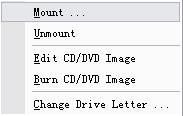
MagicISO Virtual CD/DVD-ROM is very helpful utility designed for creating and managing virtual CD drives and CD/DVD discs. MagicDisc can create virtual CD and DVD, Mount ISO image and CD/DVD images as virtual DVD or CD. Encrypts ISO image and Compresses ISO image and CD/DVD image with Universal Image Format(UIF), Make CD/DVD image from CD/DVD.
You can run games, software, see movies (VCD,SVCD,DVD), and hear music directly from your hard disk without inserting and swapping CDs and DVDs. It allows you to use almost all CD/DVD image without burning them onto CD or DVD in order to easily access your favorite games, music, or programs.
Latest Reviews

Ulven reviewed v2.7.97 on Aug 6, 2008
Works great in Vista 64bit.
Got one "error" on install, regarding the driver, but just continued installing, and it worked.
To mount images, exit the app, and choose to run as admin, or mount fails.
But works great!

allthebestnamesgone reviewed v2.7.97 on May 29, 2008
Great little freeware for XP, never had any problems with it.
Could never get it to work with Vista though, I don't know about the new version.

vima reviewed v2.5.74 on Jul 26, 2007
I confirm. Same crash with an IBM/Lenovo Z61p.
I retored to the last known stable configuration and uninstalled this little wonder !

rawbanana reviewed v2.5.74 on Jul 12, 2007
It was able to burn ISO. But it totally crashed my IBM/Lenovo Thinkpad T60... Was barely able to boot after 1 hour and uninstall the program.
Probably has a lot of conflicts with the IBM encrypted drives and other things. Be careful if u have a Thinkpad.

Jim reviewed v2.5.74 on Jun 15, 2007
Small, installed quickly, does everything it says it does, no ad-ware, didn't even require a reboot before the virtual CD-ROM showed up, in fact didn't need a reboot at all. Tried it in XP32, hope the Vista64 works as good...

venkatkumar reviewed v2.5.74 on Apr 21, 2007
Rich in features and user friendly interface.
Ability to directly edit files within the image files.
Context menu takes the user to the main application window to create image files which is ok. It would be nice to Lacks ability to be able to create image files from the context menu in windows explorer directly.
Ability to convert between ISO, BIN and Nero image file formats. I could not verify other file formats perhaps because I was using trial version.
Ability to create bootable cd's.
Overall I like this software as it helped me archive a lot of my old files in a compressed image file which would have otherwise taken up a lot of space by themselves.
I know there are some freeware softwares but I did not like them because they have very limited features which dont compare to MagicISO features.

mansa reviewed v2.5.74 on Sep 27, 2006
complete and easy to use
can make a cd or dvd image
unlike daemoon tool this one is a freeware and not an adware

Bachalor reviewed v2.5.71 on Sep 1, 2006
Nice for occasional work.

Ulven reviewed v2.7.97 on Aug 6, 2008
Works great in Vista 64bit.
Got one "error" on install, regarding the driver, but just continued installing, and it worked.
To mount images, exit the app, and choose to run as admin, or mount fails.
But works great!
allthebestnamesgone reviewed v2.7.97 on May 29, 2008
Great little freeware for XP, never had any problems with it.
Could never get it to work with Vista though, I don't know about the new version.
vima reviewed v2.5.74 on Jul 26, 2007
I confirm. Same crash with an IBM/Lenovo Z61p.
I retored to the last known stable configuration and uninstalled this little wonder !
rawbanana reviewed v2.5.74 on Jul 12, 2007
It was able to burn ISO. But it totally crashed my IBM/Lenovo Thinkpad T60... Was barely able to boot after 1 hour and uninstall the program.
Probably has a lot of conflicts with the IBM encrypted drives and other things. Be careful if u have a Thinkpad.
Jim reviewed v2.5.74 on Jun 15, 2007
Small, installed quickly, does everything it says it does, no ad-ware, didn't even require a reboot before the virtual CD-ROM showed up, in fact didn't need a reboot at all. Tried it in XP32, hope the Vista64 works as good...
venkatkumar reviewed v2.5.74 on Apr 21, 2007
Rich in features and user friendly interface.
Ability to directly edit files within the image files.
Context menu takes the user to the main application window to create image files which is ok. It would be nice to Lacks ability to be able to create image files from the context menu in windows explorer directly.
Ability to convert between ISO, BIN and Nero image file formats. I could not verify other file formats perhaps because I was using trial version.
Ability to create bootable cd's.
Overall I like this software as it helped me archive a lot of my old files in a compressed image file which would have otherwise taken up a lot of space by themselves.
I know there are some freeware softwares but I did not like them because they have very limited features which dont compare to MagicISO features.
mansa reviewed v2.5.74 on Sep 27, 2006
complete and easy to use
can make a cd or dvd image
unlike daemoon tool this one is a freeware and not an adware
Bachalor reviewed v2.5.71 on Sep 1, 2006
Nice for occasional work.