File Details |
|
| File Size | 2.0 MB |
|---|---|
| License | Freeware |
| Operating System | Windows 2000/XP |
| Date Added | December 16, 2005 |
| Total Downloads | 2,337 |
| Publisher | Microsoft Corp. |
| Homepage | Microsoft SNARF |
Publisher's Description
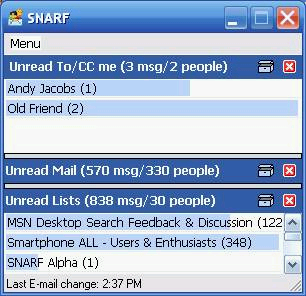
Microsoft SNARF and a Social Network and Relationship Finder. It was built around the notion that social network information that is already available to the computer system can be usefully reflected to the user: a message from a manager might be seen differently than a message from a stranger, for example. It applies this idea to email triage: handling the flow of messages when time is short and mail is long.
The SNARF UI is designed to provide a quick overview of unread mail, organized by its importance. The UI shows a series of different panes with unread mail in them; each pane shows a list of authors of messages. Clicking on a name shows all messages involving that person.
Latest Reviews

slushdot reviewed v1.7.005 on Mar 31, 2006
thundercats, THUNDERcats, THUNDERCATS, HOOOOOOOOOOOOOO!

kerryg reviewed v1.7.004 on Dec 7, 2005
SNARF is not for everyone. Not everyone wants to see their email in the same way. For ME, this is almost ideal. Where other productivity programs screw with your Outlook rules and folders, SNARF is simply a "view" into Outlook so that at a glance you can see incoming messages based on a relevancy rule that you have some control over. FOR ME, this looks like the type of tool I have been looking for.

uberfly reviewed v1.7.004 on Dec 3, 2005
I really like it. Will be a nice addition to everyday use of Outlook. Hopefully it will continue to be improved at a decent pace. One more review: ZenWarrior - you're a retard. Your mom shouldn't let you play on her computer.

ghammer reviewed v1.7.004 on Dec 2, 2005
Actually I'd give it a 4, but offsetting morons who rate without knowing what they are rating or why.
Very nicely done.
For those who say "GMail" did this.
Nope, GMail requires you to setup labels, mark email, etc.
This simply does it for you. And finds related messages.
And, works with Outlook, which is unrelated to GMail.
Not everyone wants to have a public email service.

spiked reviewed v1.7.004 on Dec 2, 2005
I think people should be free to hate Microsoft if they want, but it's pretty dumb to criticize a program without actually trying it first. SNARF is nothing like Gmail Labels. For 8 years, Outlook has had "Categories" which are exactly like Gmail Labels. The problem is that the user must do something in order to benefit from Categories or Labels (specifically: define Labels then assign them to messages; at least Outlook comes with a few predefined, common Categories so it's actually easier to use Categories in Outlook but the vast majority of people are simply too busy/lazy to assign Categories or Labels to messages). Imagine a spelling checker that comes with a totally empty dictionary. Nobody would have the patience to train it with 20,000+ words before it started to become useful.
SNARF is a start toward having Outlook organize messages without any user involvement up front. Like a spellchecker, it does allow users to customize and adjust later, but it should be useful without any user configuration.
This version, however, didn't help me much. SNARF's intelligence is based on looking at senders and your history with those senders. So if you receive a new message from somebody that you have historically replied to, and if you have historically replied quickly, then SNARF assumes that you probably want to reply quickly to this new message. For some people in some situations, this will work really well. For others, not so well. For example, if you play Fantasy Football with business associates such that you receive emails about player trades that you respond quickly to, but also work-related messages that may take longer to respond to (or involve offline responses like meetings) then SNARF cannot distinguish between your two separate relationships with the same sender.
Shrekmachine, "indexing" in the context of SNARF is very different from the indexing done by Windows Desktop Search, Lookout, Google Desktop Search, X1/Yahoo Desktop Search, etc. SNARF does not index the full text of messages, so its index is a fraction of the size of indexes created by those other programs. It doesn't need the full text because it doesn't offer any searching, nor does it filter/score based on message content. Another difference is that SNARF is written as a MAPI client rather than an Outlook add-in. Therefore, you don't have to have Outlook itself running for SNARF to index. The downside is that SNARF automatically selects your primary MAPI profile. This is fine for 99.999% of Outlook users because they only have one MAPI profile. Since I have multiple profiles (each one containing multiple accounts), SNARF gets confused and the indexing gets screwed up unless I make sure to open Outlook before SNARF, in order to force SNARF to see my desired (non-default) profile.

Shrekmachine reviewed v1.7.004 on Dec 2, 2005
Has potential, but I would like to see it integrated in Microsoft Desktop Search. To much indexer proggies and interfaces now

the way reviewed v1.7.004 on Dec 2, 2005
I am so sick of this crap.
ZenWarrior, do you not understand the concept of this site, or are you just a complete jackass?
Incase you're unaware, BetaNews and FileForum were designed for the purpose of reviewing and comparing software based upon it's merits. The fact that this software wasn't designed for you (or people like you) does not make it any less useful/valuable.
Get your head out of your ass, idiot.

benyahuda reviewed v1.7.004 on Dec 2, 2005
ZenWarrior, that's pretty harsh criticism for a project which is just getting off the ground. SNARF has been tested on Outlook 2002 and 2003. Any project needs a starting point and the current Outlook is that starting line. That does not mean that earlier versions of Outlook are forgotten, nor does it mean that SNARF will actually go anywhere.
A review of a beta project should constrain itself to the project as it is. It is helpful to suggest possible future additions, but flaming a beta for not being a completed project is not very useful. SNARF doesn't work with Thunderbird or Opera Mail either. Should it be flamed for that too.
I believe that this project shows real promise and may someday be indispensible on the desktops of millions of users who have to wade through way more e-mail than they have time for.

madrascafe reviewed v1.7.004 on Dec 2, 2005
Guys
It is optional.. Take it or leave it

simko reviewed v1.7.004 on Dec 2, 2005
I like it a lot and how you can complain about a free addon is unreal.

slushdot reviewed v1.7.005 on Mar 31, 2006
thundercats, THUNDERcats, THUNDERCATS, HOOOOOOOOOOOOOO!
kerryg reviewed v1.7.004 on Dec 7, 2005
SNARF is not for everyone. Not everyone wants to see their email in the same way. For ME, this is almost ideal. Where other productivity programs screw with your Outlook rules and folders, SNARF is simply a "view" into Outlook so that at a glance you can see incoming messages based on a relevancy rule that you have some control over. FOR ME, this looks like the type of tool I have been looking for.
uberfly reviewed v1.7.004 on Dec 3, 2005
I really like it. Will be a nice addition to everyday use of Outlook. Hopefully it will continue to be improved at a decent pace. One more review: ZenWarrior - you're a retard. Your mom shouldn't let you play on her computer.
ghammer reviewed v1.7.004 on Dec 2, 2005
Actually I'd give it a 4, but offsetting morons who rate without knowing what they are rating or why.
Very nicely done.
For those who say "GMail" did this.
Nope, GMail requires you to setup labels, mark email, etc.
This simply does it for you. And finds related messages.
And, works with Outlook, which is unrelated to GMail.
Not everyone wants to have a public email service.
spiked reviewed v1.7.004 on Dec 2, 2005
I think people should be free to hate Microsoft if they want, but it's pretty dumb to criticize a program without actually trying it first. SNARF is nothing like Gmail Labels. For 8 years, Outlook has had "Categories" which are exactly like Gmail Labels. The problem is that the user must do something in order to benefit from Categories or Labels (specifically: define Labels then assign them to messages; at least Outlook comes with a few predefined, common Categories so it's actually easier to use Categories in Outlook but the vast majority of people are simply too busy/lazy to assign Categories or Labels to messages). Imagine a spelling checker that comes with a totally empty dictionary. Nobody would have the patience to train it with 20,000+ words before it started to become useful.
SNARF is a start toward having Outlook organize messages without any user involvement up front. Like a spellchecker, it does allow users to customize and adjust later, but it should be useful without any user configuration.
This version, however, didn't help me much. SNARF's intelligence is based on looking at senders and your history with those senders. So if you receive a new message from somebody that you have historically replied to, and if you have historically replied quickly, then SNARF assumes that you probably want to reply quickly to this new message. For some people in some situations, this will work really well. For others, not so well. For example, if you play Fantasy Football with business associates such that you receive emails about player trades that you respond quickly to, but also work-related messages that may take longer to respond to (or involve offline responses like meetings) then SNARF cannot distinguish between your two separate relationships with the same sender.
Shrekmachine, "indexing" in the context of SNARF is very different from the indexing done by Windows Desktop Search, Lookout, Google Desktop Search, X1/Yahoo Desktop Search, etc. SNARF does not index the full text of messages, so its index is a fraction of the size of indexes created by those other programs. It doesn't need the full text because it doesn't offer any searching, nor does it filter/score based on message content. Another difference is that SNARF is written as a MAPI client rather than an Outlook add-in. Therefore, you don't have to have Outlook itself running for SNARF to index. The downside is that SNARF automatically selects your primary MAPI profile. This is fine for 99.999% of Outlook users because they only have one MAPI profile. Since I have multiple profiles (each one containing multiple accounts), SNARF gets confused and the indexing gets screwed up unless I make sure to open Outlook before SNARF, in order to force SNARF to see my desired (non-default) profile.
Shrekmachine reviewed v1.7.004 on Dec 2, 2005
Has potential, but I would like to see it integrated in Microsoft Desktop Search. To much indexer proggies and interfaces now
the way reviewed v1.7.004 on Dec 2, 2005
I am so sick of this crap.
ZenWarrior, do you not understand the concept of this site, or are you just a complete jackass?
Incase you're unaware, BetaNews and FileForum were designed for the purpose of reviewing and comparing software based upon it's merits. The fact that this software wasn't designed for you (or people like you) does not make it any less useful/valuable.
Get your head out of your ass, idiot.
benyahuda reviewed v1.7.004 on Dec 2, 2005
ZenWarrior, that's pretty harsh criticism for a project which is just getting off the ground. SNARF has been tested on Outlook 2002 and 2003. Any project needs a starting point and the current Outlook is that starting line. That does not mean that earlier versions of Outlook are forgotten, nor does it mean that SNARF will actually go anywhere.
A review of a beta project should constrain itself to the project as it is. It is helpful to suggest possible future additions, but flaming a beta for not being a completed project is not very useful. SNARF doesn't work with Thunderbird or Opera Mail either. Should it be flamed for that too.
I believe that this project shows real promise and may someday be indispensible on the desktops of millions of users who have to wade through way more e-mail than they have time for.
madrascafe reviewed v1.7.004 on Dec 2, 2005
Guys
It is optional.. Take it or leave it
simko reviewed v1.7.004 on Dec 2, 2005
I like it a lot and how you can complain about a free addon is unreal.

ZenWarrior reviewed v1.7.004 on Dec 2, 2005
Either Microsoft does not care at all about widespread adoption (by leaving out millions of Outlook 2000 installations) of SNARL (that's what I'll call it), or it's a typically heavy-handed attempt by Microsoft to force users to upgrade their [expensive] Microsoft suites. Either way, millions of Microsoft customers have just been told by Microsoft that they really and truly do not care about them.
(**To subsequent reviewers**: Please forgive me for neither forgetting nor overlooking Microsoft's previous business practices. You know what they are--the ones for which it is sued, that endanger your computer & data, or leave millions of computer users out in the cold, etc. Also forgive me for overlooking the vast and obvious sea change in its behaviors which would lead me to think history does not repeat itself. And, I also beg your forgiveness for not forgetting that they are preparing to *sell* to consumers the very protection consumers should have received for their money when they initially purchased Windows & other products. Believe as you wish, but I'll place my bet on history again being the best predictor of the future--and present.)