File Details |
|
| File Size | 3.1 MB |
|---|---|
| License | Shareware, $12.95 |
| Operating System | Windows 2000/9x/Server 2003/XP |
| Date Added | January 23, 2006 |
| Total Downloads | 1,345 |
| Publisher | Nistech |
| Homepage | New Mail Notifier |
Publisher's Description
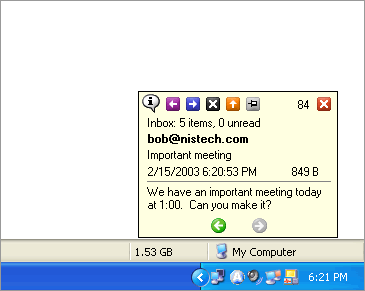
New Mail Notifier is an add-in that extends Outlooks ability to notify you of new e-mail. When Outlook receives new e-mail this program will display a small unobtrusive window in the corner of the screen. The display window contains a quick bar, the sender name, the e-mail subject, and a portion of the e-mail message. If you don’t want to open the new e-mail you can dismiss the display window with a single click or you can just let the auto-dismiss feature close the display window for you. For e-mail that you want to read you can have it open the new message in Outlook with a mouse click. The quick bar will even let you reply, forward, or delete the new e-mail without ever even opening Outlook.
Latest Reviews

mmatheny reviewed v2.0 Beta 5 on Jan 23, 2003
PopTray does this and it is free! Plus, lots more settings.

Dorways reviewed v2.0 Beta 5 on Jan 21, 2003
Just be aware that the future version of MS Outlook will integrate that kind of desktop notification when new mail arrives.
Unless you don't plan to upgrade your Outloook, it might be useless to buy this software.
PS: I gave a "one star" just to attract people's attention, it is NOT a software appreciation.

the_cr3ator reviewed v2.0 Beta 5 on Jan 20, 2003
Yo need to set the send/recieve to automatic. This will make it so it will check your mail every 10 mins or so making the new mail notification pop up

redfusion reviewed v1.0 on Aug 13, 2002
This program is for people who use Exchange or for people who use pop accounts that are set to autocheck thier email every x mins. You could be working in another program and when you get e-mail instead of having Outlook put the envelope in the task tray you will get this programs popup window.

Dominik reviewed v1.0 on Aug 8, 2002
I can't get this program to work,it popups with new email only when i click on Send&Receive.Any idea?

mmatheny reviewed v2.0 Beta 5 on Jan 23, 2003
PopTray does this and it is free! Plus, lots more settings.
Dorways reviewed v2.0 Beta 5 on Jan 21, 2003
Just be aware that the future version of MS Outlook will integrate that kind of desktop notification when new mail arrives.
Unless you don't plan to upgrade your Outloook, it might be useless to buy this software.
PS: I gave a "one star" just to attract people's attention, it is NOT a software appreciation.
the_cr3ator reviewed v2.0 Beta 5 on Jan 20, 2003
Yo need to set the send/recieve to automatic. This will make it so it will check your mail every 10 mins or so making the new mail notification pop up
redfusion reviewed v1.0 on Aug 13, 2002
This program is for people who use Exchange or for people who use pop accounts that are set to autocheck thier email every x mins. You could be working in another program and when you get e-mail instead of having Outlook put the envelope in the task tray you will get this programs popup window.
Dominik reviewed v1.0 on Aug 8, 2002
I can't get this program to work,it popups with new email only when i click on Send&Receive.Any idea?