
File Details |
|
| File Size | 58.6 MB |
|---|---|
| License | Shareware, $49.95 |
| Operating System | Windows 7/8/10 |
| Date Added | November 3, 2021 |
| Total Downloads | 1,468 |
| Publisher | O&O Software GmbH |
| Homepage | O&O DiskImage |
Publisher's Description
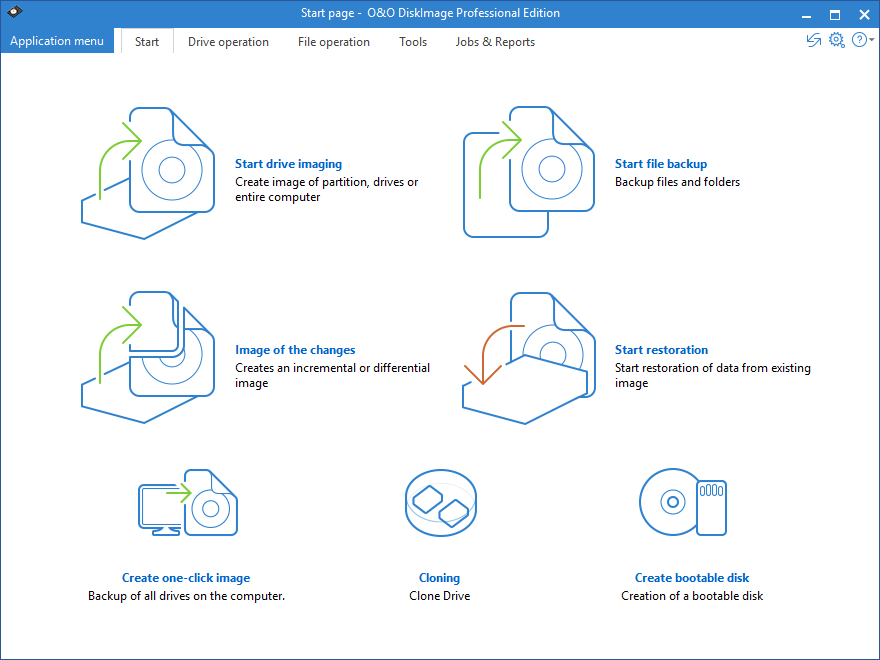
O&O DiskImage will create images and restore entire systems quickly and easily. It offers reliable protection from unforeseen data loss. All standard and professional functions are bundled up in one product. Automated, as well as individual settings are possible. Thanks to the Start CD, which includes additional system rescue tools, you will quickly have all your important data available again â?? even, if Windows does not start up anymore.
Latest Reviews

CyberDoc999 reviewed v10.0.59 on Jul 3, 2015
works where others fail
try it with a new 2 TB drive and it works great

DudeBoyz reviewed v6.8.1 on Jun 13, 2012
I got the ISO from the company for the bootable disc / bootable usb thumb driver and that worked out very well. I also have the software app itself.
They redesigned the interface a bit and it feels smoother and more efficient, both in operation and screen space utilization. Here's a list of all the changes in the new 6.8.1 version:
http://forum.oo-software...f9afed13effa68b576b29d0
They are trying to convince me that the SNAPSHOT feature, which uses a large cache to actually store the state of any open files then leaves those open files alone so there is no interruption in computer operation, will give me every single file so that the image is fully complete - just as if I booted to the CD and ran the image outside of the OS. I'm not sure about that - I've never had success with that in other apps, but I will try it extensively to see how it goes.
Email tech support is very prompt, though a couple of folks seem a bit less helpful than others. One actually said that there was no reason to update the boot CD at all and I should just stick with the 422 version. I had to tell him that I wanted the same interface and other additions both inside and outside of Windows. He finally relented. Sort of caught me off guard that he would be so contrary, but hey, that's tech support for you.
I do wish the program allowed me to choose multiple compression levels, but the single compression level they chose to use makes for a pretty fast image speed. Much faster than my old Norton Ghost 2003 for DOS.
The longer I have the program, the more I like it. I do recommend people try it. I think it is the best of all the modern imaging apps.
DudeBoyz reviewed v6.0.473 on Jun 7, 2012
Seems to work just as well as the earlier versions of 6.x
I use the Windows installation to backup everything BUT my boot drive, and the bootable disc to image my boot drive / partition.
I'd really like to have the ability to either Slipstream the latest patch into the bootable media setup, or create a new bootable disc based upon the very latest patch.
Other than that, no complaints so far.
DudeBoyz reviewed v6.0.422 on Jan 7, 2012
I have been using Acronis True Image with XP but it has trouble with Windows 7 in various ways, both with 32 bit and 64 bit versions. Even 2012 with the extra cost Plus Pack suffer lockups, crashes and corruption.
So, long story short, I tested tons of replacements and O&O DiskImage 6 Pro (I have build 374) is the only one that made the cut.
It's a very good program and I have been waffling between a 4 and a 5. But giving something a full 5 is a tough call, so for now, a solid 4 will have to do.
For almost all full Disk and Partition imaging, I prefer to use a boot disk that is outside of the Windows environment. When you purchase O&O DiskImage, you are able to download an ISO image in addition to the main program that you can burn to create a bootable CD to handle those tasks.
It's a pretty fast boot up and there are some useful items besides just the core app should you need them. Handy.
Using the program to create an image is very intuitive and easy to execute, not to mention fast. As good as that is, it's the restoration that I think sets this app apart.
You can do a Sector restore, which will recreate the image on the destination drive with a focus on maintaining a 1:1 relationship. This means that your destination partition needs to be at least the size of the original or larger. In most cases, that is no problem. But if you want to restore your image to a smaller hard drive or partition, you have that capability.as well via a File based restoration.
While there were problems with version 5.6.x and that process, all apparent issues have been corrected in the 6.x release. With Windows 7 Professional 64 bit I was able to restore an image from a 500 gig partition to a 300 gig partition without error. When the process was complete, Windows 7 seemed to be 100% back and working as if the partition size had not changed at all. All I needed was enough space for the 70 gig or so that the original OS install took up and I was golden.
One of the things I like about this app is that it flags potential issues for you and prompts the user what they want to do. For instance, the program noticed the restore partition was smaller than the original image and asked me if I wanted to try to do a Sector restore anyway, or if I wanted to try the File based restore. When it was preparing to do the restore, it noticed that the image was made from a bootable partition but the destination wasn't bootable. So it asked me if I wanted the program to make that destination partition bootable, and all I had to do was say Yes and bam, it booted up right away once the restore process was complete.
So for the bootable media implementation alone, I think it's worth forking out the $30 USD for the program.
But you can also install the core app on a PC if you want and take advantage
of the ability to do individual file / folder backup in an on-the-fly and convenient manner.
Good stuff. Highly recommended.

CyberDoc999 reviewed v10.0.59 on Jul 3, 2015
works where others fail
try it with a new 2 TB drive and it works great
DudeBoyz reviewed v6.8.1 on Jun 13, 2012
I got the ISO from the company for the bootable disc / bootable usb thumb driver and that worked out very well. I also have the software app itself.
They redesigned the interface a bit and it feels smoother and more efficient, both in operation and screen space utilization. Here's a list of all the changes in the new 6.8.1 version:
http://forum.oo-software...f9afed13effa68b576b29d0
They are trying to convince me that the SNAPSHOT feature, which uses a large cache to actually store the state of any open files then leaves those open files alone so there is no interruption in computer operation, will give me every single file so that the image is fully complete - just as if I booted to the CD and ran the image outside of the OS. I'm not sure about that - I've never had success with that in other apps, but I will try it extensively to see how it goes.
Email tech support is very prompt, though a couple of folks seem a bit less helpful than others. One actually said that there was no reason to update the boot CD at all and I should just stick with the 422 version. I had to tell him that I wanted the same interface and other additions both inside and outside of Windows. He finally relented. Sort of caught me off guard that he would be so contrary, but hey, that's tech support for you.
I do wish the program allowed me to choose multiple compression levels, but the single compression level they chose to use makes for a pretty fast image speed. Much faster than my old Norton Ghost 2003 for DOS.
The longer I have the program, the more I like it. I do recommend people try it. I think it is the best of all the modern imaging apps.
DudeBoyz reviewed v6.0.473 on Jun 7, 2012
Seems to work just as well as the earlier versions of 6.x
I use the Windows installation to backup everything BUT my boot drive, and the bootable disc to image my boot drive / partition.
I'd really like to have the ability to either Slipstream the latest patch into the bootable media setup, or create a new bootable disc based upon the very latest patch.
Other than that, no complaints so far.
DudeBoyz reviewed v6.0.422 on Jan 7, 2012
I have been using Acronis True Image with XP but it has trouble with Windows 7 in various ways, both with 32 bit and 64 bit versions. Even 2012 with the extra cost Plus Pack suffer lockups, crashes and corruption.
So, long story short, I tested tons of replacements and O&O DiskImage 6 Pro (I have build 374) is the only one that made the cut.
It's a very good program and I have been waffling between a 4 and a 5. But giving something a full 5 is a tough call, so for now, a solid 4 will have to do.
For almost all full Disk and Partition imaging, I prefer to use a boot disk that is outside of the Windows environment. When you purchase O&O DiskImage, you are able to download an ISO image in addition to the main program that you can burn to create a bootable CD to handle those tasks.
It's a pretty fast boot up and there are some useful items besides just the core app should you need them. Handy.
Using the program to create an image is very intuitive and easy to execute, not to mention fast. As good as that is, it's the restoration that I think sets this app apart.
You can do a Sector restore, which will recreate the image on the destination drive with a focus on maintaining a 1:1 relationship. This means that your destination partition needs to be at least the size of the original or larger. In most cases, that is no problem. But if you want to restore your image to a smaller hard drive or partition, you have that capability.as well via a File based restoration.
While there were problems with version 5.6.x and that process, all apparent issues have been corrected in the 6.x release. With Windows 7 Professional 64 bit I was able to restore an image from a 500 gig partition to a 300 gig partition without error. When the process was complete, Windows 7 seemed to be 100% back and working as if the partition size had not changed at all. All I needed was enough space for the 70 gig or so that the original OS install took up and I was golden.
One of the things I like about this app is that it flags potential issues for you and prompts the user what they want to do. For instance, the program noticed the restore partition was smaller than the original image and asked me if I wanted to try to do a Sector restore anyway, or if I wanted to try the File based restore. When it was preparing to do the restore, it noticed that the image was made from a bootable partition but the destination wasn't bootable. So it asked me if I wanted the program to make that destination partition bootable, and all I had to do was say Yes and bam, it booted up right away once the restore process was complete.
So for the bootable media implementation alone, I think it's worth forking out the $30 USD for the program.
But you can also install the core app on a PC if you want and take advantage
of the ability to do individual file / folder backup in an on-the-fly and convenient manner.
Good stuff. Highly recommended.