File Details |
|
| File Size | 1.8 MB |
|---|---|
| License | Freeware |
| Operating System | Windows (All) |
| Date Added | December 18, 2007 |
| Total Downloads | 4,124 |
| Publisher | Veign, LLC |
| Homepage | Pixeur |
Publisher's Description
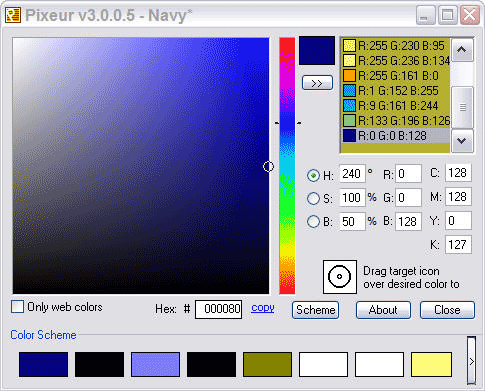
Pixeur can easily view the color, RGB, Hex, and Long value of any color you see. It will also keep a history of all colors you have selected, so going back is as simple as choosing the color from the Color History list.
Latest Reviews

SoftwareIsKing reviewed v3.1.0.3 on Dec 25, 2007
I think the color is actually very well done. Its just like the Photoshop color picker without all the overhead. Simple, easy and effective.

Nighted reviewed v3.1.0.3 on Dec 23, 2007
Does what it says...picks colours. I use Color Cop and I hate to say it, but it blows this away with support for HTML Hex, Delphi Hex, PowerBuilder, Visual Basic Hex, and Visual C++ Hex. Plus it's portable and doesn't take a dump in my system folder. Pixeur really doesn't do much for anyone other than the absolute beginner to graphics and even then I wouldn't recommend it. It has no options and the style of colour palette is nearly impossible to work with.

sd466 reviewed v3.1.0.2 on Dec 16, 2007
Just a couple of alternative
ColorPic from iconico.com (less than 500kb)
CSamp (246 kb) both freeware

Veign reviewed v3.1.0.2 on Dec 15, 2007
There's a difference between constructive criticism (which I have no issue with) and users you just want to complain.
I encourage users to send me information on how to make my applications better for them, or for anyone.

uberfly reviewed v3.1.0.2 on Dec 15, 2007
Veign, your app is rated 4.6 - plz stop the blubbering. When you're not taking shots at the reviewers, you're repeatedly crying over some pretty mild criticism. If you didn't want it reviewed, why post it here in the first place.

marien reviewed v3.1.0.2 on Dec 14, 2007
The CMYK values are completely wrong. Compare them to this web site CMYK calculator: http://web.forret.com/tools/color.asp.

molumen reviewed v3.0.0.5 on Aug 24, 2007
Great helpful software, thanks you for sharing it with the world, Veign!
Veign reviewed v2.9.0.9 on Nov 2, 2006
I just don't understand some people. Create an application, give it out for free, and give out source code to help other developers and people still choose to complain. Its users like you (the ones complaining about me) that I would prefer to not have use my application - go buy an application.

zridling reviewed v2.9.0.9 on Nov 2, 2006
It really makes no difference. Look around FileForum and many authors do this to respond to trolls like you guys. Besides, the author can reset the app's rating at any time and start over. Would you have an author vote their app crap — would that give you more confidence in it? As if you want them to say: "I built this app; I rate it as crap, however, I hope you use it." Pixeur is the class of its category, period, and it's not costing you anything.
uberfly reviewed v2.9.0.4 on Oct 26, 2006
Well, this is a good simple app the fills the need when you have it. It's very usable and comes in handy without the need to fire up a huge program like Photoshop. The GUI is a bit unrefined though (text trails of unfinished after the drag icon, the hyperlink-looking copy button, etc).
I feel like subtracting two more stars though when I see the author below voting 5 times for his own app and flaming reviewers. Chill out dude.

SoftwareIsKing reviewed v3.1.0.3 on Dec 25, 2007
I think the color is actually very well done. Its just like the Photoshop color picker without all the overhead. Simple, easy and effective.
Nighted reviewed v3.1.0.3 on Dec 23, 2007
Does what it says...picks colours. I use Color Cop and I hate to say it, but it blows this away with support for HTML Hex, Delphi Hex, PowerBuilder, Visual Basic Hex, and Visual C++ Hex. Plus it's portable and doesn't take a dump in my system folder. Pixeur really doesn't do much for anyone other than the absolute beginner to graphics and even then I wouldn't recommend it. It has no options and the style of colour palette is nearly impossible to work with.
sd466 reviewed v3.1.0.2 on Dec 16, 2007
Just a couple of alternative
ColorPic from iconico.com (less than 500kb)
CSamp (246 kb) both freeware
Veign reviewed v3.1.0.2 on Dec 15, 2007
There's a difference between constructive criticism (which I have no issue with) and users you just want to complain.
I encourage users to send me information on how to make my applications better for them, or for anyone.
uberfly reviewed v3.1.0.2 on Dec 15, 2007
Veign, your app is rated 4.6 - plz stop the blubbering. When you're not taking shots at the reviewers, you're repeatedly crying over some pretty mild criticism. If you didn't want it reviewed, why post it here in the first place.
marien reviewed v3.1.0.2 on Dec 14, 2007
The CMYK values are completely wrong. Compare them to this web site CMYK calculator: http://web.forret.com/tools/color.asp.
molumen reviewed v3.0.0.5 on Aug 24, 2007
Great helpful software, thanks you for sharing it with the world, Veign!
Veign reviewed v2.9.0.9 on Nov 2, 2006
I just don't understand some people. Create an application, give it out for free, and give out source code to help other developers and people still choose to complain. Its users like you (the ones complaining about me) that I would prefer to not have use my application - go buy an application.
zridling reviewed v2.9.0.9 on Nov 2, 2006
It really makes no difference. Look around FileForum and many authors do this to respond to trolls like you guys. Besides, the author can reset the app's rating at any time and start over. Would you have an author vote their app crap — would that give you more confidence in it? As if you want them to say: "I built this app; I rate it as crap, however, I hope you use it." Pixeur is the class of its category, period, and it's not costing you anything.
uberfly reviewed v2.9.0.4 on Oct 26, 2006
Well, this is a good simple app the fills the need when you have it. It's very usable and comes in handy without the need to fire up a huge program like Photoshop. The GUI is a bit unrefined though (text trails of unfinished after the drag icon, the hyperlink-looking copy button, etc).
I feel like subtracting two more stars though when I see the author below voting 5 times for his own app and flaming reviewers. Chill out dude.
zridling reviewed v2.8.0.0 on Sep 28, 2006
Sweet!

mELIeha reviewed v2.7.0.8 on May 5, 2006
Hi, i like this program, it makes alot of work very easy and quick.
I have a coupple of suggestions for the next versions:
Abillity to make the program smaller (In pixels), maybe so you only have the tracking device and hex code. Right now it take alot of space, so if it could be maybe 200x60px (Or even smaller) it would be very easy to fit somewhere on the screen.
Hotkey to call the program from tray.
Toggle allways on top when not using the program.
Veign reviewed v2.7.0.8 on May 4, 2006
Email me your request and details on the color spec.

oayz reviewed v2.7.0.8 on May 4, 2006
Very nice!
Having to work a lot with video I would really appreciate if color info could be displayed in YCbCr format (both 0/255 and 16/235).
Thanks!
Veign reviewed v2.7.0.3 on Apr 10, 2006
"VB using external .OCX,"
What does that have to do with anything? If you don't like installs then move along - won't hurt my feelings...
zridling reviewed v2.7.0.3 on Apr 9, 2006
If only Paint Shop Pro had Pixeur built into it. I keep commenting on this app because I use it all the time, and because it can't get any easier than this.
Veign reviewed v2.6.0.8 on Apr 2, 2006
Magnification is something that will be worked on in the next release...

Hillard reviewed v2.6.0.8 on Apr 1, 2006
Tried Colourificator and Pixeur side by side. Pixeur hands down without a doubt. Pixeur, corvette. Colourificator, chevette. Pixeur, 100lb. sledgehammer. Colourificator, rubber mallet. Absolutely, completely, 100% no comparision between the two. Save yourself time and go with Pixeur.
Veign reviewed v2.5.0.0 on Mar 18, 2006
That is very cool...
zridling reviewed v2.5.0.0 on Mar 17, 2006
Definitely a time-saver and ideal for defining colors exactly as you need them. I saw a remodeler using Pixeur on a laptop to identify and change paint colors for various rooms in a virtual house for a client this week.
Veign reviewed v2.0.0.5 on Mar 13, 2006
Why? That is such a bad interface. You are probably associated with the application and am just spamming these comments

gentlegiant reviewed v1.1.0.1 on Jun 3, 2005
To think of all the time I have wasted trying to get this information for a vb application or a web page! All I needed was Pixeur. I especially love the ability to drag around the desktop to get the exact RGB or HEX color value for any color I can see!
- Enter color by RGB
- Enter color by HEX
- Enter color by Long Value
- Enter color by name
- Enter color by Drag to color on the desktop
- Paste to the clipboard.
What more could you ask? Maybe a monkey to code you application and laugh all the way to the bank for you.

PC Rat reviewed v1.1.0.1 on Mar 12, 2005
Only thing this applet does that other color pickers don't do is maintain a history. But ~that's~ a nice feature !
The DataRat