File Details |
|
| File Size | 0.8 MB |
|---|---|
| License | Freeware |
| Operating System | Windows 2000/Server 2003/Server 2008/Vista/XP |
| Date Added | March 1, 2009 |
| Total Downloads | 17,957 |
| Publisher | ProfessorCPU |
| Homepage | RyanVM Integrator |
Publisher's Description
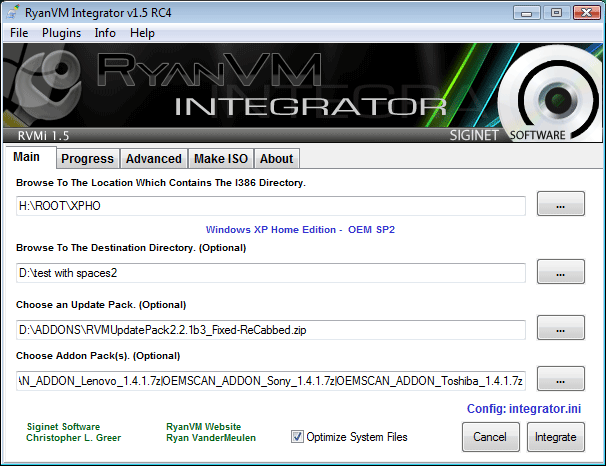
RVM Integrator is not just an integrator. It's main purpose is to actually slipstream hotfixes and third party utilities into your Windows install disks. Integrating is simply a way to attatch setup files into your windows disk and have them install at a specific moment during Windows setup. Slipstreaming will actually overwrite older files and place itself directly into the windows installation.
Latest Reviews

mikebratley reviewed v1.6 on Mar 11, 2014
4 stars

tylergierke reviewed v1.6 on Aug 23, 2013
vm integrator is great

Remax reviewed v1.6 on Oct 21, 2012
Truley Amazing peice of software!
If you need to reinstall Windows XP on many systems this is a must have utility!!

Enzechen357 reviewed v1.6 on Apr 20, 2009
RVMi is the perfect complimentary tool for the Zen masters of WinXP hacks.
Works well when daisy chained with Windows Update Downloader, nLite, DriversPacks, Xprize, or Vista transpack, or Vienna transPack. Thou not known, it is a portable stand alone for USB and U3 platform that does not require .NET framework. I for one would like to see the final evolution of this freeware...

shroom reviewed v1.6 on Mar 5, 2009
No, I still have to register to access the download link : "You are not logged in or you do not have permission to access this page."

ProfessorCPU reviewed v1.6 on Mar 5, 2009
@Nighted
Sorry for the need to register. It was only temporary for the initial release.
The offical download link is on the official website though:
http://integrator.siginetsoftware.com/
There is no need to register there. ;)
Enjoy!

Nighted reviewed v1.6 on Mar 4, 2009
Not bad, not as good as nLite for my needs. Not impressed that I must register to a forum to download this.
http://stashbox.org/432218/RVM_Integrator_1.6.7z
ProfessorCPU reviewed v1.5.3 on Apr 15, 2008
@DudeBoyz
You can slipstream service packs by using the File menu at the top. ;) File > SlipStream ServicePack.
The integrator can also integrate 3rd party utilities and switchless installers. ;) For more info check out the online manual.
Help > Online Help

DudeBoyz reviewed v1.5.3 on Apr 15, 2008
SECOND UPDATE:
Wow. This program is flat out awesome! It slipstreamed SP2 easier and faster than anything else I've been able to find, and I've been looking. For some reason, I just hadn't explored the menu bar, since the main interface is not menu based, just a series of text type boxes and buttons.
Anyway, here's the procedure:
Insert your XP CD into the drive
Use Windows Explorer or a File Manager to copy all files and folders on the CD to a folder on a local hard drive.
Run RVM & choose the Slipstream option from the File menu
Point to the folder where you copied the I386 folder and all the rest of the Windows XP CD
Point to where the Service Pack EXE resides
Tell it to execute the SlipStream
Go to the MAKE ISO tab and generate the ISO
Burn the ISO to CD using whatever app you want - IMGBURN is free
That's it. It makes it bootable for you, takes care of all the formatting, etc. and bam, you have a fully functional version with the latest service pack (SP2). If you want, you can download the Update Pack and have it slipstream in all the fixes released since SP2 at the same time, then make an ISO from that and burn the image.
I have to kick the score up to 5 because of how simple and completely this app handles things for you. All you have to do is learn the secret of where to look for the command and bam, you are golden.
Yeah, it should be more idiot proof and be better documented to make it totally obvious what to do, but it is so good at what it does, I feel a 5 is still deserved, since I can't give a 4.5.
Thanks for the help. This is one awesome program and simpler than the procedure listed on the Windows Super Site, which I thought was about as straight-forward as it got. But this program leaves that procedure in the dust. I can hardly believe that this app has been out there all this time and I didn't know about it. Wow.
UPDATE: Thanks for the tip, I'll try it and if it works, may just up the score to 5, though I think 4.5 would be better if it was allowed.
Could not figure out how to slipstream to SP2 using this thing, but I was able to slipstream the Update Pack. Does anyone know how v2.2.1 of that pack compares to the current list of Critical Updates available via Windows Update?
I'm glad that he did not include IE 7 in the Update Pack.
So, I give it a 4 because what I was able to figure out how to do seemed to work ok, but I am sort of struggling with figuring out what else the thing is useful for - it's not intuitive as far as SP1 or SP2 Slipstreaming - if it can even do it at all.
I'm glad it's out there, but I wish it was more idiot-proof and its precise capabilities were more accessible via documentation.

comeoffit reviewed v1.5.2 on Apr 14, 2008
Change log:
CAT files were not processed for SVCPACK.INF properly if they were pre-compressed in an updatepack/addon.
txtsetup_dirs/files codes will now increment if the code specified is allready in use. Even for codes under 300.
drvindex.inf is now processed in i386.
http://integrator.sigine...com/index.php?changelog
Anyways I use this in addition to nLite, I think its great for its purpose of integrating update packs and addons and also switchless installers.

mikebratley reviewed v1.6 on Mar 11, 2014
4 stars
tylergierke reviewed v1.6 on Aug 23, 2013
vm integrator is great
Remax reviewed v1.6 on Oct 21, 2012
Truley Amazing peice of software!
If you need to reinstall Windows XP on many systems this is a must have utility!!
Enzechen357 reviewed v1.6 on Apr 20, 2009
RVMi is the perfect complimentary tool for the Zen masters of WinXP hacks.
Works well when daisy chained with Windows Update Downloader, nLite, DriversPacks, Xprize, or Vista transpack, or Vienna transPack. Thou not known, it is a portable stand alone for USB and U3 platform that does not require .NET framework. I for one would like to see the final evolution of this freeware...
shroom reviewed v1.6 on Mar 5, 2009
No, I still have to register to access the download link : "You are not logged in or you do not have permission to access this page."
ProfessorCPU reviewed v1.6 on Mar 5, 2009
@Nighted
Sorry for the need to register. It was only temporary for the initial release.
The offical download link is on the official website though:
http://integrator.siginetsoftware.com/
There is no need to register there. ;)
Enjoy!
Nighted reviewed v1.6 on Mar 4, 2009
Not bad, not as good as nLite for my needs. Not impressed that I must register to a forum to download this.
http://stashbox.org/432218/RVM_Integrator_1.6.7z
ProfessorCPU reviewed v1.5.3 on Apr 15, 2008
@DudeBoyz
You can slipstream service packs by using the File menu at the top. ;) File > SlipStream ServicePack.
The integrator can also integrate 3rd party utilities and switchless installers. ;) For more info check out the online manual.
Help > Online Help
DudeBoyz reviewed v1.5.3 on Apr 15, 2008
SECOND UPDATE:
Wow. This program is flat out awesome! It slipstreamed SP2 easier and faster than anything else I've been able to find, and I've been looking. For some reason, I just hadn't explored the menu bar, since the main interface is not menu based, just a series of text type boxes and buttons.
Anyway, here's the procedure:
Insert your XP CD into the drive
Use Windows Explorer or a File Manager to copy all files and folders on the CD to a folder on a local hard drive.
Run RVM & choose the Slipstream option from the File menu
Point to the folder where you copied the I386 folder and all the rest of the Windows XP CD
Point to where the Service Pack EXE resides
Tell it to execute the SlipStream
Go to the MAKE ISO tab and generate the ISO
Burn the ISO to CD using whatever app you want - IMGBURN is free
That's it. It makes it bootable for you, takes care of all the formatting, etc. and bam, you have a fully functional version with the latest service pack (SP2). If you want, you can download the Update Pack and have it slipstream in all the fixes released since SP2 at the same time, then make an ISO from that and burn the image.
I have to kick the score up to 5 because of how simple and completely this app handles things for you. All you have to do is learn the secret of where to look for the command and bam, you are golden.
Yeah, it should be more idiot proof and be better documented to make it totally obvious what to do, but it is so good at what it does, I feel a 5 is still deserved, since I can't give a 4.5.
Thanks for the help. This is one awesome program and simpler than the procedure listed on the Windows Super Site, which I thought was about as straight-forward as it got. But this program leaves that procedure in the dust. I can hardly believe that this app has been out there all this time and I didn't know about it. Wow.
UPDATE: Thanks for the tip, I'll try it and if it works, may just up the score to 5, though I think 4.5 would be better if it was allowed.
Could not figure out how to slipstream to SP2 using this thing, but I was able to slipstream the Update Pack. Does anyone know how v2.2.1 of that pack compares to the current list of Critical Updates available via Windows Update?
I'm glad that he did not include IE 7 in the Update Pack.
So, I give it a 4 because what I was able to figure out how to do seemed to work ok, but I am sort of struggling with figuring out what else the thing is useful for - it's not intuitive as far as SP1 or SP2 Slipstreaming - if it can even do it at all.
I'm glad it's out there, but I wish it was more idiot-proof and its precise capabilities were more accessible via documentation.
comeoffit reviewed v1.5.2 on Apr 14, 2008
Change log:
CAT files were not processed for SVCPACK.INF properly if they were pre-compressed in an updatepack/addon.
txtsetup_dirs/files codes will now increment if the code specified is allready in use. Even for codes under 300.
drvindex.inf is now processed in i386.
http://integrator.sigine...com/index.php?changelog
Anyways I use this in addition to nLite, I think its great for its purpose of integrating update packs and addons and also switchless installers.

echohead reviewed v1.5.2 on Apr 14, 2008
while i prefer nlite to the rvm integrator, im glad to see how much improvement has been made in the 1.5.x version.
it'd be nice to see a changelog for 1.5.2 somewhere...
ProfessorCPU reviewed v1.5.1 on Mar 29, 2008
Not sure why you think it fails to integrate IE7 and WMP11. But it can integrate anything that someone makes an addon for.
Here is an IE7 addon right here:
http://www.ryanvm.net/fo...=4847&highlight=ie7
There are many more IE7 addons as well.
As for WMP11 addons... there used to be one... but boooggy has removed it and replaced it with his WMP11 Slipstreamer. I have created an addon that will detect the wmp11 slipstreamer and use it during an integration:
http://integrator.sigine...x.php?addons&id=180
There are addons to do just about anything to a windows disk that you can imagine. ;)
If you ever have a problem integrating anything just post your integrator.ini and log file at http://ryanvm.net/forum there are many people there who can help. ;) I am curious to see your failed integrator.ini and log?

CyberDoc999 reviewed v1.5.1 on Mar 1, 2008
fails to integrate IE7 or WM-11