File Details |
|
| File Size | 2.5 MB |
|---|---|
| License | Freeware |
| Operating System | Windows 2000/9x/Server 2003/XP |
| Date Added | December 22, 2006 |
| Total Downloads | 3,691 |
| Publisher | NuonSoft |
| Homepage | ShellEnhancer |
Publisher's Description
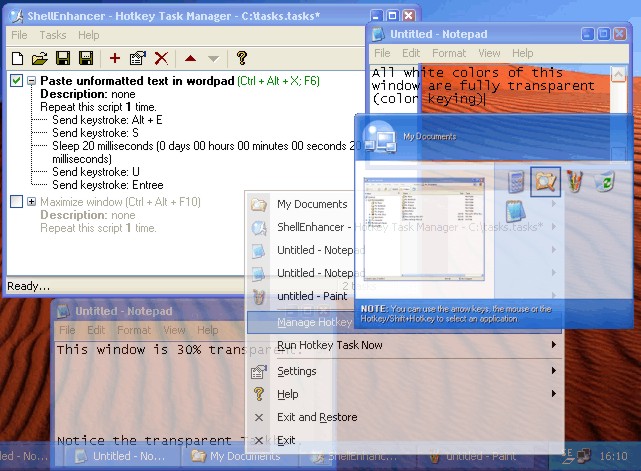
ShellEnhancer is an application designed to enhance the default shell of Windows and to make your life easier. It includes two types of taskswitcher (Enhanced TaskSwitcher and Mosaic TaskSwitcher) which you can use to replace the default Windows Alt+Tab taskswitcher. It allows you to make your own tasks. Tasks consist of a number of commands which get executed one after the other. Available commands include: insert text, send keystroke, manipulate windows, run program, start screensaver, lock workstation and many other. Tasks can be executed with hotkeys, mouse gestures or screen corners. An OSD can be shown when a task is run. With X-Window style moving and resizing you don't have to move your mouse to a corner of a window to move or resize it. Other features include: rolling up windows, making any window transparent, always on top, keep focus. This can also be automated with the Auto Managed Windows feature.
Latest Reviews

QQ reviewed v3.0.0.91 on Dec 25, 2006
well ok... so how does this *help* me..?

PC Rat reviewed v2.0 Beta on Jul 17, 2004
The re-size feature is VERY buggy. The TaskSwitcher is no improvement on the native WindowsXP alt-tab dialogue box. The transparency feature -as usual for transparency- ain't worth the bother.
It uninstalls nicely, though !
The Computer Rodent

oomingmak reviewed v2.0 Beta on Jul 16, 2004
There are certain aspects of this program that are simply stunning. Considering the complexity of some of what's being undertaken, it works amazingly well.
I have tried similar programs from other manufacturers, and while they do work, they always mess up something or other on your system. This was not the case at all using ShellEnhancer (even on my aging PC). It felt rock solid stable.
A lot of care and thought has gone into making the software flexible yet usable.
I look forward to seeing how this program gets refined and developed in the future.
I can just imagine what he would be able to do on Longhorn.

kronix2 reviewed v2.0 Beta on Jul 12, 2004
There are still some kinks to be worked out, but this is already an almost indispensable app.

Yakuzing reviewed v2.0 Beta on Jul 11, 2004
I really like this program, it does everything it says, and in a very easy way. I'll download any new version :)

speaker reviewed v2.0 Beta on Jul 11, 2004
Impressive. This is a quality program that's been well organized. I'm looking forward to future versions.

Dreimanis reviewed v2.0 Beta on Jul 11, 2004
nah. not for me, probably there are others, who have fun using it

Ehrihk reviewed v1.0 Beta on Dec 22, 2003
The program has a lot of great and useful features but it does take up a bit too much memory for my taste. The fade-in and out feature flickers too much and becomes more of an annoyance than eye-candy.

QQ reviewed v3.0.0.91 on Dec 25, 2006
well ok... so how does this *help* me..?
PC Rat reviewed v2.0 Beta on Jul 17, 2004
The re-size feature is VERY buggy. The TaskSwitcher is no improvement on the native WindowsXP alt-tab dialogue box. The transparency feature -as usual for transparency- ain't worth the bother.
It uninstalls nicely, though !
The Computer Rodent
oomingmak reviewed v2.0 Beta on Jul 16, 2004
There are certain aspects of this program that are simply stunning. Considering the complexity of some of what's being undertaken, it works amazingly well.
I have tried similar programs from other manufacturers, and while they do work, they always mess up something or other on your system. This was not the case at all using ShellEnhancer (even on my aging PC). It felt rock solid stable.
A lot of care and thought has gone into making the software flexible yet usable.
I look forward to seeing how this program gets refined and developed in the future.
I can just imagine what he would be able to do on Longhorn.
kronix2 reviewed v2.0 Beta on Jul 12, 2004
There are still some kinks to be worked out, but this is already an almost indispensable app.
Yakuzing reviewed v2.0 Beta on Jul 11, 2004
I really like this program, it does everything it says, and in a very easy way. I'll download any new version :)
speaker reviewed v2.0 Beta on Jul 11, 2004
Impressive. This is a quality program that's been well organized. I'm looking forward to future versions.
Dreimanis reviewed v2.0 Beta on Jul 11, 2004
nah. not for me, probably there are others, who have fun using it
Ehrihk reviewed v1.0 Beta on Dec 22, 2003
The program has a lot of great and useful features but it does take up a bit too much memory for my taste. The fade-in and out feature flickers too much and becomes more of an annoyance than eye-candy.