File Details |
|
| File Size | 0.5 MB |
|---|---|
| License | Shareware, $25.00 |
| Operating System | Windows NT/Server 2003/XP |
| Date Added | January 19, 2006 |
| Total Downloads | 1,276 |
| Publisher | Wordwise Solutions |
| Homepage | TaskTracker |
Publisher's Description
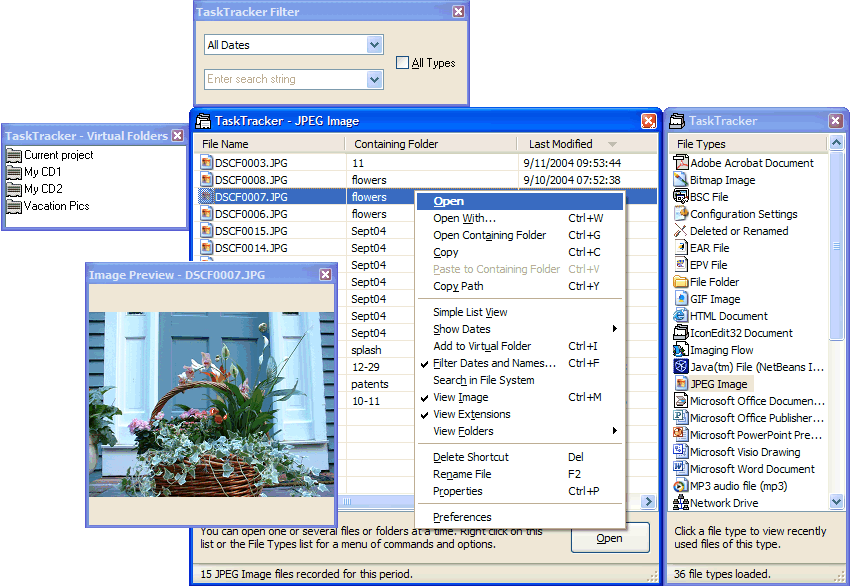
TaskTracker takes the Windows Explorer and turns it inside out. Say goodbye to tedious searches for files in Windows' convoluted file system. Now you can get to the files you want to work with - and open, copy, rename, or move them - right away without having to remember where you left them.
With TaskTracker, your files are right where you need them all the time. You may have gotten used to the Windows way of doing things, but no matter what level of Windows user you are, keeping track of your files is probably a low point in your Windows experience. It automatically tracks all kinds of file types that are registered on your system - including Office documents; multiple image formats; and many, many other document types you work with on a daily basis. You can sort file types alphabetically, by frequency of use, or by most recent use - and you can sort the files of each type by dates, names, containing folders, or folder paths.
Latest Reviews

zridling reviewed v1.1.110 on Sep 3, 2005
Quick note: If you haven't tried TaskTracker for a week, then you don't know how much time you're wasting throughout your day, whether at work or home. Manage, find, open, and cluster files are just a FEW of things TaskTracker does.
Seriously easy. Great time saver. I'm betting you won't live without it once you're hooked.

zridling reviewed v1.1.110 on Sep 3, 2005
Quick note: If you haven't tried TaskTracker for a week, then you don't know how much time you're wasting throughout your day, whether at work or home. Manage, find, open, and cluster files are just a FEW of things TaskTracker does.
Seriously easy. Great time saver. I'm betting you won't live without it once you're hooked.